A question I get asked every now and then is, as you might have guessed it, “Why so many annoying bots on the Resonite issue tracker?”.
If you don’t know what’s going on, allow me to present our two automated friends:
The log bot: this one will check your bug reports for the presence of logs. If those are found, it will post a message showing some extracted information from the log (CPU, GPU, version, etc); if not, it will add the “Needs more information” label to the issue, and request logs to be added.
The stale bot: if an issue has the dreaded “Needs more information” label and hasn’t seen any activity in 90 days, a first message will be sent to ask the author to add more information. If no updates are given within 30 days, the issue is closed. Simple as that.
Both bots are implemented using GitHub Actions and run for basically free since the repository is public. Their implementation is also completely Open-Source.
The log bot is here because adding logs is just the rule when it comes to bug reports. Everybody has to do it, including myself, so no bug report shall be excluded from it. Even if you feel your issue doesn’t needs logs attached, you MUST attach them; not only they contain some info we might need, but it also avoids the time lost going into a back and forth asking for logs. It goes without saying it’s better to have logs but not need them, than needing the logs and not having them.
The stale bot is there to clean up after the fact. If we request some info, but never hear back, we can’t work with the issue. That’s why it’s scoped to that “Needs more information” label only. Yes, this might be frustrating, but this is less time spent on managing the issue tracker and more doing actual engineering work. In any case, if you think the issue being closed was an error, you can still put a comment asking to re-open it.
Also I want to put out there a general reminder that GitHub is not a war zone, nor debate club, nor mock trial. Like any projects, we have our own set of requirements when reporting bugs that everybody has to follow. So even if you are frustrated, remember to stay civil, and focused on facts.
Likewise, another reminder that Resonite subscriptions do not carry any kind of SLA on issues or preferential treatment in general. If you really want to have a SLA on feature implementation and bug patches, please contact us to negotiate a proper business contract.
In any case, I hope this can clear up some stuff about those bots and why they are needed.
I made my first public website back in 2012. It was hosted on some free hosting provider that was injecting ads into it (and since then closed down). The website itself was a weird amalgamation of hotlinked images I found funny, random flash games and whatever text I could write at that time. Of course, to add authenticity, the website would use whatever default font your browser was using and the background was a repeated image of an Amstrad CPC computer.
It’s not until 2020 that I started to blog properly. Before that, as I couldn’t really afford some static domain name, my website was basically jumping from host to host, with most versions being lost to time nowadays. I didn’t maintain a proper blog, just a collection of random files hosted haphazardly.
The switch to proper blogging came with me finally using Hugo to build a website. Before that, I would jump around CMSes randomly, spending a few months on Spip only to switch to Grav for a few days, to finally end up with a fully custom website again.
Between 2020 and 2025, I bounced between Hugo, other generators and even a fully custom one, only to finally settle in 2025 with WordPress. Why WordPress? It’s simple. I don’t have to worry about updating a framework, having a CI pipeline break or whatever. I just focus on writing, click a large “Update” button once a month, and done. Even backups are automatic on that thing, it’s great!
So in case you’re looking to start a blog, but don’t know where to look because there are too many options: just go for the simplest. Nowadays, hosting is cheap; and more than that, one click installs are very common (for instance, at Hetzner). Managed hosting is also possible through WordPress.com and other hosting providers (and even of other CMSes if you really don’t like WordPress).
While this might be a tad more expensive than having a statically generated blog on GitHub/GitLab/Codeberg pages, this is definitely easier; and trust me, the less you have to worry about, the easier it is to write. You can see that explosion in blog posts fairly well; in 2024 I only published about 12 while in 2025, the number went up to 75 (and it might be even higher this year).
I have said some stupid stuff in the past on my blog(s); for instance, being weirdly vocal about Matrix’s implementation of E2EE and recommending it over Signal while being also weirdly defensive of Matrix online; but I’m glad those posts are still around (even if with a large “MAY BE OUTDATED” warning).
Re-reading those makes me realize how much I’ve grown as a person in the past six years, and how I managed to finally put my emotions under control to take more measured actions. I can also definitely say I must have been really annoying back then. I had opinions and I wanted the whole world to hear about them. Nowadays, it’s different; I don’t even know if this post will reach anybody at all, and frankly, it’s alright, I’m just some purple creature.
So yeah, if you want to start a blog, just blog. And keep your old stuff around, it might be hard and even painful to read, but it’s important to see how much you’ve grown.
Also, to encourage the use of Signal, I’ve created a small group chat dedicated to this blog. This is in no way a substitute for the comment section, just a more direct and instant line of discussion.
Since around September last year, I started using DMR radio. I was just about to come back from Eurofurence when I saw a message in my local radio club’s chat (shoutouts to OH2K) from someone selling a bunch of Anytone AT-D168UV. Before that, I was told that DMR had a pretty large community in Finland, but never really tried it.
Most of my contacts until then were done either on local repeaters, using bog standard VHF radios (Baofengs, Mobira), or on 20m using FT8 and a fancy Xiegu radio.
Now that I’ve been in the DMR world for a few months, I can confidently say that it’s the most fun I’ve had with the hobby so far. From doing a few QSOs after work on a weekday to participating in more organized nets during the weekend, I find it very enjoyable.
I usually hang around the world-wide talkgroup 91, as it is the most active on the Brandmeister network. Sadly, 91 can be a bit of a wild west sometimes with stuff including, but not limited to: people inventing their own phonetic alphabet, audio levels from both ends of the spectrum (AKA will either need you to boost full volume or blast your ears off at minimum), and of course, lots of network issues (EG, you thought you were talking, but nope, someone got the slot before you).
Luckily, TG91 is not the only one, I can cite TG92 (Europe) which sadly was a bit dead today when trying to do a few contacts; TG208 (France) which was also kinda dead, if not for that lone ham that was sitting at their club waiting for calls; and of course, my local one, TG244 (Finland) which is fairly active on weekends and in the weekday evenings.
DMR also has its events, for instance, on TG244, every Sunday at 19:00 (Finland local time), there is the FinDMR check-in, mostly receiving Finnish callsigns from all over the country.
On TG91, every Saturday at 16:00 (UTC), there is the World-Wide Check-In, which this time goes through the entire world for people to check-in. In late December, I actually joined the net controller group for the World-Wide Check-In and managed my first net on 2026/01/17. Reading a script and callsigns back might seem a bit boring at first, but in the end, it’s pretty fun and requires some degree of concentration.
During my first net, it felt like I completely messed up. My hotspot (more on that later) overheated and missed the two first countries because of that. I also had the logging a bit wrong, so certain callsigns didn’t go through as they should have. For the second one, on 2026/01/24, I was a bit more prepared, tho forgot to add more calls to certain countries with more callsigns (for instance, Finland needs at least three rounds, while I only called two times).
For those curious, I’m currently using an Anytone AT-D168UV in combination with a Pi-Star MMDVM hotspot.
And for people saying DMR is “cheating”, I don’t care, I’m having fun, and it’s certainly cheaper and simpler than having to buy or making a huge antenna (which I won’t be able to install anyways). I might as well sell my HF hardware given I have close to no use for it (maybe to at some point buy one of those really fancy Hytera DMR radios).
If you want to do a contact, look for me in either 91, 92 or 244; or send me a message (e-mail/Signal) to schedule a QSO (yeah, I know, more cheating).
Time for the easy blog post that I make every year. The software I use hasn’t changed much since last year, so allow me to be lazy and list it all.
Starting with the OS, you might already know that Fedora is my go-to Linux distribution nowadays. It’s easy to install and update, and now ships two different desktops (GNOME and KDE) depending on what you prefer to use. In short, what I would consider a good distribution, easy to use, user-friendly. VR also works perfectly fine with my setup (WiVRn + Quest Pro). Of course, Resonite is my privileged online VR platform for obvious reasons.
Special mention of macOS Tahoe which I use at work (with 99% of the cloud stuff disabled) which is very pleasant to use as well.
Code editors remains the same as last year:
JetBrains Rider: given I write a lot of modern .NET code, Rider does an excellent job. It’s the only purpose-specific editor I use currently.
Sublime Text: great for general-purpose, costs a bit, but I’m always ready to drop some money on good software.
Sublime Merge: graphical Git client, same as Sublime Text, works great. Nothing much else to add.
When trying to work on some APIs (notably for a FreePBX add-on), I noticed Insomnia became more and more annoying with their sign-in requests and such. I discovered Yaak to replace it. Not only the interface looks decent, but it has some cool goodies like integrated Git support to sync workspaces and WebSocket support that doesn’t crashes the whole app. Seems it receives updates quite frequently, so grabbed a license for it to support the development.
Now for the most controversial subject: instant messaging apps. As you may have noticed, I’ve decided to leave the past in the past, and nowadays, my only recommendation to contact me is Signal. I may use other apps from time to time to stay in touch with others (Matrix) or to interact with some communities (Discord), but my only recommendation is Signal. I don’t need recommendations either, I don’t have time to fight you over what is the “best” chat app.
Of course, as the whole modern world still relies on it, I still have a bunch of email addresses which I use through Thunderbird. But honestly, I’d rather communicate solely through Signal at this point. Given the headache of email delivery and losing access to various domains or email addresses, I now use Iki‘s “forever email” alias (service aimed at Finnish users or people permanently residing in Finland). With this, my mailbox is basically only storage and I send and receive emails through Iki’s service (as well as making me look more oldskool than I really am).
Don’t ask me either for my GPG key, I don’t have one anymore. If I’m gonna sign Git commits, it’s gonna be through my SSH keys. If I need to encrypt files, it’s gonna be through age. Any GPG key I’ve ever generated and distributed can essentially be considered as compromised nowadays (not because they actually are, but out of caution). Generally, you can find my up-to-date SSH public keys on my GitHub user.
For my personal projects, I’ve also started looking more into Podman out of pure curiosity. Given it works with standard OCI containers, I might switch to it completely (Docker being currently in use). But that’ll be for future me to decide, tho the quadlet files looks like a cool concept. Expect a blog post on this later if it comes to fruition!
One last thing: if right now you’re typing an angry comment saying something along the lines of “you're TOTALLY wrong for using <thing>“, stop now. I get it, my workflow might not work for you, and that’s OK. You’re not contractually forced to use any of the software listed here, I’m just another purple creature posting the software she uses on her personal blog. What is said here isn’t that important, I’ll even be impressed if more than ten other creatures see it.
And if it’s that hard to resist, do it anyways. Just know it’ll take me about 10 seconds to read your comment and decide to click on the “delete” button instead of approving the comment.
This is what works for me, thanks for listening to my ramblings.
If we have a few places in common, be it online chats or the virtual worlds of Resonite, you’ve probably noticed that I’m appearing less and less often. There’s a pretty good reason for that: I’m just so tired.
2025 has been something for me, I got a radio license and callsign, joined the Resonite Team, started to hang out more with friends, went to Eurofurence, but most importantly, in December, I finally got diagnosed with ADHD. Funnily enough, it came after seeking advice for something totally different.
As a result, I got a plethora of pills to take in the morning, but that allows me to finally do something. By that I don’t mean groundbreaking stuff, I mean chores, doing the dishes, cleaning the kitchen after a cooking session, etc. Yes, it’s boring, but honestly, it’s been great so far. I don’t need other people to push me to do something anymore, I can just do it.
I was warned about some side effects including possible hypertension, loss of appetite and others; but so far, the only one I’ve encountered happens in the evening. Of course, there’s no such thing as infinite energy, so starting 17:30-18:00, it all comes crashing down. Can’t do much, just really tired.
That’s why I’m not around much anymore. I’m just trying to find a new rhythm, one in which I wouldn’t be as tired as I am now. That translates to going to bed earlier, eating better, cutting back on some things and doing others slower.
While we’re on the subject of sleep, let’s talk a bit about it. Before getting the ADHD medication, my sleeping schedule was usually from around 2AM to 9AM, about 7 hours of sleep, which seems to be an alright amount. Nowadays, I go to bed way earlier, between 21:00 and 22:00, waking up still around 9AM, so more between 11 and 12 hours of sleep. Quite a drastic change which I’m still getting used to. While more sleep doesn’t always translates to more energy, this time, I just feel like it’s necessary. At some point, I gotta learn to listen to my body and get some rest when it needs some.
There’s also the work thing. At the moment, I basically have two sides: the purple thing that makes CI/CD and code for Resonite; and the other, darker, purple thing that writes CI/CD all day for companies and does trainings for GitHub and GitLab amongst other things. Needless to say, work kinda never stops for me, when I’m done with one, the other is here and I keep doing the same things, just for different projects. This is not healthy in any way, do not do this. This is why I started cutting back and setting proper limits starting about a week ago.
For instance, Sundays were always off-limits for me, now all the weekends are. While I was already doing that before, daily walks are now mandatory (from 45 minutes to an hour of just existing outside). Cons as well are strictly off-limits for work stuff (I’m also too lazy to setup proper development environments on my laptop, so complete win). Nowadays, I might answer or open a GitHub issue or two on weekends, but that’s about it, other personal projects and activities take precedence. For instance, I’ve been having lots of fun being a NCO for the World-Wide Check-In on the Brandmeister talkgroup 91 for DMR radio.
I love my job(s), if I could tell my smaller self that I would work on computers and actually enjoy it, I think she would explode with joy. However, it took me some time to understand that as much as I like it, it’s still work. I need to have some downtime, do something else for a bit, otherwise, as I say so often, I might as well just lose it.
So, sorry if your bug patchset or feature request has been lingering for a while; it might take a bit longer, but you’ll at least have the satisfaction that I have a healthier approach to it. If not, well, too bad, I’m not changing these new rules. You’ll also notice my activity is now more concentrated within the day (Helsinki time) instead of being at outrageous hours.
Of course, I’ll blame the Finnish winter for part of this, being in a near-constant state of night is tiring, that’s why I try scheduling my daily walks when there’s some light (originally planned to say “sun”, but weather is mostly grey mush these days around here). Also we’re in that moment in which days are finally getting longer, and soon enough, it’ll finally reach some more reasonable rhythm (at least for me, not being a native of Finland).
As a last thing, if you’ve recently asked me how I’m doing, you probably heard back “Honestly great”, or “Doing good” instead of the usual “Tired”. Well that’s the thing, I’m not tired all the time anymore, just at the times I honestly expected to be. I’m sure the overall situation will improve in the future; hanging out more AFK with friends already does a lot. In any case, that diagnosis was definitely a net positive.
First, some context. ANFR is France’s equivalent to the OFCOM (in the UK), BNetzA (in Germany) or Traficom (in Finland). They regulate allocations on the radio spectrum and everything related to it.
Last year, they did a public consultation in relation to raising the threshold for “atypical points” from 6V/m to 9V/m. As with anything concerning radio waves, they had a slew of responses from conspiracy theorists, self-proclaimed “hyperelectrosenstive” people (the term coming back fairly often), but also approval from some entities such as SNCF (the national rail system).
All those responses are published on their website: https://www.anfr.fr/REPONSES/ Given that URL is publicly accessible, PII such as names, family names, phone numbers and addresses were redacted via black boxes on the documents.
While reading the responses in my web browser, Firefox, I noticed that I could click on some of those boxes, switch to edition mode, press DEL and completely de-obfuscate the PII. I’m not a security expert by any means, and even I can say that’s pretty bad for an agency supposed to regulate frequencies.
So, what to do in this situation? I discovered this on Thursday 25 of December 2025. On Friday 26 of December 2025, I decided to give them a call, as their website stated they would be open. Of course, no response at this point.
On Monday 29 of December 2025, I called once again, and this time, got someone over the phone. After explaining the issue, I was just told, “that sounds bad, I’m going to transfer you to someone else” (paraphrased). After waiting for a bit, I ended up on someone who sounded confused and just thanked me for the report before quickly ending the call.
At this point, I wasn’t sure the issue would be even resolved from this phone call, so I waited for a bit, checking on the website now and then.
As of today, Friday 09 of January 2026, the issue has finally been fixed. While in a browser, the redaction boxes can’t be moved or deleted. When loading the PDF into Inkscape, you can move and remove the redaction boxes, but what’s under it is gone.
I’m also shooting a message to the CNIL (governmental data privacy agency) as ANFR didn’t publicly disclose that there was a possible leak of PII from their website, even if as simple as this. In my opinion, this does reach the threshold to be a personal data breach, and as the European Commission themselves says, ANFR would have had to disclose it within 72 hours.
A quick blog post to announced that I archived a bunch of Yealink-related software on Archive.org, including firmware, manuals, and configuration tools. This is due to Yealink’s support just removing things after updating their website.
Small update: I was curious about the firmware 3CX published on their website, being T4XS-66.86.0.180. This firmware not appearing on any official Yealink documentation, I sent them the following email:
Hey, I see that you are offering a T4XS-66.86.0.180 firmware for the Yealink T42s. I wonder, what are the changes from the official one? For instance, does the firmware lock the phone into 3cx or is it just bug fixes? Thanks, // jae
Today, I received the following response from 3CX:
Hello Jae, Thank you for your message, The firmware versions you see on the 3CX website are official Yealink firmware build which are simply Tested, certified, and recommended by 3CX for use with 3CX systems 3CX does not modify or “custom-code” Yealink firmware. For further information or comparisons of the firmwares, please contact Yealink directly. Let me know if you require further assistance from our end.
This firmware has therefore been added to the archive.
Happy new year again dear reader, hopefully you had wonderful holidays. Me? I spent my holidays getting increasingly frustrated by a small software named FreePBX.
FreePBX, as its name suggest, is… a PBX… manager, PBX meaning Private Branch Exchange, or to do simple, your very own VoIP and telephony server. As mentioned, FreePBX is only a front-end for another software called Asterisk, which does the real phone stuff in the background.
While both software are Open-Source, FreePBX being under (A)GPL v3 (for the most part, more on that later), and Asterisk GPLv2, there is a giant gap in quality between the two. While Asterisk generally works like you would expect it to, FreePBX has been a hassle at all level, all the more exacerbated by the current documentation, being one of the worst I’ve seen in recent times.
More than that, the default FreePBX installation script installs a plethora of proprietary “commercial” modules, which has the tendency to show you ads on login. It’s because of that poor documentation that I’m starting this small series of tutorial on how to make your own phone system using FreePBX.
“But Jae”, some might say, “why don’t you just contribute to the project instead”? The answer is simple: I’m not signing no damn SLA.
The installation
Of course, we have to start somewhere, and I actually think installing FreePBX is a good one. There are two ways to install FreePBX:
The distribution version, which is a modified Debian 12 ISO that ships FreePBX by default
In this tutorial, we’re gonna focus on the script version, as I have no idea how you’re getting servers, been provisioning them via a public cloud or having a spare machine. So we’re going to make a few assumptions:
You have a running Debian 12 server, freshly installed
You know how to follow instructions
The domain we’ll use is example.com (of course, replace with your domain)
Your server is equivalent or above of a Hetzner CPX22 (4Gb RAM, 80Gb disk 2vCPU)
So SSH into your server, and let’s start the installation by:
# Get the actual script
$ wget https://github.com/FreePBX/sng_freepbx_debian_install/raw/master/sng_freepbx_debian_install.sh -O /tmp/sng_freepbx_debian_install.sh
# Don't forget to audit it :)
$ less /tmp/sng_freepbx_debian_install.sh
# And start the install
$ bash /tmp/sng_freepbx_debian_install.shCode language:Bash(bash)
This will take a while, go fill your bottle of water and get hydrated properly in the meanwhile.
Once this is done, our first step will be getting rid of most of the proprietary modules; sadly, some provide functionality that is needed to not have the worst experience in the world. This step will throw errors, but don’t worry, in the FreePBX world, that’s normal.
# First, we get rid of everything
$ for x in $( fwconsole ma list | grep Commercial | awk '{print $2}' ); do fwconsole ma delete $x; done# Install some dependencies
$ apt install build-essential
# Now we re-add the admin tools add-on
$ fwconsole ma install sysadmin
# Upgrade the rest
$ fwconsole ma upgradeall
# Double check for any remaining commercial modules
$ fwconsole ma list
# Small note: do NOT uninstall the sysadmin module since it's one of the essentials. The following is also an example.
$ fwconsole ma remove endpointCode language:Bash(bash)
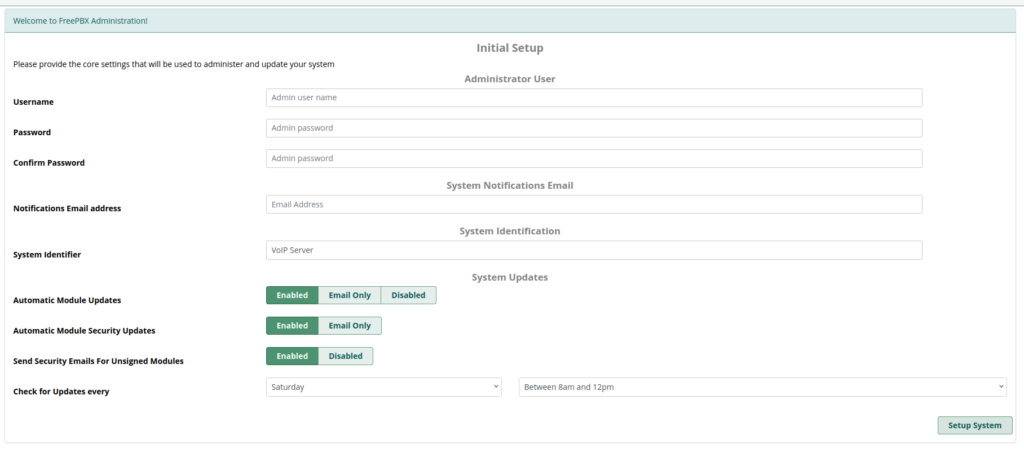
Now, let’s head to the web interface using the IP displayed after the installation. There, you will have to set up basics such as the admin user and password.
Congrats, you now have a FreePBX instance! Beware, you’ll need to skip a few ads.
Once you have done this step, log into the FreePBX dashboard. Make sure to enable the smart firewall when prompted, this is critical as bots will instantly hammer your server.
This will have the side effect of terminating your SSH connection, get your IP address (or even better, prefix), on the navigation bar, go in “Connectivity” then “Firewall”. There, in the “Networks” tab, add your prefixes by clicking the small green “+”, hit “Save” in the bottom right and finally, hit “Apply config” in the top right.
You’ll see that “Apply config” button a lot, as most actions will require you to press it.
Configuring the basics
Now, we’re going to give the only concession we’ll ever give to FreePBX. Find some temporary email address and mailbox, it’ll be important in a few lines.
In the navigation bar, head to “Admin”, then “System Admin” near the bottom. On this page, click “Activate” (on the bottom right), and follow the prompts on screen, giving the add-on your fake email. Don’t forget to put fake phone numbers as well.
Once you have an installation ID on screen, copy it, it’s faster to activate through the command line interface like so:
Thereafter, refresh the page, and you’ll see new options on the right. In those new options, click on “HTTPS Setup” and open the “Here” hyperlink in a new tab.
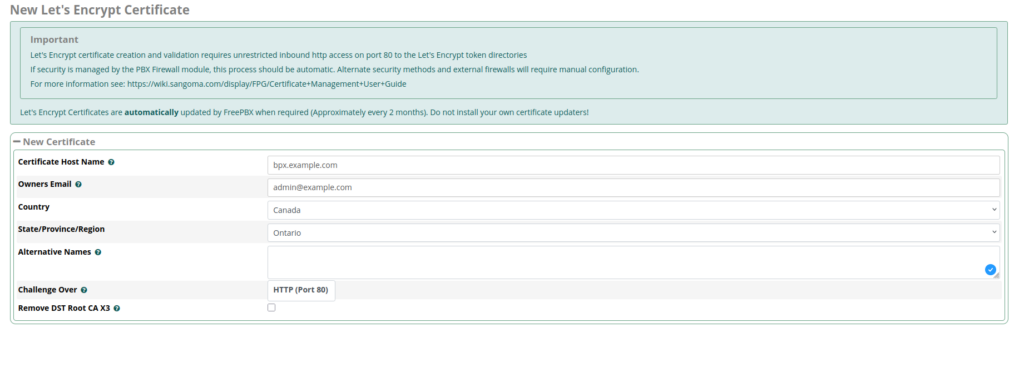
On this new page, hit “New certificate”, then “Generate Let’s Encrypt Certificate”, and fill in the info with what you have. When you’re done, hit “Generate certificate” in the bottom-right corner.
You can now close this tab and come back to the one we left open. Refresh the page, then head into “Settings”, select your certificate in the dropdown and hit “Install”. Congrats, now you can access your PBX admin panel via HTTPS.
… and that’s it for today.
Don’t miss the next tutorial, in which we’ll start adding extensions and configure emails.
Last post of the year, I hope everybody will have a wonderful 2026, even within those troubled times.
I was playing with my Yealink T42s IP phone last night, wanting to make some API endpoint that automatically generates a remote phone book for the phone. The remote phone book uses XML formatted with custom elements that are described within their official “documentation” PDF, graciously archived here.
The PDF shows the following example (from “Yealink SIP Phones XML Browser Developer’s Guide”, page 49):
<?xml version="1.0" encoding="ISO-8859-1"?><YealinkIPPhoneDirectorydefaultIndex = "integer"next = "URI"previous = "URI"Beep = "yes/no"cancelAction="URI"Timeout = "integer"refresh=“refreshtime“ url=“url“LockIn = "yes/no"><Titlewrap = "yes/no">Directory Title</Title><URL>URL</URL><InputField><Parameter>name</Parameter><preKey>key words of the contacts</preKey></InputField><MenuItem><Prompt>Contact Name</Prompt><URI>number</URI></MenuItem><!--Additional Menu Items may be added --><!--Additional soft key items may be added --></YealinkIPPhoneDirectory>Code language:HTML, XML(xml)
However, if you try it yourself, you’ll find that when updating the phone book, no entries will show up. This is because Yealink’s own documentation is faulty.
In reality, the phone book needs to look like this:
I promised it a few months ago, and here it is: ARM support for the Resonite Headless Server Software is now generally available. So, what took so long in doing the port? FrooxEngine itself runs perfectly on ARM CPUs, the issue arising when trying to hit native libraries. Resonite itself relies on about 250 external dependencies, most of which being Open-Source, some of them even shipping ARM support natively.
The issue remained in the 12 libraries left not shipping or supporting ARM, namely, FreeImage, Opus, crunch, Assimp, MSDFGen, Rnnoise, Brotli, Compressonator, SoundPipe, FreeType, SteamAudio and SteamWorks.NET.
Most of those libraries were trivial to build to ARM, and with a streak of luck, GitHub made ARM runners available right about the time I started working on this issue. Before that, you needed to cross-compile everything or spin up some kind of QEMU VM for it. With the new runners, it became as easy as defining an OS array and using it like so (partial snippets):
# Define matrix of OS versions to use
strategy:
matrix:
osver: [ubuntu-latest, ubuntu-24.04-arm]
# Use it
runs-on: ${{ matrix.osver }}
# Set artifact name depending on platform
- name: Set dist name
run: |
if ${{ matrix.osver == 'ubuntu-24.04-arm' }}; then
echo"distname=arm-dist" >> "$GITHUB_ENV"elseecho"distname=linux-dist" >> "$GITHUB_ENV"
fi
# Upload artifact with right name
- uses: actions/upload-artifact@v4
with:
path: Dist/
name: ${{ env.distname }}Code language:PHP(php)
Yup, it’s that easy. Most of the libraries were trivial, building a C or C++ program for ARM on GitHub Actions basically equates to running the same commands on the ARM runner.
All this work was also the opportunity to clean up some files shipped in the FrooxEngine repository by bundling libraries directly into NuGet packages instead. Usually, those native libraries end up in runtimes/linux-arm64/native.
Now, why did it take so long to put this together, since it sounds so trivial? Well, that question can be answered with a single name: Steamworks. We use Steam integrations (as Resonite is published on Steam), so of course, we do need to ship the Steam library, which at the time had no support for ARM64, completely crashing the type computing mechanism in FrooxEngine.
Fast-forward to November, Valve announces their headset, the Steam Frame. I didn’t care much for the headset itself, only that with it being ARM, it meant that we would finally get official ARM support for a bunch of stuff from Valve. A week or two later, they finally delivered, updating the Steamworks API library to support officially ARM. At first updating the library itself proved difficult as for some reason, Steamworks.NET builds every single architecture separately. Luckily, a PR opened on the official repository made quick work of it, and provided proper ARM builds.
Early testing of the headless was done on the Oracle Cloud Free tier ARM machine. With Steamworks patched, I finally watched the headless run flawlessly on that machine, the only error remaining being the Discord social SDK complaining about the architecture. Luckily, Discord isn’t as critical and can be ignored.
All in all, this was a fun issue to tackle, and it opens the door for more ARM stuff in the future. Maybe a native ARM build for the Steam Frame, or a mobile build? Who knows?
In any case, time for you all to finally put that Raspberry Pi you’ve had on your shelf for the past 5 years to good use again.
A small reminder that you need at least the Discoverer plan to get access to the Headless Server Software; however, any support of Resonite is greatly appreciated. If you wish to support us, you can subscribe within the account website.
Special thanks to the people & creatures that made this possible through research, direct contributions, or testing: