

描述
AdminNotes allows administrators and editors to add formatted notes to posts and pages. These notes can serve as reminders, tasks, or recommendations for content editors. Additionally, when enabled, users are notified to read these admin notes before editing the content.
Features:
– Add formatted notes using a rich text editor in both Classic and Gutenberg editors.
– Display a notification message to users when editing a post or page if admin notes are present.
– Option to enable or disable the notification on a per-post/page basis.
屏幕截图
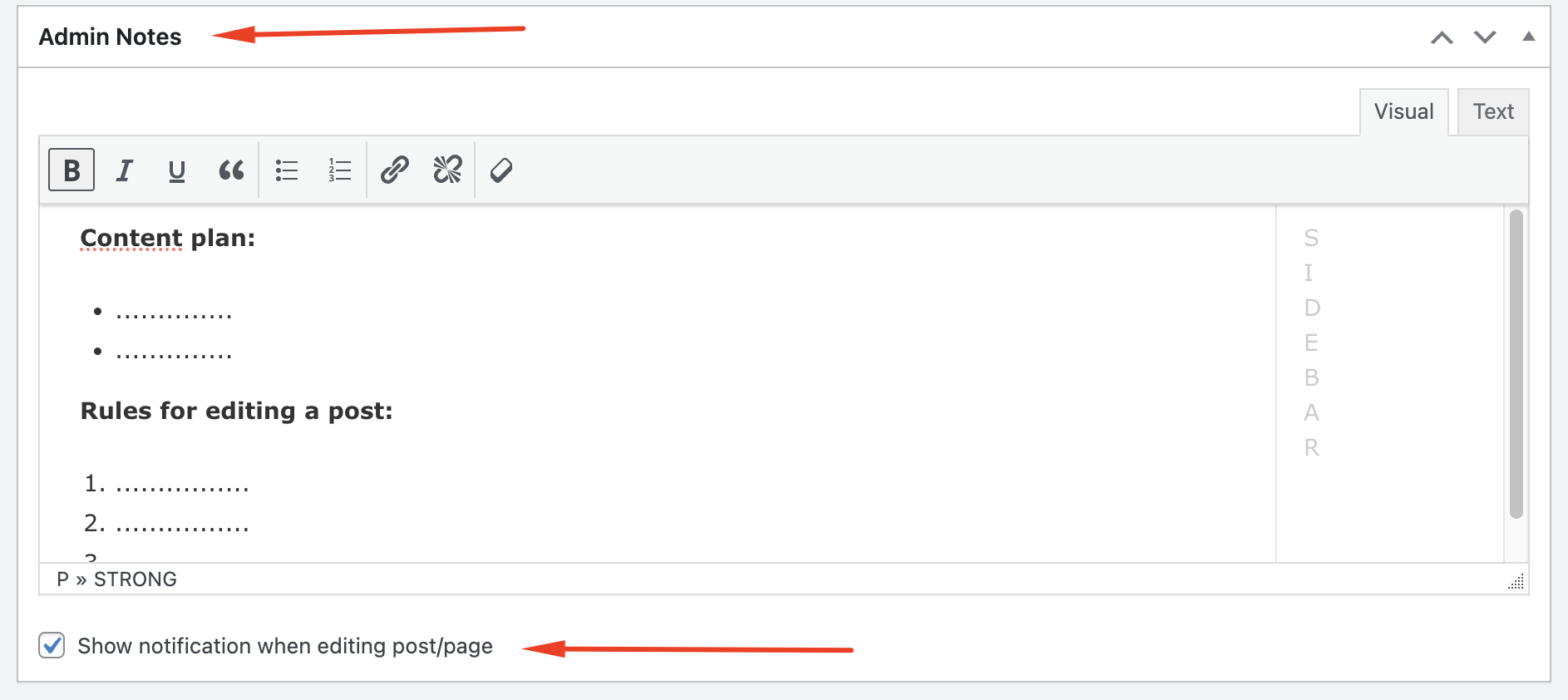
Admin Notes meta box in the Classic Editor. 
Notification message displayed to users when editing a post with admin notes.


区块
该插件提供了 1 个区块.
- Admin Notes
安装
- Upload the
admin-notesfolder to the/wp-content/plugins/directory. - Activate the plugin through the ‘Plugins’ menu in WordPress.
- Navigate to the post or page editing screen to add admin notes and configure notifications.
常见问题
-
How do I add admin notes to a post or page?
-
After activating the plugin, edit a post or page. Scroll down to the Admin Notes meta box where you can add your notes using the rich text editor.
-
How do I enable the notification message for a post or page?
-
In the Admin Notes meta box, check the box labeled “Show admin notes notification when editing” to enable the notification message for that specific post or page.
评价
此插件暂无评价。
贡献者及开发者

更新日志
1.0
- Initial release.
