

Beschreibung
Zoho ZeptoMail for WordPress
Zoho ZeptoMail (formerly TransMail) Plugin helps you to configure your ZeptoMail account in your WordPress site, to send notification emails from your website.
It is recommended to use authorized servers for sending transactional/ notification emails from websites, instead of using generic hosting servers. It is possible to misuse unauthorized and unauthenticated configuration and harm the reputation of your domain/ website when using generic servers.
This plugin can help to ensure that the transactional emails are sent from your account using ZeptoMail API’s and do not end up in the Spam.
PRE-REQUISITES
- A ZeptoMail Account
- A self-hosted WordPress site
- PHP 5.6 or later
ADVANTAGES OF ZeptoMail PLUGIN
- ZeptoMail plugin has customized the PHPMailer’s code library, used in WordPress for sending email.
- By using ’wp_mail’ function of WordPress, ZeptoMail plugin handles the custom send mail action anywhere from the entire site, without having to change/ configure at every occurrence.
- Zoho ZeptoMail advantage:
— Inbox placement
— Fast delivery
— Email segmentation
— Failed delivery logs
How is email sent using the plugin?
You can configure multiple ZeptoMail Agents in the plugin using their associated send mail tokens. You can use the Send Mail token of the Agents in your ZeptoMail account to send transactional emails from your site using ZeptoMail API.
ZeptoMail PLUGIN PARAMETERS
- Hosted region :The domain where your Zoho Account data resides.
- Email format :Emails from the plugin will be sent in the chosen format by default.
- From Name :The name that will be shown as the display name while sending all emails from your website.
- From Email Address :The email address that will be used to send all the outgoing transactional emails from your website.
- Send mail token :Send mail token generated in the ZeptoMail Agent you wish to configure in WordPress.
- Logs limit : Once the number of logs reaches the configured limit, the older logs will be deleted.
ZeptoMail PLUGIN TEST EMAIL
After configuration, you can test the plugin. Navigate to the ZeptoMail plugin – Test Email page in your Website settings.
– From address : The from email address using which you want to send the test email.
– To : Email address of the recipient.
– Subject : Subject of the email.
– Content :The message or body of the email.
For in detail instructions on how to set up ZeptoMail plugin, visit ZeptoMail plugin page .
Note :
Sending emails through ZeptoMail is subjective to our Usage Policy restrictions. Please refer to our Usage Policy details here.
Screenshots

Configure Account(screenshot-1.png) 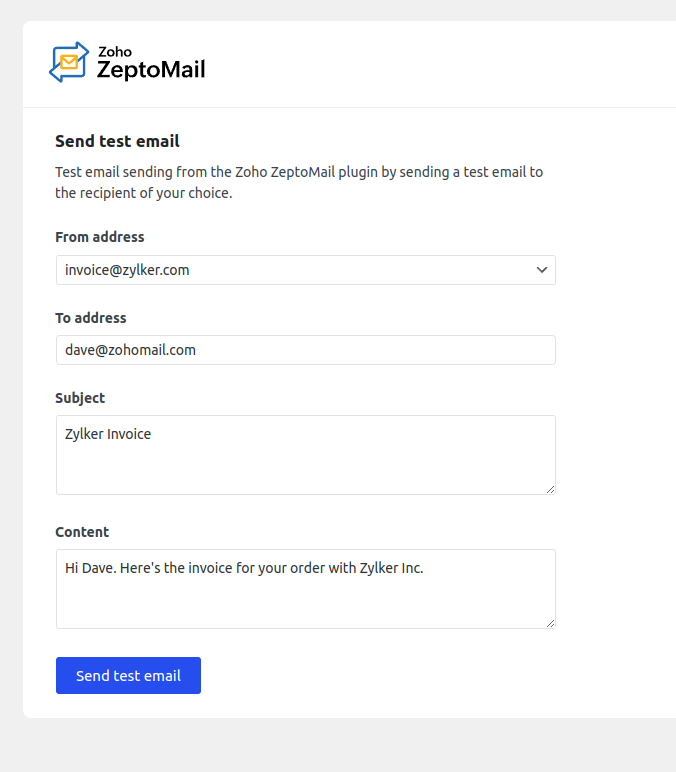
Test Mail(screenshot-2.png) 
Failed email logs(screenshot-3.png)


Installation
1) Login to your self-hosted WordPress account and navigate to the ZeptoMail plugin Account Configuration page.
2) From the Domain section, pick the region where your ZeptoMail account is hosted.
3) Login to your ZeptoMail account and access the relevant Agent .
4) Copy your existing Send Mail token or generate a new one from the SMTP & API Info section.
5) Enter the Send Mail token in the plugin configuration page.
6) Enter the From Email Address and From Name .
7) Select the default Email Format you wish to send your transactional emails in.
6) Click Save and test configuration .
7) Once the configuration is saved, the Plugin will be able to send emails from your website using ZeptoMail.
FAQ
1) What is ZeptoMail?
ZeptoMail is a transactional email sending service by Zoho Mail. This includes emails triggered by user action on your website or application like password reset emails, welcome emails, order confirmation emails etc. Having installed WordPress, if the PHP wp_mail() function isn’t working or if your notification emails are sent to spam, ZeptoMail is the service to fix these issues.
2) Is ZeptoMail free?
ZeptoMail service and this plugin are free to get started with. We provide you with 10000 free emails on sign up. If you need to send more emails, you can buy credits from your account. The pay-as-you-go plan and ensures you only pay for what you use. Find out more ZeptoMail pricing.
3) Why aren’t my HTML emails being sent?
In order for your emails to be sent in the HTML format, you need to choose HTML from the Mail format dropdown in the ZeptoMail plugin configuration page. Learn more
4) Can I link more than one Agent with the plugin?
As of now, you can only configure one ZeptoMail Agent with the plugin. You can only send emails through the chosen Agent and its associated domain, using the plugin.
5) Where do I go for more assistance with ZeptoMail plugin?
You can refer our help documentation for detailed instruction about ZeptoMail and the plugin. If you require further assistance, feel free to contact [email protected] with your questions.
Rezensionen


Mitwirkende und Entwickler
„Zoho ZeptoMail“ ist Open-Source-Software. Folgende Menschen haben an diesem Plugin mitgewirkt:
Mitwirkende
„Zoho ZeptoMail“ wurde in 2 Sprachen übersetzt. Danke an die Übersetzer für ihre Mitwirkung.
Übersetze „Zoho ZeptoMail“ in deine Sprache.
Interessiert an der Entwicklung?
Durchstöbere den Code, sieh dir das SVN Repository an oder abonniere das Entwicklungsprotokoll per RSS.
Änderungsprotokoll
1.0.1
- Handled replyTo error in WooCommerce cases
1.0.2
- Handled email address field
1.0.3
- Sanitizing to address
1.0.4
- Updated FAQs
2.0.0
- TransMail is now ZeptoMail, bug fix on warning messages
2.0.1
- Tested with WordPress 5.8
2.0.2
- Domain configuration changed for better understanding.
2.0.3
- WordPress 6.1 update.
2.1.0
- Now dynamic from address is supported. WordPress 6.1.1 update
2.2.0
- Removed bounce address, bug fix on warning messages
2.2.1
- bug fix on warning messages
2.2.2
- bug fix on warning messages
2.2.3
- WordPress 6.3.1 update and bug fix on notice
2.2.4
- bug fix on warning messages
3.0.1
- CA and SA DC support
3.1.0
- Bug fix on warning and mail sending error in last update
3.1.1
- Domain move to util
3.1.2
- WordPress 6.6 update and bug fix on warnings
3.1.3
- bug fix on attachment failure
3.1.4
- bug fix on warning and attachment failure case.
3.2.0
- Support for multiple mail agent configuration.
- Failed logs and retry option support.
3.2.1
- Bug fix on woocommerce email sending failure.
3.2.2
- Support provided for JP DC.
3.2.3
- Error handling and bug fixes.
3.2.4
- Bug fixes on warnings.
3.2.5
- Error handling and bug fixes.
3.2.6
- Fixes on security vulnerabilities.
3.2.7
- Bug fixes on fetal error.
3.2.8
- Bug fixes on From name language support.
3.2.9
- Bug fixes on wp error.
3.3.0
- Security improvements for admin-only operations.
3.3.1
- Bug fix on warnings.
3.3.2
- Security enhancements and bug fix.
3.3.3
- Content changes.
