After recently migrating our frontend to Remix, we took the opportunity to reassess how we approach frontend testing, particularly regression testing. While we already had unit test coverage, we identified a gap when it came to validating UI changes. This is where Chromatic became a part of our frontend testing strategy. This post outlines why we introduced Chromatic and how it fits into a Remix-based workflow.
Even when application functionality remains unchanged, subtle visual regressions can still be introduced. Changes to spacing, typography, layout, or component states can easily slip through without being caught by traditional tests.
What we needed was a way to automatically detect meaningful UI changes while still fitting into our existing development workflow. At the same time, it was important to avoid introducing a fragile or high-maintenance testing setup, one that adds overhead without delivering proportional benefit. Our implementation with Chromatic attempts to balance automation, reliability, and developer experience as a practical addition rather than an extra burden.
Why Chromatic?
Chromatic provides visual regression testing on top of Storybook. Instead of testing components purely through assertions, Chromatic renders components in a real browser environment and captures screenshots. These are then compared against a known baseline to highlight visual changes.
The key reasons we chose Chromatic were:
- Automated visual diffs that are easy to review
- Integration with Storybook, which we already use for component development
- CI-friendly workflow that fits well into pull requests
Chromatic offers two closely related features for reviewing UI changes: UI Review and Visual Tests. While they have some overlap of functionality, they serve different purposes and are designed for different levels of enforcement. UI Review is enabled by default, whereas Visual Tests are an optional feature.
UI Review generates snapshots that highlight differences against a baseline, with a focus on collaboration and feedback. A key characteristic of UI Review is its flexibility: anyone including the author can approve the changes. The approval is also persistent, once a UI Review is approved, further commits to the same branch do not require re-approval.
Visual Tests also generate snapshots and compare them against an approved baseline, but they treat those comparisons as authoritative. Visual Tests can be configured to run across multiple browsers or viewports. Unlike UI Review, any subsequent changes committed to a branch will require re-approval. Approval permissions can also be restricted to specific roles. Visual Tests incur additional cost, and testing across multiple browsers or viewports increase the number of snapshots generated.
Storybook as the Foundation
Chromatic works best when components are well-represented in Storybook. As part of our migration to Remix, we invested time in creating stories for our components.
- Defining common UI states
- Mocking Remix loaders and actions where needed
Chromatic simply builds on top of this foundation by continuously validating those stories.
Automatic API Mocking with OpenAPI
To keep our Storybook components realistic without manual effort, we built an automated pipeline that generates stories from our OpenAPI schema.
We use the swagger auto schema to document what each api endpoint returns, including example responses. A script then parses this backend schema alongside the remix route definitions to generate complete stories, including MSW handlers with example responses that exactly match real API contracts. The handlers are created for the full route hierarchy needed for a component to be rendered.
This means Storybook stories always stay in sync with the backend, and there is only a single source of truth to maintain, which is the OpenApi schema.
We use the below to parse the source code for a component to find imports from the API client.
const inspectModule = (filename: string) => {
  const code = readFileSync(`./app/$`, 'utf-8')
  const ast = parse(code, { jsx: true })
  const requiredMocks = ast.body
    .filter(
      (node) =>
        node.type === 'ImportDeclaration' &&
        [ '~/api/Api'].includes(node.source.value)
    )
    .map((node) =>
      (node as unknown as { specifiers: [{ imported: { name: string } }] }).specifiers.map(
        (specifier) => operations[specifier.imported.name]
      )
    )
    .reduce((acc, val) => [...acc, ...val], [])
    .filter(Boolean)
And then we use the below to build the response for the mocks
const buildExample = (schema: OpenAPIV3.SchemaObject): Example | undefined => {
  // recursively build an example from the examples given in the schema.
  if (typeof schema.example !== 'undefined') return schema.example as Example
  if (schema.type === 'array') {
    const example = buildExample(schema.items as OpenAPIV3.SchemaObject)
    if (typeof example === 'object' && example !== null && !Object.keys(example).length) return []
    return example ? [example] : []
  }
  if (schema.type === 'object') {
    return Object.entries(schema.properties ?? {}).reduce((result, [key, value]) => {
      return { ...result, [key]: buildExample(value as OpenAPIV3.SchemaObject) }
    },

  return undefined
}
How Chromatic Fits into the Workflow
Once set up, the Chromatic workflow is straightforward:
- A developer opens a pull request
- CI builds the Storybook and uploads it to Chromatic
- Chromatic runs visual comparisons against the baseline
- Any detected UI changes are surfaced directly in the PR (as below)

- From there, snapshots before and after with the changes highlighted can be viewed in storybook
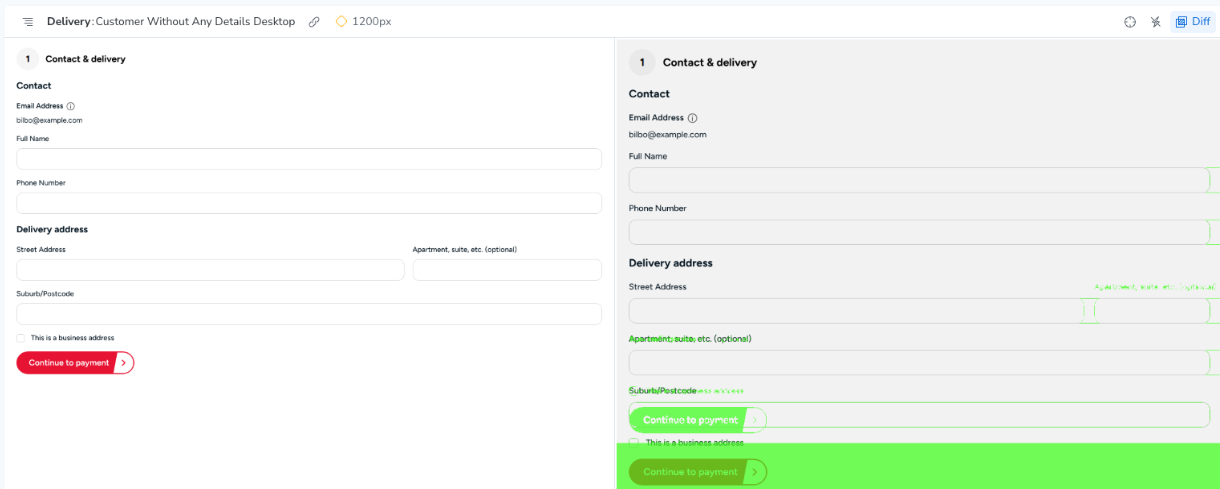
- The changes need to be Approved in Chromatic which makes visual review explicit and intentional.
Lessons Learned So Far
- Good Storybook coverage is essential. Chromatic relies on developers creating and maintaining stories for newly developed components, and Storybook itself needs ongoing care to remain a useful and accurate representation of the UI.
- Entire pages can be snapshot tested as a single component, but doing so requires a fair amount of mocking (Which we have automated)
- Baseline discipline is important and accepting visual changes should be a deliberate action.
- Chromatic is most effective when treated as part of a broader testing strategy, rather than a silver bullet.
- Finally, how restrictive or unobtrusive Chromatic feels in day-to-day development depends largely on how it is configured. Decisions such as whether to enable Visual Tests, and how approvals are gated all influence both the cost of the tool and its impact on developer workflow.
Final Thoughts
As our Remix application continues to evolve, Chromatic gives us confidence that UI changes are intentional and understood, without relying solely on manual checks.
Migrating to Remix was a natural point to rethink how we test our frontend. By adding Chromatic to our toolchain, we’re reducing an important gap in regression testing, one that traditional tests struggle to cover effectively. Visual regression testing doesn’t remove the need for thoughtful development or careful review, but it does make those processes more reliable and scalable.