-
-
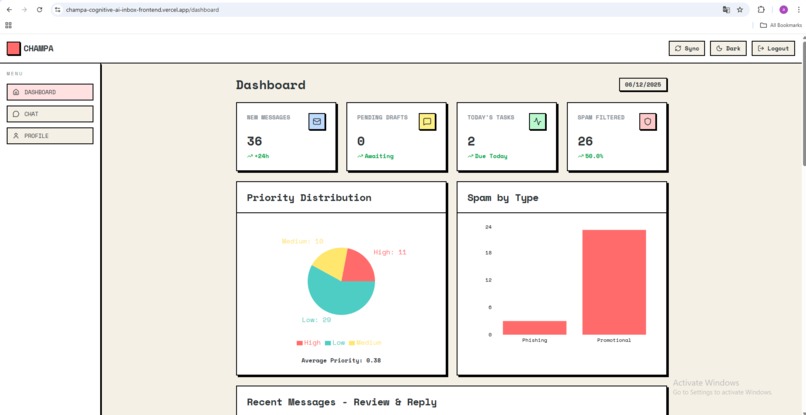
Dashboard- Light
-
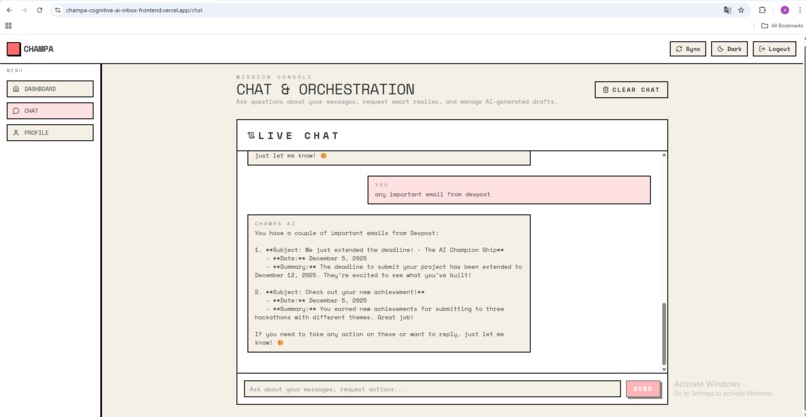
Chat- Light
-
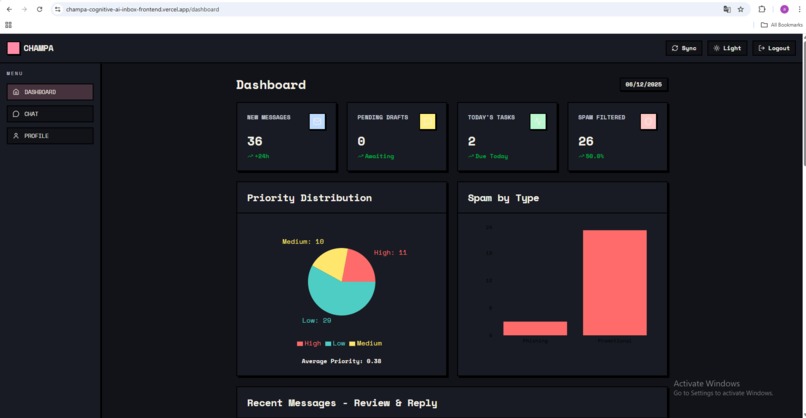
Dashboard- Dark
-
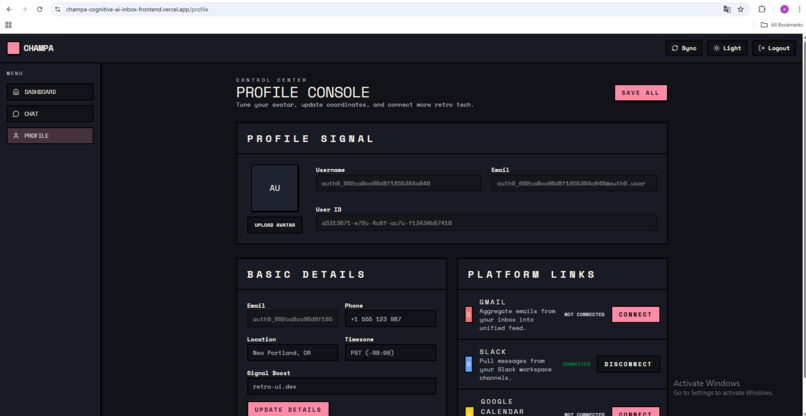
Profile- Dark
-
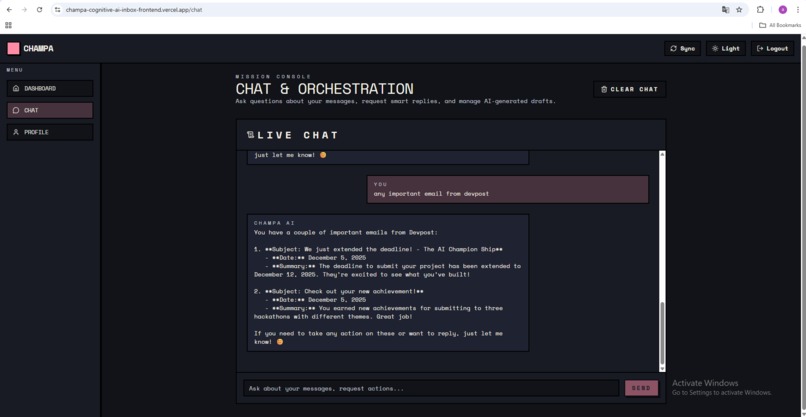
Chat- Dark
-
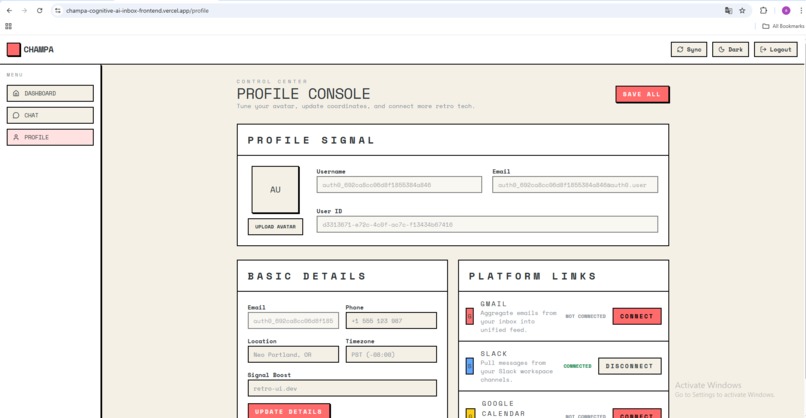
Profile- Light
-
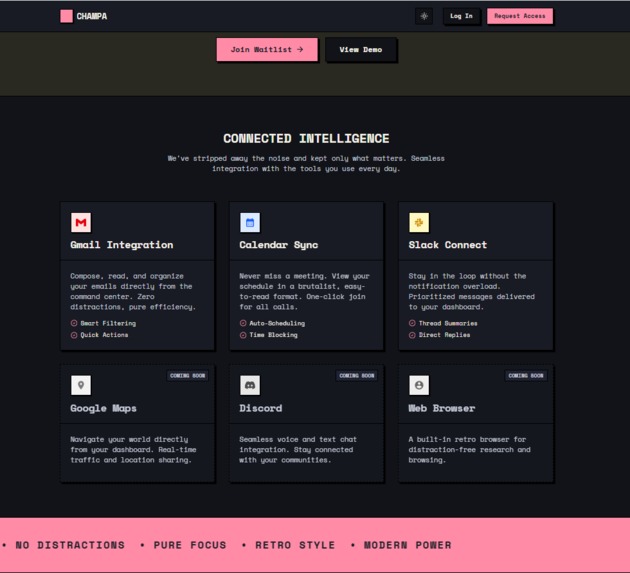
Website- Dark
-
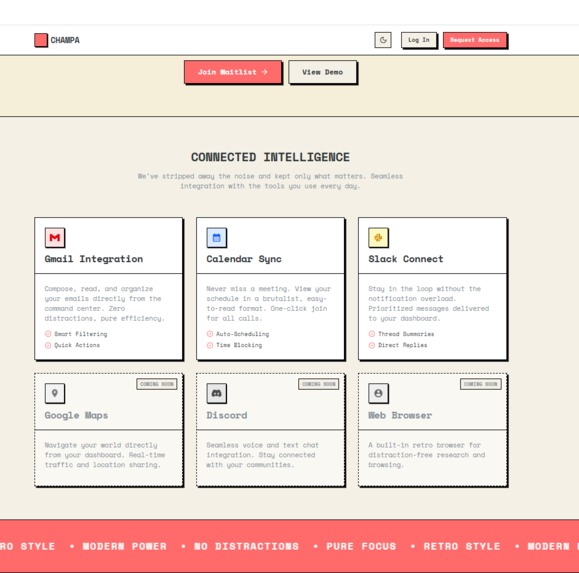
Website- Light


Champa: AI-Powered Unified Inbox
Inspiration
In today's hyper-connected world, professionals juggle multiple communication platforms—Gmail for emails, Slack for team collaboration, and Google Calendar for scheduling. Context-switching between these platforms wastes valuable time and mental energy. I've experienced the frustration of:
- Missing important emails buried in spam
- Forgetting to respond to urgent Slack messages
- Losing track of action items scattered across platforms
- Spending hours crafting professional responses
Champa was born from this pain point. I envisioned a unified inbox that doesn't just aggregate messages—it understands them. By leveraging cutting-edge AI agents, Champa transforms communication chaos into actionable intelligence.
What it does
Champa is an intelligent unified inbox that consolidates Gmail, Slack, and Google Calendar into a single, AI-enhanced interface. Here's what makes it special:
Unified Communication Hub: All my messages from Gmail, Slack, and Calendar events in one place with a clean, intuitive interface.
AI-Powered Analysis: Every message is automatically analyzed by my multi-agent AI pipeline:
- Summarization: Get the key points without reading lengthy threads
- Intent Classification: Understand if it's a question, request, FYI, or meeting invite
- Priority Scoring: AI assigns urgency scores (0-10) based on content, sender, and context
- Action Item Extraction: Automatically identifies tasks, deadlines, and follow-ups
- Spam Detection: Intelligent filtering that learns what matters to me
Smart Reply Generation: Context-aware draft responses that match my writing style and tone. The AI learns from my previous messages to generate replies that sound like me.
Interactive Chat Assistant: Query my messages naturally:
- "Show me urgent emails from this week"
- "What meetings do I have tomorrow?"
- "Find messages about the project deadline"
Human-in-the-Loop: All AI-generated replies require my approval before sending—I stay in control. Review, edit, or regenerate any draft.
Real-Time Updates: WebSocket-powered live feed that updates instantly when new messages arrive.
The AI Pipeline
Champa uses a sophisticated multi-agent architecture powered by LangGraph:
Message → Deep Agent Orchestrator → Parallel Analysis
                                   ├─ Summarization
                                   ├─ Classification
                                   ├─ Priority Scoring
                                   ├─ Action Extraction
                                   └─ Spam Detection

User Request → Smart Reply Agent → Persona Memory → Draft Generation → Human Approval
How I built it
Champa was built entirely using Kiro, leveraging its advanced AI-assisted development features to accelerate my workflow and maintain code quality. Here's how I used Kiro's key features:
Spec-Driven Development: The Foundation
I started by creating a comprehensive spec in .kiro/specs/champa-unified-inbox/ with three documents:
requirements.md: Defined 17 user stories with 85 acceptance criteria covering authentication, platform integration, AI analysis, smart replies, and the unified dashboard.
design.md: Detailed the architecture with 59 correctness properties that should hold true across all executions. Each property maps to specific requirements, creating a formal bridge between specifications and implementation.
tasks.md: Broke down implementation into 17 major tasks with 60+ subtasks, each tagged with the requirements they validate.
This spec-driven approach was transformative. Instead of vibe coding and hoping for the best, I had a clear roadmap. Kiro used the spec to:
- Generate entire modules that matched my architecture
- Ensure each implementation satisfied its correctness properties
- Track progress through the task list automatically
- Maintain consistency across frontend and backend
The spec became my single source of truth. When I asked Kiro to "implement the smart reply workflow," it referenced the spec and generated code that included LangGraph's interrupt mechanism for human-in-the-loop approval, persona memory retrieval, and proper error handling—all specified in my design document.
Steering Docs: Maintaining Consistency
I created three steering documents in .kiro/steering/ that Kiro automatically included in every interaction:
product.md: Product vision, core features, and user workflows structure.md: Project organization, file naming conventions, and architectural patterns tech.md: Technology stack, common commands, and technical constraints
These steering docs were game-changers for maintaining consistency. Every time Kiro generated code, it:
- Used RetroUI components (specified in tech.md)
- Followed my layered architecture pattern (specified in structure.md)
- Implemented property-based tests with Hypothesis (specified in tech.md)
- Placed files in the correct directories (specified in structure.md)
Without steering docs, I would have spent hours reviewing code for consistency violations. With them, Kiro generated production-ready code that followed my conventions from the start.
Agent Hooks: Automated Quality Checks
I set up three agent hooks in .kiro/hooks/ that automatically triggered on file changes:
security-review-hook: Scanned every file edit for hardcoded credentials, API keys, tokens, and security vulnerabilities. Caught several instances where I almost committed sensitive data.
code-quality-analyzer: Analyzed code for smells, anti-patterns, and opportunities to apply design patterns. Suggested refactoring my platform adapters to use the Strategy pattern, which made adding new platforms trivial.
docs-sync-on-change: Kept documentation in sync with code changes. When I modified API endpoints, it automatically updated my README and API documentation.
These hooks ran in the background, providing continuous feedback without interrupting my flow. They caught issues immediately rather than during code review, saving hours of debugging.
Vibe Coding: Rapid Prototyping
For exploratory work and rapid prototyping, I used vibe coding—natural conversation with Kiro:
"Build a LangGraph deep agent that generates smart replies using user persona memory"
Kiro generated the entire deep_agent.py module with:
- Planning middleware for breaking down reply generation into steps
- LangGraph Store integration for persona memory
- Interrupt mechanism for human approval
- Proper error handling and fallback logic
The most impressive generation was the AI pipeline. I described the workflow ("analyze messages in parallel for summary, intent, priority, tasks, and spam detection"), and Kiro created a complete LangChain-based pipeline with proper async handling, retry logic, and Qdrant integration for embeddings.
Property-Based Testing: Kiro's Secret Weapon
Kiro helped me implement property-based testing with Hypothesis—something I'd never used before. I described the properties from my design doc, and Kiro generated tests like:
# Feature: champa-unified-inbox, Property 12: All messages are normalized
@given(message=message_strategy())
def test_message_normalization(message):
    normalized = normalize_message(message)
    assert normalized.platform in ["gmail", "slack", "calendar"]
    assert normalized.sender is not None
    assert normalized.content is not None
These tests run 100+ iterations with randomly generated data, catching edge cases I never would have thought of. Kiro understood the property definitions in my spec and translated them into executable tests.
The Kiro Workflow
My typical development cycle:
- Define in Spec: Add a new requirement or task to the spec
- Ask Kiro: "Implement task 8.3 - smart reply generation workflow"
- Kiro Generates: Complete implementation referencing spec, steering docs, and existing code
- Hooks Validate: Security review, code quality analysis run automatically
- Property Tests: Kiro generates tests based on correctness properties
- Iterate: Refine based on feedback, Kiro maintains consistency
This workflow let me build a production-ready application with 10,000+ lines of code in a fraction of the time traditional development would take.
MCP: Extending Kiro's Capabilities
I leveraged Model Context Protocol (MCP) servers to extend Kiro's knowledge and capabilities beyond its base functionality:
Context7 MCP Server (@upstash/context7-mcp): This was crucial for accessing up-to-date documentation for my tech stack. When implementing LangGraph deep agents, I used Context7 to:
- Query the latest LangGraph documentation for interrupt mechanisms
- Find code examples for LangGraph Store (persona memory)
- Understand best practices for planning middleware
- Get accurate API references for subagent spawning
Without Context7, I would have been limited to Kiro's training data, which might not include the latest LangGraph features. With it, Kiro had real-time access to current documentation, ensuring my implementation used the most recent patterns and APIs.
LangChain Docs MCP Server (docs.langchain.com/mcp): Direct access to LangChain's official documentation was invaluable for building my AI pipeline. I auto-approved the SearchDocsByLangChain tool, allowing Kiro to seamlessly:
- Look up LangChain chain composition patterns
- Find examples of async chain execution
- Understand proper error handling in LangChain
- Get guidance on integrating with OpenAI and other LLM providers
The MCP integration was seamless—Kiro would automatically query these documentation sources when needed, without me having to manually search docs or copy-paste examples. It felt like having expert knowledge of LangGraph and LangChain built directly into Kiro.
Impact: MCP servers transformed Kiro from a general-purpose coding assistant into a domain expert for my specific tech stack. When I asked "How do I implement human-in-the-loop with LangGraph?", Kiro didn't just guess—it queried the official docs and gave me the exact, current implementation pattern.
Technology Stack
Backend: FastAPI, LangGraph, LangChain, SQLAlchemy, PostgreSQL, Qdrant, Auth0 Frontend: React 18, TypeScript, RetroUI, React Router, WebSocket Integrations: Gmail API, Slack SDK, Google Calendar API (direct, no third-party dependencies) Testing: pytest, Hypothesis (property-based), Jest, React Testing Library Testing: pytest, Hypothesis (property-based), Jest, React Testing Library
Challenges I ran into
1. OAuth Flow Complexity
Challenge: Managing OAuth flows for three different platforms (Google for Gmail/Calendar, Slack) with token refresh logic was incredibly complex.
Solution: I built a unified TokenRefreshMiddleware that automatically refreshes expired tokens before API calls fail. I also created abstract platform interfaces to standardize OAuth handling across providers.
# Automatic token refresh
async def refresh_if_needed(connection: PlatformConnection):
    if connection.expires_at < datetime.utcnow() + timedelta(minutes=5):
        await refresh_token(connection)
2. Message Normalization
Challenge: Gmail, Slack, and Calendar have completely different data structures. Gmail has threads, Slack has channels, Calendar has events.
Solution: I designed a NormalizedMessage schema that captures the essence of all communication types:
class NormalizedMessage(BaseModel):
    id: str
    platform: str  # "gmail", "slack", "calendar"
    sender: str
    subject: Optional[str]
    body: str
    timestamp: datetime
    thread_id: Optional[str]
    metadata: Dict[str, Any]  # Platform-specific data
3. AI Agent Reliability
Challenge: LLM outputs can be unpredictable. Sometimes the model would generate invalid JSON or miss required fields.
Solution: I implemented a robust fallback system with retry logic and structured output validation:
# Fallback chain with exponential backoff
try:
    result = await ai_chain.ainvoke(message)
except Exception as e:
    logger.warning(f"AI processing failed: {e}")
    result = fallback_analysis(message)
4. Real-Time Updates
Challenge: Users expect instant updates when new messages arrive, but polling is inefficient.
Solution: WebSocket connections for real-time push notifications. The backend broadcasts events when new messages are fetched or analyzed.
5. Persona Memory Management
Challenge: Smart replies need to match my writing style, but storing and retrieving persona information efficiently was tricky.
Solution: LangGraph Store for long-term memory. I extract writing patterns from sent messages and store them as embeddings, then retrieve relevant context when generating replies.
6. Testing AI Components
Challenge: How do you test non-deterministic AI outputs?
Solution: Property-based testing with Hypothesis. Instead of checking exact outputs, I verify properties:
@given(message=message_strategy())
def test_analysis_properties(message):
    analysis = analyze_message(message)
    # Properties that should always hold
    assert 0 <= analysis.priority <= 10
    assert analysis.category in VALID_CATEGORIES
    assert len(analysis.summary) > 0
Accomplishments that I'm proud of
Building a Production-Ready AI Agent System: I didn't just prototype—I built a fully functional system with proper error handling, fallback logic, and human-in-the-loop workflows. The LangGraph integration with interrupt mechanisms for reply approval is particularly elegant.
Direct Platform Integration: Instead of relying on third-party aggregators, I integrated directly with Gmail, Slack, and Calendar APIs. This gives me full control, better performance, and no vendor lock-in. The abstract interface design makes adding new platforms straightforward.
Dual Database Architecture: Combining PostgreSQL for structured data with Qdrant for vector embeddings enables both traditional queries and semantic search. This architecture scales beautifully and opens up powerful features like "find similar messages."
Property-Based Testing: Implementing Hypothesis for property-based tests caught edge cases that traditional unit tests would have missed. My test suite runs 100+ iterations per test to ensure reliability.
Smart Reply Persona Memory: The AI learns my writing style from sent messages and generates replies that actually sound like me. This required careful prompt engineering and memory management with LangGraph Store.
Clean, Maintainable Codebase: I followed best practices with layered architecture, type safety (TypeScript + Pydantic), comprehensive documentation, and clear separation of concerns. The codebase is ready for team collaboration and future growth.
What I learned
AI Agents Need Guardrails: Raw LLM outputs are powerful but unreliable. Structured output validation, fallback logic, and human-in-the-loop workflows are essential for production systems.
OAuth Is Hard: Token management, refresh flows, and scope handling require careful attention. Building a unified abstraction layer saved me countless debugging hours.
Interface-Based Design Pays Off: Abstract platform interfaces made it easy to add new platforms (I started with just Gmail, then added Slack and Calendar).
Property-Based Testing Catches Edge Cases: Traditional unit tests would have missed many of the edge cases I discovered with Hypothesis.
Real-Time UX Matters: WebSocket updates transformed the user experience from "refresh to check" to "instant awareness."
Vector Databases Are Game-Changers: Qdrant's semantic search enabled features I couldn't build with SQL alone (e.g., "find messages similar to this one").
What's next for Champa
More Platforms: Expand integration to Microsoft Teams, Discord, WhatsApp Business, and other communication platforms. The interface-based architecture makes this straightforward.
Advanced Scheduling: AI-powered meeting scheduling that reads my calendar, understands my preferences, and suggests optimal times. Automatically handle scheduling conflicts and send calendar invites.
Team Features: Shared inboxes for customer support teams with assignment, tagging, and collaboration features. Track response times and team performance metrics.
Mobile Apps: Native iOS and Android applications with push notifications for urgent messages and offline support for reading messages.
Voice Interface: "Hey Champa, summarize my unread emails" - voice commands for hands-free inbox management while commuting or multitasking.
Advanced Analytics: Insights into communication patterns, response times, and productivity metrics. Identify bottlenecks and optimize workflows.
Email Templates: AI-generated templates for common scenarios (meeting requests, follow-ups, introductions) that adapt to my style.
Smart Scheduling: Automatically suggest meeting times based on all participants' calendars and preferences.
Integration Marketplace: Allow third-party developers to build integrations and extensions for Champa.
Built With
- auth0
- docker
- fastapi
- gmail
- google-calendar
- javascript
- kiro
- langchain
- openai
- postgresql
- python
- qdrant
- railway
- react
- slack-api
- vercel
- vite


Log in or sign up for Devpost to join the conversation.