-
-
Frontend
-


CodeShield
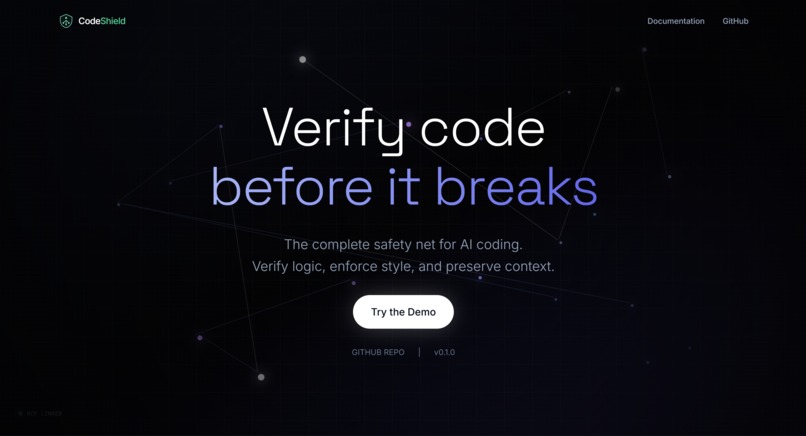
Stop getting betrayed by 90% correct code.


Inspiration
We asked real developers one brutal question: "What do you honestly hate about coding with AI?"
The responses hit hard:
"It f***ing forgets even the variables which was used in the past and creates another variable!"
"AI writes code to burn tokens. Humans write for efficiency."
"Yesterday I saw it made classes as 'fonts' instead of 'font'. The guy who PR'd it got roasted in public."
"Poor mapping. Poor interpretation. It just CAN'T SAY NO to anything!"
"More output. Least money burnt. And for god's sake... STOP WITH THE NEON TEMPLATES!"
The pattern was clear: 90% of AI-generated code works perfectly. The other 10% ruins your entire day.
Missing imports that break at runtime. Style chaos that makes PRs unreadable. Context that vanishes when you step away. And tokens burning on problems that don't need AI at all.
We're two students who got tired of this. So we built CodeShield.
What it does
CodeShield is a token-efficient verification layer that sits between AI and your codebase. It catches the 10% before it betrays you.
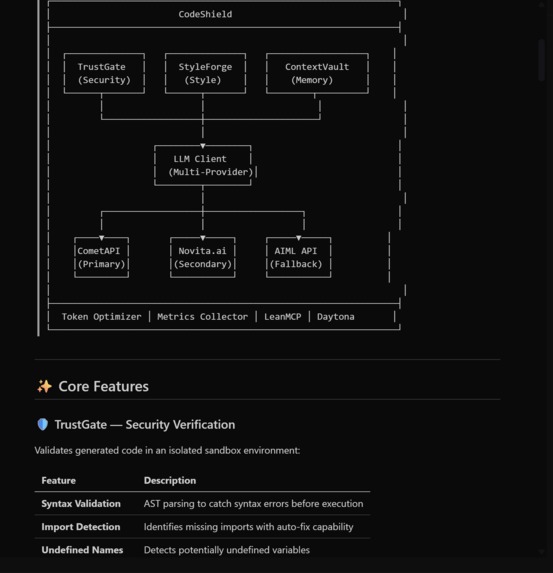
Three core modules:
🛡️ TrustGate — Security Verification
- Detects missing imports using AST parsing
- Fixes 35+ common packages locally (zero tokens!)
- Confidence scoring to tell you how "sus" the code is
- Optional sandbox execution via Daytona for untrusted code
🎨 StyleForge — Convention Enforcement
- Scans YOUR codebase to learn YOUR conventions
- Detects snake_case, camelCase, PascalCase patterns
- Converts AI's style chaos to match your project
- Typo detection using Levenshtein distance (catches
usre→user)
💾 ContextVault — State Persistence
- Save your coding session like a video game checkpoint
- Stores files, cursor position, open tabs, notes
- AI-generated briefings when you restore
- Never lose context after lunch again
⚡ Token Efficiency — 90% Savings
We obsessed over not wasting money:
| Optimization | Savings |
|---|---|
| Local Processing | 100% (no API call) |
| Response Caching | 100% (duplicate requests) |
| Prompt Compression | 40-60% |
Dynamic max_tokens |
50-75% |
| Model Tiering | 30-50% |
Missing import json? That's not a 500-token problem. That's a string concatenation we handle locally.
How we built it
Backend (Python)
- FastAPI for the REST API server (hosted on Railway)
- MCP SDK for Model Context Protocol integration
- AST module for parsing Python code and detecting imports
- SQLite for metrics, caching, and context persistence
- httpx for async HTTP to LLM providers
Frontend (React + TypeScript)
- Vite for blazing fast builds
- Tailwind CSS for styling
- Framer Motion for animations
- Monaco-inspired code editor component
Integrations (All 5 Required — Server-Side)
All API keys are stored on our backend. Clients need zero configuration.
- CometAPI — Primary LLM access (100+ models, one API)
- Novita.ai — Secondary provider with automatic failover
- AIML API — Tertiary fallback (belt AND suspenders)
- Daytona — Sandbox execution for untrusted code
- LeanMCP — The backbone of our MCP infrastructure (see below)
LeanMCP — Our MCP Deployment Hub
LeanMCP is central to how CodeShield operates. It's not just hosting—it's our entire MCP infrastructure layer:
Deployment & Scaling
- Production Hosting — Our MCP server runs on LeanMCP's global infrastructure
- Auto-scaling — Handles traffic spikes without manual intervention
- Zero-downtime Deploys — Push updates without breaking active sessions
- Multi-region Support — Low latency for users worldwide
Observability & Debugging
- Real-time Tracing — Every tool call is traced: latency, token usage, error rates
- Request Replay — Reproduce exact requests that caused issues
- Error Stack Traces — Full context when something breaks
- Performance Flamegraphs — See where time is spent in each request
Analytics & Optimization
- Tool Usage Heatmaps — Which tools are used most, when, and by whom
- Latency Percentiles — P50, P95, P99 for each tool
- Token Burn Rate — Track LLM costs per tool, per user
- Conversion Funnels — How users flow between tools
Developer Experience
- LeanMCP CLI —
leanmcp devfor local testing with production-like observability - Webhook Alerts — Slack/Discord notifications when error rates spike
- API Access — Programmatic access to all metrics for custom dashboards
- Team Collaboration — Shared access to logs and analytics
Why LeanMCP? Without LeanMCP, we'd be flying blind. Their observability layer turned debugging from "why isn't this working?" into "ah, the response took 2.3s because the Daytona sandbox cold-started." That's the difference between hours of frustration and a 5-minute fix.
MCP Server
Available as npm package (npx codeshield-mcp) — connects to our hosted backend:
verify_code— Quick validationfull_verify— With sandbox execution (Daytona)check_style— Convention analysissave_context/restore_context/list_contexts
No API keys required for clients. Just install and use.
Token Optimization Pipeline
Request → LocalProcessor → Cache Check → Prompt Compression → Model Selection → Response
            ↓                  ↓
      (fixes imports)    (returns cached)
       zero tokens        zero tokens
Local Development with LeanMCP
# Install LeanMCP CLI
npm install -g @leanmcp/cli

# Run locally with production-like observability
leanmcp dev --port 3000

# Deploy to production
leanmcp deploy --project codeshield
The CLI gives us the same tracing and metrics locally that we get in production. No more "works on my machine" mysteries.
Challenges we ran into
AST Complexity
Python's AST module is powerful but unforgiving. Handling edge cases like:
- Conditional imports (
if TYPE_CHECKING:) - Dynamic imports (
importlib.import_module()) - Star imports (
from module import *) - Relative vs absolute imports
We ended up building a comprehensive import map for 35+ packages with all their common attributes.
Style Detection Accuracy
Detecting naming conventions sounds simple until you realize:
- Mixed conventions in real codebases
- Framework-specific patterns (Django's
get_querysetvs standardget_query_set) - Abbreviations and acronyms (is
getHTTPResponsecorrect?)
We settled on majority-voting: scan the codebase, count patterns, enforce the dominant style.
Context Window Optimization
How much context is "enough"? Too little and the AI hallucinates. Too much and you burn tokens.
We built dynamic max_tokens calculation based on task complexity:
- Simple import fix: 100 tokens max
- Style correction: 200 tokens max
- Complex refactor: Let the model decide
Making Caching Actually Work
Cache invalidation is one of the two hard problems in computer science. We hash:
- The code content
- The operation type
- The style context
Same request twice? Instant response, zero cost.
MCP Protocol Learning Curve
MCP is powerful but documentation was sparse when we started. We had to:
- Read the FastMCP source code
- Experiment with tool schemas
- Debug weird serialization issues
- Figure out proper error handling
LeanMCP was our secret weapon here. Their observability dashboard showed us:
- Exactly what payloads were being sent/received
- Where serialization was breaking
- Timing breakdowns for each tool call
- Error stack traces with full context
Without LeanMCP's visibility into the MCP protocol layer, we'd still be adding print statements everywhere.
Architecture: How LeanMCP Fits In
┌─────────────────┐     ┌─────────────────┐     ┌─────────────────┐
│  Claude/Cursor  │────▶│    LeanMCP      │────▶│   CodeShield    │
│   (MCP Client)  │     │  (Proxy Layer)  │     │    (Railway)    │
└─────────────────┘     └─────────────────┘     └─────────────────┘
                              │
                              ▼
                        ┌─────────────────┐
                        │   Observability │
                        │   • Tracing     │
                        │   • Metrics     │
                        │   • Alerts      │
                        └─────────────────┘
LeanMCP sits between the MCP client and our backend, capturing everything without adding latency. It's like having X-ray vision into every request.
Accomplishments that we're proud of
- Published to PyPI & npm —
pip install codeshield-ai/npx codeshield-mcp - 70 unit tests, all passing — We tested our own code. Revolutionary.
- 35+ imports handled locally — The greatest hits of Python packages
- 90% token savings measured — Not a marketing number, actual benchmarks
- 6 MCP tools — Full integration with Claude and Cursor
- 3 LLM providers with failover — Primary goes down? We keep working.
- Sub-100ms local fixes — Instant feedback for common issues
- Real user research — We didn't guess the problems, we asked
- Working live demo — codeshield-five.vercel.app (it actually works!)
- Full LeanMCP integration — Production-grade observability and deployment
What we learned
Token cost is a product constraint, not an optimization
Every API call costs money. When you're a student, that matters. We learned to ask "does this NEED AI?" before every feature.
The biggest UX win is reducing loops
Developers don't want more buttons. They want fewer steps. One verification that catches everything beats three separate tools.
Code intelligence is 90% edge cases
The happy path is easy. Real codebases have weird imports, inconsistent styles, and legacy patterns. Handling those gracefully is the real work.
Smart defaults make demos magical
When the live demo "just works," it's because we obsessed over sensible defaults. No configuration needed for common cases.
MCP is the future of AI tooling
Direct integration with Claude/Cursor through MCP feels like magic. The AI can verify its own code before giving it to you. Meta, but powerful.
Observability isn't optional
LeanMCP taught us that you can't improve what you can't measure. Seeing every tool call, every latency spike, every error in real-time changed how we debug. We went from "it's broken somewhere" to "it's broken at line 47 of the sandbox handler, here's the stack trace."
What's next for CodeShield
Core Features
- Language expansion — JavaScript/TypeScript support (AST parsing with tree-sitter)
- IDE extensions — VS Code extension for inline verification
- Team features — Shared style configurations across projects
- Smarter caching — Semantic similarity for near-duplicate requests
- Custom import maps — Let users define their own package patterns
- CI/CD integration — Verify AI-generated PRs automatically
- Fine-tuned models — Train on common fix patterns for even faster local processing
LeanMCP-Powered Features
- Team Analytics Dashboard — Expose usage metrics to teams via LeanMCP's API
- A/B Testing — Test different verification strategies with LeanMCP's traffic splitting
- Rate Limiting — Use LeanMCP's built-in rate limiting for fair usage
- Custom Alerting — Webhook integrations for Slack/Discord when errors spike
- Audit Logs — Compliance-ready logs of all tool invocations via LeanMCP
- Multi-tenant Support — Isolated environments per team using LeanMCP's project system
- Edge Caching — Cache common responses at LeanMCP's edge nodes for sub-50ms responses
- Canary Deployments — Roll out new versions to 1% of traffic first via LeanMCP
Installation
MCP Server (for Claude/Cursor)
Zero configuration required — just install and use:
npx codeshield-mcp
Claude Desktop config (claude_desktop_config.json):
{
  "mcpServers": {
    "codeshield": {
      "command": "npx",
      "args": ["codeshield-mcp"]
    }
  }
}
That's it. No API keys needed. The MCP server connects to our hosted backend which handles all the integrations (Daytona, LLM providers, etc.).
Python Library
pip install codeshield-ai
from codeshield import verify_code, check_style

result = verify_code("print(x)", auto_fix=True)
print(result.is_valid)
Built With
- Python
- FastAPI
- MCP SDK
- React
- TypeScript
- Vite
- Tailwind CSS
- SQLite
- CometAPI
- Novita.ai
- AIML API
- Daytona
- LeanMCP
- Railway (hosting)
Links
- Live Demo: codeshield-five.vercel.app
- GitHub: github.com/Erebuzzz/CodeShield
- PyPI: pypi.org/project/codeshield-ai
- npm: npmjs.com/package/codeshield-mcp
CodeShield: Verify, don't trust.
Built With
- aiml-api
- cometapi
- daytona
- fastapi
- fastmcp
- framer-motion
- javascript
- leanmcp
- mcp
- novita-ai
- npn
- pip
- pypi
- python
- react
- sqlite
- tailwind-css
- typescript
- vercel
- vite




Log in or sign up for Devpost to join the conversation.