-
-
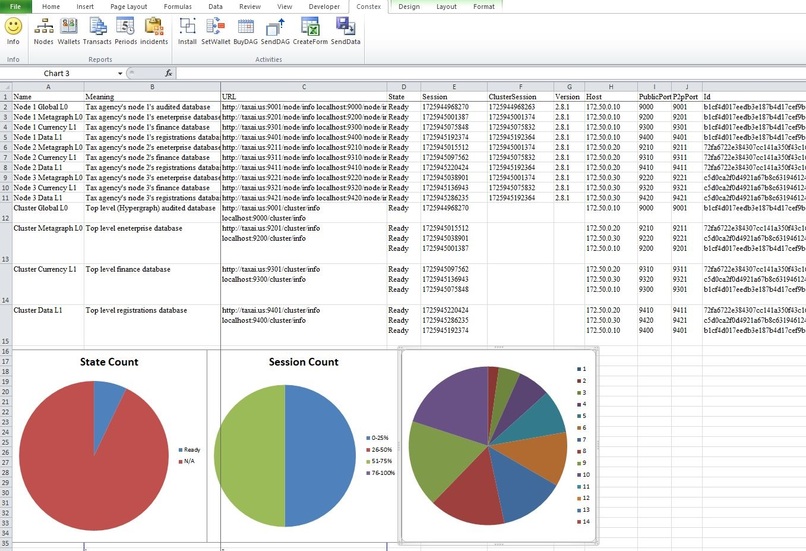
Constex Xlam - Nodes output

Inspiration
Constellation Network's Hypergraph and metagraphs technology is powerful. We felt that it is necessary to have some support utilities to make this technology user friendly and more popular.
What it does
Constex Xlam is an Excel add-on, which uses the popular Excel software and VBA language. Constex.xlam file may be placed in the system's or the user's XLSTART folder. If placed in an XLSTART folder, Constex menu shows up on the menubar, whenever Excel program is opened. When Constex menu is clicked, Constex ribbonbar shows up below the menubar.
This ribbonbar has buttons for several useful macros. Info button gives a window with information about the macros. Nodes, Wallets, Transacts, Periods, and Incidents buttons in the Reports group generate Excel spreadsheet reports. Install, SetWallet, BuyDAG, SendDAG, CreateForm, and SendData buttons in the Activities group carry out these procedures.
At this stage, Nodes macro is ready, and other macros are being developed.
How we built it
We used Excel's Visual Basic for Applications, CustomUI methods, and some Xml.
Challenges we ran into
We did not have adequate time left to develop more macros for this Xlam.
Accomplishments that we're proud of
The Constex ribbonbar is well-organized, and is likely to make this utility popular.
What we learned
We learned Constellation Network's Hypergraph and metagraphs technology.
What's next for Constex Xlam
We will build the remaining macros, and add macros as may be requested by users.


Log in or sign up for Devpost to join the conversation.