-
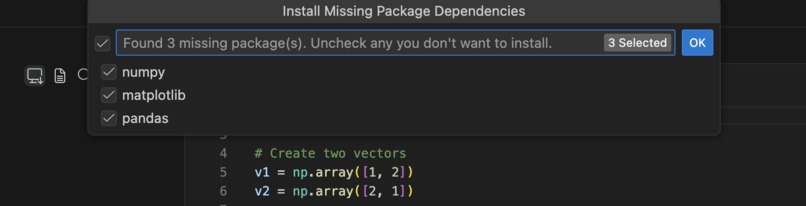
Automatic import detection
-
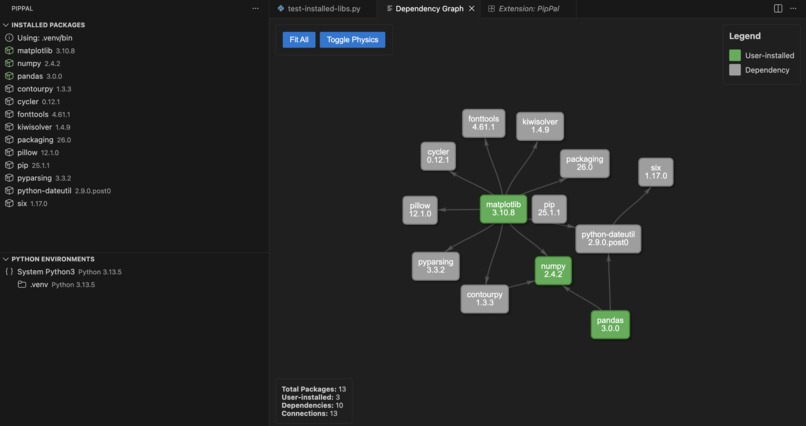
Dependancy tracking for visualisation and efficient pruning
-

Export to simple requirements.txt


The Problem
For Beginners
One of the biggest pitfalls for a newbie starting a Python project is dependency management. They're told to "simply pip install these dependencies," but they often end up installing everything globally—causing conflicts between projects in the long run.
For Everyone
Even a Python veteran may have issues. For example, when switching between Unix-based and Windows machines, remembering the command to activate the virtual environment is painful. Forget to activate it entirely, and you're polluting your global environment.
The Existing Solutions Aren't Great
Current solutions like environment managers or pip plugins aren't always convenient or accessible:
- Uni students on lab computers with limited install permissions
- Teams not using the same pip plugins
- 5GB Anaconda installs that take forever
The Solution: PipPal
PipPal is a lightweight VS Code extension that makes Python dependency management effortless for beginners and veterans alike.
Key Features
Lightweight & Accessible
- Install anywhere you have VS Code
- No heavy environment managers required
- Works even with limited permissions
Virtual Environment Management
- Create and activate virtual environments with ease
- Automatic OS detection (Unix vs Windows)
- No more forgotten activation commands
Smart Package Management
- Auto-install: Scan your imports and install dependencies automatically
- Requirements.txt: Install from or export to requirements files
- Fuzzy search: Quickly find and install packages you half-remember
Dependency Tracking
Instead of a confusing flat list from pip list, PipPal shows:
- Top-level packages you installed
- Their dependencies listed below each
- Automatic "orphan" detection and removal when uninstalling
- Dependency graph visualization for complex relationships
GUI & Keyboard Shortcuts
- Intuitive graphical interface
- Customizable keybinds for quick workflows
Built With
- claude
- npm
- typscript
- vscode


Log in or sign up for Devpost to join the conversation.