-
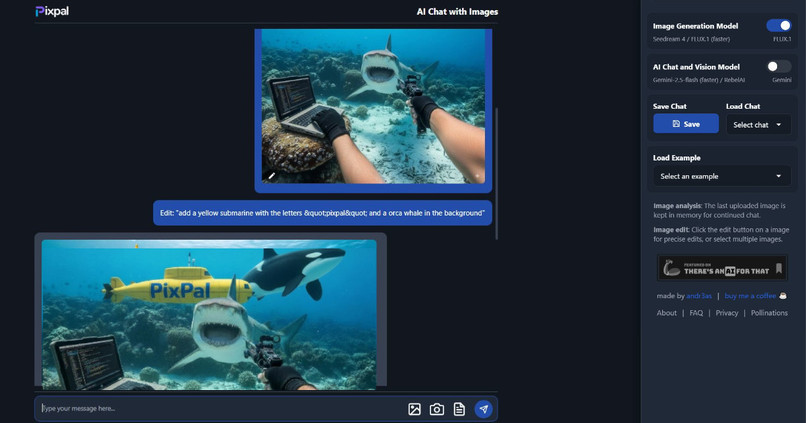
main app UI

PixPal AI Image Editing and Image to Video Web App
My Inspiration
PixPal started from a simple frustration I kept running into. Most AI image and video tools are locked behind signups, subscriptions, or watermarks, and many of them feel awkward to use on mobile. I wanted something that worked instantly and felt good to use, especially on a phone.
The idea was to build a mobile-first web app where anyone could open a browser and start creating right away. No accounts. No setup. No friction. Just edit images or turn images into videos the moment the site loads.
Description
PixPal is a browser based AI web app focused on image editing, image remixing, and AI powered image to video generation. It is designed mobile first, so the experience works smoothly on phones, tablets, and desktops without needing an app download.
Users can upload images, enhance or transform them using natural language prompts, remix visuals, or animate images into short videos, all inside a clean single page interface. Instead of complex editing tools, PixPal uses a conversational approach that makes experimenting feel natural and intuitive.
Key Features
- AI image generation
- AI powered image editing and enhancement
- Image remixing and creative generation
- Image to video generation from uploaded images
- Mobile first design
- No signup required
- No watermarks on generated content
How I Built It
PixPal is built as a modern single page web app with a strong focus on performance and simplicity. The entire app is serverless and runs with zero infrastructure costs.
It uses Cloudflare for free static hosting and Cloudflare Workers for backend logic. This setup keeps the app fast, globally distributed, and scalable without managing servers. Requests are handled close to users, which helps with responsiveness, especially on mobile devices.
A lot of time went into optimizing image uploads, image processing, and image to video generation flows so everything feels fast and lightweight.
What I Learned
Building PixPal taught me how important mobile experience is when designing creative tools. If something feels slow or awkward on a phone, users drop off quickly. I also learned how effective a serverless architecture can be when paired with a simple frontend.
Another big takeaway was how much users value freedom. Removing signups, watermarks, and unnecessary steps significantly increased engagement and experimentation.
Challenges
One of the biggest challenges was balancing quality, speed, and cost when working with AI powered image and image to video generation. These processes are resource heavy, so designing a serverless system that stays fast and affordable required careful tradeoffs.
Another challenge was building an interface that works well for both beginners and advanced users on smaller screens, especially when moving away from traditional editing controls toward a conversational workflow.
Despite these challenges, PixPal became a fast, lightweight web app built around one simple idea. Let people create instantly, anywhere, without friction.
Check it out at pixpal.chat


Log in or sign up for Devpost to join the conversation.