-
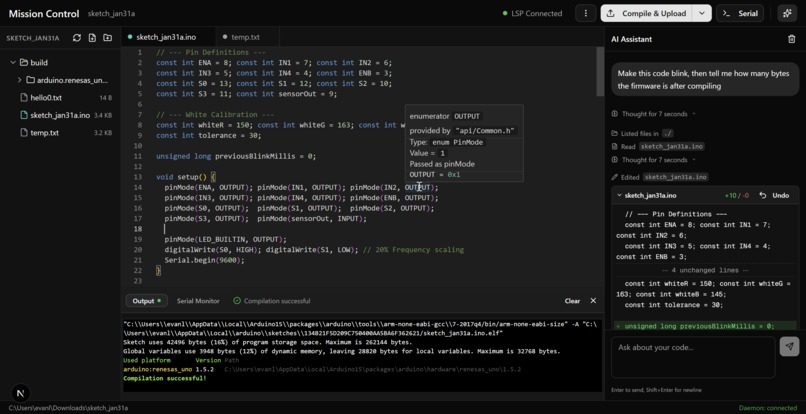
The main editor
-
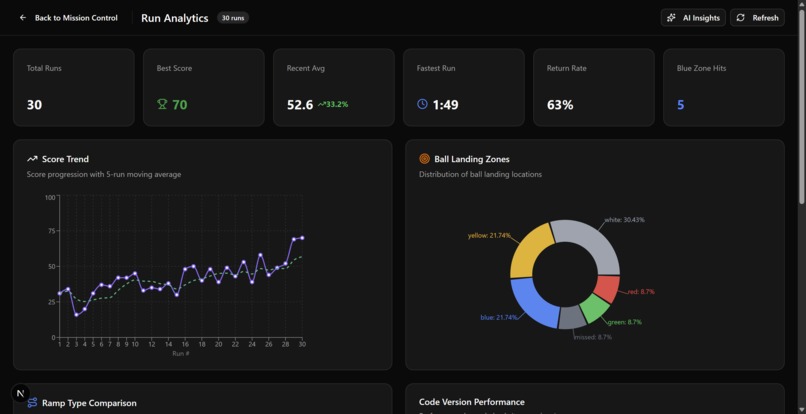
The analytics dashboard
-
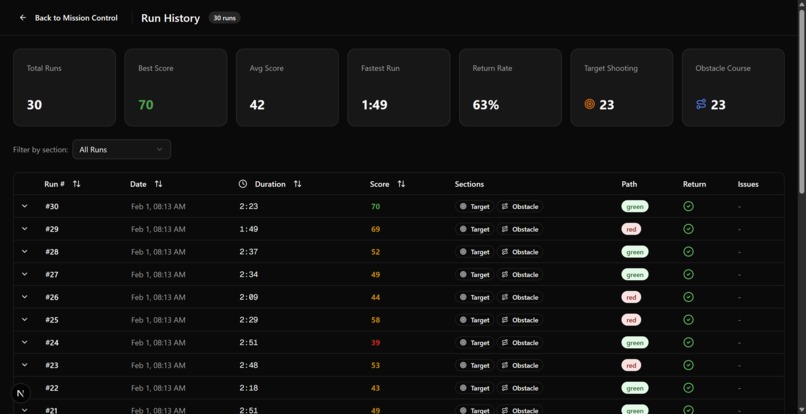
The list of runs
-
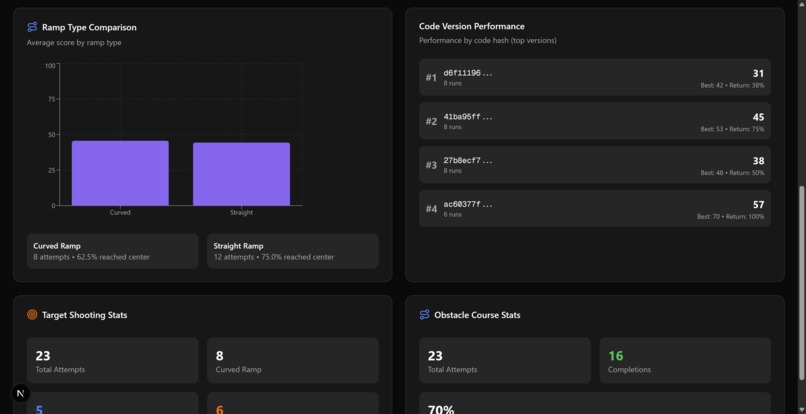
The analytics dashboard
-
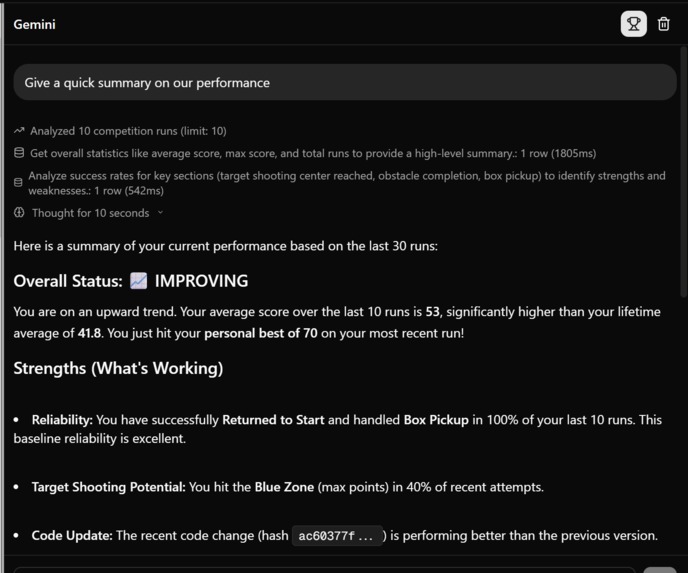
Gemini performance analyzation
-
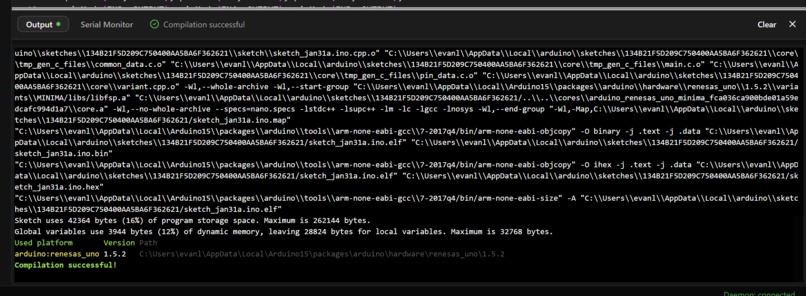
Code compilation/verification
-
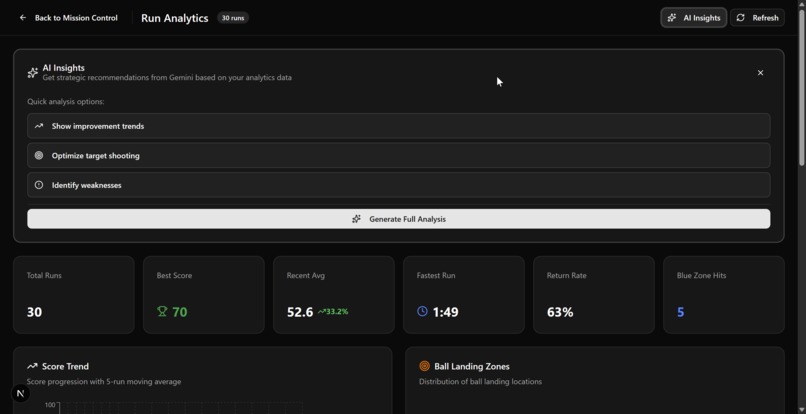
Gemini can analyze the data


After attending the MLH workshops this weekend and seeing the power of Copilot and Gemini in VS Code, we noticed a major gap: the Arduino IDE does not support Copilot. So we built our own Arduino IDE with full LSP support, code completion, and an AI agent, then connected it to performance data extracted from our robot to create Mission Control.
Mission Control is an AI-powered IDE that runs in the browser and can build and upload code to an Arduino board. It works through a lightweight daemon running on the user’s computer that syncs the local filesystem and streams build logs plus the serial port back to the web app.
Mission Control is built around Gemini, which pulls recorded performance data from MongoDB and Snowflake and uses it to propose and apply code changes. It can also test those changes without ever leaving the tab. Mission Control tracks our different code revisions and links each revision to robot performance, so we can see when the robot improves or gets worse with every change.
To apply code changes reliably, we use a two-step workflow. Gemini 3 Pro generates diffs, then Gemini 2.5 Flash applies those diffs to the code. This improves consistency since LLMs are often unreliable at generating diffs that apply cleanly.
Mission Control is deployed on DigitalOcean using the DigitalOcean Container Registry and a Droplet. We build a Docker image, push it to the Container Registry, and the Droplet pulls and runs that image so deployments stay consistent and repeatable.
When a new run is recorded, the data is first written to MongoDB Atlas, then forwarded to Snowflake for processing. We use this pipeline to power an analytics dashboard that visualizes performance trends over time and highlights our best-performing code revisions.
Solana: Our autonomous robot navigates through the environment while its ultrasonic sensor captures distance readings. These 200 samples are processed by a Python script that generates unique spiral art where circle size and color are determined by the distance values. After the artwork is generated, ElevenLabs announces the creation, and it is minted as an NFT on the Solana blockchain using Metaplex.
The Robot
Inspiration
The Winter Olympics biathlon combines cross-country skiing with precision target shooting — athletes have to be fast and accurate under pressure. We thought that was a sick concept to turn into a robot. The challenge gave us a course with picking up boxes, navigating paths, climbing ramps, and shooting a ball at a target, so we wanted to build something that could actually handle all of that reliably.
What it does
Our robot navigates a Winter Olympics–style obstacle course autonomously. It picks up a box, detects the correct path using a color sensor, drops the box off to unlock a section, climbs a ramp, follows color cues to the center of a target, and launches a ball at the bullseye. It uses onboard sensors to perceive its environment and make decisions in real time.
How we built it
We built everything around an Arduino Uno as the main controller. The DC motors handle movement and the servo motors control the claw/arm for picking up and dropping the box. A color sensor lets the robot detect the green and red paths on the track, and IR sensors help with obstacle and distance detection. For shooting, we used a servo-based launcher that fires the ball once the robot reaches the black center zone of the target. Wiring everything up on the breadboard and getting all the components talking to each other took a solid chunk of our time, but we kept the code modular — move, detect, act — so we could debug each part on its own. We wanted to keep the wiring as clean as possible but with restrictions on the amount of wires we can use and that came with our kit we needed to reorganize one too many times
Challenges we ran into
Getting the claw to reliably hold the box was probably the biggest mechanical headache. It was't a traditional claw with links that needed some imagination on how we can use it to lift the boxes. Color detection was also tricky — the sensor readings shifted depending on the lighting as well as distance to the ground, so we had to calibrate it a few times to get consistent results. We also had to be careful balancing speed and accuracy on the obstacle course, since hitting an obstruction cost us points. We also realized that position of the color sensor on the robot in reference or accordance to the wheel could affect how tight our robot could turn based off sensor data. Turning radio was a big factor as well as trying to have one wheel reverse and the other turn to piviot and turn on a spot rather than pivot.
Accomplishments that we're proud of
We got the robot to autonomously pick up the box and detect the correct path. Reliability and repeatability was a bit more diificult. We came up with creative solutions to overcome environment challenges such as bumbs/gaps in the map our robot needs to traverse. Getting the color sensor to reliably distinguish between the paths and the target zones was a win, especially given how sensitive it was to lighting.
What we learned
Wiring and sensor integration takes way longer than you'd think — clean, organized wiring actually matters for debugging. Color detection is more sensitive to environment than we expected, so calibration is key. Breaking the code into small, isolated steps (move → detect → act) made the whole process way easier to manage and debug under time pressure.
Built With
- amazon-web-services
- arduino
- cpp
- digitaloceans
- gemini
- javascript
- lps
- mongodb
- nextjs
- node.js
- python
- solana
- typescript


Log in or sign up for Devpost to join the conversation.