Basic usage of tool use (function calling)

Overview

Tool use is a technique which allows developers to connect Cohere’s Command family of models to external tools like search engines, APIs, functions, databases, etc.

This opens up a richer set of behaviors by leveraging tools to access external data sources, taking actions through APIs, interacting with a vector database, querying a search engine, etc., and is particularly valuable for enterprise developers, since a lot of enterprise data lives in external sources.

The Chat endpoint comes with built-in tool use capabilities such as function calling, multi-step reasoning, and citation generation.
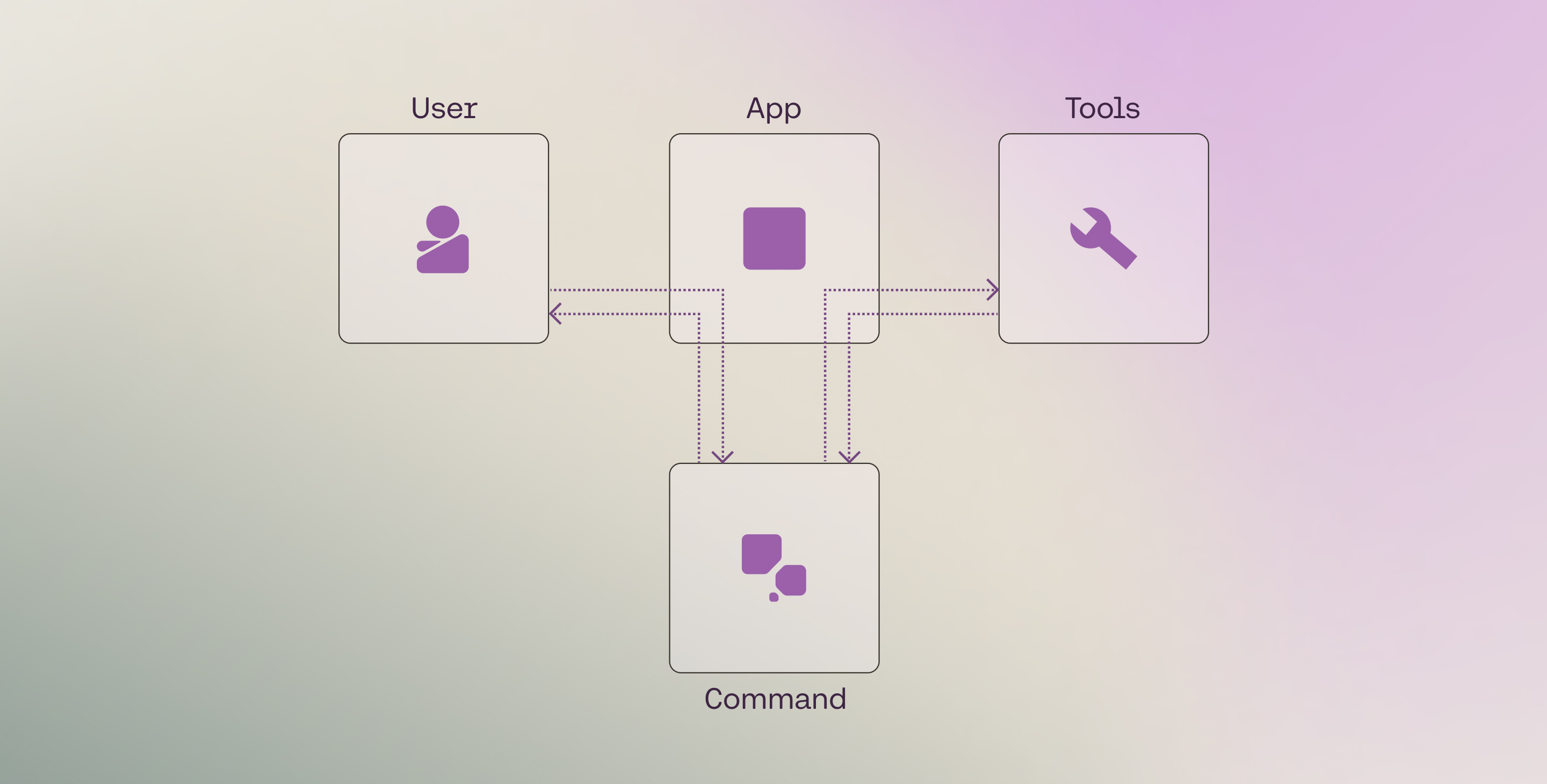
Tool use overview

An end-to-end example using tool use to search docs

This is a complete, minimal example that shows one full tool use “round trip”: the model gets a message from a user, generates a tool call, gets tool results, and responds with citations.

PYTHON
1# ! pip install -U cohere # Do this if you don't already have the Cohere client installed.
2import json
3
4import cohere
5
6
7def search_docs(query: str, top_k: int = 3):
8 # Implement your retrieval logic here (vector DB, keyword search, etc.)
9 # For simplicity, we'll return a few hardcoded "documents".
10 return [
11 {
12 "title": "Cohere API v2 - Chat",
13 "url": "https://docs.cohere.com/reference/chat",
14 "text": "Use the Chat endpoint to generate responses and optionally call tools.",
15 },
16 {
17 "title": "Tool use (function calling) overview",
18 "url": "https://docs.cohere.com/v2/docs/tool-use-overview",
19 "text": "Tool use connects models to external tools like search engines and APIs.",
20 },
21 {
22 "title": "Structured outputs",
23 "url": "https://docs.cohere.com/docs/structured-outputs",
24 "text": "Use JSON schema to define structured inputs/outputs for tools and responses.",
25 },
26 ][:top_k]
27
28
29functions_map = {"search_docs": search_docs}
30
31tools = [
32 {
33 "type": "function",
34 "function": {
35 "name": "search_docs",
36 "description": "Search documentation and return relevant snippets as documents.",
37 "parameters": {
38 "type": "object",
39 "properties": {
40 "query": {
41 "type": "string",
42 "description": "The search query to look up in the docs.",
43 },
44 "top_k": {
45 "type": "integer",
46 "description": "How many documents to return.",
47 },
48 },
49 "required": ["query"],
50 },
51 },
52 }
53]
54
55co = cohere.ClientV2("COHERE_API_KEY")
56
57# Step 1: user message
58messages = [
59 {
60 "role": "user",
61 "content": "How does tool use work in Cohere? Please cite your sources.",
62 }
63]
64
65# Step 2: model generates tool calls
66response = co.chat(
67 model="command-a-03-2025", messages=messages, tools=tools
68)
69
70if response.message.tool_calls:
71 messages.append(response.message)
72
73 # Step 3: application executes tools and sends tool results back
74 for tc in response.message.tool_calls:
75 tool_result = functions_map[tc.function.name](
76 **json.loads(tc.function.arguments)
77 )
78
79 tool_content = []
80 for data in tool_result:
81 tool_content.append(
82 {
83 "type": "document",
84 "document": {"data": json.dumps(data)},
85 }
86 )
87
88 messages.append(
89 {
90 "role": "tool",
91 "tool_call_id": tc.id,
92 "content": tool_content,
93 }
94 )
95
96# Step 4: model generates a response grounded in tool results (with citations)
97response = co.chat(
98 model="command-a-03-2025", messages=messages, tools=tools
99)
100
101print(response.message.content[0].text)
102print(response.message.citations)

In the sections below, we’ll walk through the steps in the tool-use loop, beginning with set up.

Setup

First, import the Cohere library and create a client.

PYTHON
1# ! pip install -U cohere
2import cohere
3
4co = cohere.ClientV2(
5 "COHERE_API_KEY"
6) # Get your free API key here: https://dashboard.cohere.com/api-keys

Tool definition

Before we can run a tool use workflow, we have to define the tools. We can break this process into two steps:

  • Creating the tool
  • Defining the tool schema

Creating the tool

A tool can be any function that you create or external services that return an object for a given input. Some examples:

  • A web search engine
  • An email service
  • A SQL database
  • A vector database
  • A documentation search service
  • A sports data service
  • Another LLM.

In this walkthrough, we define a search_docs function that returns relevant documentation snippets for a given query. You can implement any retrieval logic here, but to simplify, we’ll return a few hardcoded documents.

PYTHON
1def search_docs(query, top_k=3):
2 # Implement any retrieval logic here (vector DB, keyword search, etc.)
3 return [
4 {
5 "title": "Tool use (function calling) overview",
6 "url": "https://docs.cohere.com/v2/docs/tool-use-overview",
7 "text": "Tool use connects models to external tools like search engines and APIs.",
8 },
9 {
10 "title": "Chat API reference (v2)",
11 "url": "https://docs.cohere.com/reference/chat",
12 "text": "Use the Chat endpoint to generate responses and optionally call tools.",
13 },
14 {
15 "title": "Structured outputs",
16 "url": "https://docs.cohere.com/docs/structured-outputs",
17 "text": "Use JSON schema to define structured inputs/outputs for tools and responses.",
18 },
19 ][:top_k]
20 # Return a string or a list of objects. In Step 3 below, we'll wrap each object into a `document`
21 # content block so the model can cite specific tool results.
22
23
24functions_map = {"search_docs": search_docs}

The Chat endpoint accepts a string or a list of objects as the tool results. Thus, you should format the return value in this way. The following are some examples.

PYTHON
1# Example: String
2docs_search_results = "Tool use connects models to external tools like search engines and APIs."
3
4# Example: List of objects
5docs_search_results = [
6 {
7 "title": "Tool use (function calling) overview",
8 "url": "https://docs.cohere.com/v2/docs/tool-use-overview",
9 "text": "Tool use connects models to external tools like search engines and APIs.",
10 },
11 {
12 "title": "Structured outputs",
13 "url": "https://docs.cohere.com/docs/structured-outputs",
14 "text": "Use JSON schema to define structured inputs/outputs for tools and responses.",
15 },
16]

Defining the tool schema

We also need to define the tool schemas in a format that can be passed to the Chat endpoint. The schema follows the JSON Schema specification and must contain the following fields:

  • name: the name of the tool.
  • description: a description of what the tool is and what it is used for.
  • parameters: a list of parameters that the tool accepts. For each parameter, we need to define the following fields:
    • type: the type of the parameter.
    • properties: the name of the parameter and the following fields:
      • type: the type of the parameter.
      • description: a description of what the parameter is and what it is used for.
    • required: a list of required properties by name, which appear as keys in the properties object

This schema informs the LLM about what the tool does, and the LLM decides whether to use a particular tool based on the information that it contains.

Therefore, the more descriptive and clear the schema, the more likely the LLM will make the right tool call decisions.

In a typical development cycle, some fields such as name, description, and properties will likely require a few rounds of iterations in order to get the best results (a similar approach to prompt engineering).

Here’s an example:

PYTHON
1tools = [
2 {
3 "type": "function",
4 "function": {
5 "name": "search_docs",
6 "description": "Search documentation and return relevant snippets as documents.",
7 "parameters": {
8 "type": "object",
9 "properties": {
10 "query": {
11 "type": "string",
12 "description": "The search query to look up in the docs.",
13 },
14 "top_k": {
15 "type": "integer",
16 "description": "How many documents to return.",
17 },
18 },
19 "required": ["query"],
20 },
21 },
22 },
23]
The endpoint supports a subset of the JSON Schema specification. Refer to the Structured Outputs documentation for the list of supported and unsupported parameters.

Tool use workflow

At a high level, there are four steps in the core tool-use loop:

  • Step 1: Get user message: A user asks, “How does tool use work in Cohere? Please cite your sources.”
  • Step 2: Generate tool calls: A tool call is made to a documentation search tool with something like search_docs("tool use Cohere").
  • Step 3: Get tool results: The tool returns relevant documentation snippets (documents).
  • Step 4: Generate response and citations: The model provides the answer grounded in those snippets, with citations.

The following sections go through the implementation of these steps in detail.

Step 1: Get user message

In the first step, we get the user’s message and append it to the messages list with the role set to user.

PYTHON
1messages = [
2 {
3 "role": "user",
4 "content": "How does tool use work in Cohere? Please cite your sources.",
5 }
6]

Optional: If you want to define a system message, you can add it to the messages list with the role set to system.

PYTHON
1system_message = """## Task & Context
2You help people answer their questions and other requests interactively. You will be asked a very wide array of requests on all kinds of topics. You will be equipped with a wide range of search engines or similar tools to help you, which you use to research your answer. You should focus on serving the user's needs as best you can, which will be wide-ranging.
3
4## Style Guide
5Unless the user asks for a different style of answer, you should answer in full sentences, using proper grammar and spelling.
6"""
7
8messages = [
9 {"role": "system", "content": system_message},
10 {
11 "role": "user",
12 "content": "How does tool use work in Cohere? Please cite your sources.",
13 },
14]

Step 2: Generate tool calls

Next, we call the Chat endpoint to generate the list of tool calls. This is done by passing the parameters model, messages, and tools to the Chat endpoint.

The endpoint will send back a list of tool calls to be made if the model determines that tools are required. If it does, it will return two types of information:

  • tool_plan: its reflection on the next steps it should take, given the user query.
  • tool_calls: a list of tool calls to be made (if any), together with auto-generated tool call IDs. Each generated tool call contains:
    • id: the tool call ID
    • type: the type of the tool call (function)
    • function: the function to be called, which contains the function’s name and arguments to be passed to the function.

We then append these to the messages list with the role set to assistant.

1response = co.chat(
2 model="command-a-03-2025", messages=messages, tools=tools
3)
4
5if response.message.tool_calls:
6 messages.append(response.message)
7 print(response.message.tool_plan, "\n")
8 print(response.message.tool_calls)

Example response:

1I will search the docs for how tool use works in Cohere.
2
3[
4 ToolCallV2(
5 id="search_docs_1byjy32y4hvq",
6 type="function",
7 function=ToolCallV2Function(
8 name="search_docs", arguments='{"query":"tool use Cohere","top_k":3}'
9 ),
10 )
11]

By default, when using the Python SDK, the endpoint passes the tool calls as objects of type ToolCallV2 and ToolCallV2Function. With these, you get built-in type safety and validation that helps prevent common errors during development.

Alternatively, you can use plain dictionaries to structure the tool call message.

These two options are shown below.

PYTHON
1messages = [
2 {
3 "role": "user",
4 "content": "Find docs about tool use and structured outputs.",
5 },
6 {
7 "role": "assistant",
8 "tool_plan": "I will search the docs for tool use and structured outputs.",
9 "tool_calls": [
10 ToolCallV2(
11 id="search_docs_dkf0akqdazjb",
12 type="function",
13 function=ToolCallV2Function(
14 name="search_docs",
15 arguments='{"query":"tool use","top_k":3}',
16 ),
17 ),
18 ToolCallV2(
19 id="search_docs_gh65bt2tcdy1",
20 type="function",
21 function=ToolCallV2Function(
22 name="search_docs",
23 arguments='{"query":"structured outputs","top_k":3}',
24 ),
25 ),
26 ],
27 },
28]

The model can decide to not make any tool call, and instead, respond to a user message directly. This is described here.

The model can determine that more than one tool call is required. This can be calling the same tool multiple times or different tools for any number of calls. This is described here.

Step 3: Get tool results

During this step, the actual function calling happens. We call the necessary tools based on the tool call payloads given by the endpoint.

For each tool call, we append the messages list with:

  • the tool_call_id generated in the previous step.
  • the content of each tool result with the following fields:
    • type which is document
    • document containing
      • data: which stores the contents of the tool result.
      • id (optional): you can provide each document with a unique ID for use in citations, otherwise auto-generated
PYTHON
1import json
2
3if response.message.tool_calls:
4 for tc in response.message.tool_calls:
5 tool_result = functions_map[tc.function.name](
6 **json.loads(tc.function.arguments)
7 )
8 tool_content = []
9 for data in tool_result:
10 # Optional: the "document" object can take an "id" field for use in citations, otherwise auto-generated
11 tool_content.append(
12 {
13 "type": "document",
14 "document": {"data": json.dumps(data)},
15 }
16 )
17 messages.append(
18 {
19 "role": "tool",
20 "tool_call_id": tc.id,
21 "content": tool_content,
22 }
23 )

Step 4: Generate response and citations

By this time, the tool call has already been executed, and the result has been returned to the LLM.

In this step, we call the Chat endpoint to generate the response to the user, again by passing the parameters model, messages (which has now been updated with information from the tool calling and tool execution steps), and tools.

The model generates a response to the user, grounded on the information provided by the tool.

We then append the response to the messages list with the role set to assistant.

1response = co.chat(
2 model="command-a-03-2025", messages=messages, tools=tools
3)
4
5messages.append(
6 {"role": "assistant", "content": response.message.content[0].text}
7)
8
9print(response.message.content[0].text)

Example response:

1Tool use lets models call external tools (like doc search) and then answer using the tool results, with citations.

It also generates fine-grained citations, which are included out-of-the-box with the Command family of models. Here, we see the model generating two citations, one for each specific span in its response, where it uses the tool result to answer the question.

PYTHON
1print(response.message.citations)

Example response:

1[Citation(start=0, end=8, text='Tool use', sources=[ToolSource(type='tool', id='search_docs_1byjy32y4hvq:0', tool_output={'title': 'Tool use (function calling) overview', 'url': 'https://docs.cohere.com/v2/docs/tool-use-overview', 'text': 'Tool use connects models to external tools like search engines and APIs.'})], type='TEXT_CONTENT')]

Above, we assume the model performs tool calling only once (either single call or parallel calls), and then generates its response. This is not always the case: the model might decide to do a sequence of tool calls in order to answer the user request. This means that steps 2 and 3 will run multiple times in loop. It is called multi-step tool use and is described here.

State management

This section provides a more detailed look at how the state is managed via the messages list as described in the tool use workflow above.

At each step of the workflow, the endpoint requires that we append specific types of information to the messages list. This is to ensure that the model has the necessary context to generate its response at a given point.

In summary, each single turn of a conversation that involves tool calling consists of:

  1. A user message containing the user message
    • content
  2. An assistant message, containing the tool calling information
    • tool_plan
    • tool_calls
      • id
      • type
      • function (consisting of name and arguments)
  3. A tool message, containing the tool results
    • tool_call_id
    • content containing a list of documents where each document contains the following fields:
      • type
      • document (consisting of data and optionally id)
  4. A final assistant message, containing the model’s response
    • content

These correspond to the four steps described above. The list of messages is shown below.

PYTHON
1for message in messages:
2 print(message, "\n")
1{
2 "role": "user",
3 "content": "How does tool use work in Cohere? Please cite your sources."
4}
5
6{
7 "role": "assistant",
8 "tool_plan": "I will search the docs for how tool use works in Cohere.",
9 "tool_calls": [
10 ToolCallV2(
11 id="search_docs_1byjy32y4hvq",
12 type="function",
13 function=ToolCallV2Function(
14 name="search_docs", arguments='{"query":"tool use Cohere","top_k":3}'
15 ),
16 )
17 ],
18}
19
20{
21 "role": "tool",
22 "tool_call_id": "search_docs_1byjy32y4hvq",
23 "content": [{"type": "document", "document": {"data": "{\"title\":\"Tool use (function calling) overview\",\"url\":\"https://docs.cohere.com/v2/docs/tool-use-overview\",\"text\":\"Tool use connects models to external tools like search engines and APIs.\"}"}}],
24}
25
26{
27 "role": "assistant",
28 "content": "Tool use lets models call external tools (like doc search) and then answer using the tool results, with citations."
29}

The sequence of messages is represented in the diagram below.

Note that this sequence represents a basic usage pattern in tool use. The next page describes how this is adapted for other scenarios.