
توضیحات
A responsive and easy-to-use tool for dividing your content in your posts/pages. This ultra-lightweight plugin allows you to put your content in columns of various widths. What you see is what you get, and it’s totally free.
Usage example
1. Create rows using [GDC_row]
[GDC_row][/GDC_row]
2. Add columns using [GDC_column]
[GDC_row]

[GDC_column size="third"]
Your content here
[/GDC_column]

[GDC_column size="third"]
Your content here
[/GDC_column]

[GDC_column size="third"]
Your content here
[/GDC_column]

[/GDC_row]
Available sizes
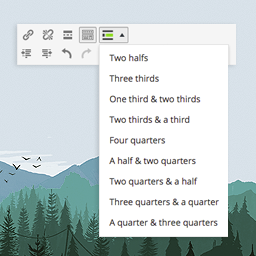
- half
- third
- two-thirds
- quarter
- three-quarters
See more code examples on the documentation page.
Support
Find help in our forums for this plugin (we’ll answer you fast, promise).
عکسهای صفحه

Grid Shortcodes (front view) 
Grid Shortcodes (admin view) 
Grid Shortcodes (admin view) 
Grid Shortcodes (admin view)


نصب
Installation
- In your WordPress admin panel, go to Plugins > New Plugin
- Find our Grid Shortcodes plugin by WP Darko and click Install now
- Alternatively, download the plugin and upload the contents of grid-shortcodes.zip to your plugin directory, which usually is /wp-content/plugins/
- Activate the plugin
Usage example
1. Create rows using [GDC_row]
[GDC_row][/GDC_row]
2. Add columns using [GDC_column]
[GDC_row]

[GDC_column size="third"]
Your content here
[/GDC_column]

[GDC_column size="third"]
Your content here
[/GDC_column]

[GDC_column size="third"]
Your content here
[/GDC_column]

[/GDC_row]
Available sizes
- half
- third
- two-thirds
- quarter
- three-quarters
See more example on the documentation page.
سوالات متداول
-
Usage example
-
1. Create rows using [GDC_row]
-
[GDC_row][/GDC_row] -
2. Add columns using [GDC_column]
-
[GDC_row] [GDC_column size="third"] Your content here [/GDC_column] [GDC_column size="third"] Your content here [/GDC_column] [GDC_column size="third"] Your content here [/GDC_column] [/GDC_row] -
Available sizes
-
- half
- third
- two-thirds
- quarter
- three-quarters
See more example on the documentation page.
-
Support
-
Find help on our support platform for this plugin (we’ll answer you fast, promise).
نقد و بررسیها


توسعه دهندگان و همکاران
“Grid Shortcodes” نرم افزار متن باز است. افراد زیر در این افزونه مشارکت کردهاند.
مشارکت کنندگان
ترجمه “Grid Shortcodes” به زبان شما.
علاقه مند به توسعه هستید؟
Browse the code, check out the SVN repository, or subscribe to the development log by RSS.
گزارش تغییرات
1.1.1
- Fixed minor vulnerability issue
1.1
- Stripping out paragraphs and new lines between columns (thanks @makbeta).
1.0
- Initial release
