Mention @somebody. They’re notified.
Ever wish you could summon a particular someone to take a look at an issue or pull request? Now you can: When you @mention a GitHub username anywhere in the…
Ever wish you could summon a particular someone to take a look at an issue or
pull request? Now you can:

When you @mention a GitHub username anywhere
in the context of an issue or pull request, that person is notified and
subscribed to future updates.
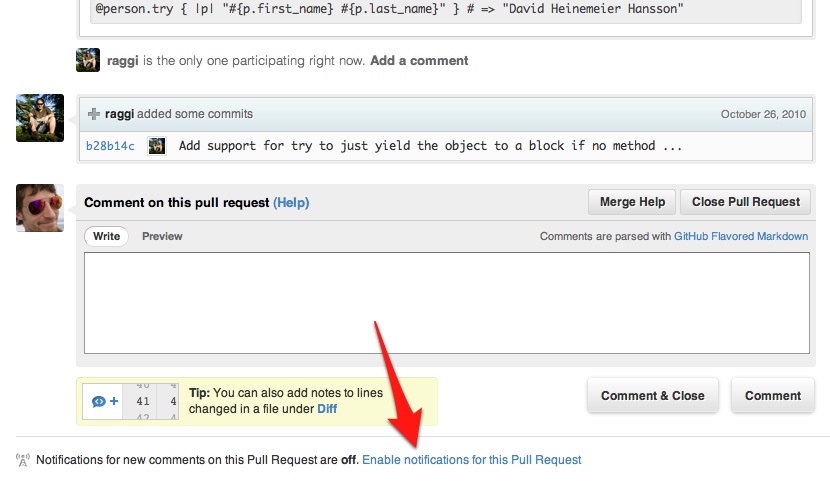
Better Notification Controls
You can also now manage notification settings at the individual issue or pull
request level. This lets you manually subscribe to any issue without commenting,
or unsubscribe from issues no longer relevant to your interests:
Disabling @mention Notifications
Would you rather not be notified when mentioned? Disable
@mention notifications in the
Notification Center
under Account Settings:

Written by

Related posts

Pick your agent: Use Claude and Codex on Agent HQ
Claude by Anthropic and OpenAI Codex are now available in public preview on GitHub and VS Code with a Copilot Pro+ or Copilot Enterprise subscription. Here’s what you need to know and how to get started today.

What the fastest-growing tools reveal about how software is being built
What languages are growing fastest, and why? What about the projects that people are interested in the most? Where are new developers cutting their teeth? Let’s take a look at Octoverse data to find out.

Year recap and future goals for the GitHub Innovation Graph
Discover the latest trends and insights on public software development activity on GitHub with data from the Innovation Graph through Q3 2025.
