
Descrizione
Social Media Auto-Posting and Scheduling Plugin for WordPress Sites and Blogs.
Blog2Social autoposts, cross-promotes, schedules and automatically shares your website content and content from any other source to social networks such as Facebook, X (Twitter), Instagram, LinkedIn, TikTok, YouTube, Reddit, Medium, Pinterest, Telegram, Mastodon, Discord, Bluesky, Google Business Profile, Threads, Flickr, VK.com, Tumblr, Torial, Diigo, Blogger.com, Instapaper, Ravelry, Vimeo, HumHub, Band, XING.
Blog2Social automatically creates social media posts for your content and shares them at the best times for each network. Save valuable time and effort by avoiding manual sharing.
Compatibile con WooCommerce, Gutenberg Editor, Hummingbird, Bitly, Rebrand.ly, Sniply, WP Automatic Plugin, Page Builder e RSS Importer.
#New: Best Time Settings for video networks available
Blog2Social is a freemium WordPress plugin with a free basic version and Premium plans offering advanced features. Some functions of the auto-poster are Premium features to comply with the API rules and community guidelines of the social networks.
The Blog2Social Free version offers a wide range of features. (See what’s included in the free version).
To benefit from advanced features for automatic sharing and scheduling your content on social media, you can start your free 30-day Blog2Social Premium Pro trial today.
Reti supportate
for cross-posting
* Facebook – Post to your profile and page (Free)
* X (Twitter) – Post to your X account (add-on)
* Instagram – Post to your business account (from Smart)
* LinkedIn – Post to your profile (Free) or page (from Pro)
* TikTok – Share blog posts, images, and videos directly on TikTok (add-on) and photo posts or carousels with multiple images (from Pro)
* YouTube – Publish videos on your YouTube channel (add-on)
* Reddit – Post to your subreddits (Free)
* Medium – Post with canonical-backlinks to your original post (Free)
* Pinterest – Post to all your Pinboards (from Smart)
* Telegram – Post to your Telegram groups and channels (from Business)
* Mastodon – Post to your Mastodon account (from Pro)
* Discord – Post to your Discord servers (from Smart)
* Google Business Profile – Post to your Google Business Listing (from Pro)
* Bluesky – Post to your Bluesky account (Free)
* Threads – Post to your account (Free)
* Tumblr – Post with canonical-backlinks (Free)
* Torial – Post with canonical-backlinks (Free)
* Flickr – Post to your Flickr profile (Free)
* VK.com – Post to your profile (Free), page (from Pro) or groups (from Pro)
* Diigo – Post a bookmark to your account (Free)
* Blogger.com – Post with canonical-backlinks (from Smart)
* Instapaper – Post to your Instapaper account (from Pro)
* Ravelry – Post to your Ravelry account (from Smart)
* Vimeo – Publish videos on your Vimeo channel (add-on)
* HumHub – Post to your profile and space (add-on)
* Band – Post to your Band groups (from Smart)
* XING – Post to your profile (Free) and page (from Pro)
Key Benefits of Using Blog2Social for Social Media Automation
BLOG2SOCIAL GRATUITO
- Share your content on 14 different networks: Facebook (profile and page), LinkedIn (profile), Threads, Bluesky, XING (profile), VK (profile), Pinterest, Reddit, Torial, Medium, Tumblr, Flickr, Diigo at once.
- Customize your social media posts with personal comments, hashtags, handles, emojis, and select images or animated GIFs.
- Edit the complete HTML markup for Tumblr, Torial, and Medium.
- Gestisci tutti i post e le pagine degli utenti e condividili sui tuoi canali.
- Re-post old posts and keep your feed active.
- Salva i tuoi post sui social media come bozze.
- Condividere video e post da altre fonti.
- Visualizza tutti i tuoi post dei social media in un unico posto.
- Automatically generate hashtags from WordPress tags.
- Edit meta tag information of your blog posts and pages.
- Use the free Blog2Social Extension for Firefox and Chrome.
- Let AI write, refine and optimize your social media posts.
BLOG2SOCIAL PREMIUM
- Share content on over 21 networks: Facebook, X (Twitter), LinkedIn, XING, VK, Pinterest, Instagram, TikTok, YouTube, Vimeo, Reddit, Torial, Medium, Tumblr, Flickr, Diigo, Google Business Profile, Telegram, Ravelry, Discord, Instapaper, Mastodon, Bluesky, HumHub, Band.
- Schedule your posts for any time and date.
- Automatically create, schedule and publish posts from your website.
- Share videos, image galleries, Reels and Stories.
- Autopost imported content via RSS.
- Create custom templates per platform.
- Manage all users’ posts and accounts.
- Track success with UTM parameters.
- Manage multiple accounts per network.
- Team management for Business licenses.
- Priority support by email and phone.
10 MOTIVI PER SCEGLIERE BLOG2SOCIAL PREMIUM
- Easy Social Media Scheduling – Auto-post and schedule your content with the built-in Best Time Manager or set your own custom times.
- Cross-Posting and Cross-Promotion – Customize each post per network with hashtags, @handles, emojis, images, GIFs, and post format options.
- Social Media Calendar – Manage, organize, edit, and reschedule your posts via drag & drop. Filter by network or date.
- Social Media Autoposting – Automatically share new and updated blog posts. Assign posting rules to users or import RSS feeds.
- Share Content from Any Source – Create and publish posts from links, texts, images, or videos—right from your browser or clipboard.
- Video Post Sharing and Scheduling – Publish and schedule videos for YouTube, Vimeo, TikTok, Facebook, Instagram, LinkedIn, and more. Reels & Stories included.
- Social-Media-Ready Website Content – Edit and enhance link previews by customizing Open Graph and X Card tags for every post or page.
- URL Tracking with Analytics Parameters – Add UTM or other URL parameters for detailed tracking in Google Analytics and similar tools.
- Re-Share and Re-Schedule Evergreen Content – Keep your social feeds active by repurposing and reusing older posts.
- Extended Tools and more Features – Access URL shorteners (Bitly, Rebrandly, Sniply), AI text assistant Assistini, share to Threads, retweet on X, and more.
Lingue supportate
English, German, French, Portuguese, Russian, Spanish, Italian, Swedish, Korean
Screenshot
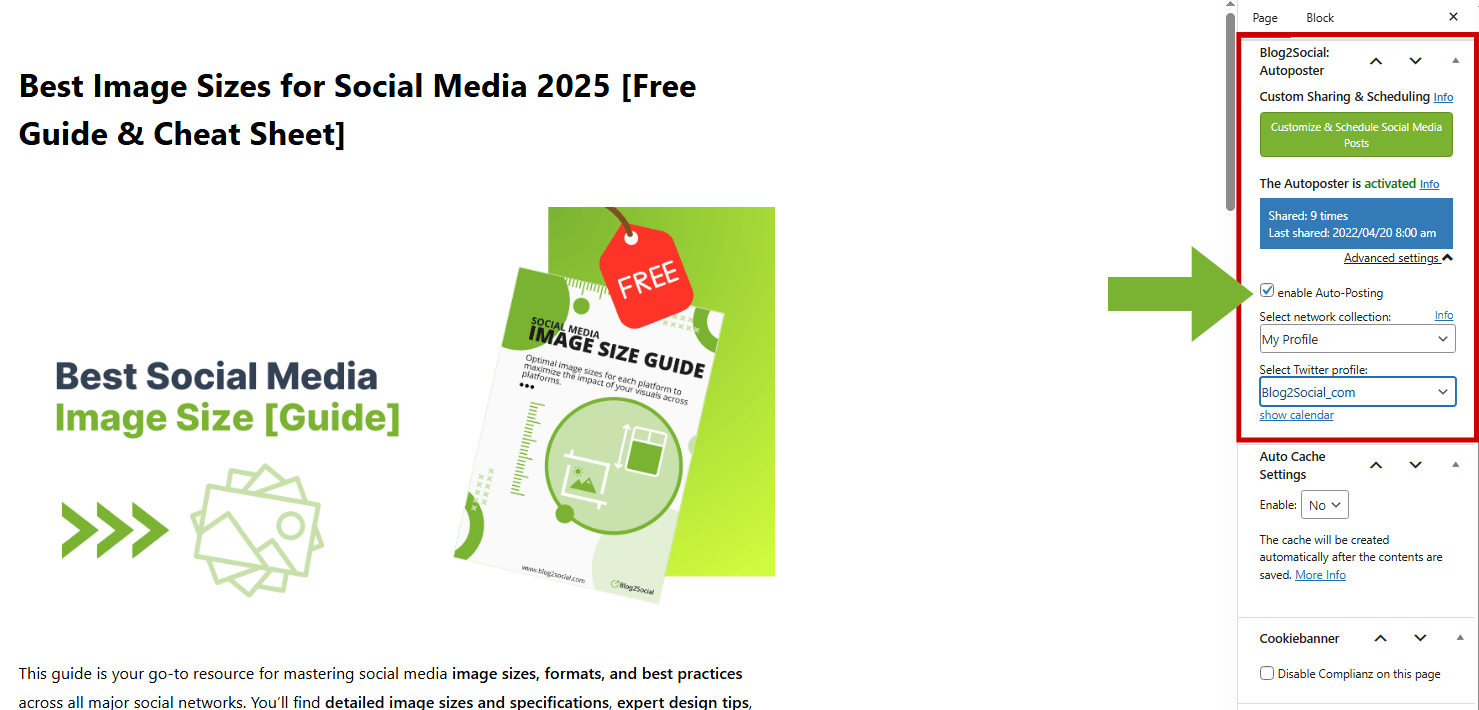
Condividi automaticamente i tuoi post di blog nuovi e aggiornati sui social media. 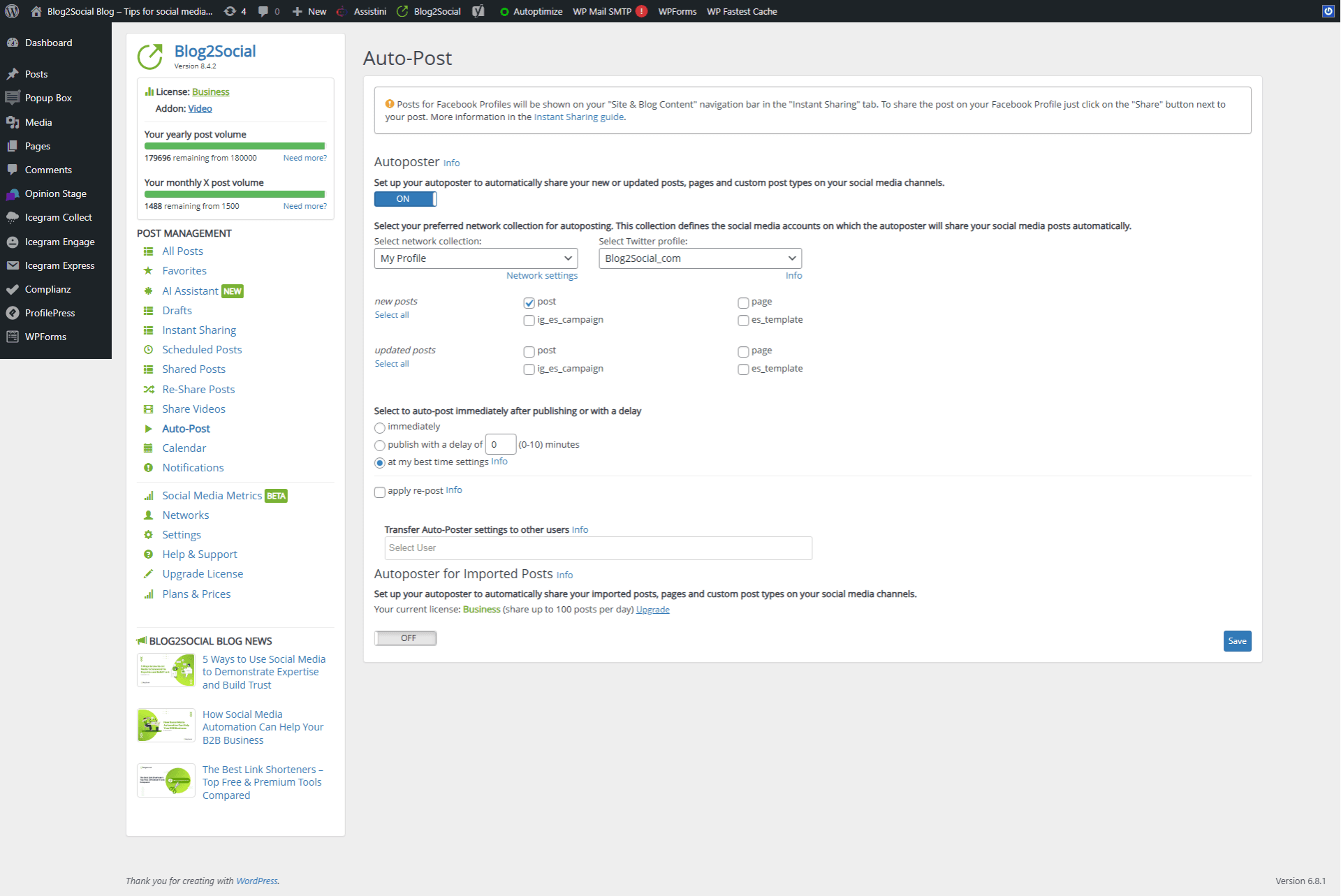
Configure autoposting to fit your needs. 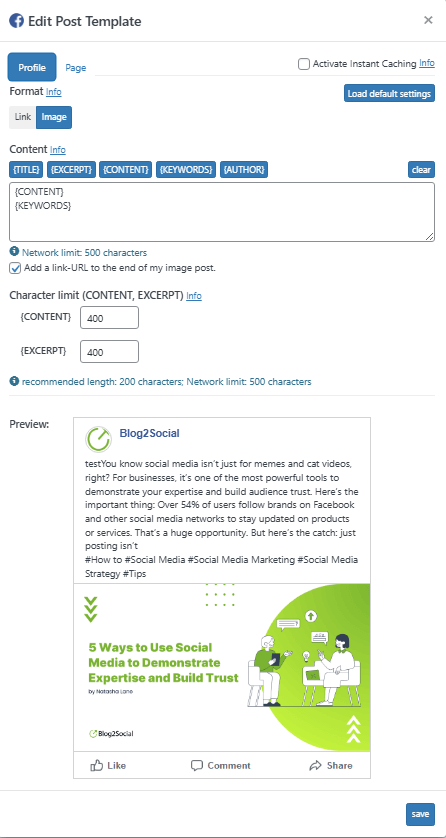
Choose which information is used in your social media posts. 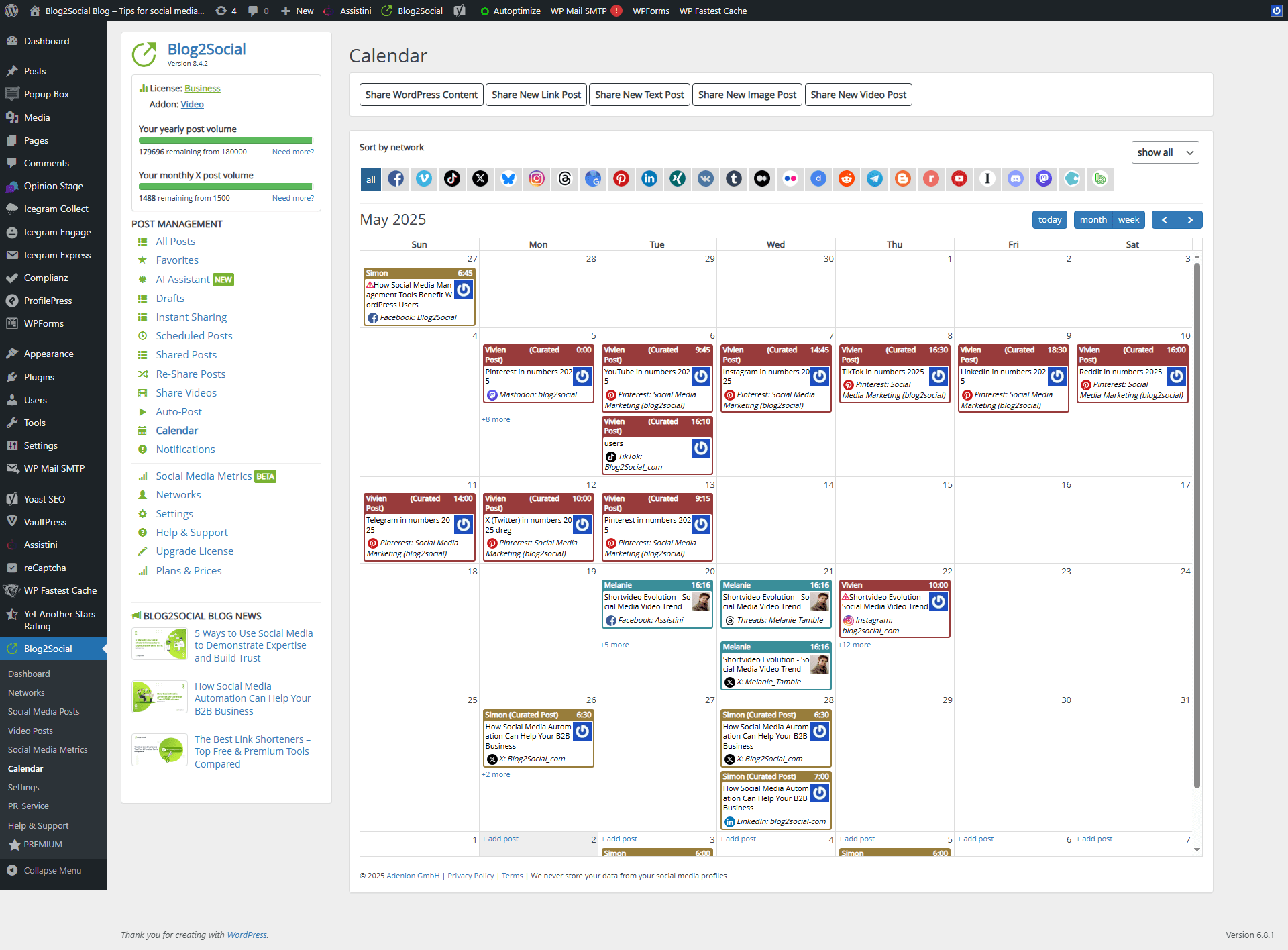
Organize scheduling with the Social Media Calendar. 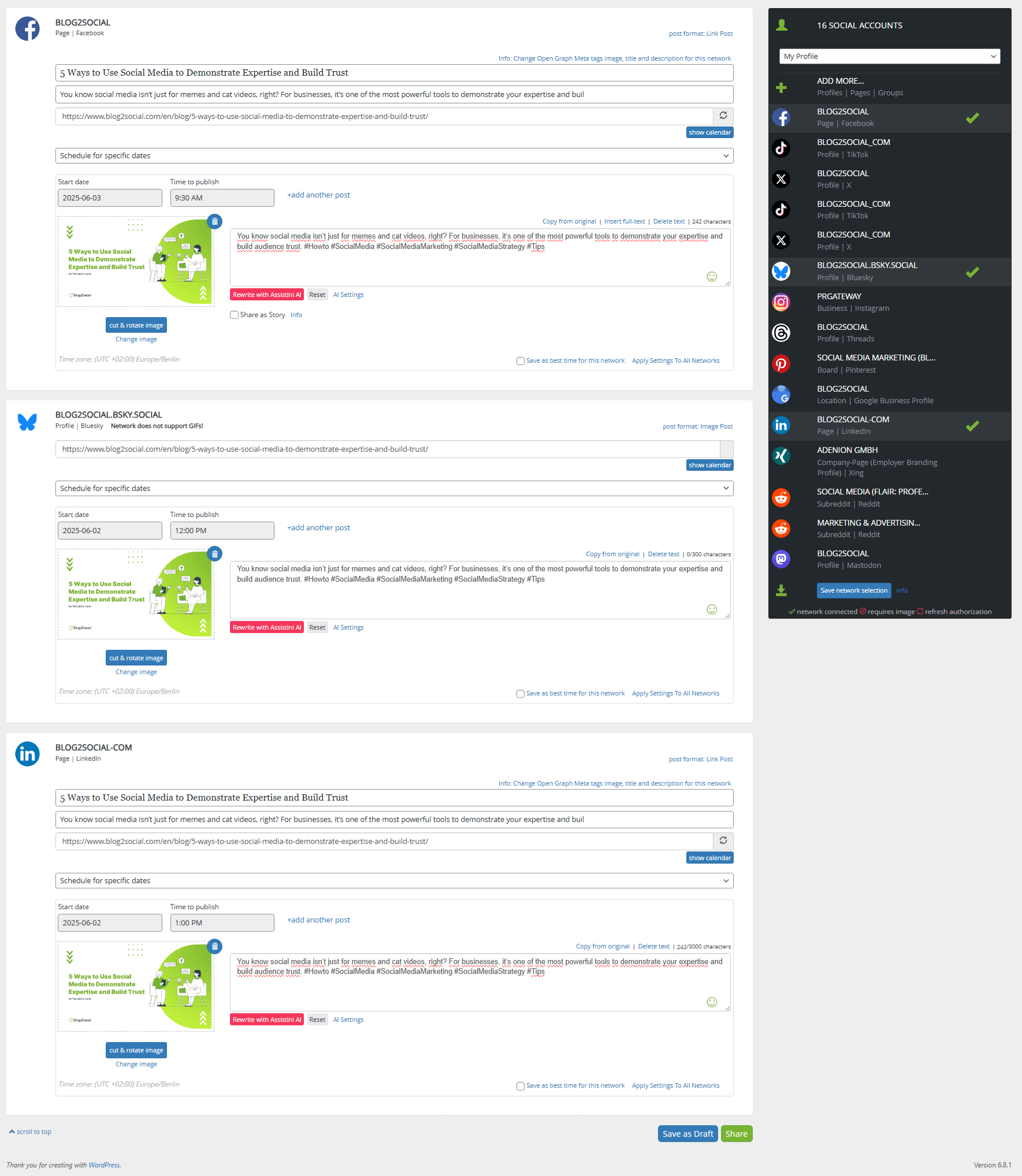
Schedule tailored posts for maximum engagement. 
Schedule posts recurrently. 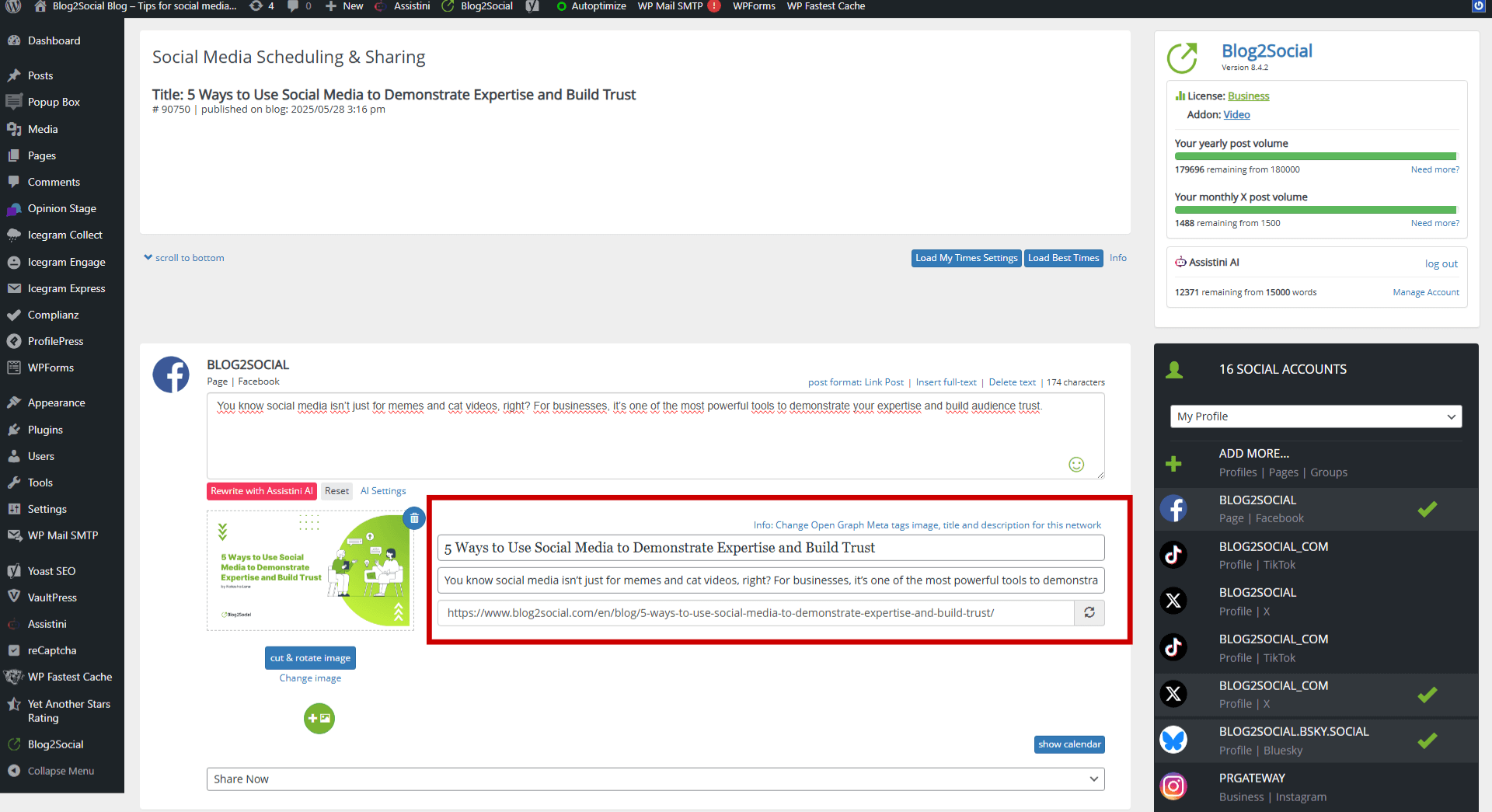
Blog2Social automatically adds Open Graph tags. 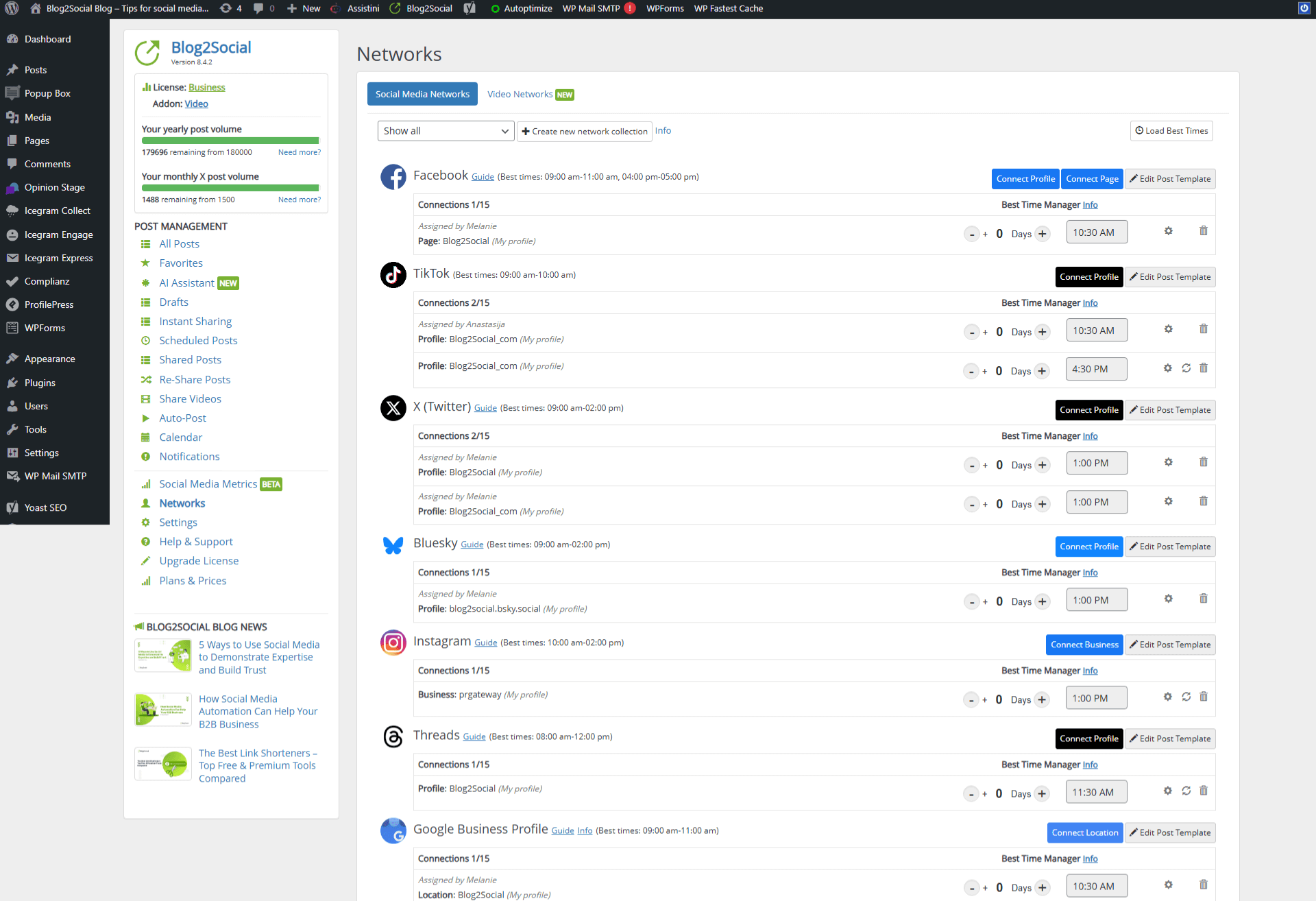
Connect accounts on over 20 social networks.


Installazione
- Vai al pannello di amministrazione della tua bacheca di WordPress
- Select “Plugin” -> “Add New”
- Enter “Blog2Social” in the search
- Click “Install Now”
- Enter FTP data if required
- Activate the plugin
- Blog2Social appears in the menu
Step-by-step guide
FAQ
-
Yes. Blog2Social offers a free version with comprehensive basic features and Premium plans for advanced automation.
-
Share blog posts and content on 14 networks, customize posts, manage pages and users, re-post old content, generate hashtags, edit meta tags, and use the free browser extension.
-
Register at Premium Trial. You’ll receive a license key via email.
-
Do I have to cancel my free trial?
-
No. After 30 days your account switches back to Blog2Social Free automatically.
-
Access to 20+ networks, social media calendar, auto-posting, team management, multiple accounts per network, advanced scheduling, tracking and priority support.
-
Do I need special folder permissions?
-
No. Default WordPress plugin permissions (755) are sufficient.
Recensioni


Contributi e sviluppo
“Blog2Sociale: Pubblicazione automatica e pianificata per Social media” è un software open source. Le persone che hanno contribuito allo sviluppo di questo plugin sono indicate di seguito.
Collaboratori


“Blog2Sociale: Pubblicazione automatica e pianificata per Social media” è stato tradotto in 11 lingue. Grazie a chi traduce per il contributo.
Traduci “Blog2Sociale: Pubblicazione automatica e pianificata per Social media” nella tua lingua.
Ti interessa lo sviluppo?
Esplora il codice segui il repository SVN, segui il log delle modifiche tramite RSS.
Changelog
8.7.3
Aggiornamento di sicurezza aggiuntivo
8.7.2
Ottimizzazione dell’usabilità
8.7.1
Aggiornamento di sicurezza aggiuntivo
8.7.0
Ottimizzazione dell’usabilità
8.6.1
Aggiornamento di sicurezza aggiuntivo
8.6.0
Ottimizzazione dell’usabilità
8.5.1
Ottimizzazione dell’usabilità
8.5.0
Network: TikTok Photo / Video direct posting
8.4.7
Ottimizzazione dell’usabilità
8.4.6
Ottimizzazione dell’usabilità
8.4.5
Ottimizzazione dell’usabilità
8.4.4
Bugfix: post add/update nonce verification
8.4.3
Ottimizzazione dell’usabilità
8.4.2
Ottimizzazione dell’usabilità
8.4.1
Ottimizzazione dell’usabilità
8.4.0
TikTok Photo Intergation
8.3.3
Ottimizzazione dell’usabilità
8.3.2
Ottimizzazione dell’usabilità
8.3.1
Ottimizzazione dell’usabilità
8.3.0
Network Band Intergation
8.2.0
Network X conversion
8.1.2
Ottimizzazione dell’usabilità
8.1.1
Ottimizzazione dell’usabilità
8.1.0
Threads Integration
8.0.3
Ottimizzazione dell’usabilità
8.0.2
Ottimizzazione dell’usabilità
8.0.1
Ottimizzazione dell’usabilità
8.0.0
Integration AI Text Assistent Assistini
7.5.4
Ottimizzazione dell’usabilità
7.5.3
Ottimizzazione dell’usabilità
7.5.2
Ottimizzazione dell’usabilità
7.5.1
Ottimizzazione dell’usabilità
7.5.0
Bluesky and HumHub Integration, Facebook Group changes to instant sharing
7.4.2
Ottimizzazione dell’usabilità
7.4.1
Ottimizzazione dell’usabilità
7.4.0
Ottimizzazione dell’usabilità
7.3.5
Usability Optimization, Pinterest Title, AI Social Media Post Generator, Today’s Content Calendar Tips
7.3.4
Bugfix: Video Posting Status
7.3.3
Bugfix: Post-Preview-Editor
7.3.2
Instagram Stories, LinkedIn Video Upload for profiles
7.3.1
Ottimizzazione dell’usabilità
7.3.0
Ottimizzazione dell’usabilità
7.2.3
Ottimizzazione dell’usabilità
7.2.2
Optimize Auto-Poster
7.2.1
Aggiornamento di sicurezza aggiuntivo
7.2.0
Twitter Own App Integration
7.1.3
Ottimizzazione dell’usabilità
7.1.2
Bugfix: Video-Upload
7.1.1
Bugfix: LinkedIn Profile
7.1.0
Video Scheduling & Mastodon,Discord Integration
7.0.2
Bugfix: Pinterest Autorisation
7.0.1
Bugfix: Autoposting
7.0.0
Publish and share videos
