
Description
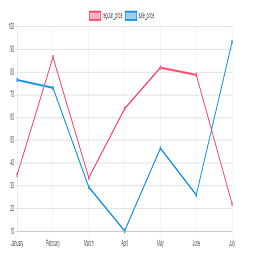
Chart plugin to view price changes of woocommerce product.
- 1-Place the Php code do_shortcode( ‘[chartprice]’ ); in the single page product.
- 2-use shortcode [chartprice] in product post.
- 3-change setting in woocommerce page setting.
Arbitrary section
-
for change format date use php code below in function.php file:
Screenshots

Plot in product 
Settting


Installation
This section describes how to install the plugin and get it working.
e.g.
- Upload plugin folder to the /wp-content/plugins/ directory
- Activate the plugin through the ‘Plugins’ menu in WordPress
FAQ
1-Place the Php code do_shortcode( ‘[chartprice]’ ); in the single page product.
2-use shortcode [chartprice] in product post.
3- for change format date use php code below in function.php file:
    add_filter('chart_price_apply_filter_format_date', 'format_date');

    function format_date($date)

    {

    $date=date('Y/m/d');//defult Y-m-d

    return $date;

    }
Reviews


Contributors & Developers
“Plot prices woocommerce product (product price history)” adalah perisian sumber terbuka. Orang-orang berikut telah menyumbang kepada pemalam ini.
Penyumbang
Translate “Plot prices woocommerce product (product price history)” into your language.
Berminat dalam pembangunan?
Layari kod, periksa repositori SVN, atau langgani log pembangunan dengan RSS.
Changelog
1.0
*head version of plugin
1.1
*chang js file to chart js
2.0
*add the variable product to plot
