
Where are the QuadMenu Items – Archives – Widgets metaboxes?
1. Make sure you have the menu location activated in your QuadMenu > Options > Configuration > Location Name.

2. Include a menu in the active location.

3. Go to Appearance > Menus > Screen Options and make sure QuadMenu Items, QuadMenu Archives, and QuadMenu Widgets are checked.

I am encountering the 403 Forbidden error. How do I fix it?
If you create many theme locations, or when you import the demo content, that comes with many theme locations, the size of the $_POST PHP variable will increase. For some servers, this can cause problems with ModSecurity, generating the 403 Forbidden error. If that’s the case, you can follow this guide to remove and uninstall or disable ModSecurity: https://techjourney.net/remove-and-uninstall-or-disable-modsecurity-mod_security/
I an encountering a memory size exhausted error. How do I fix it?
This means you don’t have enough memory available on your server for all your setup: WordPress functionalities, WP theme and plugins. So you can either increase the memory limit or free up some memory, by disabling plugins or switching to another theme. If you need help in dealing with the memory limit, you can follow this guide: Increasing memory allocated to PHP
An icon appears next to items in the Theme Locations list. What does it mean?
The theme locations where QuadMenu is activated will be marked with a menu icon.
What is a theme location?
In WordPress, theme locations define where you can place menus. Each WP theme supports a number of menus. The QuadMenu Plugin allows a complete menu customization, by allowing you to add more theme locations and more menus and to customize each one individually.
How can I add widgets to the menu?
Widgets can be included inside the columns of the mega, tabs and carousel menus.
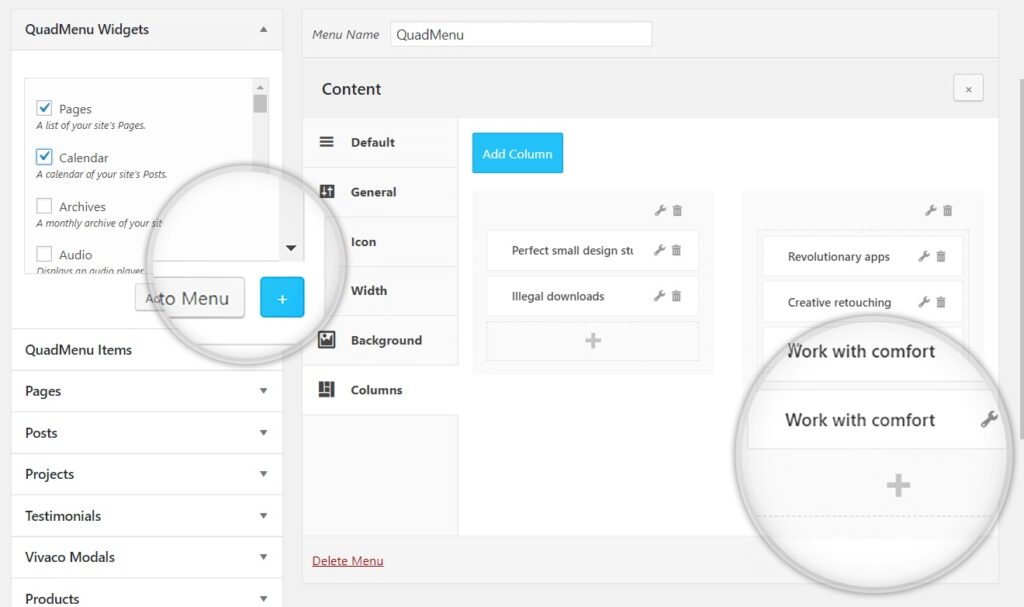
By click inside the column, a new metabox called QuadMenu Widgets will be included in the menu sidebar, and a new button will be included in all items metabox just beside the “Add to Menu” button.
Then you can select the items and press the blue button to include this menu items into the column.
Can I add shortcodes inside widgets?
Shortcodes allow you to do add additional features in your WordPress post content and other areas of your website.
WordPress doesn’t allow you to execute shortcodes inside widgets, however, you can do it with this hook.

add_filter( 'widget_text', 'do_shortcode' );How can I add my own CSS code?
If you’re a developer who wants to do an advanced customization, go to QuadMenu > Options > CSS and use the Custom CSS field to include your custom CSS.
You can point to a specific menu by including the next CSS code.
#quadmenu .quadmenu_theme_name {
background-color: transparent;
}
Can I do a backup of my QuadMenu Plugin settings?
Yes. Go to Appearance > QuadMenu > Options > Import / Export and download your current settings as a data file that you can keep on your computer.
Please note: this backup is only for the style and layout of your theme locations.
You should use Tools > Export if you want to export the menu’s contents.
Please note that widgets inside columns can’t be imported and you should activate the plugin before to start the import process. Otherwise, you will lose custom QuadMenu data, like icons, subtitles, etc.
Where I have to go to activate my license key?
To activate the premium version, you have to insert your license key, email attached to account and market where you purchased it, in license tab. Both plugins must be installed and active in order to show up, freeware and Premium. Learn here how to install and activate.
How to achieve perfect integration with my website?
There are three possibilities to integrate QuadMenu at your theme:
- The first step should be review if exist any integration plugin specific for the theme you are using. Explore list HERE.
- If there you could find an specific plugin that is for your theme, the only thing you have to do is to install and activate the integration plugin.
- If you couldn’t find the proper plugin for your theme in use, You have to apply a proper distribution and location of your menus inside your theme. You should use the atomatic integration for this specific use case. Check the domentation HERE
- If automatic integration doesn’t work on your site, we recommend to go for manual integration. Full documentation HERE
How to fix the “double menu” issue?
The double menu issue appears when the integration of QuadMenu was not done properly. please check previous question.
Pay special attention to this situation! Many developers are used to create a menu for desktop version and another for mobile devices. And as both are update to the same time, they could appear simultaneously, and consume resources unnecessarily. Review if this is the case too.
If this is your case, try to contact developer to erase duplicates of menu location (you never have two menu locations with same name). Otherwise you could find the Menu ID and add a parameter Display none.As you could see on the following script:
<code><nav id=”yourmenu”>

#yourmenu {display:none}

eso ponelo entre </code>
My license has expired. Shall I need to renew it?
As we explained in our License Policies our products are on time buy, It means your product will keep working normally. The deadline of any specific license is related to premium support, so if you want to extend the support, you should buy an extended support time.

