

Опис
WP REST API Key Authentication adds a simple API key-based authentication method to the WordPress REST API. This plugin is perfect for developers who want to interact with the REST API securely without relying on complex OAuth authentication mechanisms.
Key Features:
- Multiple API Keys: Create and manage multiple API keys with custom names.
- Secure API Key Storage: API keys are hashed and securely stored in the WordPress database.
- Single Display for Security: API keys are shown only once after creation.
- REST API Access Control: Authenticate requests by including an API key in the
Authorizationheader. - Admin Interface: Manage API keys with a user-friendly admin page.
- Copy to Clipboard Popup: Easily copy generated API keys with a built-in popup.
The plugin is lightweight and integrates seamlessly with WordPress.
Usage
-
Generate an API Key:
- Go to API Keys in the WordPress admin menu.
- Enter a name for the API key and click “Generate API Key”.
- The API key will appear in a popup. Copy it immediately, as it will not be displayed again.
-
Use the API Key:
- Include the API key in the
Authorizationheader of your REST API requests:
Authorization: Bearer YOUR_API_KEY
- Include the API key in the
-
Delete API Keys:
- To revoke access, delete an API key from the API Keys admin page.
License
This plugin is licensed under the GPLv2 or later. See the License URI for details.
Скріншоти
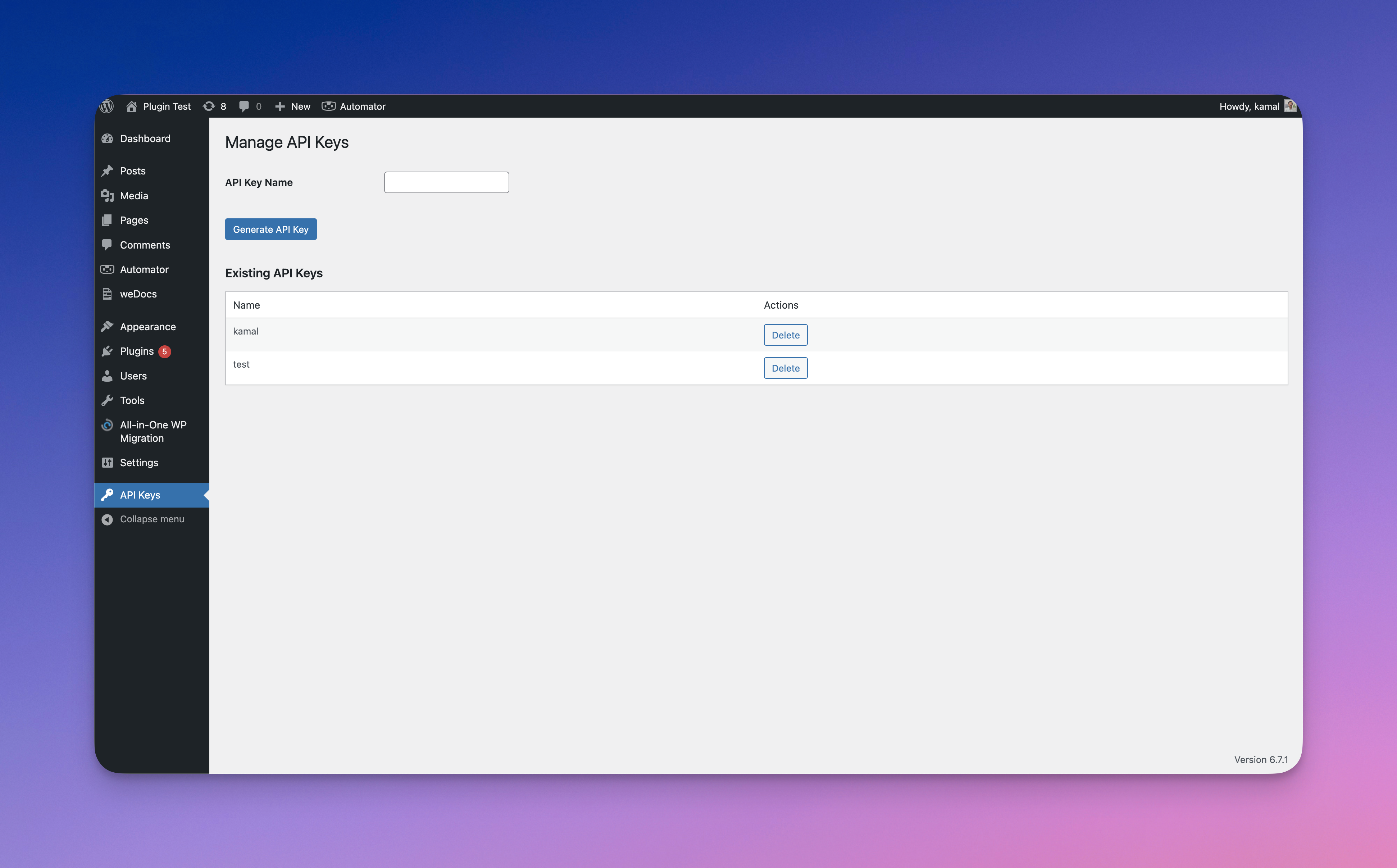
API Key Management Interface
Manage API keys with a simple interface, including options to create and delete keys.
Generated API Key Popup
Popup showing the API key after generation, with an option to copy it to the clipboard.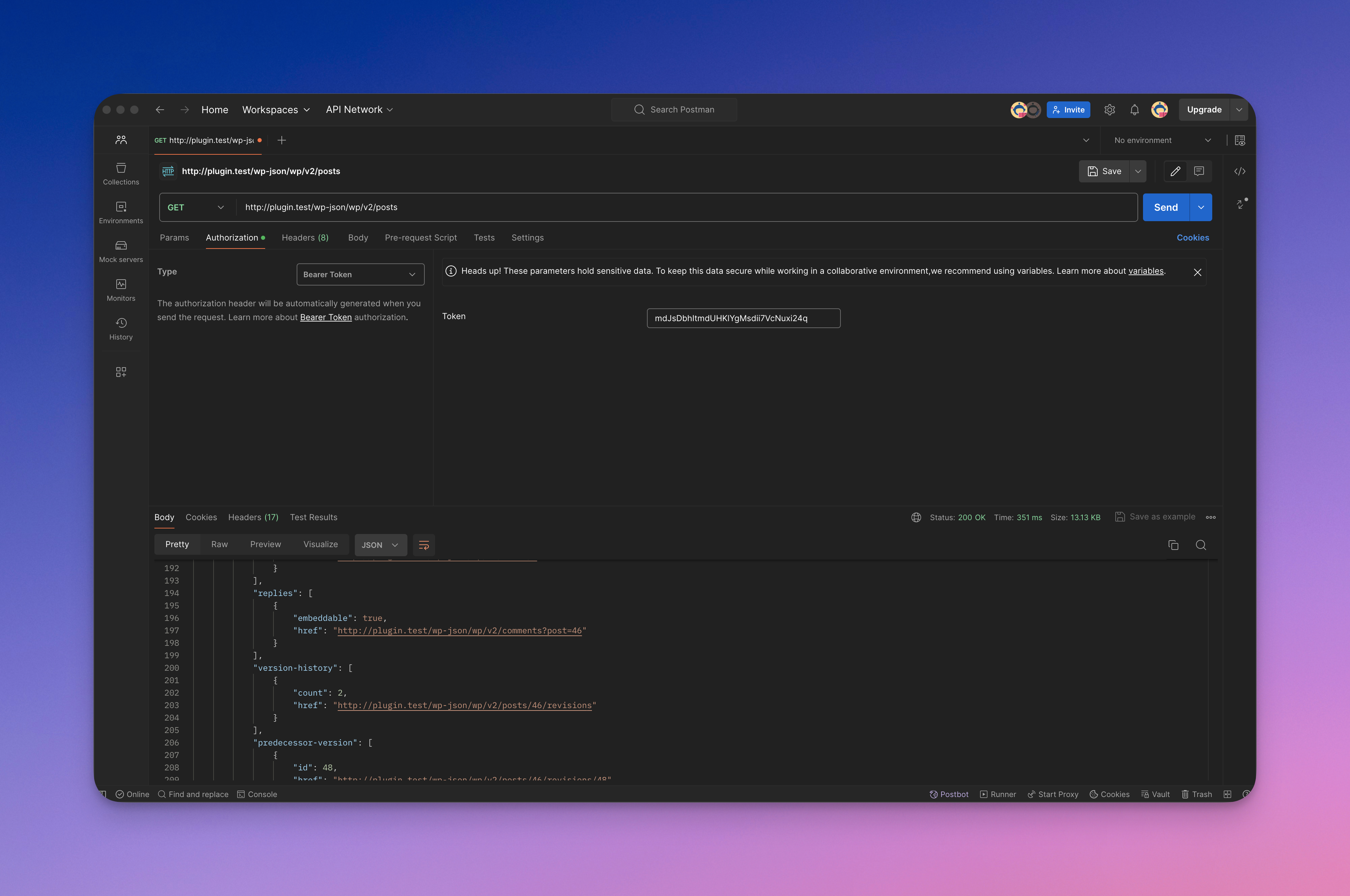
REST API Authorization Example
Example of how to use the API key in theAuthorizationheader.


Встановлення
- Download the plugin ZIP file.
- Go to your WordPress admin dashboard and navigate to Plugins > Add New.
- Click on the Upload Plugin button and select the ZIP file.
- Click Install Now and then activate the plugin.
- Navigate to API Keys in the admin menu to start managing your API keys.
Часті питання
-
How are API keys stored?
-
API keys are hashed using PHP’s
password_hashfunction and stored securely in the WordPress database. The raw key is only shown once upon creation. -
What happens if I lose an API key?
-
If you lose an API key, you must generate a new one. The plugin does not store raw API keys for security reasons.
-
How do I authenticate a REST API request?
-
Include the API key in the
Authorizationheader using theBearertoken format: Authorization: Bearer YOUR_API_KEY -
Can I create multiple API keys?
-
Yes, you can generate multiple API keys with custom names and manage them from the admin interface.
Відгуки
Для цього плагіна немає відгуків.
Учасники та розробники
“WP REST API Key Authentication” — проект з відкритим вихідним кодом. В розвиток плагіну внесли свій вклад наступні учасники:
Учасники
“WP REST API Key Authentication” було перекладено на 1 локалізацію. Дякуємо перекладачам за їх роботу.
Перекладіть “WP REST API Key Authentication” на вашу мову.
Цікавитесь розробкою?
Перегляньте код, перегляньте сховище SVN або підпишіться на журнал розробки за допомогою RSS.
Журнал змін
1.0
- Initial release.
- Added support for API key creation and deletion.
- Added REST API authentication using API keys.
- Added popup with “Copy to Clipboard” functionality for generated API keys.
