◦ Optimized configs
◦ Industry-leading support
GPU → Memory
GPU memory and why it’s important
Understanding GPU memory is key to unlocking the full potential of modern computing. Whether you’re training a machine learning model, simulating complex scientific phenomena, creating stunning visual effects, or powering a cutting-edge AI application, GPU memory plays a pivotal role in determining performance, speed, and efficiency.
If you’ve ever wondered why some GPUs are better suited for high-performance computing (HPC) tasks or how memory capacity impacts your ability to process massive datasets, stick around. Learning how GPU memory enables breakthroughs across industries and empowers you to make smarter decisions when choosing or optimizing your hardware.
Get premium GPU server hosting
Unlock unparalleled performance with leading-edge GPU hosting services.
What is GPU memory?
GPU memory is a specialized type of memory designed to handle the immense data throughput required for parallel processing tasks performed by graphics processing units (GPUs).
Unlike general-purpose RAM in a CPU, GPU memory is optimized to work in tandem with the GPU’s architecture to quickly access and process vast amounts of data. This makes it crucial not only for rendering high-definition graphics in gaming and visualization but also for powering modern applications like machine learning, artificial intelligence (AI), and high-performance computing (HPC).
For instance:
- In AI training and inference, GPU memory is used to store neural network models and large datasets, enabling the GPU to process complex computations simultaneously.
- In scientific simulations, such as weather modeling or molecular dynamics, GPU memory ensures that huge datasets are efficiently managed and processed in real-time.
- In content creation, GPU memory allows for smooth video editing and 3D rendering without lag.
Why GPU memory is important
GPU memory will play a transformative role in shaping the future of machine learning, AI, high-performance computing, and video and gaming technology. As datasets grow larger and computational demands intensify, the need for high-capacity, high-speed GPU memory becomes more and more critical.
Machine learning and AI development
ML and AI models are becoming more sophisticated and resource-intensive, with applications ranging from generative AI to autonomous systems. GPU memory will continue to be pivotal in handling the sheer volume of data required for training and deploying these models efficiently.
As artificial intelligence moves toward more complex architectures—like multi-modal and foundation models—larger memory capacities will ensure that GPUs can store model parameters, activations, and datasets in-memory without bottlenecks.
High-performance computing (HPC)
The HPC trend toward exascale computing and real-time simulations will demand GPUs with greater memory capacity.
Applications like climate modeling, drug discovery, and astrophysics rely on the ability to efficiently process immense datasets and perform intricate calculations. Enhanced GPU memory will enable researchers to tackle larger, more detailed problems with the necessary accuracy and speed.
Video and gaming technology
Let’s not forget where we came from. In gaming and video technology, GPU memory will support the next generation of immersive experiences.
Advanced rendering techniques like ray tracing, together with higher resolutions (e.g., 8K) and refresh rates, will require GPU with substantial memory. It takes a lot of power to handle texture data, real-time lighting, and complex shading algorithms without lag.
Beyond gaming, virtual and AR applications will rely on GPU memory to deliver seamless, high-fidelity experiences by managing real-time data streams and rendering across multiple devices.
Broader implications
Looking forward, the role of GPU memory will extend into emerging fields such as digital twins, real-time collaboration in virtual environments, and personalized AI systems.
As memory technologies evolve, we may see advancements like unified memory models that bridge the gap between GPU and system memory—or innovations that allow GPUs to access distributed datasets with minimal latency. These developments will empower GPU to handle increasingly complex workloads, making GPU memory a cornerstone of future technological progress.
Types of GPU memory
There are different types of memory available within GPU architecture. Each type serves a specific purpose in determining the overall performance of a GPU.
- Local memory: The fastest and smallest type of GPU memory, located directly on the GPU chip, used for storing temporary data during computation.
- Shared memory: Accessible by all threads within a GPU block, ideal for sharing data between threads and improving overall performance.
- Register memory: The fastest memory available on a GPU, used to store variables and intermediate results during GPU computations.
- Global memory: The largest type of GPU memory, accessible by all threads, used for storing data that needs to be shared between different blocks and persists throughout the entire GPU execution.
- Constant memory: A read-only type of GPU memory, accessed by all threads, typically used for storing constants and other read-only data.
- Texture memory: Optimized for texture access, used for storing textures commonly utilized in graphics processing.
- VRAM (Video RAM): Dedicated memory on a graphics card, holding the frame buffer, textures, and other graphics-related data.
- HBM: High Bandwidth Memory, a newer type of GPU memory offering high bandwidth and lower power consumption, commonly used in high-performance GPUs.
GPU memory vs VRAM
“Aren’t GPU memory and VRAM the same thing?”
Not really. The terms are often used interchangeably, but (despite what all the AI-generated, copy/paste content on the web tells you), GPU memory and VRAM (Video RAM) are not exactly the same.
VRAM is a specific type of GPU memory. Video RAM traditionally refers to the dedicated memory used for visual data, for rendering graphics. It was initially associated with older types of memory like DRAM (Dynamic RAM) designed for video-related tasks.
In modern GPUs, VRAM is generally the GDDR memory (such as GDDR6) or HBM, which is used for graphics-related processing. It is a subset of GPU memory, focused on graphical workloads, while GPU memory in general encompasses broader use cases—reflecting the diverse roles GPUs now play.
| GPU | VRAM | |
|---|---|---|
| Scope | Broad; includes all memory used by GPUs | Specific type of memory used for graphics workloads |
| Applications | Machine learning, AI, HPC, gaming, visualization | Primarily gaming, video rendering, and graphical tasks |
| Includes | GDDR, HBM, unified memory, shared memory, etc. | GDDR and similar memory types |
| Uses | Computational models, large datasets, simulations | Texture mapping, rendering, frame buffering |
That said, the industry does widely use the term ‘VRAM’ to refer to GPU memory.
CPU memory vs GPU memory
CPU and GPU chips work well together, because they specialize in different, complimentary tasks. The difference between GPU memory and CPU memory lies in their architecture, purpose, and how they handle data processing.
Where GPU specializes in ML/AI applications, graphics and video rendering, and HPC tasks, CPU excels at basic systems operations, application execution and support, and data management.
The design of GPU memory prioritizes high throughput for data-intensive, parallel workloads. CPU memory, on the other hand, focuses on versatility—ensuring efficient access to a variety of smaller, sequential tasks that are required by most applications and operating systems.
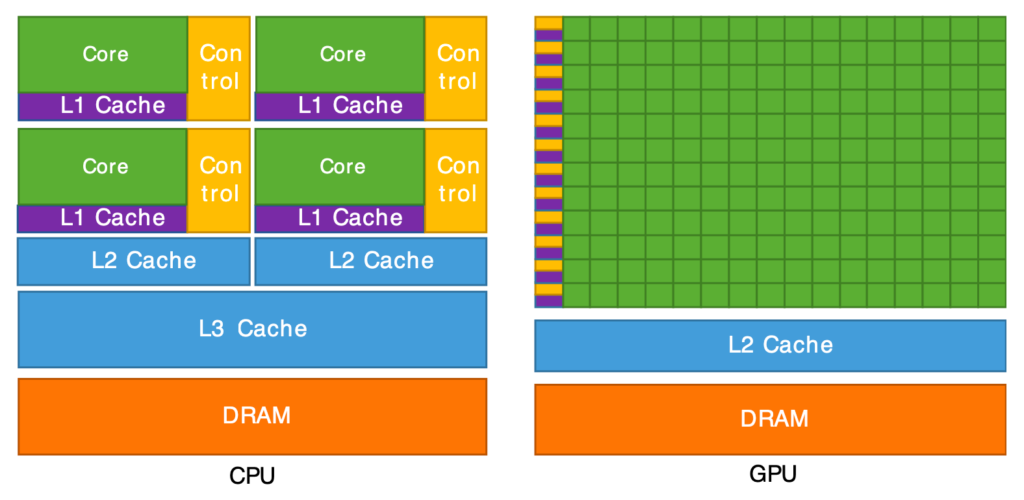
A simple explanation is the library example: CPU memory is like a librarian retrieving varied books one by one (emphasizing latency), whereas GPU memory is like a team of assistants bringing huge stacks of books simultaneously (emphasizing throughput).
How to free up GPU memory
Efficient management of GPU memory is important for maximizing the performance of your GPU. To optimize GPU memory usage:
- Close unnecessary apps and processes: Many applications, especially those involving video playback, 3D rendering, or machine learning, consume GPU memory even when running in the background. Closing unnecessary programs can free up GPU resources.
- Optimize the workload: When running programs like machine learning models or rendering tasks, optimizing your workload can prevent over-allocation of GPU memory.
- Turn it off and turn it back on again: Seriously. Over time, memory leaks or cached data can accumulate and occupy GPU memory. Restarting or resetting the GPU clears this cache.
- Update GPU drivers: New drivers often include optimizations for memory management.
- Enable GPU memory management in applications: Some programs allow you to explicitly manage memory allocation or release unused resources (e.g., TensorFlow’s tf.keras.backend.clear_session()).
- Use task-specific GPUs: For heavy tasks, dedicate a high-memory GPU to avoid interference from other workloads.
If you still need more GPU memory, consider renting a GPU server instead of maintaining your own hardware. GPU server hosting provides access to the best GPU servers, and you can scale your resources as needed.
How much GPU memory is enough?
Determining how much GPU memory you need for a project or workload requires understanding the specific demands of your tasks and the type of data you’ll process.
1. Analyze your workload
The type of workload you’re handling significantly influences GPU memory requirements.
- Machine learning and AI:
- Larger models (e.g., GPT, ResNet, Transformer-based) and datasets demand more memory.
- Key factors: Model size, batch size, and dataset size.
- Example: Training a large neural network with high batch sizes might require 16–48 GB or more GPU memory.
- High-Performance Computing (HPC):
- Tasks like molecular simulations, fluid dynamics, or genomic analysis can require memory for vast datasets and real-time processing.
- Key factors: Dataset size and computational complexity.
- Example: HPC simulations often need GPUs with 24–64 GB or more memory.
- Graphics and video rendering:
- Real-time rendering, 3D modeling, and video editing require memory for textures, shaders, and frame buffers.
- Key factors: Resolution (e.g., 4K or 8K), texture size, and frame rates.
- Example: 8K video editing or high-resolution rendering may require GPUs with at least 12–24 GB of memory.
2. Understand the data size and processing requirements
Estimate the size of the data your project will process at any given time.
- Machine Learning: Calculate the total memory needed for:
- Model parameters.
- Input data (batch size × size of each data point).
- Gradients, activations, and temporary storage during computation.
- Graphics: Consider:
- Texture size (e.g., 4K textures require significantly more memory than 1080p).
- Number of objects and complexity of scenes.
- HPC: Account for:
- Size of datasets loaded into memory.
- Memory required for intermediate computations.
3. Research memory requirements for similar projects
Look at benchmarks or case studies for tasks and projects similar to yours. Many software frameworks, such as TensorFlow, PyTorch, Blender, or Adobe Premiere Pro, provide guidelines or recommendations for GPU memory.
- Example for ML: NVIDIA recommends GPUs with at least 16 GB of memory for training models on medium-to-large datasets.
- Example for gaming/rendering: 8–12 GB is typically sufficient for most modern 4K gaming or rendering tasks, while ultra-high settings or multi-display setups may require 16+ GB.
4. Plan to scale
If you anticipate scaling your workload (e.g., larger datasets, higher resolutions, or more complex models), plan for additional memory capacity.
Example: If you’re working on AI research, opting for a GPU with 24 GB or more ensures room for larger models and datasets.
5. Test your workload on available hardware
If possible, test your workload on GPU with different memory capacities to understand its memory demands. Tools like NVIDIA’s nvidia-smi or AMD’s performance monitoring utilities can help you measure memory usage during the workload.
6. Consider budget vs. need
While higher memory GPUs can future-proof your setup, they are also more expensive. Match the GPU to your immediate needs while balancing cost-effectiveness.
Rule of thumb for common workloads:
| Task | Recommended GPU memory |
|---|---|
| Basic gaming or small ML tasks | 4-8 GB |
| Modern gaming or 1080p rendering | 8-12 GB |
| 4K gaming or ML training on moderate datasets | 12-16 GB |
| Large ML models, AI research, 8K rendering | 24-48 GB |
| HPC or enterprise-level tasks | 48 GB+ |
Other GPU considerations
GPU memory plays a major role in performance, but it’s only one piece of the puzzle when choosing a GPU server hosting provider. Whether you’re training AI models, rendering complex visuals, or accelerating scientific simulations, you’ll need to evaluate the full hardware and infrastructure setup—not just how much memory each card includes.
It’s also worth noting that the amount of memory on a GPU is fixed by the hardware and cannot be upgraded later, so it’s important to select the right configuration from the start.
In addition to memory, consider:
- GPU architecture (e.g., NVIDIA H100 vs A100), which affects core processing speed and compatibility with frameworks like CUDA or TensorRT.
- GPU-to-CPU ratio is another critical factor, as insufficient CPU resources can bottleneck even the fastest GPUs.
- NVLink or PCIe bandwidth determines how quickly data can be transferred between GPUs or from GPU to CPU, impacting multi-GPU workflows.
- Power and cooling infrastructure, especially in high-density setups—reliable hosting providers should offer optimized environments to keep GPU performance stable under continuous load.
GPU memory FAQs
Get top-tier GPU server hosting
Unlock unparalleled performance with Liquid Web’s leading-edge GPU hosting services and convenient AI/ML software stack.
Our GPU server hosting stands out for high-performance hardware (featuring advanced NVIDIA GPU like the L4 and H100 NVL), paired with powerful AMD EPYC CPU, and high-speed DDR5 memory for handling demanding workloads such as AI and machine learning.
Click below to explore GPU server options or start a chat to talk to one of our experts about GPU hosting!
Additional resources
What is a GPU? →
What is, how it works, common use cases, and more
GPU for cybersecurity →
How GPU are changing the world of cybersecurity and what the future may hold
GPU vs CPU →
What are the core differences? How do they work together? Which do you need?

Kelly Goolsby has worked in the hosting industry for nearly 16 years and loves seeing clients use new technologies to build businesses and solve problems. His roles in technology have included all facets of Sales and, more recently, Solution Architecture, Technical Sales, and Sales Training. Kelly really loves having a hand in developing new products and helping clients learn how to use them.
