New to Rust? Grab our free Rust for Beginners eBook Get it free →
Angularjs tutorial for beginners

AngularJS can still appear in a maintained dashboard or an older single-page application, but it is no longer a sensible starting point for a new frontend.
The task-list example below passed its browser checks in Chromium with AngularJS 1.8.3, giving you an inspectable path through modules, controllers, directives, and two-way data binding in a legacy codebase.
AngularJS support status comes first
Google ended official AngularJS support in January 2022.
The AngularJS project page directs new development to modern Angular, while the npm package also carries an end-of-support warning.
That boundary changes the reason to learn it.
Use this AngularJS tutorial for beginners when you must read, debug, test, or migrate an AngularJS 1.x application.
A fresh npm audit of AngularJS 1.8.3 reported a high-severity direct dependency finding with no fix available, including cross-site scripting and regular expression denial-of-service advisories.
Treat untrusted HTML, resource URLs, and user-controlled values as security boundaries, then plan migration rather than assuming an unsupported package can be patched later.
Do not confuse AngularJS with Angular.
AngularJS uses JavaScript, controllers, scopes, and HTML directives, while modern Angular is a separate TypeScript-based framework with components and a different toolchain.
What AngularJS does in the browser
AngularJS compiles HTML after the page loads.
It looks for directives such as ng-app and ng-controller, creates the associated application objects, and connects their data to the document object model (DOM).
This connection is called data binding.
When a model value changes during an AngularJS digest cycle, AngularJS updates the bound view, and ng-model can also carry an input change back into the model.
The mechanism reduces manual calls to querySelector(), textContent, and addEventListener().
It also creates a maintenance boundary because a large collection of watchers can make a page slower and can hide when a value changes.
Set up a small AngularJS project
Create an empty directory, initialize npm, and install the package without a version pin.
In July 2026, npm resolved the angular package to 1.8.3 and printed its official deprecation notice.
mkdir angularjs-task-list
cd angularjs-task-list
npm init -y
npm install angular
The example serves the local package from node_modules.
That makes the dependency explicit and avoids depending on a remote content delivery network (CDN) during local development.
Create a sample directory with index.html and app.js.
Serve the project root rather than opening the HTML file directly so browser behavior matches an HTTP page.
python3 -m http.server 8000
Open http://localhost:8000/sample/ after the server starts.
Stop the server with Ctrl+C when you finish.
Build the view with AngularJS directives
Place the following markup in sample/index.html.
The script path points one directory up because node_modules sits in the project root.
<!doctype html>
<html lang="en" ng-app="taskApp">
<head>
  <meta charset="utf-8">
  <title>AngularJS task list</title>
  <script src="../node_modules/angular/angular.min.js"></script>
</head>
<body ng-controller="TaskController as taskList">
  <h1>{{ taskList.heading }}</h1>

  <form ng-submit="taskList.addTask()">
    <input ng-model="taskList.newTask" placeholder="Add a task" required>
    <button type="submit">Add</button>
  </form>

  <p>{{ taskList.remaining() }} task(s) remaining</p>

  <ul>
    <li ng-repeat="task in taskList.tasks track by $index">
      <label>
        <input type="checkbox" ng-model="task.done">
        <span ng-class="{ done: task.done }">{{ task.title }}</span>
      </label>
    </li>
  </ul>

  <script src="app.js"></script>
</body>
</html>
The ng-app directive names the root module.
AngularJS starts inside that element and leaves the rest of the document alone.
The ng-controller directive creates the controller context exposed as taskList.
This controller-as form makes the owner of each property visible in the template and avoids relying on unnamed scope properties.
Expressions inside double braces render values.
The ng-repeat directive creates one list item per task, while track by $index gives each repeated row an identity within this small array.
Add the module and controller
Place this JavaScript in sample/app.js.
The module name must match the value passed to ng-app.
angular.module('taskApp', [])
  .controller('TaskController', function () {
    var vm = this;

    vm.heading = 'Legacy task list';
    vm.tasks = [
      { title: 'Trace the existing controller', done: true },
      { title: 'Add a regression test', done: false }
    ];

    vm.addTask = function () {
      vm.tasks.push({ title: vm.newTask, done: false });
      vm.newTask = '';
    };

    vm.remaining = function () {
      return vm.tasks.filter(function (task) {
        return !task.done;
      }).length;
    };
  });
The empty array creates a module with no declared dependencies.
Calling angular.module() with only the module name would retrieve an existing module instead, so dropping the array changes the meaning of the call.
The controller stores its public state on vm, which is the object that taskList references in the template.
Submitting the form calls addTask(), updates the array, and clears the bound input.
AngularJS then runs a digest cycle and checks the values used by the template.
The changed array makes ng-repeat add a row, and the remaining() expression updates the count.
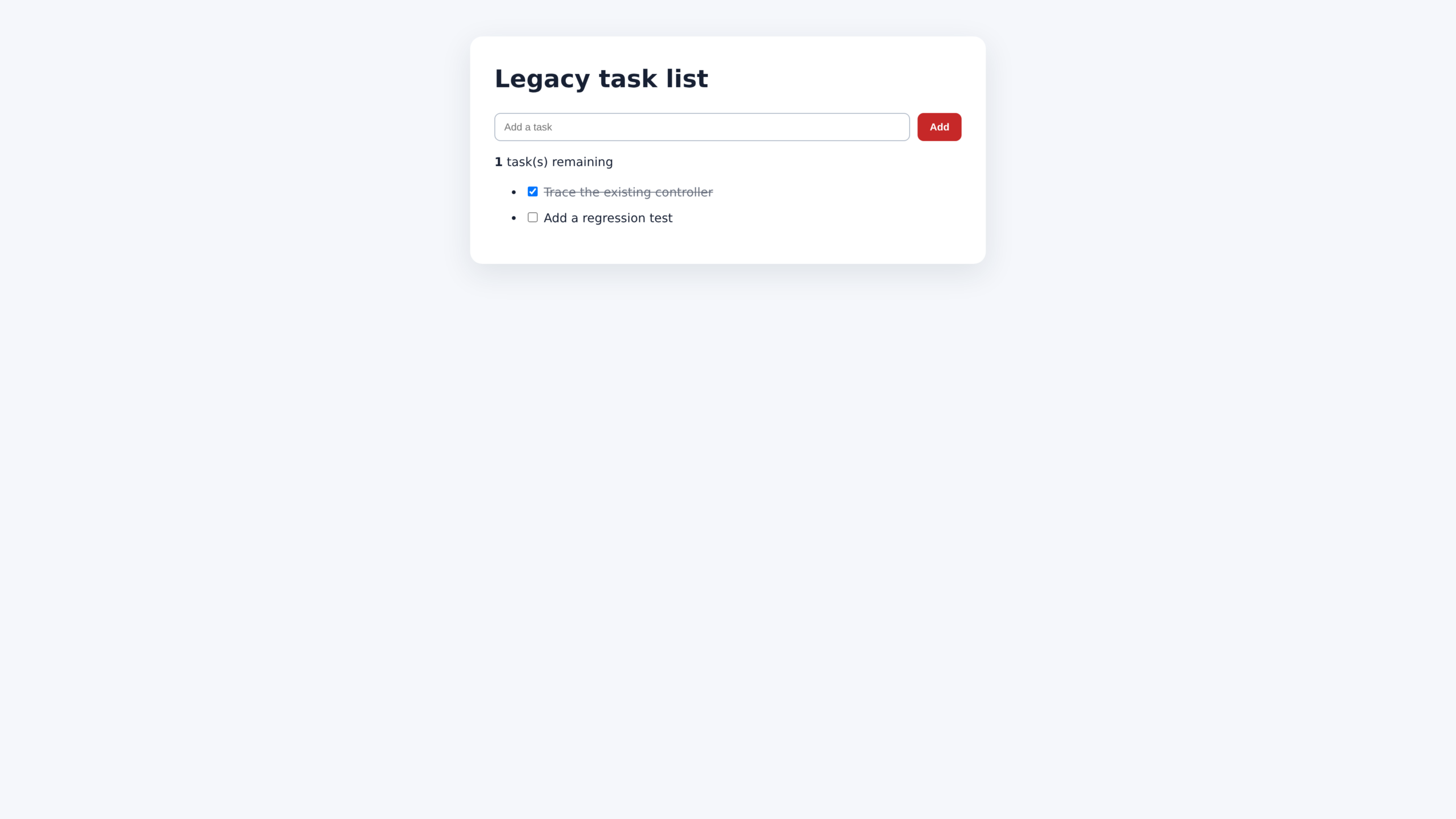
Follow one data change through the app
The input uses ng-model to keep taskList.newTask synchronized with the text field.
The form uses ng-submit, so pressing Enter and clicking Add follow the same controller method.
Each checkbox binds to task.done.
When you change it, the model updates first, ng-class reevaluates the object expression, and the span receives or loses the done class.
This is the core AngularJS flow.
A directive captures browser input, the controller changes plain JavaScript data, and the digest cycle refreshes expressions and directive output.
Know the main AngularJS building blocks
A module groups controllers, services, filters, directives, and configuration.
A larger application can declare dependencies on other modules instead of placing every feature in one file.
A controller prepares state and event methods for a view.
Keep direct DOM manipulation out of controllers because it makes behavior harder to isolate in a test.
A directive extends HTML with behavior.
Built-in directives cover events, loops, conditional rendering, form state, CSS classes, and data binding, while custom directives can package repeated interface behavior.
A service holds reusable logic or shared state and is created through AngularJS dependency injection.
The built-in $http service performs HTTP requests, though a maintained application should wrap API access behind a feature-specific service.
A filter transforms a displayed value without changing the source value.
Filters work well for compact presentation changes, but expensive filtering inside a large repeated list can run many times during digest checks.
Common failures and their causes
Most first-app failures come from bootstrap order, module naming, or work that runs outside the AngularJS lifecycle.
The page shows literal double braces
AngularJS did not bootstrap the template.
Check that angular.min.js loaded without a 404, the ng-app module name exists, and a JavaScript error did not stop initialization.
The module is not available
The error Module ‘taskApp’ is not available usually means the module name differs between ng-app and app.js, or app.js loaded before AngularJS.
It can also happen when retrieval syntax is used before any code creates the module.
A view does not update
AngularJS automatically schedules digest work for its own directives and services.
A callback from a non-Angular library may execute outside that lifecycle, so maintained legacy integrations sometimes need $apply(), $evalAsync(), or a wrapper service.
Do not add $apply() blindly.
Calling it while a digest is already running raises another error, so first identify which callback crosses the framework boundary.
Production minification breaks dependency injection
AngularJS can infer dependency names from function parameters, but minifiers may rename those parameters.
Existing production code often uses an explicit annotation array or the $inject property to preserve dependency names.
Where to go after the first app
If you maintain a page that changes without a full reload, continue with the AngularJS single-page application example.
Read the two-way data binding explanation when you need to trace how input state reaches a controller.
For timed view updates, the AngularJS interval example shows how framework-managed timing participates in digest work.
The AngularJS POST request example is the next step when the view must send data to a server.
AngularJS remains worth understanding when it protects an application your team already operates.
For new frontend work, choose an actively supported framework, and treat this runnable task list as a small inspection surface for the legacy concepts you need to migrate.