New to Rust? Grab our free Rust for Beginners eBook Get it free →
np.cumsum in Python: calculate a running total across an array


np.cumsum is the NumPy function used when you need a running total instead of a single final sum. Instead of collapsing an array down to one number, it returns a new array where each entry is the sum of every value that came before it, plus itself.
Syntax and parameters of np.cumsum
The function signature is simple and every argument except the array itself is optional.
numpy.cumsum(a, axis=None, dtype=None, out=None)
- a: the input array. A list or a NumPy array both work, since NumPy converts a plain list into an array before running the calculation.
- axis: the direction the running total moves along. Leave it as
Noneand NumPy flattens the array first, treating every element as one long sequence. - dtype: the data type of the returned array. Skip it and NumPy infers a type from the input, though it upgrades small integer types to the platform default to avoid overflow.
- out: an existing array to write the result into instead of allocating a new one. Useful when you are processing large arrays and want to avoid extra memory allocation.
The return value is always a new array unless out is set, in which case a reference to that array comes back instead.
What is a cumulative sum
A cumulative sum is a running total. Picture a list of numbers like [1, 2, 3, 4]. At each step you add the current number to everything that came before it, so the result reads 1, then 1 + 2 = 3, then 3 + 3 = 6, then 6 + 4 = 10.
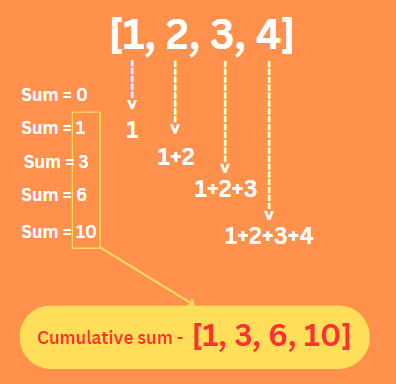
So the cumulative sum at each step folds in the current value and every value before it. Think of it as a subtotal that grows one entry at a time as you move through a list.
Any time you care about the trend up to a point in a sequence, rather than only the final total, a cumulative sum is the tool for the job.
Calculate the cumulative sum of a 1D array
A 1-dimensional array is the simplest case. Pass it to np.cumsum with no axis argument and NumPy treats it as a flat sequence, adding each value to the running total from the one before it.
import numpy as np

numbers = input("Enter a list of numbers separated by spaces: ")
numbers_list = list(map(int, numbers.split()))
numbers_array = np.array(numbers_list)
cum_sum = np.cumsum(numbers_array)
print("The Original array:", numbers_array)
print("The Cumulative sum of the given data:", cum_sum)
Output:
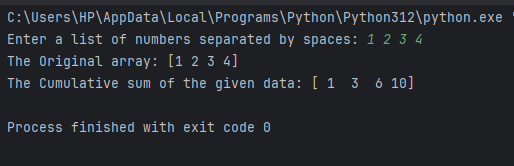
This script reads space separated numbers from the console, converts them into a NumPy array and hands that array straight to np.cumsum. For an input like 1 2 3 4, the output comes back as [1, 3, 6, 10], matching the running total from the previous section exactly. There is no axis to think about here since a 1D array only has one direction to move through.
Calculate the cumulative sum of a 2D array along an axis
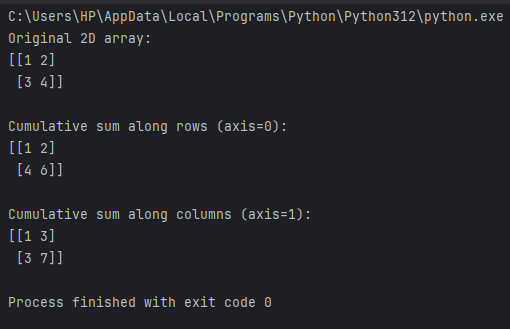
Once an array gains a second dimension, the axis argument decides which direction the running total travels. Axis 0 moves down through the rows, building a running total for each column. Axis 1 moves across the columns, building a running total for each row.
import numpy as np

array_2d = np.array([[1, 2],
                     [3, 4]])
sum_rows = np.cumsum(array_2d, axis=0)
sum_columns = np.cumsum(array_2d, axis=1)
print("Original 2D array:")
print(array_2d)
print("\nCumulative sum along rows (axis=0):")
print(sum_rows)
print("\nCumulative sum along columns (axis=1):")
print(sum_columns)
Output:
Control the output type and array with dtype and out
The dtype and out parameters give you control over how the result gets stored, which matters once you are working with larger datasets or mixing integers with decimals.
import numpy as np

numbers = np.array([1, 2, 3, 4, 5])
result = np.zeros_like(numbers, dtype=float)
np.cumsum(numbers, out=result)
print("Original array:", numbers)
print("Cumulative sum with dtype=float and out parameter:", result)
Output:
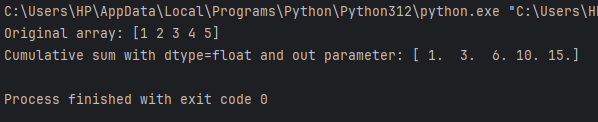
Here dtype=float on the pre-allocated result array forces every value in the running total to come back as a float, even though the original array holds integers. The out parameter then tells np.cumsum to write directly into that array instead of creating a brand new one. This pattern helps when a script calls cumsum repeatedly inside a loop, since reusing one array avoids the overhead of allocating fresh memory on every pass.
A practical example, tracking a running total of expenses
Cumulative sums are easiest to reason about with a concrete scenario, so here is one built around tracking a week of daily spending.
import numpy as np

days = np.arange(1, 8)
daily_expenses = np.array([450, 620, 300, 890, 150, 700, 400])
running_total = np.cumsum(daily_expenses)

for day, total in zip(days, running_total):
    print(f"Day {day}: running total so far is {total}")
The arange function builds the day numbers from 1 through 7 and np.cumsum turns the daily amounts into a running total you can print alongside each day. By day 7, the last value in running_total is the full week’s spending. Every value before it shows exactly where the total stood on that day.
The same idea extends naturally into pandas once your data lives in a DataFrame instead of a plain array. If you are also tracking averages alongside the running total, the pandas DataFrame mean guide and the walkthrough on how to build a DataFrame from lists both cover the setup steps that usually come right before a cumulative sum calculation on tabular data.
How np.cumsum compares with np.sum
It is easy to mix up np.cumsum with np.sum since both work on the same kind of input, so it helps to separate what each one actually returns.
np.sum collapses an array down to a single number, the grand total of every element. np.cumsum instead returns a full array the same size as the input, where every position holds the subtotal up to that point. If np.sum is the number at the bottom of a receipt, np.cumsum is the subtotal printed after every item on that receipt.
import numpy as np

array = np.array([1, 2, 3, 4, 5])

total_sum = np.sum(array)
cumulative_sum = np.cumsum(array)

print("Total Sum:", total_sum)
print("Cumulative Sum:", cumulative_sum)
Running this prints a total sum of 15 alongside a cumulative sum of [1, 3, 6, 10, 15]. Notice that the last value in the cumulative sum always matches the plain sum, since the final running total is by definition the sum of everything.
NumPy has a whole family of aggregate functions alongside sum and cumsum. Functions like np min and np.max reduce an array down to its smallest or largest value the same way np.sum reduces it to a total, while operations like array addition with np.add work element by element instead of accumulating. Knowing which category a function falls into makes it much faster to guess how a new NumPy function will behave before you even run it.
Floating point precision in cumulative sums
There is a subtle detail worth knowing if your array holds decimal values instead of clean integers. Because of how floating point rounding works, the last value in a cumulative sum can differ slightly from what np.sum returns on the exact same array.
import numpy as np

b = np.array([1, 2e-9, 3e-9] * 1000000)
print(b.cumsum()[-1])
print(b.sum())
np.sum uses a pairwise summation strategy internally that reduces rounding error, while np.cumsum has to add values strictly in order since each step depends on the one before it. For most everyday arrays the difference is far too small to matter, but if a script needs the last value of a cumulative sum to match a separately computed total exactly, this is the reason a tiny mismatch can show up.
np.cumulative_sum, the newer array API alternative
Recent NumPy versions added np.cumulative_sum as an Array API compatible alternative to np.cumsum. The two functions calculate the same running total and for most scripts you can keep using np.cumsum without any changes.
The difference shows up if your code needs to run against other array libraries that follow the Python Array API standard, since np.cumulative_sum matches that shared interface while np.cumsum keeps NumPy’s own long-standing argument names. If you are starting a new project today and portability across array libraries matters, it is worth knowing this option exists even though np.cumsum remains the more common choice in existing code and tutorials.
NumPy also ships np.cumprod for a running product instead of a running total. Functions like np.einsum handle more advanced summation patterns across multiple array dimensions at once.
Key takeaways
- np.cumsum returns a running total the same size as the input, not one number.
- Axis None flattens the array into one continuous running total.
- Axis 0 accumulates down columns and axis 1 accumulates across rows.
- dtype controls the output type, useful when integers need to become floats.
- out writes results into an existing array instead of allocating a new one.
- np.sum returns one final total while np.cumsum returns every subtotal along the way.
- Floating point cumulative sums can differ slightly from np.sum on the same data.
- np.cumulative_sum is a newer Array API alternative to the same calculation.
Frequently asked questions
What does np.cumsum do in NumPy?
It returns a running total across an array, where each position holds the sum of every value up to and including itself, rather than one final combined total.
What is the default axis for np.cumsum?
The default is None, which flattens the array into one sequence first and returns a single running total across every element regardless of the original shape.
Can np.cumsum handle negative or floating point numbers?
Yes, np.cumsum works the same way on negative values, decimals or a mix of both, adding each one to the running total exactly as it would with positive integers.
What is the difference between np.cumsum and np.sum?
np.sum returns a single grand total for the array, while np.cumsum returns a full array showing the subtotal at every step along the way to that same total.
Does np.cumsum work on pandas DataFrames?
Not directly, but pandas ships its own DataFrame.cumsum method that works the same way column by column or row by row, depending on the axis you choose.
Why does my np.cumsum result look wrong on a 2D array?
Check which axis you passed. Axis 0 accumulates down columns and axis 1 accumulates across rows. Mixing these up is the most common reason results look unexpected.
Should I use np.cumsum or np.cumulative_sum?
np.cumsum remains the standard choice for most scripts. Reach for np.cumulative_sum only if your code needs to follow the Python Array API standard across multiple array libraries.
Conclusion
np.cumsum turns a list of numbers into a running total with a single function call. The axis, dtype and out parameters give you enough control to handle 1D data, 2D grids and large arrays without much extra code. Once you know how it differs from np.sum and how axis direction works on multi-dimensional arrays, most of the confusion around this function tends to clear up quickly.