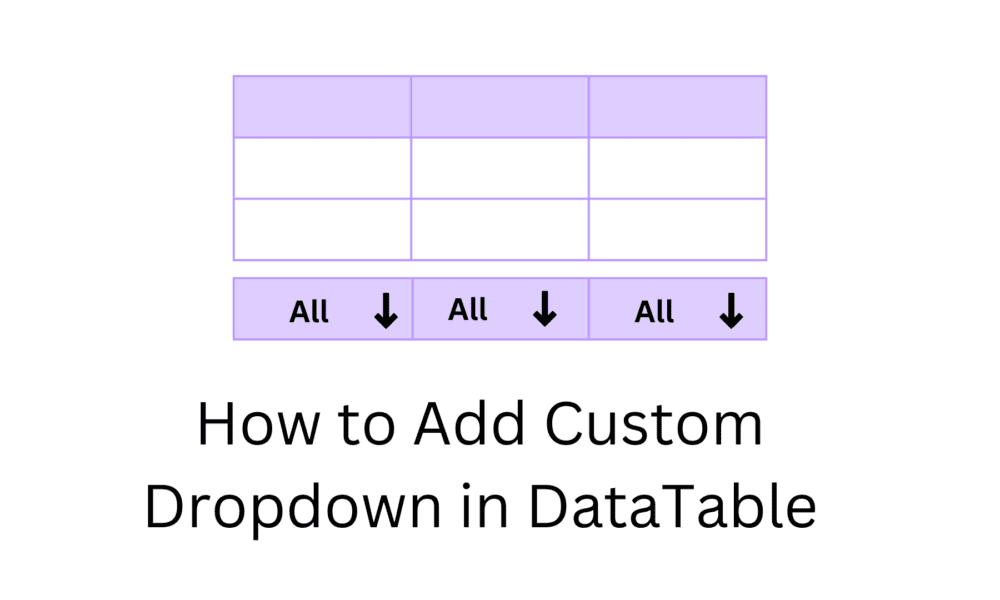
How to Add Custom Dropdown in DataTable

In this tutorial, we will learn How to Add Custom Dropdown in DataTable. I will show how to use a custom drop-down menu to filter a DataTable by column value. I will give you an example to create a drop-down that displays the unique list of strings from a column and when the user selects the dropdown value, the data table will be rendered with only records with the selected value.
How to Add Custom Dropdown in DataTable
Table of concept
- Gender column Dropdown Filter
- Individual column searching
Gender column Dropdown Filter
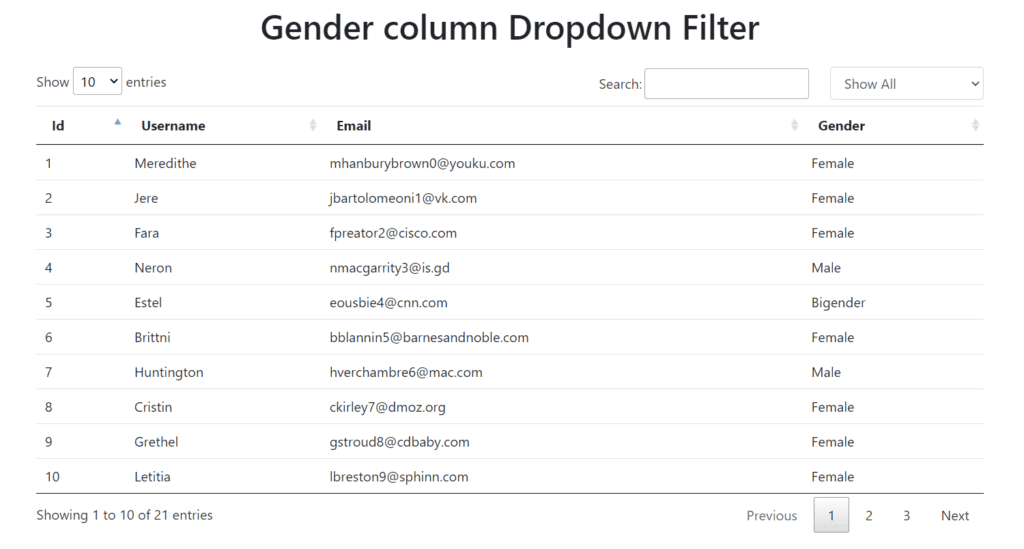
Example
<!doctype html>

<html lang="en">

<head>
    <meta charset="utf-8">

    <title>How to Add Custom Dropdown in DataTable</title>
    <meta name="description" content="">
    <link rel="stylesheet" href="https://cdn.datatables.net/1.10.23/css/jquery.dataTables.min.css" />
    <link rel="stylesheet" href="https://stackpath.bootstrapcdn.com/bootstrap/4.5.2/css/bootstrap.min.css" />
    <style>
        .custom-cls {
            display: inline;
            width: 180px;
            margin-left: 25px;
        }
    </style>
</head>

<body>
    <h1 class="text-center m-3">Gender column Dropdown Filter</h1>
    <div class="container mt-4">
        <select id="customFilter" class="form-control custom-cls">
            <option value="">Show All</option>
            <option value="Male">Male</option>
            <option value="Female">Female</option>
            <option value="Bigender">Bigender</option>
            <option value="Genderfluid">Genderfluid</option>
        </select>

        <!-- Set up the datatable -->
        <table class="table" id="userTable">
            <thead>
                <tr>
                    <th>Id</th>
                    <th>Username</th>
                    <th>Email</th>
                    <th>Gender</th>
                </tr>
            </thead>
            <tbody>
                <tr>
                    <td>1</td>
                    <td>Meredithe</td>
                    <td>mhanburybrown0@youku.com</td>
                    <td>Female</td>
                </tr>
                <tr>
                    <td>2</td>
                    <td>Jere</td>
                    <td>jbartolomeoni1@vk.com</td>
                    <td>Female</td>
                </tr>
                <tr>
                    <td>3</td>
                    <td>Fara</td>
                    <td>fpreator2@cisco.com</td>
                    <td>Female</td>
                </tr>
                <tr>
                    <td>4</td>
                    <td>Neron</td>
                    <td>nmacgarrity3@is.gd</td>
                    <td>Male</td>
                </tr>
                <tr>
                    <td>5</td>
                    <td>Estel</td>
                    <td>eousbie4@cnn.com</td>
                    <td>Bigender</td>
                </tr>
                <tr>
                    <td>6</td>
                    <td>Brittni</td>
                    <td>bblannin5@barnesandnoble.com</td>
                    <td>Female</td>
                </tr>
                <tr>
                    <td>7</td>
                    <td>Huntington</td>
                    <td>hverchambre6@mac.com</td>
                    <td>Male</td>
                </tr>
                <tr>
                    <td>8</td>
                    <td>Cristin</td>
                    <td>ckirley7@dmoz.org</td>
                    <td>Female</td>
                </tr>
                <tr>
                    <td>9</td>
                    <td>Grethel</td>
                    <td>gstroud8@cdbaby.com</td>
                    <td>Female</td>
                </tr>
                <tr>
                    <td>10</td>
                    <td>Letitia</td>
                    <td>lbreston9@sphinn.com</td>
                    <td>Female</td>
                </tr>
                <tr>
                    <td>11</td>
                    <td>Alonso</td>
                    <td>astoddarta@usda.gov</td>
                    <td>Male</td>
                </tr>
                <tr>
                    <td>12</td>
                    <td>Vick</td>
                    <td>vtitheringtonb@elegantthemes.com</td>
                    <td>Male</td>
                </tr>
                <tr>
                    <td>13</td>
                    <td>Sharity</td>
                    <td>sshilstonec@seattletimes.com</td>
                    <td>Female</td>
                </tr>
                <tr>
                    <td>14</td>
                    <td>Korie</td>
                    <td>kboaked@arizona.edu</td>
                    <td>Female</td>
                </tr>
                <tr>
                    <td>15</td>
                    <td>Terry</td>
                    <td>tbuttwelle@aboutads.info</td>
                    <td>Genderfluid</td>
                </tr>
                <tr>
                    <td>16</td>
                    <td>Estel</td>
                    <td>eousbie4@cnn.com</td>
                    <td>Bigender</td>
                </tr>
                <tr>
                    <td>17</td>
                    <td>Brittni</td>
                    <td>bblannin5@barnesandnoble.com</td>
                    <td>Female</td>
                </tr>
                <tr>
                    <td>18</td>
                    <td>Huntington</td>
                    <td>hverchambre6@mac.com</td>
                    <td>Male</td>
                </tr>
                <tr>
                    <td>19</td>
                    <td>Cristin</td>
                    <td>ckirley7@dmoz.org</td>
                    <td>Female</td>
                </tr>
                <tr>
                    <td>20</td>
                    <td>Grethel</td>
                    <td>gstroud8@cdbaby.com</td>
                    <td>Female</td>
                </tr>
                <tr>
                    <td>21</td>
                    <td>Letitia</td>
                    <td>lbreston9@sphinn.com</td>
                    <td>Female</td>
                </tr>
            </tbody>
        </table>

    </div>

    <script src="https://code.jquery.com/jquery-3.5.1.min.js"></script>
    <script src="https://cdn.datatables.net/1.10.23/js/jquery.dataTables.min.js"></script>

    <script>
        $("document").ready(function () {

            $("#userTable").dataTable({
                "searching": true
            });

            var table = $('#userTable').DataTable();

            $("#userTable_filter.dataTables_filter").append($("#customFilter"));

            var index = 0;
            $("#userTable th").each(function (i) {
                if ($($(this)).html() == "Gender") {
                    index = i;
                    return false;
                }
            });

            $.fn.dataTable.ext.search.push(
                function (settings, data, dataIndex) {
                    var selectedItem = $('#customFilter').val()
                    var gender = data[index];
                    if (selectedItem === "" || gender.includes(selectedItem)) {
                        return true;
                    }
                    return false;
                }
            );

            //When you change event for the Gender Filter dropdown to redraw the datatable
            $("#customFilter").change(function (e) {
                table.draw();
            });

            table.draw();
        });
    </script>
</body>

</html>Individual column searching
In this example, you can add an event handler when the select element is changed and when you can change the content of the next selection using the selector-modifier.
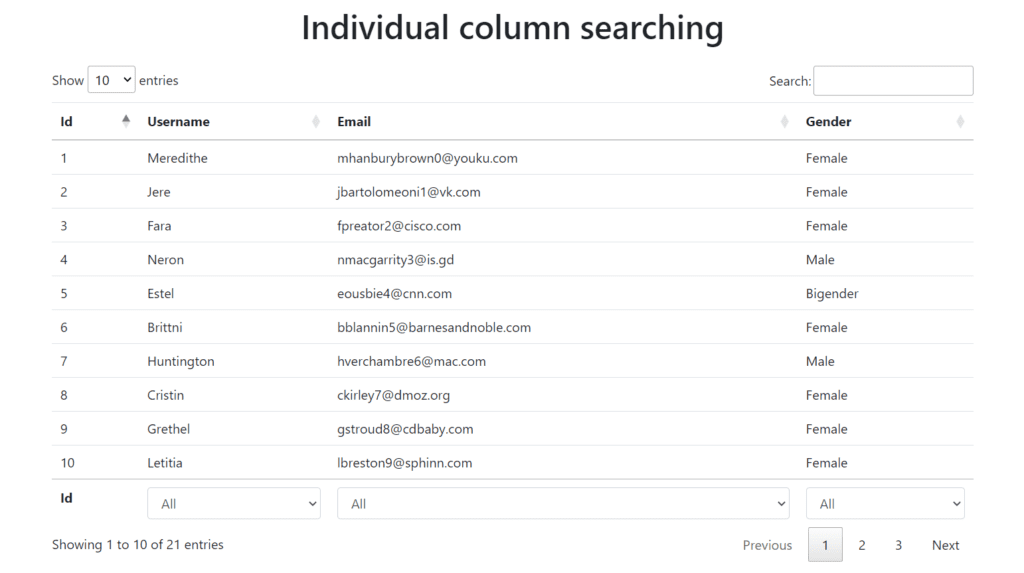
Example
<!doctype html>

<html lang="en">

<head>
    <meta charset="utf-8">

    <title>How to Add Custom Dropdown in DataTable</title>
    <meta name="description" content="">
    <link rel="stylesheet" href="https://cdn.datatables.net/1.13.1/css/jquery.dataTables.min.css" />
    <link rel="stylesheet" href="https://stackpath.bootstrapcdn.com/bootstrap/4.5.2/css/bootstrap.min.css" />
</head>

<body>
    <h1 class="text-center m-3">Individual column searching</h1>
    <div class="container mt-4">

        <!-- Set up the datatable -->
        <table class="table" id="userTable" style="width:100%">
            <thead>
                <tr>
                    <th>Id</th>
                    <th>Username</th>
                    <th>Email</th>
                    <th>Gender</th>
                </tr>
            </thead>
            <tbody>
                <tr>
                    <td>1</td>
                    <td>Meredithe</td>
                    <td>mhanburybrown0@youku.com</td>
                    <td>Female</td>
                </tr>
                <tr>
                    <td>2</td>
                    <td>Jere</td>
                    <td>jbartolomeoni1@vk.com</td>
                    <td>Female</td>
                </tr>
                <tr>
                    <td>3</td>
                    <td>Fara</td>
                    <td>fpreator2@cisco.com</td>
                    <td>Female</td>
                </tr>
                <tr>
                    <td>4</td>
                    <td>Neron</td>
                    <td>nmacgarrity3@is.gd</td>
                    <td>Male</td>
                </tr>
                <tr>
                    <td>5</td>
                    <td>Estel</td>
                    <td>eousbie4@cnn.com</td>
                    <td>Bigender</td>
                </tr>
                <tr>
                    <td>6</td>
                    <td>Brittni</td>
                    <td>bblannin5@barnesandnoble.com</td>
                    <td>Female</td>
                </tr>
                <tr>
                    <td>7</td>
                    <td>Huntington</td>
                    <td>hverchambre6@mac.com</td>
                    <td>Male</td>
                </tr>
                <tr>
                    <td>8</td>
                    <td>Cristin</td>
                    <td>ckirley7@dmoz.org</td>
                    <td>Female</td>
                </tr>
                <tr>
                    <td>9</td>
                    <td>Grethel</td>
                    <td>gstroud8@cdbaby.com</td>
                    <td>Female</td>
                </tr>
                <tr>
                    <td>10</td>
                    <td>Letitia</td>
                    <td>lbreston9@sphinn.com</td>
                    <td>Female</td>
                </tr>
                <tr>
                    <td>11</td>
                    <td>Alonso</td>
                    <td>astoddarta@usda.gov</td>
                    <td>Male</td>
                </tr>
                <tr>
                    <td>12</td>
                    <td>Vick</td>
                    <td>vtitheringtonb@elegantthemes.com</td>
                    <td>Male</td>
                </tr>
                <tr>
                    <td>13</td>
                    <td>Sharity</td>
                    <td>sshilstonec@seattletimes.com</td>
                    <td>Female</td>
                </tr>
                <tr>
                    <td>14</td>
                    <td>Korie</td>
                    <td>kboaked@arizona.edu</td>
                    <td>Female</td>
                </tr>
                <tr>
                    <td>15</td>
                    <td>Terry</td>
                    <td>tbuttwelle@aboutads.info</td>
                    <td>Genderfluid</td>
                </tr>
                <tr>
                    <td>16</td>
                    <td>Estel</td>
                    <td>eousbie4@cnn.com</td>
                    <td>Bigender</td>
                </tr>
                <tr>
                    <td>17</td>
                    <td>Brittni</td>
                    <td>bblannin5@barnesandnoble.com</td>
                    <td>Female</td>
                </tr>
                <tr>
                    <td>18</td>
                    <td>Huntington</td>
                    <td>hverchambre6@mac.com</td>
                    <td>Male</td>
                </tr>
                <tr>
                    <td>19</td>
                    <td>Cristin</td>
                    <td>ckirley7@dmoz.org</td>
                    <td>Female</td>
                </tr>
                <tr>
                    <td>20</td>
                    <td>Grethel</td>
                    <td>gstroud8@cdbaby.com</td>
                    <td>Female</td>
                </tr>
                <tr>
                    <td>21</td>
                    <td>Letitia</td>
                    <td>lbreston9@sphinn.com</td>
                    <td>Female</td>
                </tr>
            </tbody>
            <tfoot>
                <tr>
                    <th>Id</th>
                    <th>Username</th>
                    <th>Email</th>
                    <th>Gender</th>
                </tr>
            </tfoot>
        </table>

    </div>

    <script src="https://code.jquery.com/jquery-3.5.1.js"></script>
    <script src="https://cdn.datatables.net/1.13.1/js/jquery.dataTables.min.js"></script>

    <script>
        $(document).ready(function () {
            $('#userTable').DataTable({
                initComplete: function () {
                    this.api().columns().every(function (ind) {
                        var column = this;
                        if(ind != 0) {
                            var select = $('<select class="form-control custom-cls"><option value="">All</option></select>').appendTo($(column.footer()).empty()).on('change', function () {
                                var val = $.fn.dataTable.util.escapeRegex($(this).val());
                                column.search(val ? '^' + val + '$' : '', true, false).draw();
                            });

                            column.data().unique().sort().each(function (d, j) {
                                select.append('<option value="' + d + '">' + d + '</option>');
                            });
                        }
                    });
                },
            });
        });
    </script>
</body>

</html>