-
-
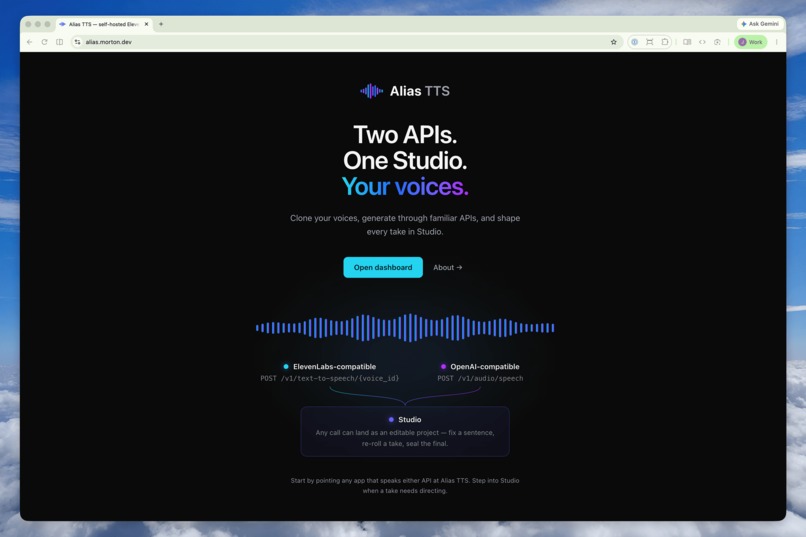
Alias TTS is a self-hosted voice server that speaks both the ElevenLabs and OpenAI text-to-speech dialects.
-
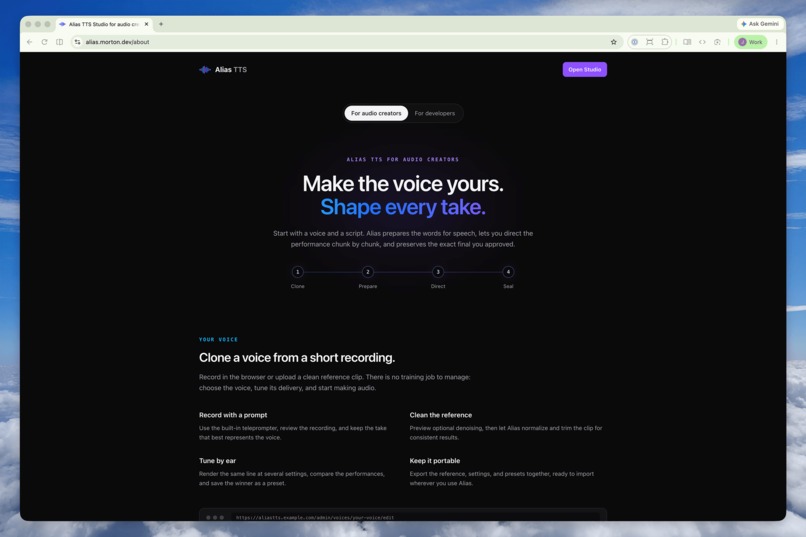
The about page goes into detail about all the features of the app for creators.
-
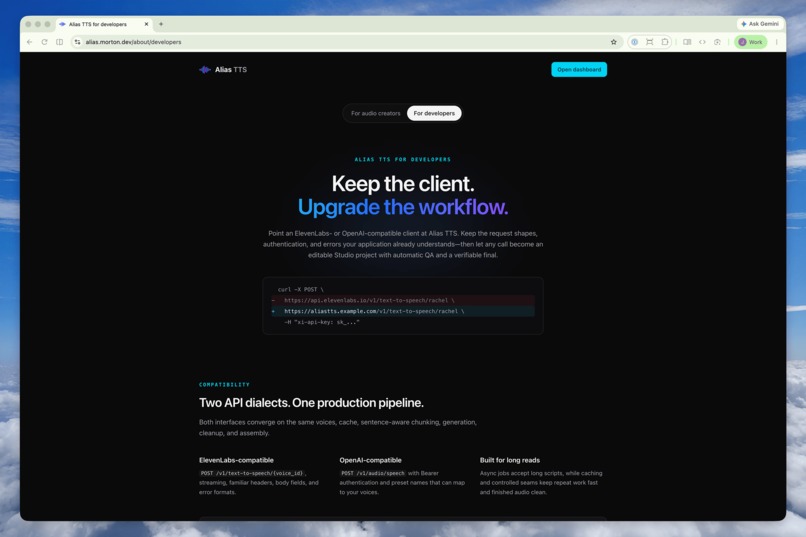
The developer about page talks about using Alias TTS in your apps.
-
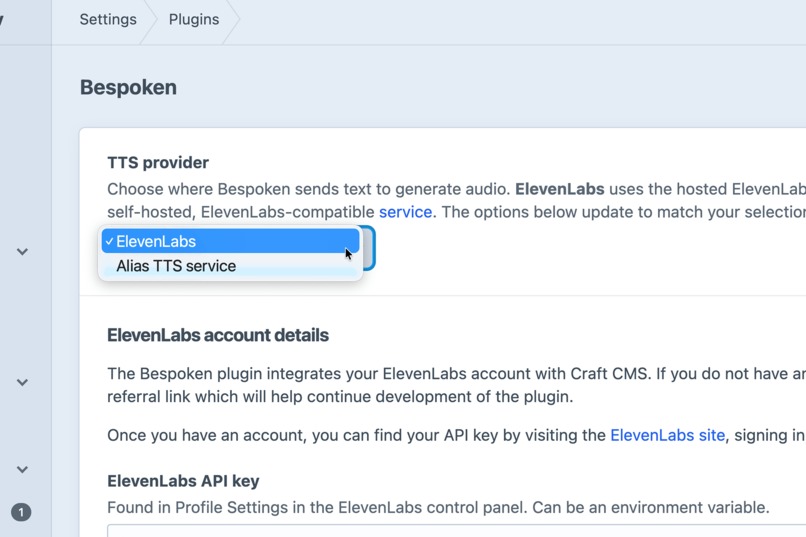
Example of a CMS plugin switching to Alias TTS. Change where the API call goes. That's it!.
-
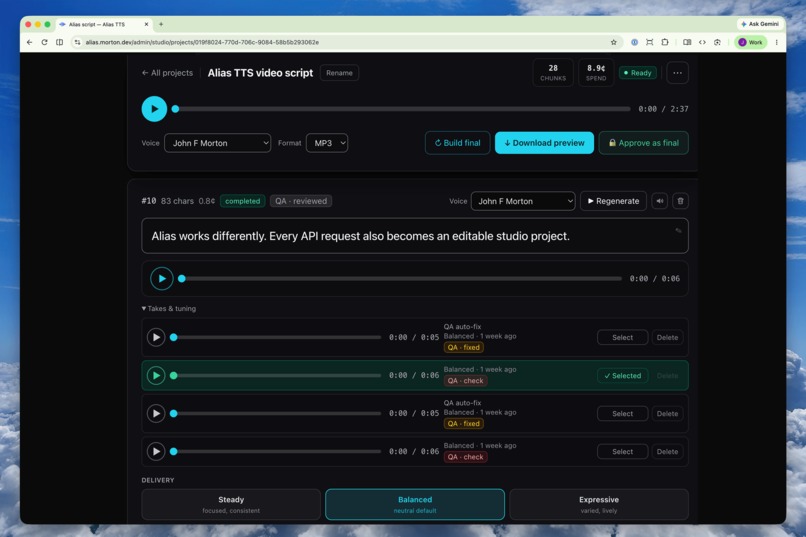
You’re directing the audio, not re-buying it — per-line delivery, temperature, even a pinned seed.
-
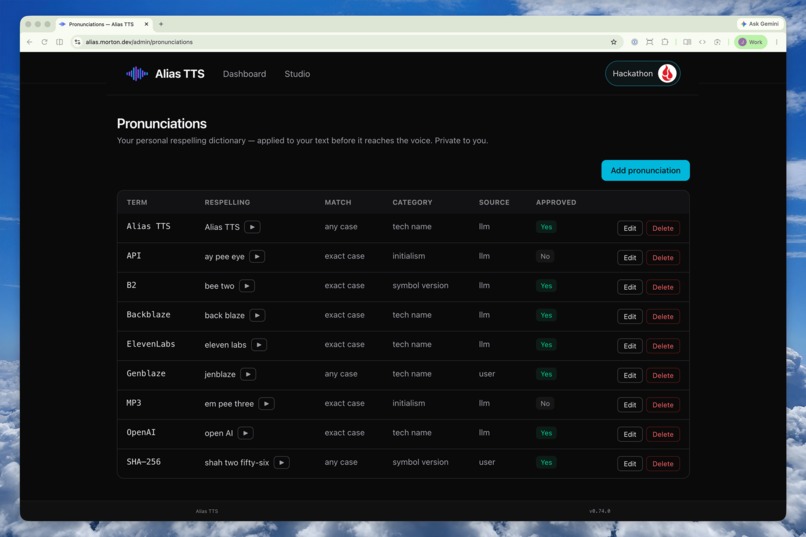
Before any audio is generated, a language model flags the names, brands, and acronyms a synthetic voice might mangle.
-
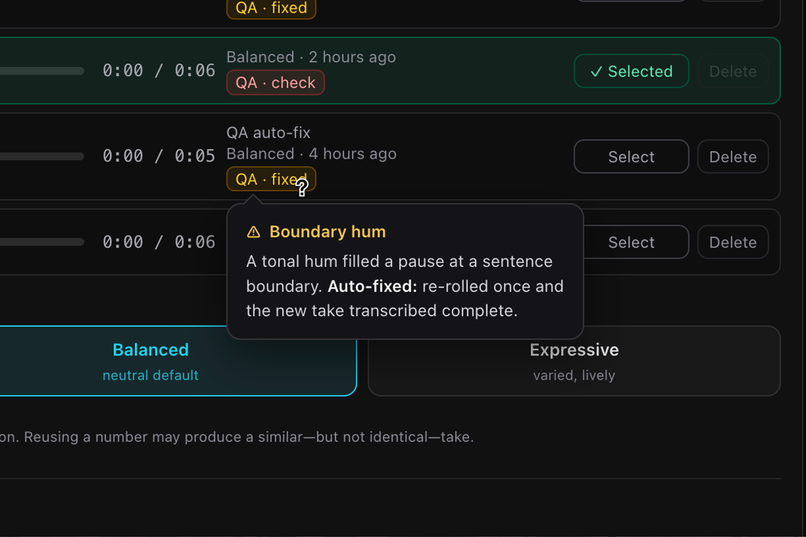
Every take is scored by a Genblaze QA workflow for truncation, noise, and dropped words. Defective takes are re-rolled before stitching.
-
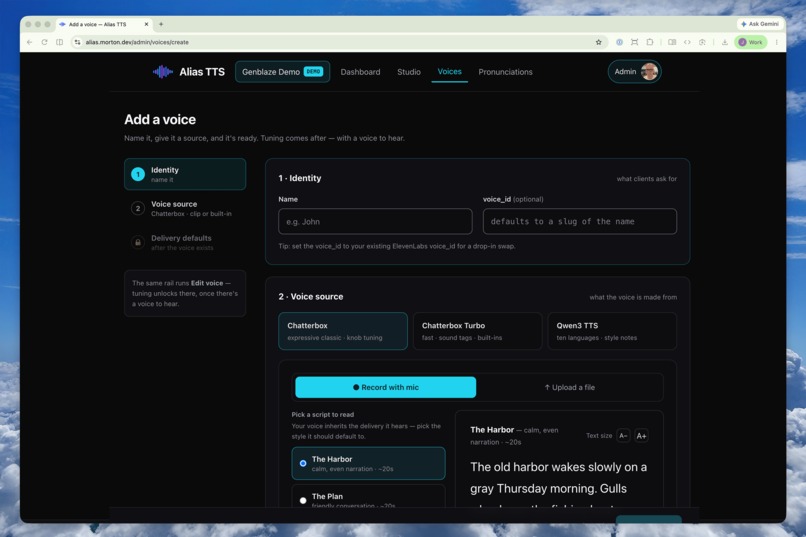
Your voices: record in the in-app studio or use a short reference clip, then tuned by ear — A/B comparisons and saved delivery presets
-
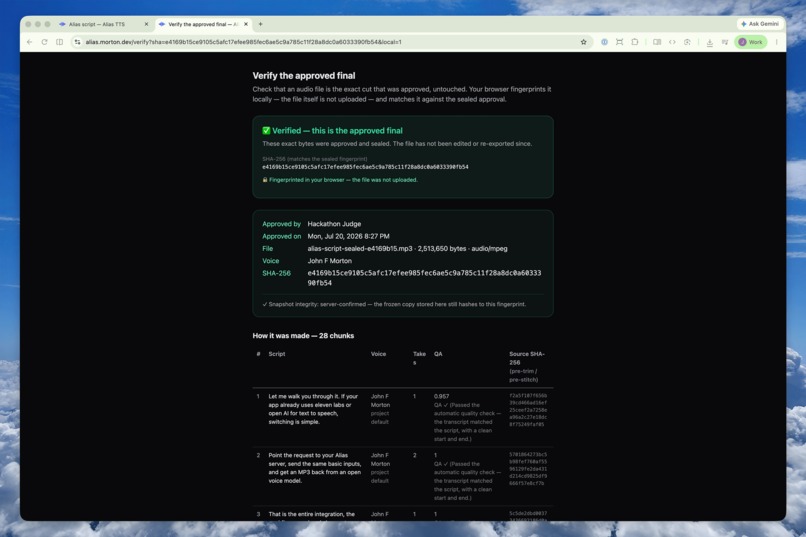
Everything lands on a private Backblaze B2 bucket: the final, the SHA–256 manifest, and every take — including the re-rolls that lost.
-
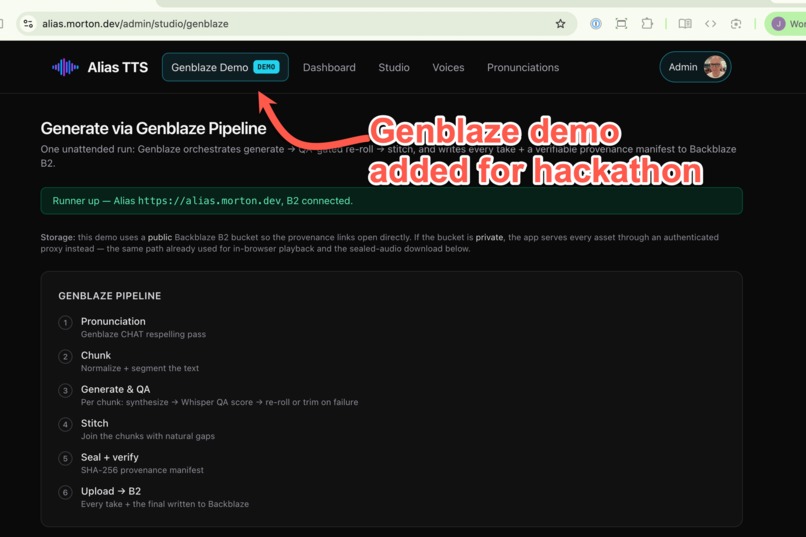
The hackathon version of the app has a Genblaze demo page to show exactly how Genblaze powers the workflow behind the scenes.
-
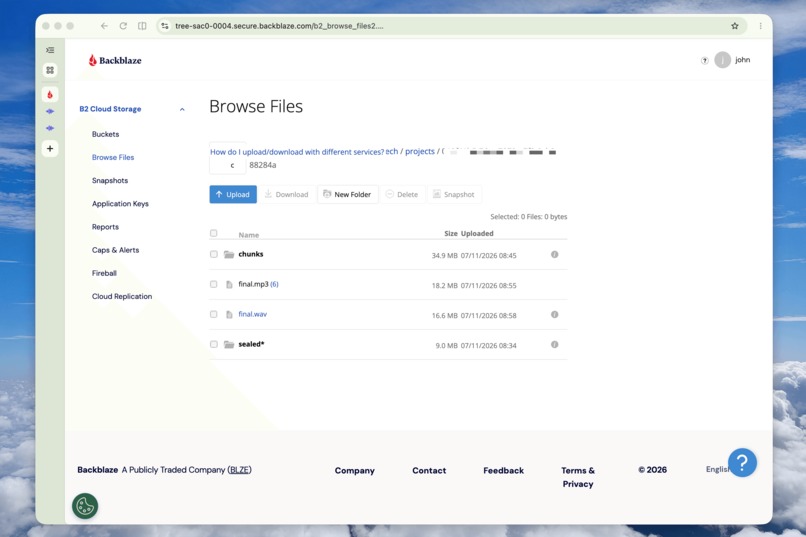
Every recording, the final and all the pieces end up on Backblaze.


Alias TTS
Inspiration
Earlier in my career, I produced voice-over sessions in professional studios, recording multiple takes and assembling the strongest moments into a final performance.
Neural TTS APIs replaced that process with a single-shot workflow: send a script, accept the result, and regenerate the entire thing when one line fails. The audio could be remarkable, but getting a dependable result often required several expensive full-length generations.
When I discovered Chatterbox, I realized an open model could produce audio that rivaled commercial TTS services—when it delivered a strong take. What it lacked was the studio workflow around it.
So I built Alias TTS to provide that workflow: generate multiple takes, evaluate them, keep the strongest, and assemble the final audio—with Genblaze coordinating the pipeline and Backblaze B2 preserving every take.
What it does
Alias TTS integrates like an API and works like a studio.
A drop-in replacement for leading TTS APIs
Alias speaks the ElevenLabs and OpenAI TTS dialects, so an existing integration can switch by changing its base URL. My own Craft CMS text-to-speech plugin now runs on Alias in production.
About 7× cheaper for a representative long-form generation
At the effective per-character rate of ElevenLabs' Creator plan, a roughly 1,200-word article—about 7,200 characters—costs approximately $1.31 to generate. Using Chatterbox on Replicate, the same input costs about $0.18, with usage-based pricing and no subscription.
Every API call becomes an editable project
Each call automatically becomes a project in Alias Studio. The script is already divided into chunks, the final audio is assembled, and every generated take is preserved.
When one word or sentence is wrong, you reroll only that chunk—often for about a penny—instead of regenerating and paying for the entire script. Even failed API calls become recovery projects rather than dead ends.
Unlike commercial studio workflows that require separate enterprise API access, Alias makes Studio the default destination for every call, on infrastructure you control.
Your own voices
Alias supports zero-shot voice cloning from a short reference clip. You can upload a recording or capture one directly in the browser, where it is cleaned automatically.
Each voice can have saved delivery presets and use either of two open engines:
- Chatterbox for high-quality cloned speech
- Chatterbox Turbo for faster generation and expressive tags such as
[laugh]or[sigh]
Automated quality control
Before generation, a pronunciation pass identifies names, brands, acronyms, and other terms a synthetic voice may mishandle. Corrections can be saved to a per-user pronunciation dictionary that improves over time.
After generation, a Whisper-based ASR (automatic speech recognition) loop evaluates every take for problems such as:
- missing or dropped words
- truncated speech
- stalls and repetitions
- noise at the end of a clip
Alias automatically rerolls defective takes, selects the best valid result, and stitches the winners into the final audio.
The goal is not merely to generate speech. It is to produce audio reliable enough that I am willing to publish it under my own name.
A complete, verifiable production archive
Every run stores its final audio, a SHA-256 manifest, and all of its component takes—including rejected rerolls—in a private Backblaze B2 bucket.
Once a project is approved, the creator can download a self-contained archive containing the final audio, a human-readable production receipt, the machine-readable manifest, and every saved take. Selected and unused takes are identified individually, and their hashes can be checked against the manifest.
The final can also be verified later in the browser. Alias hashes the local file and compares it with the sealed record; the audio being checked never needs to be uploaded.
About the name
The API is a drop-in alias for a commercial service, and the generated voice is an alias of mine—or yours.
So, Alias seemed like a great name.
How I built it: the Genblaze workflow
Genblaze coordinates every AI step through one provider-agnostic interface spanning three model types.
For each script chunk, Alias:
- generates a take with Chatterbox on Replicate;
- transcribes and evaluates it through a local Whisper sidecar;
- rerolls detected defects in a best-of-N loop;
- trims unwanted tail noise without re-encoding the audio;
- selects the best valid take.
A separate pipeline stitches the winning chunks into the final file. When a project has multiple unfinished chunks, Alias processes them through a bounded pool of queue workers. Each worker atomically claims its next chunk, allowing independent clips to be generated concurrently without two workers rendering the same one. The concurrency limit remains configurable so generation can be matched to the provider and deployment.
The pronunciation pass is also implemented as a Genblaze provider. It uses Llama on Replicate by default and Anthropic Haiku in my production environment, but either can be replaced through configuration.
Backblaze B2 is the durable storage layer for run manifests, final audio, generated takes, rejected rerolls, and voice reference clips. The bucket remains private, and Alias serves audio through an authenticated proxy with support for range requests.
Around the generation pipeline is a Laravel application containing:
- the Studio editor
- ElevenLabs- and OpenAI-compatible API endpoints
- asynchronous generation jobs
- bounded-concurrency generation workers
- voice and pronunciation management
- health and diagnostics tools
- more than 700 automated tests
The application is deployed in production through Laravel Forge and can also ship as a single self-contained Docker image.
Challenges I ran into
Detecting failures without damaging good audio
Neural TTS is non-deterministic. The QA system needed to identify truncations, stalls, dropped words, and noisy tails without removing quiet trailing speech or valid performance choices.
That required combining ASR comparisons with targeted audio analysis rather than treating every unusual ending as a defect.
Making the API-to-Studio handoff free
A completed API call needed to become an editable project without regenerating anything. Alias carries the original chunks, takes, selections, and final audio directly into Studio.
The handoff also had to remain isolated from the API response itself. A Studio-related failure must never prevent a successfully generated audio file from being returned.
Making concurrent generation safe
Generating independent chunks in parallel is straightforward until users edit or regenerate those chunks while a run is still active. Alias needed to prevent two workers from claiming the same chunk, incorporate chunks added during a run, support cancellation, and recover cleanly when a worker reached its time limit.
I implemented a claim-based worker loop with atomic locking and configurable concurrency. Workers share progress through the project run, hand unfinished work to fresh jobs when necessary, and settle the run only after every claimed chunk has landed.
Making a complex audio workflow feel simple
Generating one editable chunk turned out to be a surprisingly complex UX problem. A user can change the text, switch voices, adjust generation settings, create multiple takes, compare them, and choose which take belongs in the final recording.
My first interface made sense to me because I already understood the system. Watching friends use it revealed where that familiarity had hidden confusing controls, unclear state changes, and developer-oriented language.
That testing helped me translate model parameters into approachable choices, clarify what would be regenerated, and make comparing and selecting takes feel natural. The workflow remains powerful, but users no longer need to understand its implementation to use it confidently.
What I learned
The hard part is not generating good audio—it's guaranteeing it
Access to strong generative models is increasingly commoditized. The real product is the reliability layer that turns inconsistent output into something safe to publish. Once I understood how to build that QA layer, Alias began to feel like a product rather than a model wrapper.
The unit of value is the take, not the file
A conventional TTS API treats the completed audio file as the product. Alias treats each take as a durable, editable asset. Once every take remains addressable, “regenerate everything” becomes “reroll the one line that is wrong.” This is where my background in video and audio production paid off.
Provenance turns trust into verification
A final audio file alone says little about how it was made. A manifest preserves its hash, source chunks, selected takes, and rejected alternatives. The downloadable archive gives the creator the assets behind that record rather than leaving the production history trapped inside the service.
A good provider abstraction creates leverage
Once generation, transcription, and language-model calls shared a consistent interface, adding another API dialect became an adapter and adding another voice engine became a catalog entry. That abstraction is what made a multi-model product manageable for one developer.
What is next for Alias TTS
Finding out who Alias is for
I initially imagined Alias as a developer-focused product. Its compatibility with existing TTS APIs felt like the killer feature: developers could point an existing integration at Alias and gain a more editable, reliable generation workflow.
The unexpected response came from creators who were not interested in the API at all. When I demonstrated Alias Studio to friends, they immediately understood the value of working with narration as editable chunks and multiple takes. Several asked whether they could use it themselves, including a documentary filmmaker who wants access for voice-over work.
That changed the question I want to explore next. Rather than assuming Alias is primarily an API for developers, I want to invite a small group of creators into Studio and learn how they use it in real projects.
I want to understand whether the take-based workflow solves a recurring production problem for them, which parts of Studio still assume too much technical knowledge, and what Alias would need to become a reliable shared service rather than a tool built primarily for me.
Better default voices
Alias currently emphasizes voice cloning and relies on public-domain recordings for its default voices. If other creators begin using it, I would like to commission professional voice actors to create a small, distinctive voice catalog with clear permission for synthetic use.
Chatterbox Pro could provide another route to professional built-in voices and would open the door to additional inference providers such as GMI Cloud. Alias's provider abstraction means those options could be added without changing the Studio workflow.
Clearer usage and performance reporting
Alias already records generation costs, processing times, rerolls, API usage, and voice activity. I want to turn that data into useful feedback for creators: what each project cost, how long it took, where rerolls occurred, and how much the QA workflow saved compared with regenerating the complete recording.
Built With
- chatterbox
- genblaze
- laravel
- python
- whisper


Log in or sign up for Devpost to join the conversation.