Basic Examples (14)
Convert a regular array into a SparseAssociation:
Extract elements from it:
This is equivalent to:
Unlike Association, you cannot extract keys that haven’t been specified beforehand:
SparseAssociation works with Part:
Extracting multiple elements with Part yields another SparseAssociation of reduced size:
Indexing by position is also possible:
Convert the SparseAssociation to a SparseArray:
Further convert the SparseArray to a nested list using Normal:
Convert the SparseAssociation to array rules:
Convert the sparse association directly to a nested Association:
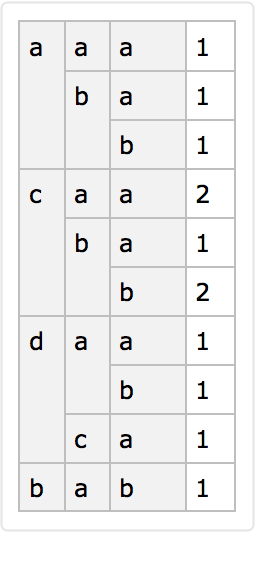
Convert it to a ragged dataset with the default elements omitted:
Convert the sparse association to a nested Association with the default elements omitted:
Reassemble the SparseAssociation from the nested Association (up to permutation of the keys):
Scope (6)
Construct a SparseAssociation from a SparseArray:
Define a SparseAssociation using an array of rules:
Use Keys to extract the keys used at the different levels. The ordering of the keys depends on their appearance in the rules:
Specify the ordering of the keys in advance:
Specify different orderings at different levels:
Use a default element other than 0 and specify keys that do not appear in the list of rules:
Keys without a specified value will yield the default value:
Specify different keys at different levels:
The functions Length, Dimensions, ArrayDepth, MatrixQ, VectorQ and ArrayQ are supported:
Map is supported for operations that preserve the dimensions of the array:
Construct a SparseAssociation from nested associations:
Missing values at any level will be dropped, but the keys will be retained:
Applications (1)
A SparseAssociation is more memory efficient than a nested Association because the keys do not have to be stored multiple times on each level:
Properties and Relations (4)
A SparseAssociation can be reconstructed from its array rules and its keys:
It can also be reconstructed from its underlying SparseArray and its keys:
It can be reconstructed from the corresponding nested Association if the correct default value is provided:
Test if a SparseAssociation has been constructed correctly:
Possible Issues (4)
It is not possible to mix keys and position specifications at one level:
This is analogous to the same limitation of Association:
Use only strings or only integers instead:
At different levels, different specifications can be used:
Neat Examples (3)
Excel files often have row and column headers. SparseAssociation provides an easy mechanism to create a lookup table from such data:
The data can now be queried like an Association:
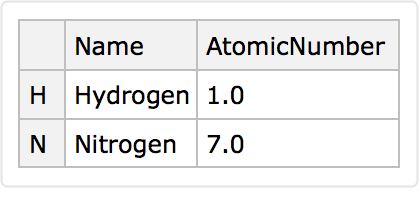
Convert to a Dataset:
![array = BlockRandom[
SeedRandom[1];
RandomInteger[2, {4, 3, 2}]
]](https://www.wolframcloud.com/obj/resourcesystem/images/8fa/8fabea7a-e08a-4e94-96b5-b1b7f580aa8d/58807f25a8ebf7a0.png)

![sparseAssoc = ResourceFunction["SparseAssociation"][array, {"a", "b", "c", "d"}]](https://www.wolframcloud.com/obj/resourcesystem/images/8fa/8fabea7a-e08a-4e94-96b5-b1b7f580aa8d/4ad5a18edb776770.png)

![sparseAssoc["d", "b", "a"]](https://www.wolframcloud.com/obj/resourcesystem/images/8fa/8fabea7a-e08a-4e94-96b5-b1b7f580aa8d/0a7c1a36958f6a09.png)

![array[[4, 2, 1]]](https://www.wolframcloud.com/obj/resourcesystem/images/8fa/8fabea7a-e08a-4e94-96b5-b1b7f580aa8d/2b26f61a376600ed.png)

![sparseAssoc["e", "f", "g"]](https://www.wolframcloud.com/obj/resourcesystem/images/8fa/8fabea7a-e08a-4e94-96b5-b1b7f580aa8d/1710756621b8ca5c.png)

![sparseAssoc[["d", "b", "a"]]](https://www.wolframcloud.com/obj/resourcesystem/images/8fa/8fabea7a-e08a-4e94-96b5-b1b7f580aa8d/10d727f11604da07.png)

![sparseAssoc[[{"a", "c"}, All, "a"]]](https://www.wolframcloud.com/obj/resourcesystem/images/8fa/8fabea7a-e08a-4e94-96b5-b1b7f580aa8d/611f749a328a1aed.png)

![sparseAssoc[[{1, 3}, All, 1]]](https://www.wolframcloud.com/obj/resourcesystem/images/8fa/8fabea7a-e08a-4e94-96b5-b1b7f580aa8d/6c94f9b266c2aa6b.png)

![Values[sparseAssoc]](https://www.wolframcloud.com/obj/resourcesystem/images/8fa/8fabea7a-e08a-4e94-96b5-b1b7f580aa8d/548ce56700bc7616.png)

![Normal[%]](https://www.wolframcloud.com/obj/resourcesystem/images/8fa/8fabea7a-e08a-4e94-96b5-b1b7f580aa8d/40eed95f584c8380.png)

![ArrayRules[sparseAssoc]](https://www.wolframcloud.com/obj/resourcesystem/images/8fa/8fabea7a-e08a-4e94-96b5-b1b7f580aa8d/44002f26070f3932.png)

![Normal[sparseAssoc]](https://www.wolframcloud.com/obj/resourcesystem/images/8fa/8fabea7a-e08a-4e94-96b5-b1b7f580aa8d/3cde36c37fd6b3f3.png)

![Dataset[sparseAssoc, "IncludeDefaultValues" -> False]](https://www.wolframcloud.com/obj/resourcesystem/images/8fa/8fabea7a-e08a-4e94-96b5-b1b7f580aa8d/22d1a769886aed5d.png)
![Normal[sparseAssoc, "IncludeDefaultValues" -> False]](https://www.wolframcloud.com/obj/resourcesystem/images/8fa/8fabea7a-e08a-4e94-96b5-b1b7f580aa8d/70724b5cf10f3f42.png)

![ResourceFunction["SparseAssociation"][%, Automatic]](https://www.wolframcloud.com/obj/resourcesystem/images/8fa/8fabea7a-e08a-4e94-96b5-b1b7f580aa8d/721cbd26074614cb.png)

![ResourceFunction["SparseAssociation"][
SparseArray[{{1, 1} -> 1, {2, 2} -> 2, {3, 3} -> 3, {1, 3} -> 4}],
{"a", "b", "c"}
]](https://www.wolframcloud.com/obj/resourcesystem/images/8fa/8fabea7a-e08a-4e94-96b5-b1b7f580aa8d/1b23dda03231ff26.png)

![rules = {{"a", "a"} -> 1, {"a", "c"} -> 4, {"b", "b"} -> 2, {"c", "c"} -> 3};
ResourceFunction["SparseAssociation"][rules, Automatic]](https://www.wolframcloud.com/obj/resourcesystem/images/8fa/8fabea7a-e08a-4e94-96b5-b1b7f580aa8d/6a47e013d6c00f36.png)

![Keys[%]](https://www.wolframcloud.com/obj/resourcesystem/images/8fa/8fabea7a-e08a-4e94-96b5-b1b7f580aa8d/0e28fb4b5fc19b69.png)

![Keys@ResourceFunction["SparseAssociation"][rules, {"a", "b", "c"}]](https://www.wolframcloud.com/obj/resourcesystem/images/8fa/8fabea7a-e08a-4e94-96b5-b1b7f580aa8d/71110d84c9b34088.png)

![Keys@ResourceFunction["SparseAssociation"][
rules, {{"a", "b", "c"}, {"c", "b", "a"}}]](https://www.wolframcloud.com/obj/resourcesystem/images/8fa/8fabea7a-e08a-4e94-96b5-b1b7f580aa8d/78bce3d59f7c6bec.png)

![ResourceFunction[
"SparseAssociation"][{"a" -> 2}, {"a", "b", "c", "d"}, 1]](https://www.wolframcloud.com/obj/resourcesystem/images/8fa/8fabea7a-e08a-4e94-96b5-b1b7f580aa8d/3a87c84cf771e41b.png)

![%["c"]](https://www.wolframcloud.com/obj/resourcesystem/images/8fa/8fabea7a-e08a-4e94-96b5-b1b7f580aa8d/1c61357bd6d2e9fe.png)

![sparseAssoc = ResourceFunction[
"SparseAssociation"][{{"a", "f"} -> 2}, {{"a", "b", "c", "d"}, {"e",
"f", "g"}}]](https://www.wolframcloud.com/obj/resourcesystem/images/8fa/8fabea7a-e08a-4e94-96b5-b1b7f580aa8d/6dfabe81827d6a48.png)

![sparseAssoc = ResourceFunction[
"SparseAssociation"][{{"a", "d"} -> 2}, {"a", "b", "c", "d"}]](https://www.wolframcloud.com/obj/resourcesystem/images/8fa/8fabea7a-e08a-4e94-96b5-b1b7f580aa8d/1ea4edaa8479a2c7.png)

![Through[{Length, Dimensions, ArrayDepth, MatrixQ, VectorQ, ArrayQ}@
sparseAssoc ]](https://www.wolframcloud.com/obj/resourcesystem/images/8fa/8fabea7a-e08a-4e94-96b5-b1b7f580aa8d/0c88c97ec3a4385f.png)

![Map[f, sparseAssoc, {2}]](https://www.wolframcloud.com/obj/resourcesystem/images/8fa/8fabea7a-e08a-4e94-96b5-b1b7f580aa8d/36b89bf31a56c94f.png)

![Normal@Values[%]](https://www.wolframcloud.com/obj/resourcesystem/images/8fa/8fabea7a-e08a-4e94-96b5-b1b7f580aa8d/4bb1349366b2dc2a.png)

![ResourceFunction[
"SparseAssociation"][<|"a" -> <|"f" -> 1|>, "b" -> <|"f" -> 2, "g" -> 3|>|>, Automatic]](https://www.wolframcloud.com/obj/resourcesystem/images/8fa/8fabea7a-e08a-4e94-96b5-b1b7f580aa8d/6febf14c339be897.png)

![ResourceFunction[
"SparseAssociation"][<|"a" -> <|"f" -> 1, "g" -> Missing[]|>, "b" -> <|"f" -> 2, "h" -> 3|>, "c" -> Missing[]|>, Automatic]](https://www.wolframcloud.com/obj/resourcesystem/images/8fa/8fabea7a-e08a-4e94-96b5-b1b7f580aa8d/567f756c52947e37.png)

![Keys[%]](https://www.wolframcloud.com/obj/resourcesystem/images/8fa/8fabea7a-e08a-4e94-96b5-b1b7f580aa8d/422e6dda48be21dc.png)

![sparseAssoc = BlockRandom[SeedRandom[1];
ResourceFunction["SparseAssociation"][
RandomVariate[BernoulliDistribution[1/10], {26, 26, 26}], Alphabet[]]
]](https://www.wolframcloud.com/obj/resourcesystem/images/8fa/8fabea7a-e08a-4e94-96b5-b1b7f580aa8d/268b6adc841626f3.png)

![{
ByteCount[sparseAssoc],
ByteCount[
Normal@sparseAssoc], (* Full nested associations that store the default values as well *)
ByteCount[
Normal[sparseAssoc, "IncludeDefaultValues" -> False]] (* Nested associations that only store the 1's *)
}](https://www.wolframcloud.com/obj/resourcesystem/images/8fa/8fabea7a-e08a-4e94-96b5-b1b7f580aa8d/746b0467ca038012.png)

![sparseAssoc = ResourceFunction["SparseAssociation"][
RandomInteger[5, {4, 2}], {{"a", "b", "c", "d"}, {"e", "f", "g"}}, 1]](https://www.wolframcloud.com/obj/resourcesystem/images/8fa/8fabea7a-e08a-4e94-96b5-b1b7f580aa8d/77bd784410aafb59.png)

![ResourceFunction["SparseAssociation"][ArrayRules[sparseAssoc], Keys[sparseAssoc]] === sparseAssoc](https://www.wolframcloud.com/obj/resourcesystem/images/8fa/8fabea7a-e08a-4e94-96b5-b1b7f580aa8d/0308cbc75d9a01e5.png)

![ResourceFunction["SparseAssociation"][Values[sparseAssoc], Keys[sparseAssoc]] === sparseAssoc](https://www.wolframcloud.com/obj/resourcesystem/images/8fa/8fabea7a-e08a-4e94-96b5-b1b7f580aa8d/0ef0c1a6e304d6cd.png)

![ResourceFunction["SparseAssociation"][Normal[sparseAssoc], Keys[sparseAssoc], 1] === sparseAssoc](https://www.wolframcloud.com/obj/resourcesystem/images/8fa/8fabea7a-e08a-4e94-96b5-b1b7f580aa8d/170a2c7f019cfc31.png)

![MatchQ[sparseAssoc,
ResourceFunction[
"SparseAssociation"][_Association?(#["ValidatedQ"] &)]
]](https://www.wolframcloud.com/obj/resourcesystem/images/8fa/8fabea7a-e08a-4e94-96b5-b1b7f580aa8d/6e6a0d89791e6cfd.png)

![sparseAssoc = ResourceFunction["SparseAssociation"][
RandomInteger[5, {4, 3}], {"a", "b", "c", "d"}];
sparseAssoc[[{"a", 2}]]](https://www.wolframcloud.com/obj/resourcesystem/images/8fa/8fabea7a-e08a-4e94-96b5-b1b7f580aa8d/7d91c7a35e366214.png)

![<|"a" -> 1, "b" -> 2|>[[{"a", 2}]]](https://www.wolframcloud.com/obj/resourcesystem/images/8fa/8fabea7a-e08a-4e94-96b5-b1b7f580aa8d/7bd2ae6fb477950e.png)

![sparseAssoc[[{"a", "b"}]]](https://www.wolframcloud.com/obj/resourcesystem/images/8fa/8fabea7a-e08a-4e94-96b5-b1b7f580aa8d/281d7a44fb4760c5.png)

![sparseAssoc[[{1, 2}]]](https://www.wolframcloud.com/obj/resourcesystem/images/8fa/8fabea7a-e08a-4e94-96b5-b1b7f580aa8d/02136af6f371611a.png)

![sparseAssoc[[{1, 2}, {"a", "b"}]]](https://www.wolframcloud.com/obj/resourcesystem/images/8fa/8fabea7a-e08a-4e94-96b5-b1b7f580aa8d/273bbfc113f63e21.png)

![sheet = Import["ExampleData/elements.xls", {"Data", 1}][[
All, {2, 1, 3, 4}]];
sheet // TableForm](https://www.wolframcloud.com/obj/resourcesystem/images/8fa/8fabea7a-e08a-4e94-96b5-b1b7f580aa8d/1a045a6ba425260e.png)

![sparseAssoc = ResourceFunction["SparseAssociation"][
sheet[[2 ;;, 2 ;;]],
{
sheet[[2 ;;, 1]], (* row headers *)
sheet[[1, 2 ;;]] (* column headers *)
}
]](https://www.wolframcloud.com/obj/resourcesystem/images/8fa/8fabea7a-e08a-4e94-96b5-b1b7f580aa8d/58816dec8a3bc598.png)

![sparseAssoc["He", "AtomicWeight"]](https://www.wolframcloud.com/obj/resourcesystem/images/8fa/8fabea7a-e08a-4e94-96b5-b1b7f580aa8d/7293ab976658384b.png)

![Dataset@sparseAssoc[[{"H", "N"}, {"Name", "AtomicNumber"}]]](https://www.wolframcloud.com/obj/resourcesystem/images/8fa/8fabea7a-e08a-4e94-96b5-b1b7f580aa8d/737e98e8eb7a2305.png)