

Security Model and Architecture
Last updated
Saturday, May 03, 2025
SELECT's Security Model
Secure by Design
SELECT only requires read access to usage metadata from your data platform. This metadata describes how your platform is being used, not the data itself. No actual customer data or sensitive information is accessed. Some examples of this metadata include, but are not limited to:
- The number and size of tables across your databases or datasets
- Billing and cost data for platform services
- Query execution history and performance statistics
- Warehouse and compute resource utilization metrics
This data is stored in SELECT's own infrastructure where insights can be derived and presented to our customers. We follow a principle of least privilege, and only extract the minimum subset of metadata required for SELECT's services.
Zero Access to Customer Data
We do not have read or write access to any of the data stored in your data platform. Access is tightly controlled during the onboarding process where customers create a dedicated service identity for SELECT with an extremely limited set of permissions.
SELECT Architecture
The security features discussed above can be further visualized in the diagram below outlining SELECT's secure & limited data access architecture.
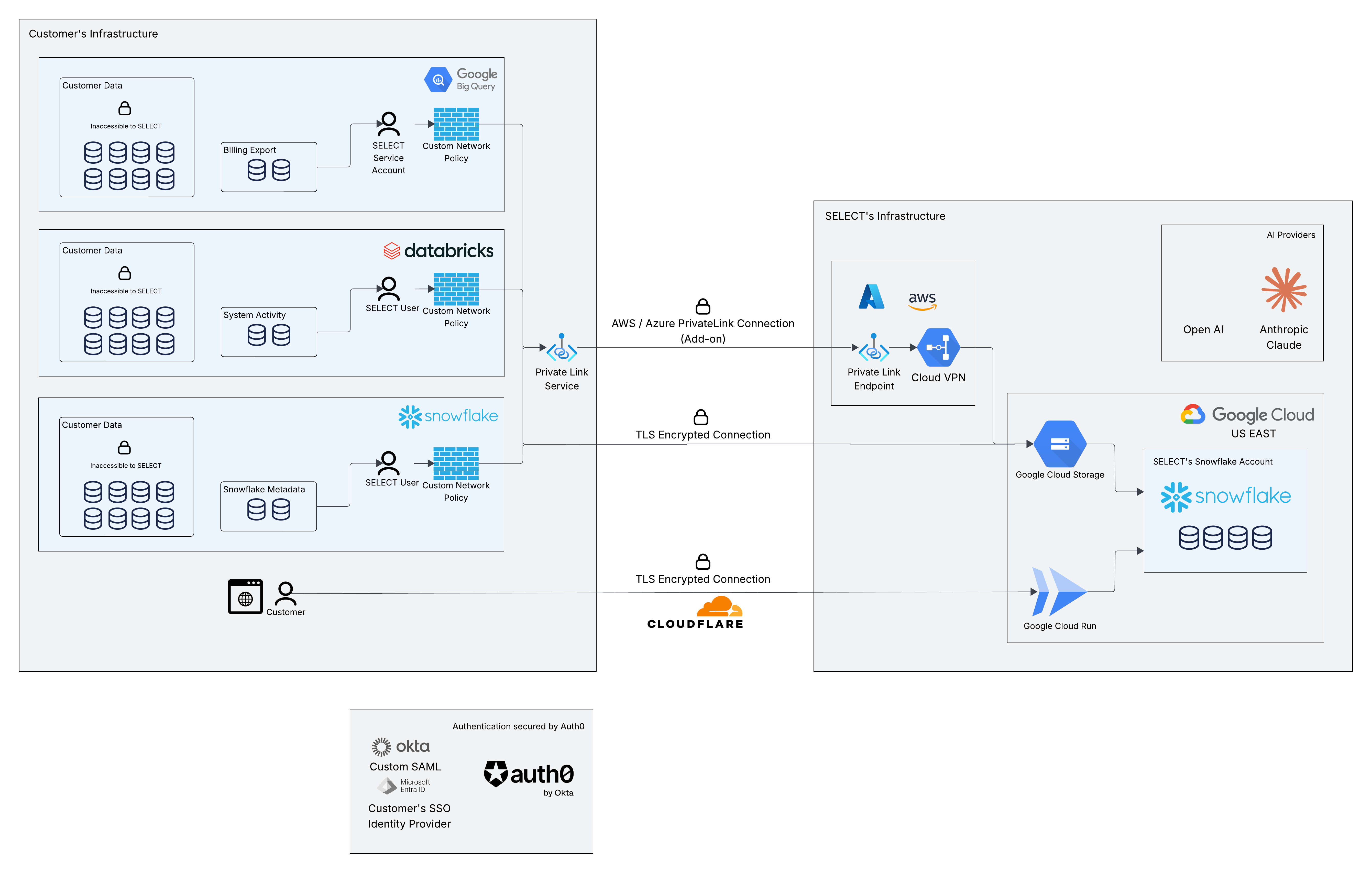
Data Flow
- The customer creates a dedicated service identity with read-only access to platform usage metadata.
- Network restrictions can be applied to limit connections to SELECT's fixed IP addresses.
- Metadata is extracted and loaded to isolated, customer-specific storage in SELECT's infrastructure.
- Data is stored in an isolated schema specific to each customer, ensuring strict data segregation.
- Insights are derived from this dataset and presented to the customer in SELECT's web application.
User Access Flow
- Access to SELECT is governed by the customer's SSO system (Okta, Entra ID, etc.) if configured, or the default Google SSO and Username + Password authentication options. MFA can also be enabled.
- The user's access within SELECT is governed by roles, which can also be configured based on custom SSO Team memberships.
- SELECT uses secure logical separation to isolate tenant data. Users only have access to the data and insights from their own organization's metadata. Access and allowed actions are further restricted by the user's configured roles.
See full details in the user management and RBAC documentation.
Query Text Sanitization
While rare, we recognize it is possible that users within a customer's company may inadvertently include sensitive information in their query text. For example, an engineer may be debugging an issue and query all notifications sent to a particular user. They may even store some notes to themselves in the query comments:
SELECT is designed for this worst case scenario and can strip out any literal values and sensitive comments before storing the metadata. This functionality can be enabled upon request. Using the same query example from above, we would only store the following query_text in our database:
Similar scrubbing can be performed across any free-form text fields ingested from the customer's platform metadata into SELECT's database. This is a popular feature for customers in regulated industries who need compliance with HIPAA, PCI, or GDPR.
What Snowflake metadata do we access?
SELECT accesses Snowflake usage metadata to present users with insights and recommendations related to cost & performance optimization. More information on the exact views we access and their purpose is provided below.
Account Usage
The following views from the account_usage schema are accessed. All views contain metadata about the customer's Snowflake usage. Examples include performance statistics about historical queries run, billing amounts for different Snowflake services, and performance data for virtual warehouses. Please refer to the Snowflake documentation for each view if additional information is required. The account usage views accessed are required to present customers with comprehensive cost and performance insights.
snowflake.account_usage.access_historysnowflake.account_usage.automatic_clustering_historysnowflake.account_usage.cortex_agent_usage_historysnowflake.account_usage.cortex_aisql_usage_historysnowflake.account_usage.cortex_analyst_usage_historysnowflake.account_usage.cortex_document_processing_usage_historysnowflake.account_usage.cortex_fine_tuning_usage_historysnowflake.account_usage.cortex_functions_query_usage_historysnowflake.account_usage.cortex_provisioned_throughput_usage_historysnowflake.account_usage.cortex_rest_api_usage_historysnowflake.account_usage.cortex_search_daily_usage_historysnowflake.account_usage.cortex_search_serving_usage_historysnowflake.account_usage.database_replication_usage_historysnowflake.account_usage.database_storage_usage_historysnowflake.account_usage.document_ai_usage_historysnowflake.account_usage.materialized_view_refresh_historysnowflake.account_usage.metering_daily_historysnowflake.account_usage.metering_historysnowflake.account_usage.network_policiessnowflake.account_usage.network_rule_referencessnowflake.account_usage.network_rulessnowflake.account_usage.object_dependenciessnowflake.account_usage.pipe_usage_historysnowflake.account_usage.pipessnowflake.account_usage.proceduressnowflake.account_usage.query_historysnowflake.account_usage.search_optimization_historysnowflake.account_usage.serverless_task_historysnowflake.account_usage.sessionssnowflake.account_usage.snowflake_intelligence_usage_historysnowflake.account_usage.snowpark_container_services_historysnowflake.account_usage.stage_storage_usage_historysnowflake.account_usage.storage_usagesnowflake.account_usage.table_dml_historysnowflake.account_usage.table_pruning_historysnowflake.account_usage.table_storage_metricssnowflake.account_usage.tablessnowflake.account_usage.tag_referencessnowflake.account_usage.task_historysnowflake.account_usage.task_versionssnowflake.account_usage.viewssnowflake.account_usage.warehouse_events_historysnowflake.account_usage.warehouse_load_historysnowflake.account_usage.warehouse_metering_history
Organization Usage
The following views from the organization_usage schema are accessed:
snowflake.organization_usage.contract_items: Contains information about a customer's current Snowflake contract. We use this to help provide users with budgeting forecasts.snowflake.organization_usage.rate_sheet_daily: Contains information about the effective rates applied on each day. Required to calculate spend data.snowflake.organization_usage.remaining_balance_daily: Contains information about a customer's remaining contract balance. Required to determine the effective rates to apply when calculating costs and for budget forecasting.snowflake.organization_usage.usage_in_currency_daily: Contains information about how much a customer is being billed each day. Required to provide customers with Snowflake spend analytics.snowflake.organization_usage.warehouse_metering_history: Warehouse spend across the Snowflake org.
What BigQuery metadata do we access?
SELECT accesses BigQuery usage metadata via INFORMATION_SCHEMA views and GCP billing exports to present users with insights and recommendations related to cost & performance optimization. Similar to Snowflake and Databricks, we only access usage metadata — never actual customer data.
INFORMATION_SCHEMA Views
The following views from BigQuery's INFORMATION_SCHEMA are accessed across each region where the customer has data. All views contain metadata about BigQuery usage and configuration. Please refer to the Google Cloud documentation for each view if additional information is required.
INFORMATION_SCHEMA.JOBS_BY_PROJECT: Query execution history with performance metrics including duration, bytes processed, slot usage, and caching statistics.INFORMATION_SCHEMA.JOBS_TIMELINE_BY_ORGANIZATION: Organization-wide per-second slot utilization for capacity analysis.INFORMATION_SCHEMA.RESERVATIONS: Current reservation configurations including autoscale settings and edition.INFORMATION_SCHEMA.RESERVATIONS_TIMELINE: Historical slot capacity tracking for reservation utilization analysis.INFORMATION_SCHEMA.ASSIGNMENTS: Reservation-to-project, folder, and organization mappings.INFORMATION_SCHEMA.ASSIGNMENT_CHANGES: Assignment modification history for point-in-time chargeback.INFORMATION_SCHEMA.CAPACITY_COMMITMENTS: Slot commitment plans, state, and configuration.INFORMATION_SCHEMA.CAPACITY_COMMITMENT_CHANGES: Commitment lifecycle history including start and end times.INFORMATION_SCHEMA.TABLE_STORAGE: Per-table storage breakdown including active, long-term, logical, and physical bytes.INFORMATION_SCHEMA.TABLE_STORAGE_USAGE_TIMELINE: Daily storage usage time-series for storage cost tracking.INFORMATION_SCHEMA.TABLES: Table inventory and metadata.INFORMATION_SCHEMA.TABLE_OPTIONS: Per-table options including descriptions, labels, and tags.INFORMATION_SCHEMA.SCHEMATA: Dataset-level metadata.INFORMATION_SCHEMA.SCHEMATA_OPTIONS: Per-dataset options such as storage billing model.INFORMATION_SCHEMA.PROJECT_OPTIONS: Project-level options including fluid-scaling configuration.
Billing Exports
The following GCP Cloud Billing export tables are accessed. SELECT requires bigquery.dataViewer scoped to only the billing export dataset — no access to any other datasets in the project.
gcp_billing_export_resource_v1_*: GCP Cloud Billing detailed usage export, filtered to BigQuery and BigQuery Reservation API services only. Required to provide customers with BigQuery spend analytics.cloud_pricing_export: SKU-level pricing data, filtered to BigQuery services only. Required to calculate actual spend amounts.
What Databricks metadata do we access?
SELECT accesses Databricks system tables to present users with insights and recommendations related to cost & performance optimization. Similar to Snowflake, we only access usage metadata — never actual customer data. More information on the exact system tables we access and their purpose is provided below.
Billing
The following tables from the system.billing schema are accessed to provide customers with spend analytics and budgeting forecasts:
system.billing.usage: Usage metrics by SKU, cloud, and date. Required to provide customers with Databricks spend analytics.system.billing.account_prices: Account-level pricing per SKU. Required to calculate actual spend data.system.billing.list_prices: List pricing per SKU. Used as a fallback for spend calculations.
Query History
The following table from the system.query schema is accessed:
system.query.history: SQL query execution history with performance metrics such as duration, I/O, result fetch times, and caching statistics. Required to provide query performance insights.
Compute
The following tables from the system.compute schema are accessed:
system.compute.warehouses: SQL warehouse configuration metadata including size, clustering, and tags.system.compute.warehouse_events: Warehouse state transitions (scaled up, scaled down, running, stopped, etc.).system.compute.clusters: All-purpose and job cluster configurations including node types, autoscaling, and runtime versions.system.compute.node_timeline: Per-node resource metrics including CPU, memory, network, and disk utilization.
Access & Lineage
The following tables from the system.access schema are accessed:
system.access.audit: Audit logs used for workspace discovery and account-level metadata.system.access.table_lineage: Table-level data lineage tracking source and target tables.system.access.column_lineage: Column-level lineage tracking source and target columns.system.access.workspaces_latest: Workspace metadata including workspace name, URL, and status.
Jobs & Pipelines
The following tables from the system.lakeflow schema are accessed:
system.lakeflow.jobs: Job definitions and metadata including creator, tags, and trigger configuration.system.lakeflow.job_tasks: Task configurations within jobs including task keys and dependencies.system.lakeflow.job_run_timeline: Job execution timeline with performance metrics such as setup, queue, run, and cleanup durations.system.lakeflow.job_task_run_timeline: Task-level execution timeline within job runs.system.lakeflow.pipelines: Delta Live Tables pipeline definitions including type, settings, and configuration.
Model Serving
The following table from the system.serving schema is accessed:
system.serving.served_entities: Served ML entity configurations including endpoint details for LLMs, external models, foundation models, and custom models.
Storage Optimization
The following table from the system.storage schema is accessed:
system.storage.predictive_optimization_operations_history: Delta Lake optimization operations including compaction, vacuum, and analyze with status and metrics.
