
JavaScript Tools
Stop sending sensitive code to servers and start formatting, validating, and securing data instantly with JSTools.Space's private, local developer.
VisitPublished on:
June 29, 2026
Pricing:
About JavaScript Tools
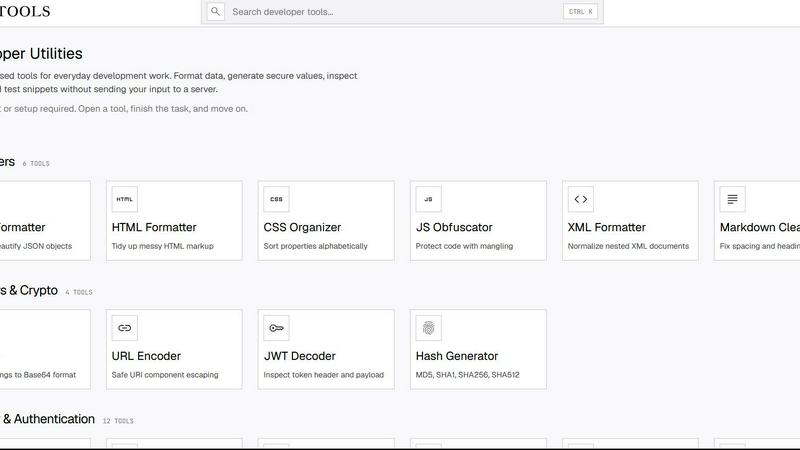
JSTools.Space is a free, privacy-first platform that provides a comprehensive suite of focused utilities for common development tasks, designed to solve the daily friction points developers face when working with data formats, security credentials, and code snippets. The platform addresses the core challenge of needing quick, reliable tools without compromising sensitive information or disrupting workflow. Instead of juggling multiple online services, installing heavy desktop applications, or writing one-off scripts, developers can access over 70 specialized tools directly in their browser. The core value proposition is simple: every tool processes data locally on the client side, meaning no code, credentials, tokens, or test data ever leaves the user's machine. This eliminates the security risks and privacy concerns associated with server-based utilities. JSTools.Space is built for frontend and backend developers, security engineers, DevOps practitioners, and technical writers who need to format and validate JSON, HTML, CSS, XML, and Markdown; encode Base64 and URLs; inspect JWTs; generate passwords, API keys, UUIDs, hashes, salts, nonces, TOTP secrets, and other authentication values; compare text; query structured data; and prototype HTML, CSS, and JavaScript. The platform requires no account creation, project setup, or configuration, enabling developers to open a tool, complete the task, and move on without friction. Beyond the browser-based tools, JSTools.Space extends its utility through the JSTools JSON Inspector Chrome extension and the cross-platform JSON Studio desktop application, providing consistent functionality across different environments.
Features of JavaScript Tools
Privacy-First Local Processing Architecture
The most critical feature of JSTools.Space is its commitment to privacy through local processing. Every tool performs its operations directly inside the user's browser using JavaScript, without sending any data to an external server. This architecture solves the fundamental security problem developers face when using online utilities: the risk of exposing proprietary code, sensitive credentials, API keys, or confidential test data to third-party servers. Whether formatting a JSON payload containing customer information, decoding a JWT with authentication tokens, or generating cryptographic salts, all processing happens in isolation on the local machine. This approach eliminates the need for trust in external infrastructure and removes the compliance concerns that often prevent developers from using convenient online tools in regulated environments.
Comprehensive Tool Suite for Development Workflows
JSTools.Space delivers an extensive collection of over 70 specialized utilities organized into logical categories that mirror common development workflows. The platform includes formatters for JSON, HTML, CSS, XML, and SQL; text tools for comparison, case conversion, and whitespace normalization; a complete Markdown ecosystem with 15 tools for editing, conversion, and export; encoding and cryptography tools for Base64, URLs, JWTs, and hash generation; and a robust security and authentication section with 19 tools for generating passwords, passphrases, API keys, secrets, salts, TOTP codes, session IDs, CSRF tokens, and UUIDs. This breadth eliminates the need to search for and evaluate multiple separate tools, providing a single trusted source for virtually any development utility task.
No Account or Setup Required
The platform removes all barriers to immediate productivity by requiring no account creation, registration, login, or project configuration. Developers can navigate directly to the tool they need, begin working instantly, and complete their task without any onboarding overhead. This design philosophy addresses the common pain point of time wasted on setup processes for simple utility tasks. The platform's search functionality and CTRL+K keyboard shortcut enable rapid navigation across the entire tool library, allowing developers to find and launch the right tool in seconds. This frictionless experience is particularly valuable for developers who need to perform quick formatting, encoding, or generation tasks multiple times throughout their workday.
Cross-Platform Extensions and Desktop Applications
JSTools.Space extends its functionality beyond the browser through the JSTools JSON Inspector Chrome extension and the cross-platform JSON Studio desktop application. The Chrome extension provides deep integration with browser developer tools, enabling developers to inspect and analyze JSON data directly within their browser's developer panel. The JSON Studio desktop application offers a standalone, feature-rich environment for working with JSON data, supporting complex queries, transformations, and visualizations. These complementary tools ensure that developers can access JSTools capabilities regardless of their preferred working environment, whether in the browser, as a browser extension, or as a dedicated desktop application.
Use Cases of JavaScript Tools
Formatting and Validating API Response Data
A backend developer receives a large, minified JSON response from an API endpoint that is completely unreadable in its raw form. Instead of manually adding line breaks and indentation or copying the data into an untrusted online formatter, the developer opens JSTools.Space's JSON Formatter, pastes the minified JSON, and instantly receives a beautifully formatted, indented, and validated object. The tool immediately highlights any syntax errors, such as missing commas or unclosed brackets, allowing the developer to identify and fix issues in the API response before debugging further. This process takes seconds and ensures sensitive data never leaves the local machine.
Generating Secure Authentication Credentials
A security engineer needs to generate a set of production-ready credentials for a new microservice, including a 256-bit API key with a custom prefix, a bcrypt hash for user passwords, and a Base32 TOTP secret for two-factor authentication. Using JSTools.Space's Security and Authentication section, the engineer generates the API key with a configurable prefix and length, produces a bcrypt hash with adjustable cost factors, and creates a TOTP secret that is immediately compatible with authenticator apps. All generation happens locally, ensuring the raw secrets are never transmitted over the network or stored on a third-party server, maintaining the security integrity of the credential generation process.
Converting Markdown Documentation for Multiple Platforms
A technical writer maintains a single Markdown source file for product documentation but needs to publish it across multiple platforms including a company wiki, a Google Docs document for stakeholder review, and a PDF for client distribution. Using JSTools.Space's Markdown tool collection, the writer converts the Markdown to Confluence markup for the wiki, exports a clean copy to Google Docs for collaborative editing, and generates a print-ready PDF for the client package. The Markdown Linter ensures the source document has proper heading hierarchy and spacing before conversion, preventing formatting issues downstream. This workflow eliminates the manual reformatting that typically consumes hours of a technical writer's time.
Debugging JWT Authentication Issues
A frontend developer is troubleshooting an authentication failure where the application rejects a user's JWT token. The developer copies the token from the browser's local storage and pastes it into JSTools.Space's JWT Decoder. The tool instantly decodes the token's header and payload, revealing the algorithm, issuer, expiration time, and user claims without requiring any server-side processing or external API calls. The developer discovers the token has expired based on the decoded timestamp, confirming the issue is an expired session rather than a signing problem. This rapid local inspection saves the developer from setting up a debugging environment or writing custom decoding scripts.
Frequently Asked Questions
Is any data sent to a server when I use JSTools.Space tools?
No, absolutely no data is sent to any server. All processing happens directly in your browser using JavaScript. This is the core design principle of JSTools.Space. When you paste code, credentials, tokens, or any other data into a tool, that information never leaves your local machine. There are no background API calls, analytics trackers that capture input data, or server-side processing pipelines. This privacy-first architecture ensures you can work with sensitive information, proprietary code, and production credentials without any security or compliance concerns.
Do I need to create an account or sign up to use JSTools.Space?
No account creation, registration, or login is required to use any tool on JSTools.Space. You can open the website, navigate to the tool you need, and start working immediately. There is no project setup, configuration, or onboarding process. This zero-friction approach is designed to respect your time and allow you to complete tasks quickly without unnecessary overhead. Simply open a tool, complete your task, and move on with your work.
What types of tools are available on JSTools.Space?
JSTools.Space offers over 70 specialized utilities organized into eight main categories: Formatters (JSON, HTML, JavaScript, XML, SQL), CSS Tools (checker, formatter, minifier, organizer, unused CSS removal, typeset, transparent hex), Text Tools (counter, diff checker, case converter, duplicate line removal, whitespace cleaner, slug generator, unicode converter), Markdown Tools (15 tools including editor, table generator, linter, and converters to PDF, Word, HTML, Google Docs, Slack, Notion, Jira, and Confluence), Encoders and Crypto (URL encoder, JWT decoder, hash generator), Base64 Tools (19 tools for encoding and decoding various formats), Security and Authentication (19 tools for generating passwords, API keys, secrets, salts, TOTP codes, UUIDs, and cryptographic hashes), and additional tools for text comparison and structured data querying.
Are there any desktop or browser extension versions of JSTools.Space?
Yes, JSTools.Space extends its functionality beyond the web application with two additional products. The JSTools JSON Inspector is a Chrome extension that integrates directly into your browser's developer tools, allowing you to inspect and analyze JSON data within the browser's developer panel. The JSON Studio is a cross-platform desktop application that provides a comprehensive environment for working with JSON data, including advanced querying, transformation, and visualization capabilities. Both extensions maintain the same privacy-first, local-processing philosophy of the web platform.
Similar to JavaScript Tools

PNG to SVG
Free, private image conversion tools that run entirely in your browser.



AIQualityHQ
AIQualityHQ instantly evaluates your AI prompts for structure, safety, and privacy using a free, local engine that delivers deterministic scores and.



TeamSlide
TeamSlide lets your team build on-brand presentations instantly by syncing approved slides from your content system directly into PowerPoint.

Blur & Unblur AI
Free online face blur and unblur tool with local browser processing.
