
JavaScript Tools
JSTools.Space provides privacy-first developer utilities for formatting code, inspecting data, and generating secure values without server uploads.
Visit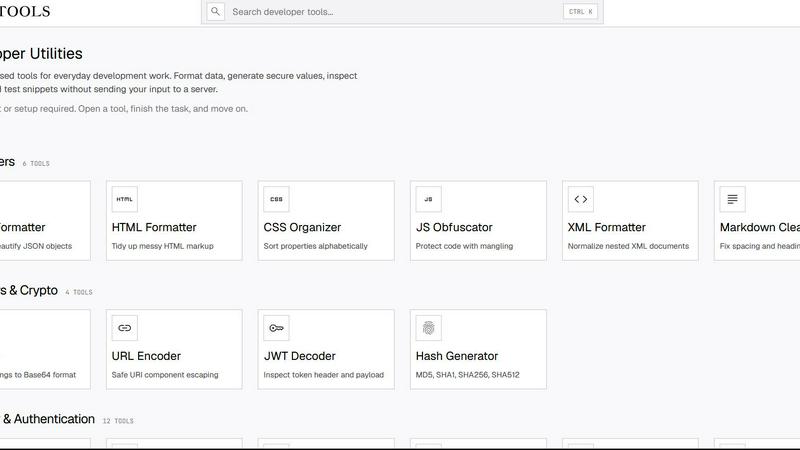
About JavaScript Tools
JavaScript Tools, hosted at JSTools.Space, is a comprehensive, privacy-first platform offering a vast suite of focused utilities for modern development workflows. It is designed for developers, security engineers, and technical writers who need to quickly format code, generate secure tokens, inspect data structures, or prototype front-end components without the overhead of setting up a local environment or sending sensitive data to a server. The platform processes the vast majority of operations directly in the browser using client-side JavaScript, ensuring that code, credentials, API keys, tokens, and test data never leave the user's machine. This architecture eliminates the need for user accounts, project setup, or server-side processing, allowing developers to open a tool, complete a task, and move on immediately. The product covers a wide range of developer domains, including JSON, HTML, CSS, XML, SQL, and Markdown formatting; Base64, URL, and JWT encoding and decoding; password, API key, UUID, hash, salt, nonce, and TOTP secret generation; text comparison and case conversion; and a live HTML, CSS, and JavaScript prototyping environment. Beyond the core web tools, JavaScript Tools offers a configurable Dummy Data Library for generating realistic test data, practical documentation, a developer security blog, the JSTools JSON Inspector Chrome extension for in-browser JSON inspection, and the cross-platform JSON Studio desktop application for deeper data management. The platform's tech-stack oriented approach emphasizes integration with common development pipelines, compatibility with standard formats and protocols, and a frictionless user experience that prioritizes speed, security, and accuracy.
Features of JavaScript Tools
Comprehensive Formatting and Validation Suite
This feature provides a unified interface for formatting, beautifying, minifying, and validating a wide array of data formats critical to modern development. Users can process JSON, HTML, CSS, XML, SQL, and Markdown with dedicated tools that normalize indentation, fix syntax errors, and optimize file size. For example, the JSON Formatter can minify or beautify JSON objects, the CSS Checker validates syntax and identifies issues, and the SQL Formatter produces readable query structures. All processing occurs client-side, so sensitive data like database schemas or proprietary markup is never transmitted over the network. This suite is essential for debugging, code review, and preparing data for integration with APIs, databases, or build pipelines.
Secure Token and Credential Generation
JavaScript Tools includes a robust set of generators for creating cryptographically secure values used in authentication, authorization, and session management. The platform offers tools for generating strong random passwords, memorable passphrases, prefix-safe API keys, HMAC-ready JWT secrets, custom alphabet random strings, hex salts for hashing flows, Base32 TOTP shared secrets for two-factor authentication, opaque session identifiers, CSRF tokens, OAuth state parameters, nonces, and UUID v4 identifiers. Additionally, it supports Argon2 and Bcrypt password hashing, AES-256-GCM encryption and decryption, SHA hash generation (SHA-1 through SHA-512), and MurmurHash for fast non-crypto hashing. These tools are designed for integration into authentication pipelines, security testing, and configuration of identity providers.
Client-Side Data Processing and Privacy
A core architectural principle of JavaScript Tools is that all data processing happens directly within the user's browser. This eliminates the need to upload code, credentials, tokens, or test data to an application server, providing a strong privacy guarantee. Users can format sensitive JSON payloads, decode JWT tokens containing user claims, generate API keys for production systems, or encrypt confidential data without any risk of server-side logging or interception. The platform requires no account creation, no project setup, and no data retention policies to manage. This feature is particularly valuable for developers working with regulated data, proprietary codebases, or security-conscious environments where data exfiltration must be prevented.
Cross-Platform and Extension Ecosystem
Beyond the web-based tools, JavaScript Tools offers a suite of companion applications that extend its functionality into different workflows. The JSTools JSON Inspector is a Chrome extension that allows developers to inspect and navigate JSON objects directly within the browser's developer tools, providing a more integrated experience for debugging API responses. The cross-platform JSON Studio desktop application offers a richer environment for managing, querying, and transforming JSON data locally. Additionally, the platform includes a configurable Dummy Data Library for generating realistic test data, practical documentation for each tool, and a developer security blog that covers topics like token management, encryption best practices, and secure coding patterns. This ecosystem ensures that the tools are accessible wherever developers work.
Use Cases of JavaScript Tools
Debugging and Formatting API Responses
A developer working with a RESTful API needs to inspect a large JSON response that is minified and unreadable. Using the JSON Formatter, they can paste the raw response into the browser-based tool, which immediately beautifies the JSON with proper indentation and syntax highlighting. They can then validate the structure against a schema, identify missing fields or type mismatches, and copy the formatted output back into their code editor. This process is repeated multiple times during a debugging session, and because all data stays client-side, there is no risk of exposing API keys or sensitive user data that might be embedded in the response. The same workflow applies to HTML, XML, and CSS responses from web services.
Generating and Validating Authentication Secrets
A security engineer is configuring a new OAuth 2.0 flow for a microservices architecture. They need to generate a cryptographically random OAuth state parameter, a CSRF token for form protection, and a JWT secret for signing tokens. Using JavaScript Tools, they open the OAuth State generator to produce a unique, opaque value for redirect correlation, the CSRF Token generator to create a form protection token, and the JWT Secret Generator to create an HMAC-ready signing secret. They then use the JWT Decoder to inspect a sample token and verify that the header and payload structure is correct. All these operations are performed in a single session without leaving the browser, and the generated secrets are immediately ready for integration into configuration files or environment variables.
Converting and Encoding Data for Interoperability
A technical writer is preparing documentation that includes code snippets in multiple formats. They need to encode a Base64 image for embedding in an HTML email, convert a Markdown table to HTML for a web page, and generate a URL-encoded query string for an API example. Using the Markdown to HTML tool, they convert a complex table into semantic markup. The Image to Base64 tool allows them to drag and drop an image file, which is encoded locally and provides a data URI for embedding. The URL Encoder tool safely escapes special characters in a URI component. These conversions ensure compatibility across different platforms, email clients, and documentation systems without requiring external libraries or command-line tools.
Prototyping and Testing Front-End Snippets
A front-end developer is experimenting with a new CSS layout and needs to quickly test how a set of HTML elements behave with specific styles. They open the Markdown Editor or the general prototyping environment within JavaScript Tools, write the HTML structure, apply CSS rules using the CSS Typeset or CSS Organizer tools, and then preview the rendered output in real time. They can also use the JavaScript Obfuscator to protect a final script before deployment or the CSS Minifier to compress stylesheets for production. This rapid prototyping cycle allows the developer to iterate on design ideas, validate browser compatibility, and generate optimized output without setting up a local development server or build tool.
Frequently Asked Questions
Is my data safe when using JavaScript Tools?
Yes, your data is completely safe. JavaScript Tools processes all data directly inside your browser using client-side JavaScript. Your code, credentials, tokens, API keys, and test data are never uploaded to any application server. This means there is no risk of server-side logging, data breaches, or unauthorized access. The platform does not require you to create an account, set up a project, or accept any data collection policies. Your data remains on your machine and is only used for the specific operation you are performing.
Do I need to install any software to use the web tools?
No, the core web tools at JSTools.Space require no installation. They are fully functional in any modern web browser. Simply navigate to the tool you need, paste or upload your data, and the processing happens instantly in your browser. However, if you want enhanced functionality, you can optionally install the JSTools JSON Inspector Chrome extension for in-browser JSON inspection or the cross-platform JSON Studio desktop application for more advanced data management. These are optional additions that extend the platform's capabilities into specific workflows.
What file formats and data types are supported?
JavaScript Tools supports a broad range of formats and data types common in development workflows. For formatting and validation, it supports JSON, HTML, CSS, XML, SQL, and Markdown. For encoding and decoding, it supports Base64 (with conversions to and from text, images, audio, video, PDF, hex, and files), URL encoding, JWT decoding, and basic authentication header decoding. For security and authentication, it supports generating passwords, passphrases, API keys, JWT secrets, random strings, salts, TOTP secrets, session IDs, CSRF tokens, OAuth state parameters, nonces, UUIDs, and various hash algorithms including MD5, SHA1, SHA256, SHA512, Argon2, Bcrypt, and MurmurHash. It also supports AES-256-GCM encryption and decryption.
How do the client-side hash and encryption tools work?
The hash and encryption tools, such as the SHA Hash Generator, Argon2 Hash Generator, and AES Encryption tool, all run entirely in your browser using Web Crypto API or JavaScript implementations of the algorithms. When you input data, the tool computes the hash or performs the encryption locally. For AES-256-GCM, the encryption key and initialization vector are generated or provided by you, and the ciphertext is produced client-side. This means your plaintext data and encryption keys never leave your machine. The tools are designed for generating hashes for password storage, creating digital signatures, or encrypting data for secure storage and transmission, all with the privacy guarantee of client-side processing.
Similar to JavaScript Tools

Free, private image conversion tools that run entirely in your browser.

Ornold MCP lets AI agents control Chromium and antidetect browsers: click, type, read screens, record workflows, replay profiles without scripts.


Managed remote build cache for Nx, Lerna, Turbo, Gradle, and Bazel. Reuse artifacts across CI and developer machines.

AIQualityHQ is a free browser-based tool that instantly checks your AI prompts for structure, safety, privacy, and accuracy with zero server tracking.

RedLinz turns screenshots into AI prompts by letting you circle and annotate exactly what you want an LLM to change.

Free online face blur and unblur tool with local browser processing.

Locai lets you run powerful AI models on your own hardware, keeping data private and cutting cloud costs.
