

ShadowLock
ShadowLock detects and blocks data leaks to unapproved AI tools with simple one-click controls.
About ShadowLock
ShadowLock is a shadow AI detection and governance platform built specifically for MSPs and IT teams. It provides real-time visibility and control over how employees use AI tools, catching risky activity before sensitive data leaves the endpoint. Unlike traditional managed-device controls, ShadowLock covers the blind spots that often go undetected: browser extensions, desktop AI apps, local LLMs like Ollama, and personal accounts used on company machines. The platform works through three integrated layers: a browser extension that intercepts and classifies risky pastes to AI sites, a Windows agent that blocks desktop AI apps and deploys silently via your existing RMM, and a multi-tenant dashboard that lets you audit or block each control with audit-ready reports. Built for MSPs to govern AI across every client from one place, ShadowLock is private by design with no keystroke logging and zero content transmission. It addresses the growing risk of employees submitting customer records, credentials, and confidential documents into unapproved AI tools, leaving organizations exposed to legal, compliance, and liability issues. With support for over 100 AI tools, services, and desktop apps, ShadowLock gives you the visibility to see shadow AI and the controls to stop it.
Features of ShadowLock
Three-Layer Coverage
ShadowLock covers the full AI surface across browser, desktop app, and cloud tool layers without enterprise-level deployment complexity. The endpoint agent monitors AI activity, scans browser extensions, and detects local AI apps. The browser enforcement layer intercepts pastes, file uploads, and sensitive data typed into prompts. The Microsoft 365 scanner connects to each client environment to detect AI app usage within approved SaaS tools.
Silent RMM Deployment
The Windows agent deploys silently via your existing RMM tool, requiring zero user interaction or dedicated security engineering. Once installed, it automatically locks down AI functionality built into Chrome, Edge, Brave, and Firefox. This makes it easy for MSPs to roll out across hundreds or thousands of endpoints without disrupting workflows or requiring manual configuration on each machine.
Browser Enforcement Layer
The browser extension self-configures once the agent is installed and immediately begins intercepting risky behavior. It classifies pastes, file uploads, and sensitive data typed directly into prompts on AI sites like ChatGPT, Claude, and Gemini. It also enforces data-sharing opt-out settings on each AI tool and applies your organization's policies with clear user-facing messages.
Multi-Tenant Dashboard
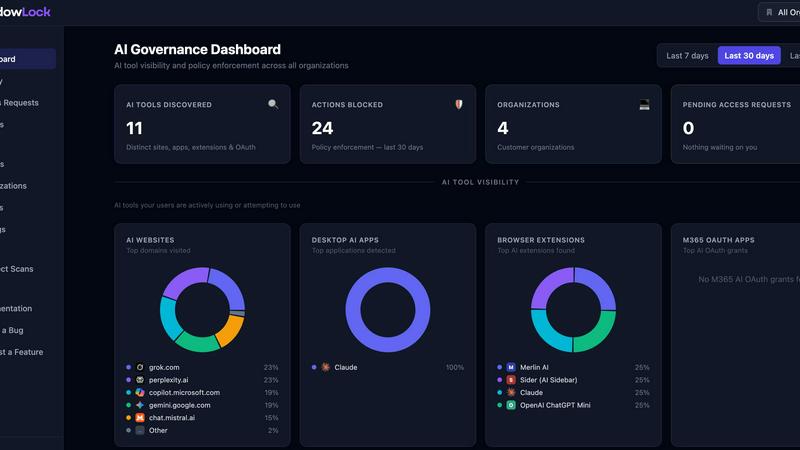
The centralized dashboard gives MSPs a single pane of glass to manage AI governance across every client. You can audit or block each control individually, view real-time activity, and generate audit-ready reports. This eliminates the need to jump between different tools or client environments, saving time and reducing the chance of missing critical alerts.
Use Cases of ShadowLock
Preventing HIPAA and ePHI Exposure
Healthcare organizations and their MSPs can use ShadowLock to prevent patient data from being pasted into public AI tools without a Business Associate Agreement in place. The platform detects and blocks ePHI from being submitted to ChatGPT, Claude, or other unapproved AI services, eliminating the risk of HIPAA violations and the associated fines and legal exposure.
Governing AI Use Across Multiple Clients
MSPs managing dozens or hundreds of clients can use ShadowLock's multi-tenant dashboard to govern AI use from one place. Instead of deploying separate solutions for each client, you get unified visibility and control. You can create policies that apply across all clients or customize them per client, ensuring consistent protection without administrative overhead.
Protecting Trade Secrets and Intellectual Property
Organizations handling proprietary source code, contracts, or product plans can use ShadowLock to prevent employees from submitting sensitive data to AI coding assistants and desktop AI apps. The platform detects when GitHub Copilot, Cursor, or other AI tools access confidential files and blocks data transmission, preserving trade secret protections.
Responding to AI-Related Incidents
When an AI-related incident occurs, ShadowLock provides the forensic visibility needed to answer which tool was used, which account was involved, and what data was submitted. This information is critical for triage, notifications, and defensibility. Without prior visibility, organizations cannot properly investigate incidents or demonstrate compliance with breach notification requirements.
Frequently Asked Questions
How does ShadowLock detect shadow AI use without violating privacy?
ShadowLock is private by design. It does not perform keystroke logging or transmit the content of what employees type or paste. Instead, it uses classification technology to identify when sensitive data types are being entered into AI tools, then blocks or alerts based on your policies. This approach provides the visibility you need without compromising employee privacy.
Can ShadowLock be deployed alongside existing endpoint security tools?
Yes. ShadowLock is designed to integrate with your existing RMM and security stack. The Windows agent deploys silently through your current management tools, and the browser extension self-configures after installation. There is no need to replace or reconfigure your existing endpoint protection, antivirus, or DLP solutions. ShadowLock fills the specific gap around AI governance.
Does ShadowLock cover AI use on personal accounts and unmanaged devices?
ShadowLock covers AI use on managed Windows endpoints where the agent and browser extension are installed. This includes personal accounts accessed on those devices, such as an employee using their personal ChatGPT account on a company laptop. For unmanaged devices or mobile endpoints, ShadowLock provides visibility through the Microsoft 365 scanner, which detects AI app usage within approved SaaS tools.
What happens when an employee tries to paste sensitive data into an AI tool?
When ShadowLock detects sensitive data being pasted, uploaded, or typed into an AI tool, it takes the action defined in your policy. This can include blocking the action entirely, showing a warning message to the employee, or allowing it with an audit log entry. The employee receives a clear, user-facing message explaining why the action was blocked or flagged, reducing confusion and supporting your security awareness efforts.
How long does it take to deploy ShadowLock across a client environment?
Deployment is designed to be fast and simple. Once you configure your RMM to push the ShadowLock agent, it installs silently on all target endpoints within minutes. The browser extension self-configures after the agent is installed, so there is no need for manual browser setup. Most MSPs can deploy ShadowLock across a new client environment in under an hour, with no disruption to end users.
Pricing of ShadowLock
ShadowLock offers a free trial so you can test the platform with no upfront commitment. Pricing is based on the number of endpoints and clients managed. For specific pricing tiers, plans, and volume discounts, visit the ShadowLock website or contact the sales team. The free trial gives you full access to all features, including the multi-tenant dashboard, browser enforcement, and agent capabilities, so you can evaluate the platform in your own environment before making a purchase decision.
Similar to ShadowLock


Plate Photo AI
Upload a phone photo, pick a style, and get a pro food shot in seconds to boost your menu and sales.

Breezit AI
Breezit AI is the simple sales assistant that captures every venue inquiry and converts 50% more leads into bookings.


Vibeworker
Vibeworker scores every new Upwork job against your profile and strategy, sending instant notifications for only the best matches.

PrimeClaws VPS
PrimeClaws VPS keeps your AI agent running 24/7 in the cloud with zero setup, and for a limited time includes free daily requests to frontier models.
