Official account for @FieldView Support. Account monitored by Support Team. Tweet us anytime- weekends & holidays may vary. 1.888.924.7475 | [email protected]
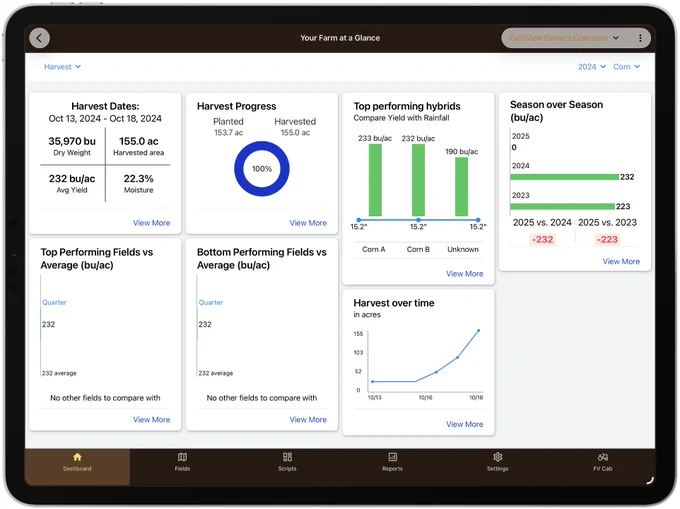
Your Farm at a Glance
The efficient way to analyze information. This tile offers straightforward reports using the data you've already collected in FieldView™. Save time and gain insights effortlessly.
support.climate.com/kt#/kA0Vb00000…
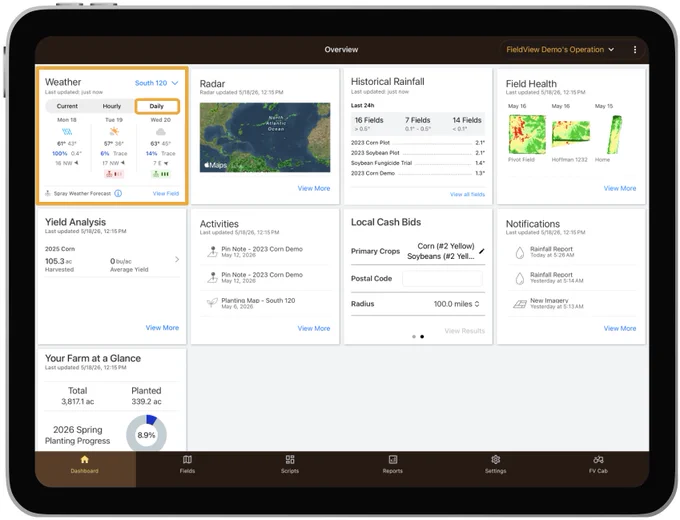
FieldView™ Spray Weather Forecast
Spray Weather Forecast uses weather data - such as wind, rain, and temperature - to recommend the best possible window for spraying.
support.climate.com/kt#/kA0Vb00000…
How to Use the Custom Mapping Feature
The Custom Mapping Feature enables growers to create a custom map that allows areas of the field to be mapped in a distinct color to document a custom attribute that's relevant to the operation.
Application Summary Report
Using the FieldView™ Cab app is a powerful way to collect, visualize, store and document spray applications. The Application Summary report enables customers to save or share this application data easily through a PDF report.
support.climate.com/kt?gclsrc=aw.d…