Webhooks
OpenAI webhooks allow you to receive real-time notifications about events in the API, such as when a batch completes, a background response is generated, or a fine-tuning job finishes. Webhooks are delivered to an HTTP endpoint you control, following the Standard Webhooks specification. The full list of webhook events can be found in the API reference.
View the full list of webhook events.
Below are examples of simple servers capable of ingesting webhooks from OpenAI, specifically for the response.completed event.
1
2
3
4
5
6
7
8
9
10
11
12
13
14
15
16
17
18
19
20
21
22
23
24
25
import os
from openai import OpenAI, InvalidWebhookSignatureError
from flask import Flask, request, Response

app = Flask(__name__)
client = OpenAI(webhook_secret=os.environ["OPENAI_WEBHOOK_SECRET"])

@app.route("/webhook", methods=["POST"])
def webhook():
    try:
        # with webhook_secret set above, unwrap will raise an error if the signature is invalid
        event = client.webhooks.unwrap(request.data, request.headers)

        if event.type == "response.completed":
            response_id = event.data.id
            response = client.responses.retrieve(response_id)
            print("Response output:", response.output_text)

        return Response(status=200)
    except InvalidWebhookSignatureError as e:
        print("Invalid signature", e)
        return Response("Invalid signature", status=400)

if __name__ == "__main__":
app.run(port=8000)To see a webhook like this one in action, you can set up a webhook endpoint in the OpenAI dashboard subscribed to response.completed, and then make an API request to generate a response in background mode.
You can also trigger test events with sample data from the webhook settings page.
1
2
3
4
5
6
7
8
9
10
11
from openai import OpenAI

client = OpenAI()

resp = client.responses.create(
  model="o3",
  input="Write a very long novel about otters in space.",
  background=True,
)

print(resp.status)
In this guide, you will learn how to create webook endpoints in the dashboard, set up server-side code to handle them, and verify that inbound requests originated from OpenAI.
Creating webhook endpoints
To start receiving webhook requests on your server, log in to the dashboard and open the webhook settings page. Webhooks are configured per-project.
Click the "Create" button to create a new webhook endpoint. You will configure three things:
- A name for the endpoint (just for your reference).
- A public URL to a server you control.
- One or more event types to subscribe to. When they occur, OpenAI will send an HTTP POST request to the URL specified.
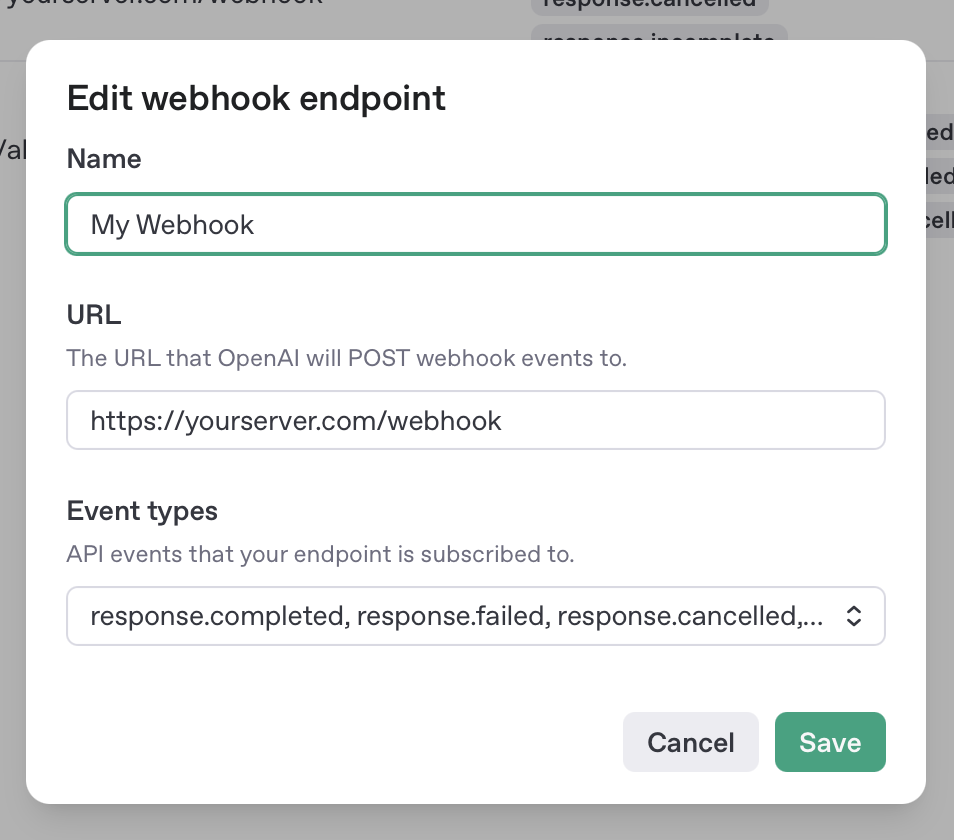
After creating a new webhook, you'll receive a signing secret to use for server-side verification of incoming webhook requests. Save this value for later, since you won't be able to view it again.
With your webhook endpoint created, you'll next set up a server-side endpoint to handle those incoming event payloads.
Handling webhook requests on a server
When an event happens that you're subscribed to, your webhook URL will receive an HTTP POST request like this:
1
2
3
4
5
6
7
8
9
10
11
12
13
POST https://yourserver.com/webhook
user-agent: OpenAI/1.0 (+https://platform.openai.com/docs/webhooks)
content-type: application/json
webhook-id: wh_685342e6c53c8190a1be43f081506c52
webhook-timestamp: 1750287078
webhook-signature: v1,K5oZfzN95Z9UVu1EsfQmfVNQhnkZ2pj9o9NDN/H/pI4=
{
  "object": "event",
  "id": "evt_685343a1381c819085d44c354e1b330e",
  "type": "response.completed",
  "created_at": 1750287018,
  "data": { "id": "resp_abc123" }
}
Your endpoint should respond quickly to these incoming HTTP requests with a successful (2xx) status code, indicating successful receipt. To avoid timeouts, we recommend offloading any non-trivial processing to a background worker so that the endpoint can respond immediately.
If the endpoint doesn't return a successful (2xx) status code, or doesn't respond within a few seconds, the webhook request will be retried. OpenAI will continue to attempt delivery for up to 72 hours with exponential backoff. Note that 3xx redirects will not be followed; they are treated as failures and your endpoint should be updated to use the final destination URL.
In rare cases, due to internal system issues, OpenAI may deliver duplicate copies of the same webhook event. You can use the webhook-id header as an idempotency key to deduplicate.
Testing webhooks locally
Testing webhooks requires a URL that is available on the public Internet. This can make development tricky, since your local development environment likely isn't open to the public. A few options that may help:
- ngrok which can expose your localhost server on a public URL
- Cloud development environments like Replit, GitHub Codespaces, Cloudflare Workers, or v0 from Vercel.
Verifying webhook signatures
While you can receive webhook events from OpenAI and process the results without any verification, you should verify that incoming requests are coming from OpenAI, especially if your webhook will take any kind of action on the backend. The headers sent along with webhook requests contain information that can be used in combination with a webhook secret key to verify that the webhook originated from OpenAI.
When you create a webhook endpoint in the OpenAI dashboard, you'll be given a signing secret that you should make available on your server as an environment variable:
export OPENAI_WEBHOOK_SECRET="<your secret here>"The simplest way to verify webhook signatures is by using the unwrap() method of the official OpenAI SDK helpers:
1
2
3
4
5
client = OpenAI()
webhook_secret = os.environ["OPENAI_WEBHOOK_SECRET"]

# will raise if the signature is invalid
event = client.webhooks.unwrap(request.data, request.headers, secret=webhook_secret)Signatures can also be verified with the Standard Webhooks libraries:
1
2
3
$webhook_secret = getenv("OPENAI_WEBHOOK_SECRET");
$wh = new \StandardWebhooks\Webhook($webhook_secret);
$wh->verify($webhook_payload, $webhook_headers);
Alternatively, if needed, you can implement your own signature verification as described in the Standard Webhooks spec
If you misplace or accidentally expose your signing secret, you can generate a new one by rotating the signing secret.
