PYnative

Python Programming

  • Learn Python
    • Python Tutorials
    • Python Basics
    • Python Interview Q&As
  • Exercises
  • Quizzes
  • Code Editor
Home » Python » Databases » Python Delete from SQLite Table

Python Delete from SQLite Table

Updated on: April 28, 2021 | 6 Comments

Learn to delete data from an SQLite table using Python. You’ll learn how to use Python’s built-in module sqlite3 to delete data from the SQLite table.

Goals of this lesson

  • Delete a single and multiple rows, all rows, a single column, and multiple columns from the SQLite table using Python
  • Use a Python parameterized query to provide value at runtime to the SQLite delete query
  • Execute a bulk delete using a single query

Also Read:

  • Solve Python SQLite Exercise
  • Read Python SQLite Tutorial (Complete Guide)

Table of contents

  • Prerequisite
  • Steps to delete a single row from SQLite table
  • Use Python Variable in a query to Delete Row from SQLite table
  • Delete multiple rows from SQLite table
  • Next Steps:

Prerequisite

Before executing the following program, please make sure you know the SQLite table name and its column details.

For this lesson, I am using the ‘SqliteDb_developers’ table present in my SQLite database.
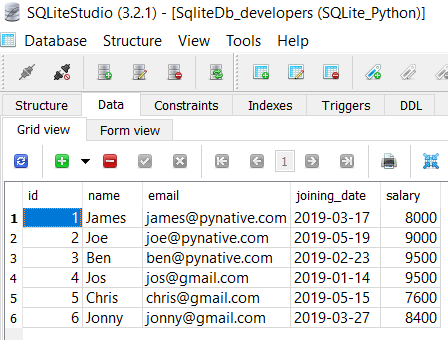
sqlitedb_developers table with data

If a table is not present in your SQLite database, then please refer to the following articles: –

  • Create SQLite table from Python.
  • Insert data into SQLite Table from Python

Steps to delete a single row from SQLite table

How to delete from SQLite table using Python

  1. Connect to SQLite from Python

    Refer to Python SQLite database connection to connect to SQLite database from Python using sqlite3 module.

  2. Define a SQL Delete Query

    Next, prepare a SQL delete query to delete a row from a table. Delete query contains the row to be deleted based on a condition placed in where clause of a query.
    For example, DELETE FROM MySQL_table WHERE id=10;

  3. Get Cursor Object from Connection

    Next, use a connection.cursor() method to create a cursor object. using cursor object we can execute SQL queries.

  4. Execute the delete query using execute() method

    The cursor.execute(query) method executes the operation stored in the delete query.
    After a successful delete operation, the execute() method returns the number of rows affected.

  5. Commit your changes

    After successfully executing a delete operation, make changes persistent into a database using the commit() of a connection class.

  6. Get the number of rows affected

    Use a cursor.rowcount method to get the number of rows affected. The count depends on how many rows you are deleting.
    You can also execute SQLite select query from Python to verify the result.

  7. Close the cursor object and database connection object

    use cursor.clsoe() and connection.clsoe() method to close the cursor and SQLite connections after your work completes.

As of now, the SqliteDb_developers table contains six rows, so let’s remove the developer whose id is 6.

Example

import sqlite3

def deleteRecord():
    try:
        sqliteConnection = sqlite3.connect('SQLite_Python.db')
        cursor = sqliteConnection.cursor()
        print("Connected to SQLite")

        # Deleting single record now
        sql_delete_query = """DELETE from SqliteDb_developers where id = 6"""
        cursor.execute(sql_delete_query)
        sqliteConnection.commit()
        print("Record deleted successfully ")
        cursor.close()

    except sqlite3.Error as error:
        print("Failed to delete record from sqlite table", error)
    finally:
        if sqliteConnection:
            sqliteConnection.close()
            print("the sqlite connection is closed")

deleteRecord()
Code language: Python (python)

Output:

Connected to SQLite Record deleted successfully  the sqlite connection is closed
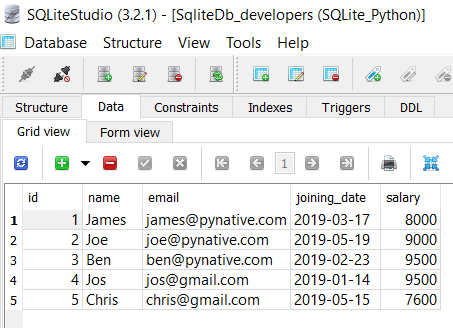
sqlitedb_developers table after deleting a row from Python

Note: If you are doing multiple delete operations and wanted to revert your change in case of failure of any operations, use the rollback() function of the connection class to revert the changes. Use rollback() function in except block.

Use Python Variable in a query to Delete Row from SQLite table

Most of the time, we need to delete a row from an SQLite table where the id passed at runtime. For example, when a user cancels his/her subscription, we need to delete the entry from a table as per the user id. In such cases, It is always best practice to use a parameterized query.

The parameterized query uses placeholders (?) inside SQL statements that contain input from users. It helps us to delete runtime values and prevent SQL injection concerns.

import sqlite3

def deleteSqliteRecord(id):
    try:
        sqliteConnection = sqlite3.connect('SQLite_Python.db')
        cursor = sqliteConnection.cursor()
        print("Connected to SQLite")

        sql_update_query = """DELETE from SqliteDb_developers where id = ?"""
        cursor.execute(sql_update_query, (id,))
        sqliteConnection.commit()
        print("Record deleted successfully")

        cursor.close()

    except sqlite3.Error as error:
        print("Failed to delete reocord from a sqlite table", error)
    finally:
        if sqliteConnection:
            sqliteConnection.close()
            print("sqlite connection is closed")

deleteSqliteRecord(5)Code language: Python (python)

Output

Connected to SQLite Record deleted successfully sqlite connection is closed
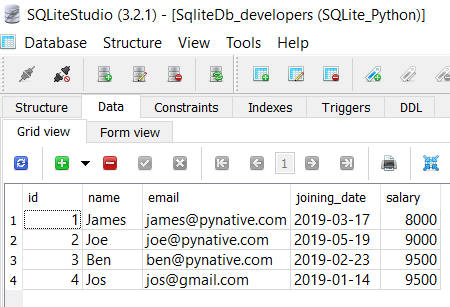
sqlitedb_developers table after removing row using parameterized query
sqlitedb_developers table after removing row using a parameterized query

Let’s understand the above example

  • We used the parameterized query to accept developer id at runtime using a placeholder(?) for the id column
  • Next, We then prepared data tuple by using Python variables.
  • Next, we passed the SQL delete query and data tuple to a cursor.execute() method.
  • In the end, we made our changes permanent into the database using a commit() method of a connection class.

Delete multiple rows from SQLite table

In the above example, we have used execute() method of cursor object to update a single record, but sometimes, we need to delete an N-number of rows. For example, You want to delete employee data from the developer’s table who left the organization.

Instead of executing a delete query repeatedly to delete each record, you can perform the bulk delete operation in a single query using the cursor.executemany() method.

The executemany(query, seq_param) method accepts two parameters a SQL query and a list of records to delete.

In this example, we are removing three rows.

import sqlite3

def deleteMultipleRecords(idList):
    try:
        sqliteConnection = sqlite3.connect('SQLite_Python.db')
        cursor = sqliteConnection.cursor()
        print("Connected to SQLite")
        sqlite_update_query = """DELETE from SqliteDb_developers where id = ?"""

        cursor.executemany(sqlite_update_query, idList)
        sqliteConnection.commit()
        print("Total", cursor.rowcount, "Records deleted successfully")
        cursor.close()

    except sqlite3.Error as error:
        print("Failed to delete multiple records from sqlite table", error)
    finally:
        if sqliteConnection:
            sqliteConnection.close()
            print("sqlite connection is closed")

idsToDelete = [(4,), (3,)]
deleteMultipleRecords(idsToDelete)
Code language: Python (python)

Output

Connected to SQLite
Total 2 Records deleted successfully
sqlite connection is closed

Let’s understand the above example

  • We prepared SQLite parameterized delete query with a single placeholder and then created a list of Ids to remove in tuple format.
  • Each element of a list is nothing but a tuple for each row. Each tuple contains the id of a developer. Here we created three tuples, so we are deleting three rows.
  • Next, we called a executemany() method to delete multiple rows from the SQLite table.
  • To get to know the number of records updated, we used a cursor.rowcount method.

Next Steps:

To practice what you learned in this article, Please solve a Python Database Exercise project to Practice and master the Python Database operations.

Filed Under: Python, Python Databases

Did you find this page helpful? Let others know about it. Sharing helps me continue to create free Python resources.

TweetF  sharein  shareP  Pin

About Vishal

Image

I’m Vishal Hule, the Founder of PYnative.com. As a Python developer, I enjoy assisting students, developers, and learners. Follow me on Twitter.

Related Tutorial Topics:

Python Python Databases

Python Exercises and Quizzes

Free coding exercises and quizzes cover Python basics, data structure, data analytics, and more.

  • 15+ Topic-specific Exercises and Quizzes
  • Each Exercise contains 10 questions
  • Each Quiz contains 12-15 MCQ
Exercises
Quizzes

Comments

  1. Imageyi says

    April 27, 2021 at 5:59 pm

    Why do you need to commit before and after the print line? Printing cursor.rowcount should not affect the database?

    sqliteConnection.commit()
    print("Total", cursor.rowcount, "Records deleted successfully")
    sqliteConnection.commit()

    Thanks!

    Reply
    • ImageVishal says

      April 28, 2021 at 9:55 am

      You are correct, I have updated the article

      Reply
  2. ImageAndrew says

    April 9, 2020 at 7:41 pm

    Awesome, thanks a million for this =)

    Reply
    • ImageVishal says

      April 10, 2020 at 3:50 pm

      You’re welcome

      Reply
  3. ImageR.K.Sharma says

    January 19, 2020 at 4:35 pm

    Please share the code for deleting multiple columns from a database using SQlite3 in python.

    Reply
    • ImageVishal says

      January 23, 2020 at 5:57 pm

      Hi R.K. Sharma Execute this code after succesfull connection.

      cursor = connection.cursor()
      alter_column = """ALTER TABLE Table_Name DROP COLUMN column1, column2"""
      cursor.execute(alter_column)
      connection.commit()
      
      Reply

Leave a Reply Cancel reply

your email address will NOT be published. all comments are moderated according to our comment policy.

Use <pre> tag for posting code. E.g. <pre> Your entire code </pre>

In: Python Python Databases
TweetF  sharein  shareP  Pin

  Python SQLite

  • Python SQLite Guide
  • Python SQLite Insert
  • Python SQLite Select
  • Python SQLite Update
  • Python SQLite Delete
  • Python SQLite Create Functions
  • Python Parameterized Query
  • Python SQLite BLOB
  • Python SQLite DateTime
  • Python Database Exercise

 Explore Python

  • Python Tutorials
  • Python Exercises
  • Python Quizzes
  • Python Interview Q&A
  • Python Programs

All Python Topics

Python Basics Python Exercises Python Quizzes Python Interview Python File Handling Python OOP Python Date and Time Python Random Python Regex Python Pandas Python Databases Python MySQL Python PostgreSQL Python SQLite Python JSON

About PYnative

PYnative.com is for Python lovers. Here, You can get Tutorials, Exercises, and Quizzes to practice and improve your Python skills.

Explore Python

  • Learn Python
  • Python Basics
  • Python Databases
  • Python Exercises
  • Python Quizzes
  • Online Python Code Editor
  • Python Tricks

Follow Us

To get New Python Tutorials, Exercises, and Quizzes

  • Twitter
  • Facebook
  • Sitemap

Legal Stuff

  • About Us
  • Contact Us

We use cookies to improve your experience. While using PYnative, you agree to have read and accepted our:

  • Terms Of Use
  • Privacy Policy
  • Cookie Policy

Copyright © 2018–2025 pynative.com

Advertisement