Change a MySQL User Password via cPanel
If you aren't familiar with using the command line interface, using cPanel makes it easy to change MySQL user passwords.
If you aren’t familiar with using the command line interface, using cPanel makes it easy to change MySQL user passwords.
Use cPanel to Change MySQL Passwords
- Log into your cPanel account for the database’s domain. If you aren’t sure how to access cPanel, read Getting Started with cPanel first.
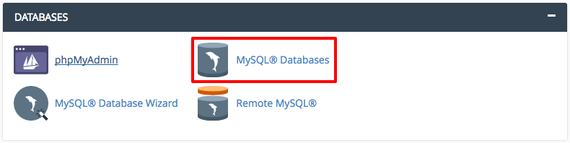
- Scroll down to the Databases section on the cPanel home page and click on MySQL Databases. This is where you can create new databases, manage current databases, create users, and manage users.

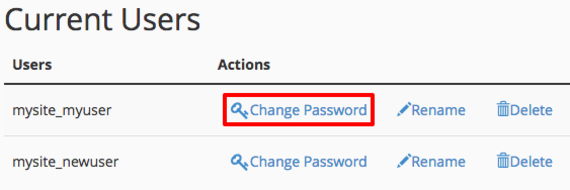
- Scroll down to the Current Users section and find the user that needs a new password. Click Change Password.

- Choose and confirm a strong password and click Change Password (cPanel even includes a password generator if you need a new strong password created). That’s all there is to it! (For information about creating strong passwords, see Best Practice: Creating a Secure Password)