Checking a MySQL Database for Errors and Repairing
To check and repair MySQL database errors in cPanel, navigate to the MySQL Databases section after logging in. From there, you can access the home screen to manage databases and users.
You can easily check your MySQL database for errors and repair them from the cPanel MySQL Databases home screen. Once you are logged into cPanel, click on the MySQL Databases link to take you to the home screen to manage your databases and users. If you need help creating and logging into your cPanel account, please see our article Creating a cPanel User Account.
Check the Database for Errors
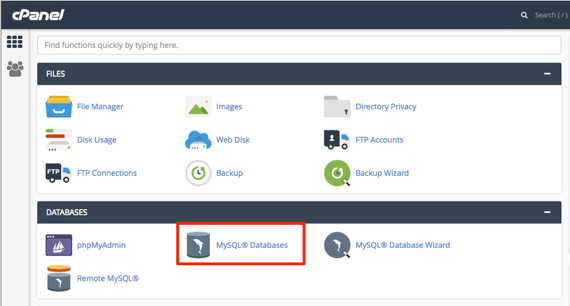
- From the home page of cPanel click on MySQL Databases.

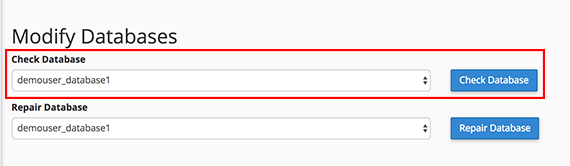
- You will see Modify Databases below the Create New Database section.
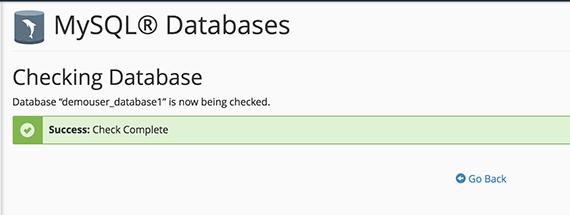
- Select Check Database to check for any errors. You will be navigated to a page notifying of the progress of the check.

- A green Check Complete bar will appear if there are no errors. If there are errors, they will be listed and a red bar will notify you that errors were found.

Repair the Database
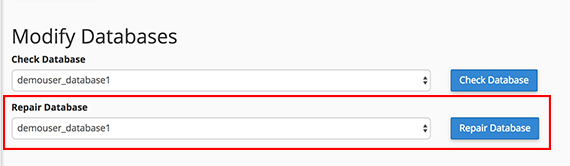
- If your database check returns errors, click Repair Database under the Modify Database section in the MySQL Databases home screen.
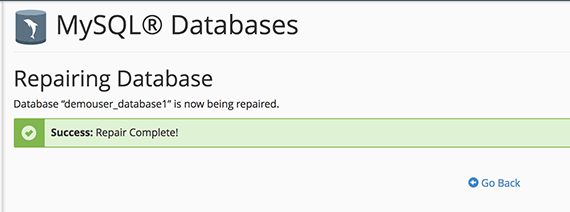
- This will begin a repair of your database and a green bar confirming that your database has been repaired will appear.