

Deleting MySQL Users
If you are using MySQL databases with multiple users, you may need to control database access by deleting database users. You can delete MySQL users using either cPanel or the command line.
If you are using MySQL databases with multiple users, you may need to control database access by deleting database users.
You can delete MySQL users using:
Using cPanel to Delete MySQL Users
If you aren’t familiar with using the command line interface, use cPanel to delete MySQL users.
- Log into your cPanel account for the database’s domain. If you aren’t sure how to access cPanel, read Getting Started with cPanel first.
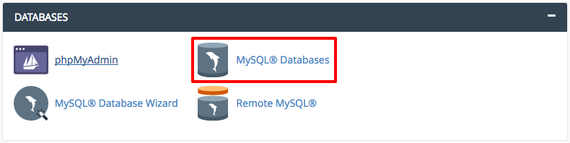
- Scroll down to the Databases section on the cPanel home page and click on MySQL Databases. This is where you can create new databases, manage current databases, create users, and manage users.

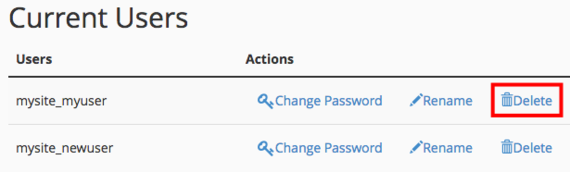
- Scroll down to the Current Users section. Find the user you need to delete and click Delete.

- Confirm that you want to delete the user. Once you delete a user, it cannot be undone!
Using Command Line to Delete MySQL Users
If you’re comfortable with the command line, it only takes a few minutes to delete MySQL users.
- Using the terminal program of your choice, log into your server as root. If you haven’t logged into your server using the command line before, read Logging into Your Server via Secure Shell (SSH) first.
- Log into your MySQL server by typing
mysql -u root -p
The -u root flag tells MySQL you want to log in as the root user, and the -p flag prompts MySQL to ask you for a password. When prompted, enter your root password and press Enter.
- You’ll now see a MySQL prompt that looks like
mysql>
- Now you’ll use the DROP command to delete a user. Deleting users cannot be undone. In the command prompt, type
DROP USER 'testuser'@'localhost';
- Replace “testuser” with the user you’d like to delete.
You’ve successfully deleted a MySQL user!
