Summary: in this tutorial, you’ll learn how to use the JavaScript string repeat() method to repeat a string a number of times.
Introduction to the JavaScript String repeat() method #
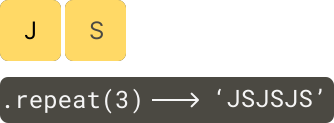
The String.prototype.repeat() method returns a new string that repeats the original string a number of times.
Here’s the syntax of the repeat() method:
str.repeat(count)In this method, the count is an integer that specifies the number of times to repeat the string str. The count is greater than 0 and less than +Infinity.
If the count is zero, the repeat() method returns an empty string. If the count is negative or +Infinity, the repeat() method raises a RangeError exception.
Note that the repeat() method doesn’t change the original string but returns a new string.
JavaScript String repeat() method examples #
Let’s take some examples of using the repeat() method.
1) Basic JavaScript repeat() method example #
The following example shows how to use the repeat() method:
let result = '*'.repeat(1);
console.log({ result });
result = '*'.repeat(3);
console.log({ result });
result = '*'.repeat(0);
console.log({ result });Output:
{ result: '*' }
{ result: '***' }
{ result: '' }2) JavaScript String repeat() method with negative count example #
The repeat() method will raise a RangeError exception if you pass a negative count into the method. For example:
let result = '*'.repeat(-1);Output:
RangeError: Invalid count value3) Using the repeat() method with a non-string object #
The repeat() method is generic by design, which does not require its this value to be a String object. Therefore, you can use the repeat() method with any other objects. For example:
const message = {
toString() {
return 'Hi';
},
};
const result = String.prototype.repeat.call(message, 3);
console.log(result);Output:
HiHiHiSummary #
- Use the
repeat()method to repeat a string a number of times. - The
repeat()method is generic, which doesn’t require thethisvalue to be aStringobject.
Thank you for your feedback!
