
Summary: in this tutorial, you will learn how to use the SQLite common table expressions (CTE) to make your queries more readable.
Introduction to SQLite common table expressions #
In SQLite, common table expressions (CTE) are temporary result sets defined within the scope of a query. CTEs allow you to make your query more readable.
Additionally, CTEs enable modular SQL queries by breaking them into smaller, logical units.
In practice, you can use CTEs to replace the subqueries to make them more readable.
Here’s the syntax for defining a CTE in SQLite:
WITH cte_name AS (
-- cte query definion
)
-- main query using the cte
SELECT * FROM cte_name;In this syntax:
- First, specify a name for the CTE in the
WITHclause. - Second, provide a query that defines the CTE inside the parentheses followed by the
ASkeyword. The result set followed by this query forms the temporary result set you can reference in the main query. - Third, write the main query that references the CTE.
Here’s an example to illustrate the CTE syntax:
WITH cte_example AS (
SELECT column1, column2
FROM table_name
WHERE condition
)
SELECT * FROM cte_example;In this syntax:
cte_exampleis the name of the CTE- The CTE query retrieves data from column 1 and column 2 of the table_name based on the specified condition. Note that the query may include join, group by, having, and other clauses of the
SELECTstatement. - The main query selects all columns from the CTE
cte_example.
SQLite common table expression examples #
Let’s take some examples of using the SQLite CTEs.
1) Basic SQLite CTE example #
We’ll use the tracks table from the sample database:
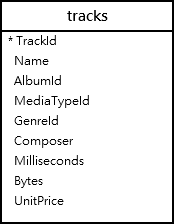
The following example uses a CTE to retrieve the top 5 tracks from the tracks table:
WITH top_tracks AS (
SELECT trackid, name
FROM tracks
ORDER BY trackid
LIMIT 5
)
SELECT * FROM top_tracks;Output:
trackid | name
--------+----------------------------------------
1 | For Those About To Rock (We Salute You)
2 | Balls to the Wall
3 | Fast As a Shark
4 | Restless and Wild
5 | Princess of the Dawn
(5 rows)How it works.
- First, define a CTE named
top_tracksthat retrieves the top 5 tracks from the tracks table. - Second, select
track_idand name from the CTE.
2) Finding the total sales amount for each customer #
We’ll use the invoices and invoice_items tables:
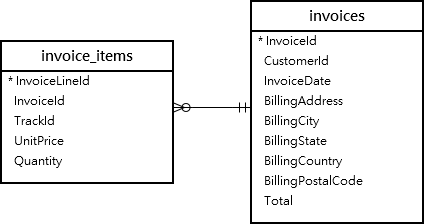
The following example uses a CTE to find the top 5 customers by total sales from the invoices and invoice_items tables:
WITH customer_sales AS (
SELECT c.customerid,
c.firstname || ' ' || c.lastname AS customer_name,
ROUND(SUM(ii.unitprice * ii.quantity),2) AS total_sales
FROM customers c
INNER JOIN invoices i ON c.customerid = i.customerid
INNER JOIN invoice_items ii ON i.invoiceid = ii.invoiceid
GROUP BY c.customerid
)
SELECT customer_name, total_sales
FROM customer_sales
ORDER BY total_sales DESC, customer_name
LIMIT 5;Output:
customer_name | total_sales
-------------------+------------
Helena Holý | 49.62
Richard Cunningham | 47.62
Luis Rojas | 46.62
Hugh O'Reilly | 45.62
Ladislav Kovács | 45.62
(5 rows)Summary #
- Use common table expressions (CTE) to create a temporary result set defined within the scope of a query.
Thank you for your feedback!
