File Menu
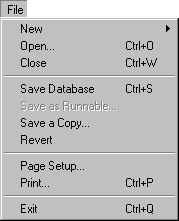
The File Menu
New
New Script (ctrl-N) creates a new script window, which can be saved to the desktop, external to Frontier's Object Database. New WP-text, Outline, Menubar, Table and Database also create new objects which can be saved to the desktop.
Open
(ctrl-O)
If you choose the Open... command from this menu, Frontier's action will depend on what you choose to open. You can open a different root file, perhaps to copy and paste a few scripts. If you open an exported Frontier object, Frontier will ask you where in the Object Database to store it and will then store it in the indicated location. If you open a desktop script, Frontier will run it.
Close
(ctrl-W)
The Close command will close whatever window is frontmost in Frontier.
Save Database
(ctrl-S)
Save and Save a Copy are very important commands in Frontier. Any changes you make to the Object Database are kept in memory until you save. Except in extreme circumstances you will always want to save your changes as you go. Use the Backup command in the Main menu to keep your database backed up.
Save as Runnable...
Saves a script as a desktop script. The desktop script will be run instead of opened for editing when double-clicked.
Save a Copy
Save a Copy makes a compacted copy of the Object Database. Frontier will re-use free space in the object database, but because of fragmentation within the database, Save a Copy will often make the file smaller. If Frontier is taking a long time to save your work, try doing a Save a Copy, it will probably speed things up.
Revert
The Revert command, after confirmation, disposes of in-memory changes to the database, and re-opens it from disk.
Print
Prints the contents of the frontmost window. (If that window is a table, it prints only the table itself, not the contents of each object stored in the table.)
Quit
(ctrl-Q)
Saves the Object Database and then quits the program.

|








 © Copyright 1992-2026 UserLand Software,
Inc..
© Copyright 1992-2026 UserLand Software,
Inc..