SOAP for Frontier
What is SOAP? 
From the abstract of the SOAP 1.1 specification: "SOAP is a lightweight protocol for exchange of information in a decentralized, distributed environment. It is an XML based protocol that consists of three parts: an envelope that defines a framework for describing what is in a message and how to process it, a set of encoding rules for expressing instances of application-defined datatypes, and a convention for representing remote procedure calls and responses. SOAP can potentially be used in combination with a variety of other protocols; however, the only bindings defined in this document describe how to use SOAP in combination with HTTP and HTTP Extension Framework."
On May 9th, 2000, SOAP 1.1 was submitted as a Note to the World Wide Web Committee (W3C). (UserLand's press release, additional quotes)
On June 20th, 2000, UserLand released the first version of SOAP support for Frontier. This release implements a client and a server for performing remote procedure calls over HTTP using the SOAP encoding for parameters and return values.
Download and installation
If you already have Frontier 6.2 or greater, you can skip this step -- you can skip ahead.
This release requires at least Frontier 6.1.
- Download builtins.soap [70kB] and open it from within Frontier.
- When asked for a name for the imported object, confirm the default choice, system.verbs.builtins.soap.
- Open the soap.init script and click the Run button. This will install the SOAP-RPC responder and set up the user.soap table.
- Finally, Jump to user.webserver.responders.SOAP, and set enabled to true. That's it, you're done.
How to use soap.rpc.client
The client-side interface for performing SOAP-RPC calls is implemented in soap.rpc.client. The parameter list of this script is very similar to betty.rpc.client. Most of the parameters have the same meaning, with the following exceptions:
- The actionURI parameter is used in the HTTP request line and in the SOAPAction header. It identifies the object to be called on the server.
- The methodName parameter is the name of a method exposed by the object that is identified by the actionURI parameter.
- The adrparams parameter is the address of a list or record containing the parameters to be passed to the server. If it's a record, every record element is a parameter with the element name determining the parameter name. If it's a list, it is assumed that the names of parameters are not important and they will simply be named "param1", "param2", etc.
- Asynchronous RPC calls are currently not supported, so there are no equivalents to the flAsync, adrCallback, extraInfo, and adrErrorCallback parameters of betty.rpc.client.
If you followed the install instructions, you should now be able to run the following example script. It will make an RPC call to the copy of Frontier running on your own machine, so make sure that Frontier's built-in web server is running.
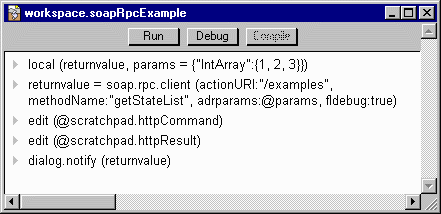
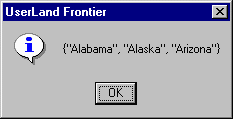
The server should return a list containing the names of the first, second, and third state of the U.S.A. in alphabetical order, i.e. Alabama, Alaska, and Arizona.
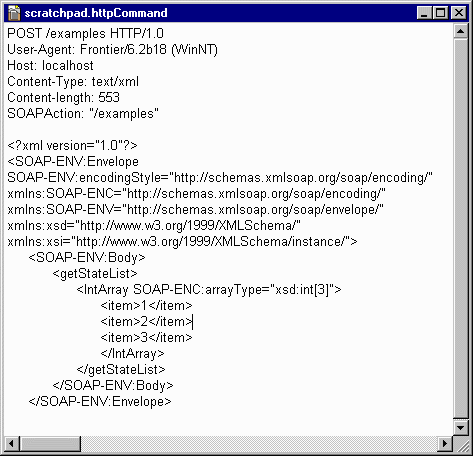
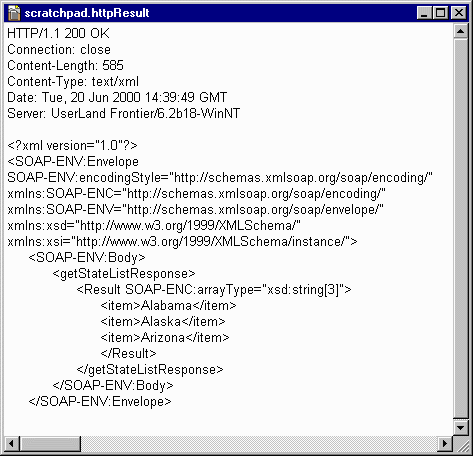
This is what the HTTP request and result should look like that were exchanged between the client and the server:
How to write a SOAP-RPC handler
Writing a SOAP-RPC handler is very similar to writing an XML-RPC handler.
Look in the Web Server sub-menu of the Web menu. If the first command is "Start," choose it. If it's "Stop," your server is already running.
Open user.soap.rpcHandlers and create a new subtable named "testing". In that table, create a new script called helloWorld. It takes one parameter, the name of the person who wants to be greeted and returns a string saying hello to that person.
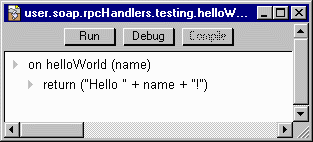
To call the handler, create a new script in the workspace table called callSoapRpc.
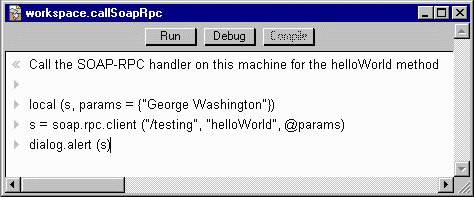
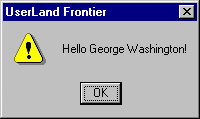
Run the script. You should see a dialog:
The current implementation supports the transportation of the following Frontier data types over SOAP-RPC: binaryType, booleanType, charType, dateType, doubleType, listType, longType, intType, shortType, stringType, tableType, and unknownType.
If the server encounters an error while processing a SOAP-RPC request, the response will contain a SOAP fault instead of a return value. If soap.rpc.client encounters this SOAP fault, it will throw a scriptError. So if you embed the call to soap.rpc.client in a try statement, you can catch the error. When writing a SOAP-RPC handler, just call scriptError to get a SOAP fault sent back to the client.
Take a look at soap.exampleRpcHandlers for more sample SOAP-RPC handlers. You will find script snippets to call these handlers in the bundle labeled "debugging code" at the bottom of the soap.rpc.client script.
More information
A story on Soap.Weblogs.Com has some general information on the current limitations of our implementation.
How to Enable the Manila SOAP Interface.
Manila RPC Spec.

|








 © Copyright 1992-2026 UserLand Software,
Inc..
© Copyright 1992-2026 UserLand Software,
Inc..