Frontier and Apache, 2 IP Addresses (Mac OS X)
Eric Soroos has a tutorial that you can use to get Frontier and Apache to listen on port 80 on two different IP addresses using Mac OS X.
Steps to setup 
1. Setup the two addresses.
2. Setup Frontier on one address.
3. Test and make Step 1&2 permanent.
4. [Optional] Setup Apache on the other address.
Read the rest of the Frontier and Apache, 2 IP Addresses Tutorial.
Revision
Note: This document is being updated, the following text is still in progress/being revised.
New method
Thanks to Sam DeVore who wrote the original technote to use the Mac OS X firewall to handle port forwarding along with assistance from Eric Sooros who helped with the original port forwarding support.
(LL: Which versions of OS X support these docs? Panther and newer/server editions?)
The Server Admin tools included with Mac OS X provides built in tools to get the same result as using the port forwarding included with Manila.
Steps
1. Open the Server Admin tool and select the "Firewall" section for the server you want to run Manila on.
2. Click on the Advanced Tab.
3. Add a new rule and set like shown below. Replacing the IP address with the one you want Manila to listen on and the port that you have Manila actually listening to.
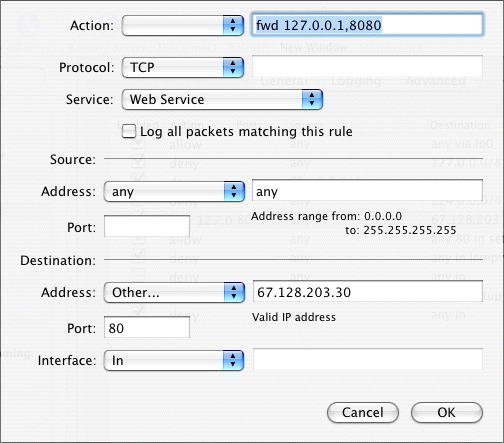
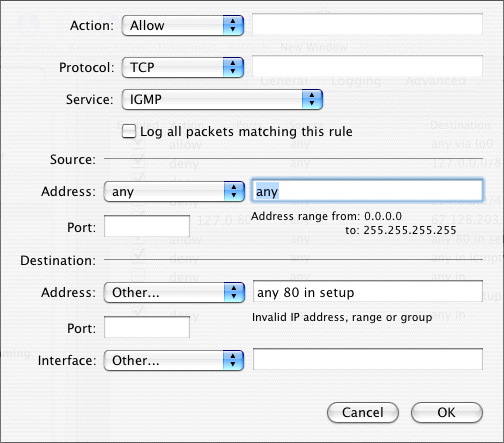
4. Add another rule to allow port 80 to go through like below:
5. Drag the rules around to get the ones that you have added higher in the list, similar to what you see below:
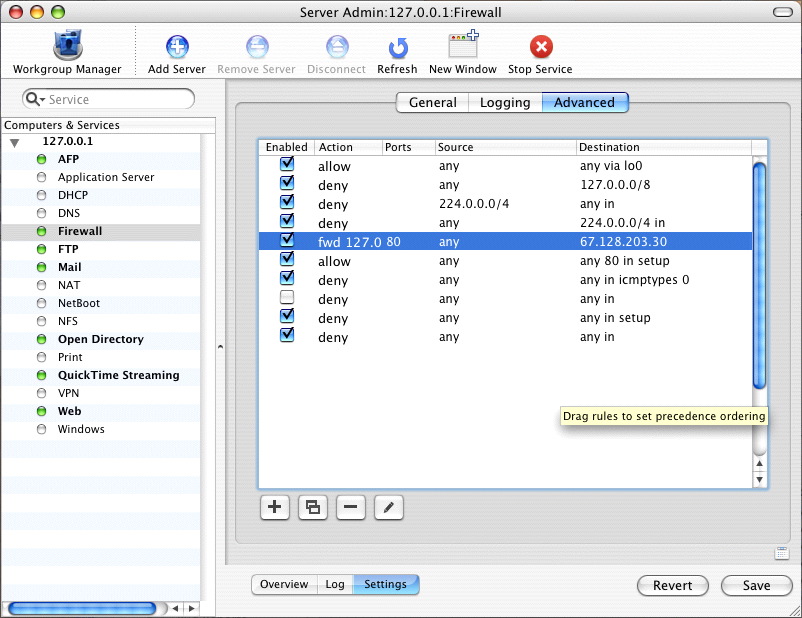
6. Save the new rules, and Manila should be getting traffic port forwarded from port 80.
Notes
(LL: Determine status of this and update multihoming notes)
This doesn't address needs for Multihoming, but I think Eric's startup script still works for that. I have two ethernet cards in my machine so I have not tested that part yet.
Troubleshooting
Check that performance caching in the web server settings is off. It seems that the performance caching is handled before the firewall rules and can cause all the rules to get disrupted. If you want to have the cache running you might try adding a rule to point port 16020 to port 8080 as well.

|









 © Copyright 1992-2026 UserLand Software,
Inc..
© Copyright 1992-2026 UserLand Software,
Inc..