Close
0%
0%

Bringing Text to Life on an ESP32

Text on a small display should come alive. It started with clock digits made of Bézier curves; this is where the idea went.

Similar projects worth following
A clock tells you the time, and you get it at a glance: you look, you know. Good design makes it easier to spot; animation makes it feel alive. Do you need the animation? No. It's a finishing touch, the kind an artist adds: everything works without it, and with it the thing is a pleasure to look at. This project is about pulling off that kind of touch on a microcontroller. It started in 2021 with a clock whose digits were Bézier curves, went on through a font editor, a dot-matrix clock, the Game of Life, and morphing between glyphs, and five years later came back to where it began. I do it simply because I like bringing information to life, and because I like programming as a kind of art. Microcontrollers come with their own limits, and getting around them is the challenge. A warning: it's a long story, and I tell it one step at a time.

"NICE TOUCH, DUDE"

After the Bézier curve clock that I built in 2021 https://habr.com/ru/articles/818873/ (in Russian), I got the idea of doing an entire handwritten font the same way. The existing formats, TTF and OpenType, don't work for this, and not because they're hard to parse. They store the outline of a letter, the boundary of a fill, while a handwritten font needs the path of the pen: the order of the strokes, their direction, where the pen leaves the paper, and how a letter joins its neighbor. None of that is in an outline, and you can't recover it from one. So I needed a format of my own: simple, but more general than the one in that clock, where any digit fit into three curves and, in theory, into two if you were willing to give up on looks. I had to start with a font editor, hw-fonts https://github.com/jef-sure/hw-fonts which I threw together in Vue with no build system at all: open index.html on your own machine and you can load a font you saved earlier or download the result of your editing. More on it in the log about the font.

The next touch was morphing fonts described by the coordinates of their dots: the dot-matrix clock https://habr.com/ru/articles/817927/ (in Russian).

Then came an intermediate step: live morphing in the Game of Life https://habr.com/ru/articles/1081830/ (in Russian).

That step led to the next one, morphing between the glyphs of a font https://github.com/jef-sure/cyd-dotview-morphing — although the font was really just a source there, and what it actually does is morph between any two matrices. The work moved from one idea to the next and left a handful of possible strategies along the way. Out of that grew a separate framework for morphing between matrices in dgx https://github.com/jef-sure/esp32-component-dgx — more on it in the log about dot morphing.

And all of it for a "nice touch." Simply because I like bringing information to life, and because I like programming as a kind of art. Microcontrollers come with their own limits, and that turns into the challenge: how do you get around them?

A warning: this is a long story. Five years have passed since the idea first came up, the experiments and the search for ideas took a long time, and if I cut the story short it stops holding together.

The story is told in the project logs, one step at a time. The page shows the newest log first; this is the order to read them in:

1. Where it started: a clock of Bézier digits
2. Three problems with curves on a microcontroller
3. A font that stores the path of the pen
4. Joining two letters with one curve

More to come.
  • An HTML page cut up at build time

    Anton Petrusevich • 6 hours ago • 0 comments

    A web page on a microcontroller is usually either entirely static or assembled in code from scraps of HTML in printf calls, and then you can neither open it in a browser nor hand it to a web designer. Here the page is an ordinary HTML file, misc/index.html. You can open it from disk and see what it looks like, and edit it in any editor; the field values in it are marked by placeholders such as %HOST_NAME% and %TIMEZONE_OPTIONS%.

    I came up with this back for the dot-matrix clock https://habr.com/ru/articles/817927/ (in Russian), along with the QR code for setup. There a Perl script cut up the HTML. I had to move to Python because ESP-IDF drags it along in any case, while a person may well not have Perl.

    The idea itself I picked up from the "real" template engines in big systems: they, too, first parse a template into constant pieces and calls to code, and then run the finished list. Here the parsing has been moved to build time, and only the running is left for the microcontroller. I haven't seen this approach in other people's microcontroller projects.

    At build time the script misc/split_to_template.py minifies the file, removing comments and the whitespace between tags, and cuts it into pieces at those placeholders. The pieces become a header file with an array of pairs, "constant text, handler": the constant text is the piece of HTML up to the next placeholder, and the handler is a function that outputs the value for that placeholder. The function's name is made from the placeholder's name: %HOST_NAME% becomes http_data_host_name. The clock's page has eight placeholders and nine pieces, 4 KB of HTML after minifying.

    The array is included in main/webserver.c, where those functions are written. The compiler checks that they match: a placeholder added to the HTML without a function, or a function without a placeholder, is a build error, not an empty field on the page that somebody notices six months later.

    A request for the page is handled by walking the array: send a constant piece, call the handler, on to the next piece. Everything is sent in parts, chunked, straight from flash: the page is never assembled in memory, there is no buffer for it, and there is no template engine. A handler sends its value with &, <, >, and quotes replaced by HTML entities, so that a key or a name containing one of those characters doesn't break the page. The only handler with a buffer is the list of time zones: that is about 600 option lines, tens of kilobytes, and they are collected a kilobyte at a time and sent in batches rather than one by one.

    The form comes back as a form-encoded POST, no more than 2 KB, and is parsed in place in the string received: %XX and + are decoded right where they were read, and no memory is needed for a copy. The fields go into the settings structure, and the whole structure is compared with the current one: if nothing changed, nothing is written to NVS and the page answers "no changes." After parsing, the browser is redirected to a result page, so refreshing the page in the browser doesn't submit the form again.

    The settings are stored in NVS as one record: the structure and its version number. When a field is added, the number goes up, a record of the previous version is read as the beginning of the new one, and the new fields get their defaults. That lets the firmware be updated without losing the settings. A record with an unknown version isn't read at all, and the clock starts from a clean slate.

    On a board with a DSI display there is one more record in NVS, and this one isn't a setting: the measurements of the board. On first start dgx measures from what size on a piece of a picture is better handed to the hardware transfer than to the processor, and the clock saves the result so it doesn't have to measure on every power-on. The measurement takes 0.07 s and doesn't show on the screen. "Clear all settings" leaves this record alone: it describes the board, not the owner.

  • Setting it up without a computer

    Anton Petrusevich • 6 hours ago • 0 comments

    In the 2021 clock the Wi-Fi password and the service keys lived in sdkconfig, that is, in the firmware. Now the project configuration holds only the hardware, and everything that has to do with location, network, and services the clock keeps in its own NVS, where it survives reflashing. It is set in two ways: the Wi-Fi network from a phone over BLE, with the standard Espressif app that is in Google Play and the App Store, and the rest on a web page that the clock serves itself. Neither needs a computer.

    Network

    In the dot-matrix clock the network was set through SoftAP: the clock brought up its own access point. I dropped that: on the phone you have to connect by hand to a new, unfamiliar access point. With BLE the phone stays on its own network, and the app does everything else. Not the most convenient app, I have to say. The provisioning protocol allows for arbitrary extra data of your own, but the app can't handle it. If you need to set up several devices at once, you'll be typing the same data into the app every time. Its advantage is that the app already exists for both platforms: you don't have to become an app developer yourself, write your own app for both platforms, and so on. Too much hassle.

    The app is called ESP BLE Provisioning. A clock that doesn't know a network shows a QR code for it. The QR code carries the device name, "CLOCK-" plus the last three bytes of the MAC address, and a proof-of-possession password: the network can be set by the phone that read the code off the screen, not by anyone who happened to hear the clock over BLE. The app sends the network name and password, the clock tries to connect and answers the phone: connected, wrong password, or no such network. After a failure you can send another network.

    When the clock already has a network and it needs to be changed, the old one is set aside while the setup runs: if no phone shows up within 3 minutes, the clock goes back to the old network and back to work. A clock with no network waits for a phone as long as it takes.

    BLE is needed only for that time. Network setup is a boot of its own: once it has a network, the clock restarts, and in normal operation the BLE stack is unloaded and its controller's memory is returned to the heap. As a side benefit, the radio doesn't have to be shared between Wi-Fi and BLE, and Wi-Fi runs without sleep mode: with it, the clock answered a request for the page with a delay.

    Before setup, the name on the network is "weather-clock-" plus those same three bytes of the MAC address, so that two units in one house don't fight over the name. Under the same name with ".local" added the clock answers on the local network. The name can be changed on the page; letters, digits, and hyphens are kept, and anything else becomes a hyphen.

    Of several access points with the same network name the clock picks the strongest one, not the first one it hears, and after a drop it reconnects in 2 seconds.

    The settings page

    The BOOT button restarts the clock into settings mode. How long you press means nothing, and there is no long press: in an enclosure the button may be a touch button, and when a clock is being carried it's held however it's held, and a finger may rest on the button for as long as you like.

    Settings mode is a boot of its own. The press writes a request to NVS and restarts the clock; the next boot picks up the request, erases it, and brings up the page instead of the clock, and the boot after that is the clock again. That way the page has the screen and the memory all to itself: the web server doesn't have to share RAM with the virtual screens and the tasks of the clock.

    Once it's up, the clock connects to the network and shows the address of the page as text and as a QR code, with the signal level next to it: a page that loads poorly is explained by a weak signal. The page waits 5 minutes, and then the clock goes back to work. Pressing the button again closes it too. If the clock couldn't connect to the...

    Read more »

  • 53 KB for a handshake: memory on an ESP32

    Anton Petrusevich • a day ago • 0 comments

    The clock doesn't have much RAM, and here is where it goes. Virtual screens: the hours-and-minutes band 32 KB, the temperature band 16 KB, the city name band 15 KB, and the seconds line and the wait indicators together under 2 KB. The glow of the weather icon: two brightness maps at a byte a pixel, 80x74 pixels, 12 KB. Task stacks: five at 4 KB, 8 KB for the weather task, 2 KB for the button, 30 KB in all. Wi-Fi and the system take the rest.

    The hungriest consumer isn't on that list, because it lives for one second: the TLS handshake of a weather request. The service sends a chain of four certificates with keys up to 4096 bits, and verifying it, together with the TLS buffers, takes about 53 KB under ESP-IDF 5.5 and about 48 KB under 6.0. That memory has to be there every 5 minutes, or the weather won't arrive.

    Free before a weather request: 71 KB under ESP-IDF 5.5.4, 73 KB under ESP-IDF 6.0.1.
    Left at the worst moment of the handshake: 19 KB under ESP-IDF 5.5.4, 26 KB under ESP-IDF 6.0.1.

    That was measured right after power-on, while the wait indicators are still on the screen. Once they have what they were waiting for, they go away along with their task and give back another 7.5 KB: the band, the task's stack, and whatever it was using.

    Those indicators made for a story while this text was being written. Under ESP-IDF 5.5 the weather suddenly stopped arriving: the handshake was one kilobyte short for verifying a certificate. The memory had been taken by the wait indicators I had added the day before. They live until the first weather arrives, and the weather couldn't arrive while they were holding the memory. First I turned off the blur of the weather icon: its copy of the frame cost 6 KB. Then, in dgx 0.4.9, the glow went from four bytes a pixel to two, the one-pass blur learned to do without the copy, and it came back. Free memory before a weather request went from 52 KB to 71.

    The same thrift is behind two decisions described in the log about setup: the BLE stack is unloaded as soon as the network is set, and the settings page lives in a boot of its own and doesn't share memory with the clock's screens.

  • The first thing built on it: a weather clock

    Anton Petrusevich • a day ago • 0 comments

    Image

    A weather clock in a handwritten font

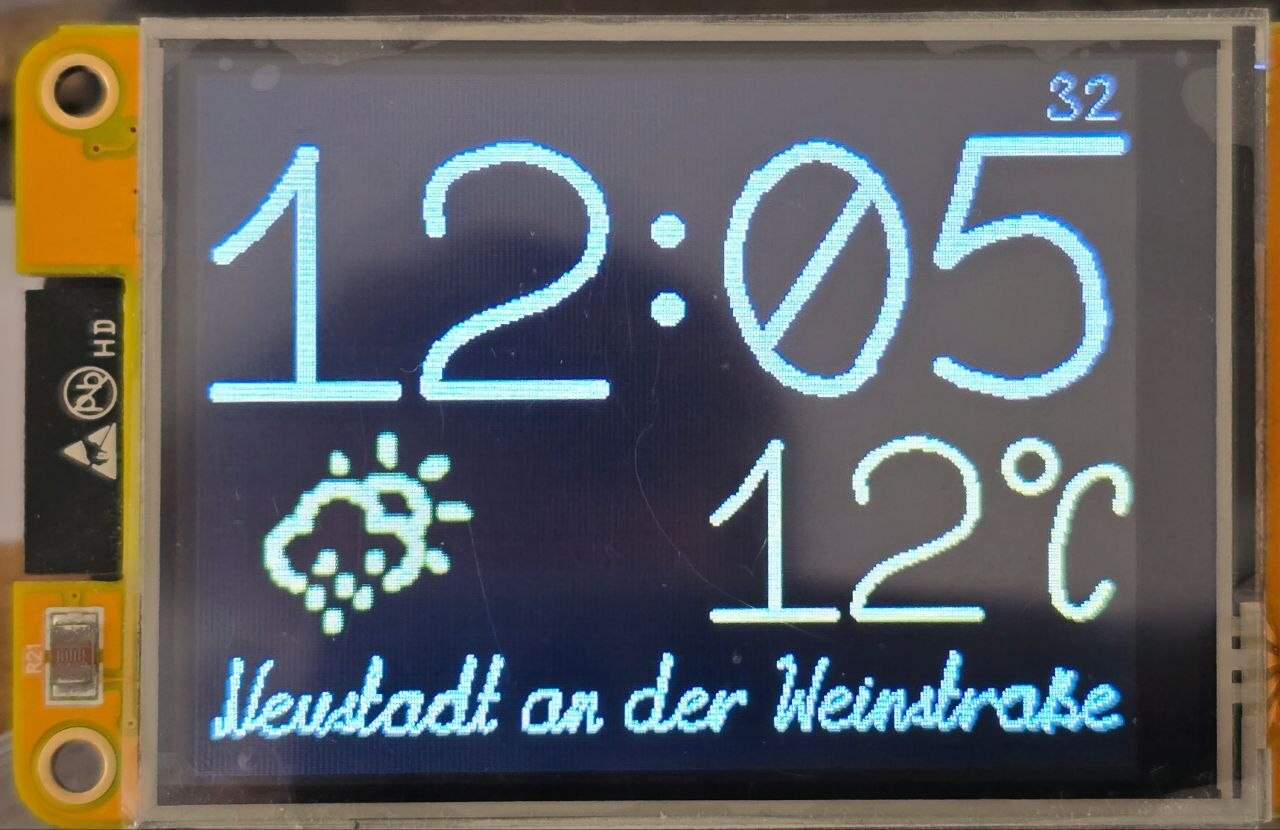
    A clock on an ESP32 with a 320x240 display. The time, the temperature, and the city name are drawn in a handwritten font built from Bézier curves: the digits of the time flow into one another, and the temperature and the city are written out stroke by stroke. The weather icon is made of dots and flows smoothly from one icon into the next.

    What the pen writes

    The pen writes:
    1. The time at power-on, digit by digit, in about a second. After that the digits only flow into one another;
    2. The city name, letter by letter;
    3. The temperature. It changes rarely, so it doesn't need morphing. The pen first erases the characters that changed, along the same path it wrote them and twice as fast, and then writes the new ones. The degree sign sits at the right edge, and the digits and the minus sign before it stay in fixed places;
    4. The letters "Z" and "W" in the top row, while the clock is waiting for the time and the weather after power-on: the pen writes the letter, erases it, and writes it again.

    There is no real erasing here; it's a trick: to remove what was written, the pen writes the same thing once more, along the same path and at the same thickness, only in ink the color of the paper.

    The font has no "℃" sign. It is assembled on the spot: a ring in the upper left corner and a narrow letter "C" from the font, together the size of one digit.

    The minus before a number is not a hyphen. The hyphen in the font sits at the middle of the lowercase letters, which is where it belongs in a name like "Rostov-on-Don." In front of digits it ends up too low and looks like an underscore that has crept upward. So font0ss has a separate minus sign: a bar at half the height of the digits, 31 units above the hyphen. The font doesn't swap one for the other on its own; the minus is put there by the code that writes the number: the temperature gets the minus sign (−), and the city name keeps its hyphen (-).

    Power-on is in the video at the end of this log: the pen writes the time and the city name, and the indicators in the top row show what the clock is still waiting for. Wi-Fi connects first, then the weather arrives, and the time from the network comes last.

    Scale in the clock

    The temperature is drawn with one scale for both axes. So is the city name, as long as it fits its place across; a long name is not shrunk but squeezed horizontally, the letters keep their height, and the pen slims down along with it. A short name is not stretched to the full width. The digits of the time always have two scales, across and down, and they are computed from the room on the screen. The hours-and-minutes line is divided into slots, one per digit. The widest digit of the font has to fit a slot across and the tallest has to fit the line down; that gives two numbers, how many pixels a cell takes across and how many down. The proportions of the font are not preserved.

    Only the control points are stretched: x is multiplied by one scale and y by the other, while the pen stays round and the same thickness in every direction. So a stretched digit has vertical and horizontal lines of the same weight, unlike lettering stretched in an image editor, where the horizontal strokes get fat.

    The clock picks the pen thickness itself, and it is the clock, not the font, that ties it to the scale: the pen is 9 font cells times the scale, so the line grows and shrinks with the letter. At a scale of 0.5 that is 4–5 pixels, and at a scale of 2 it is 18. With two scales the geometric mean is used: on a 320x240 screen that comes to 6 pixels for the hours and minutes and 1 pixel for the seconds.

    The digits differ in width; a one is narrower than a zero. The slot is the same for all of them, and a digit is shifted to the middle of it, so the time doesn't slide around the screen when a one replaces a zero.

    That kind of stretching doesn't work for handwritten letters: with different scales on the two axes the slant and the curves would drift,...

    Read more »

  • One task owns the display

    Anton Petrusevich • 2 days ago • 0 comments

    Exactly one task works with the display. I hold to the principle that one party alone should work with a physical bus: no locks are needed, and what to do is passed along in messages. I try to build things this way every time, and it is also why none of the components I publish in the Espressif registry https://components.espressif.com/components?q=namespace:jef-sure are thread-safe: one task owns the device, and there is nobody to protect it from. The time, the weather, the city, and the wait indicators each draw on virtual screens of their own and send that task a message: what to show and where. Once it has sent the message, a task waits for nothing and goes on with its own business.

    There is no lock on a virtual screen either: at any moment it has one owner. While a task is drawing, the screen is its own. A "show this" message hands the screen to the display task, which transfers it to the display and hands it back. A task waits only when it needs its screen again and the screen hasn't come back yet: right before drawing on it. Until that moment it is free, and that time goes to the other tasks.

    The "screen is back" signal is a FreeRTOS binary semaphore, one per screen, but it doesn't work as a lock. A task takes it before drawing and, when it sends the message, doesn't give it back: the screen goes along with the message. The display task never takes it and never waits on it; it only gives it after the transfer.

    There used to be a mutex here. Both sides took it, the owner of the screen and the display task, which waited on it. It wasn't protecting any shared data; it was standing in for that same handing of the screen from one to the other. Now the handoff is explicit, and the display task waits for nothing.

    That is also where the pace comes from. Over SPI you can't draw more often than the screen gets to the display: the transfer takes time, and that time is always enough. For a display on DSI the transfer costs almost nothing, so there the source keeps the pace itself, the way a video player does: it doesn't start the next picture until one frame of the display has passed since the previous one.

    For the details on curves, thick lines, and the font, see the dgx documentation, Handwritten text in DGX:

    https://github.com/jef-sure/esp32-component-dgx/blob/main/docs/handwriting-en.md

  • Drawing: segments, thick lines, ink

    Anton Petrusevich • 3 days ago • 0 comments

    How it was

    In 2021 I tried to come up with an algorithm for choosing the number of segments automatically, but in the end I settled for a fixed one: 13 for any curve. For a small curve that is too many, for a large one too few. I did the thickness by brute force: thick segments, with filled circles at the joints to close the wedges. I'm sorry to say I was never happy with the joints, and when I timed it, the circles alone turned out to take a third to a half of the time to draw a symbol. Anti-aliasing mostly hid the flaws of the joints, and for its sake the digits were drawn on 8-bit virtual screens, where a byte is an amount of ink.

    Every digit had its own virtual screen, 40x120, and the ones that had changed were sent to the display. Two tasks drew on them, time and weather, and a third, the main one, transferred them to the display: it was sent a message that a frame was ready. While the message was on its way, the drawing task could already have started the next frame, and the main task would have transferred a half-erased screen. To keep that from happening, a semaphore guarded the virtual screens: whoever draws or transfers holds it.

    How it is now

    The editor counts the segments: for every curve it stores the smallest number at which the polyline strays from the curve by no more than half a unit. On output that number is multiplied by the square root of the scale. The right half of the zero in font0ss needs 13 segments at a scale of 1, 10 at half scale, and 19 at double. Funny thing: at a scale of 1 it comes to the very 13 I picked by eye in 2021. Or maybe my eye is just trained by now.

    The square root is there because the deviation of a polyline from a curve falls as the square of the number of segments: a curve twice as large needs 1.41 times as many, not twice as many. Saving on segments is worth it: the drawing time depends on how many there are, not on the length of the line.

    A segment is now a single convex shape: a rectangle with a flat start and, at the end, a disc as wide as the line. The start is covered by the disc of the previous segment, so there are no gaps at the bends whatever the turn. The font draws in about 60% of the time it used to take.

    The gain is in calls, not pixels. A shape is filled row by row: for every row of the screen there is one call that paints a horizontal strip from the left edge of the shape to the right. A call costs 1.3–1.9 µs almost regardless of how many pixels are in the strip. Before, a segment and the circle at its joint were filled separately, and where they overlapped the same screen row was painted twice. Now there is one shape and it is convex: in any screen row it has exactly one strip, and so one call.

    The curves are no longer anti-aliased: the joints it used to hide are gone by construction. The edge of a line became soft again later, in another way: dgx got a pen with a soft edge, and the clock writes with it now. That is a log of its own, at the end. Post-processing is still available, but only for dot morphing. There, each frame can be run through a filter before output, and dgx comes with a ready-made blur filter: a one-bit icon looks jagged without blur. The weather icon uses it, one pass. What that filter once cost is told in the log about memory.

    The 8-bit virtual screens stayed, even though the anti-aliasing they were there for is gone; the soft pen writes only on them. A byte is an amount of ink: 0 is paper, 255 is ink. A screen like that has no color; the color appears when it is transferred to the display: a table of 256 values says what color to show each amount of ink in, from the color of the paper to the color of the ink. To recolor the time, at sunset for instance, it's enough to recompute the table; the drawing itself stays as it is. And eight bits instead of sixteen cut the memory in half: the hours-and-minutes band, 320x100, takes 32 KB instead of 64, the temperature band, 220x74, takes 16 KB, and the city name band, 320x46, another 15 KB....

    Read more »

  • Dot morphing

    Anton Petrusevich • 5 days ago • 0 comments

    The second kind of morphing in the clock works on dots, not curves: that is how the weather icon flows. It didn't come from the 2021 clock but down another branch, through three projects in a row.

    Image

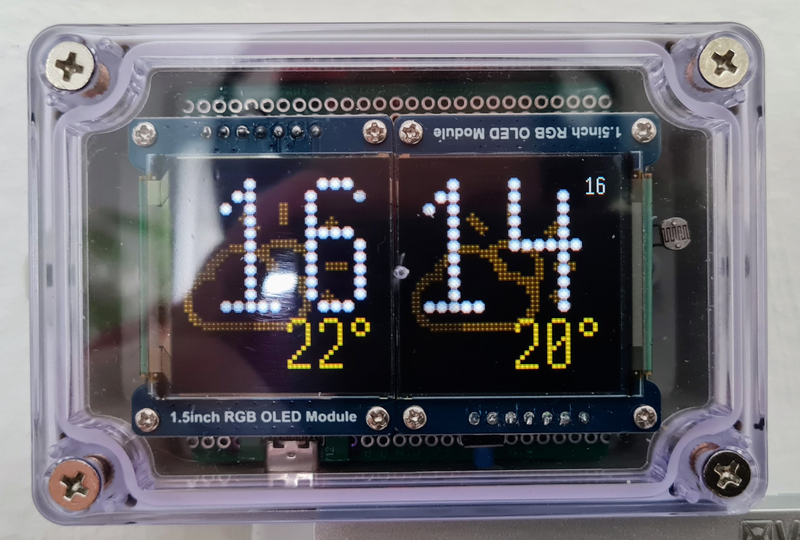
    First there was the dot-matrix clock https://habr.com/ru/articles/817927/ (in Russian) on two OLED displays. 

    Image

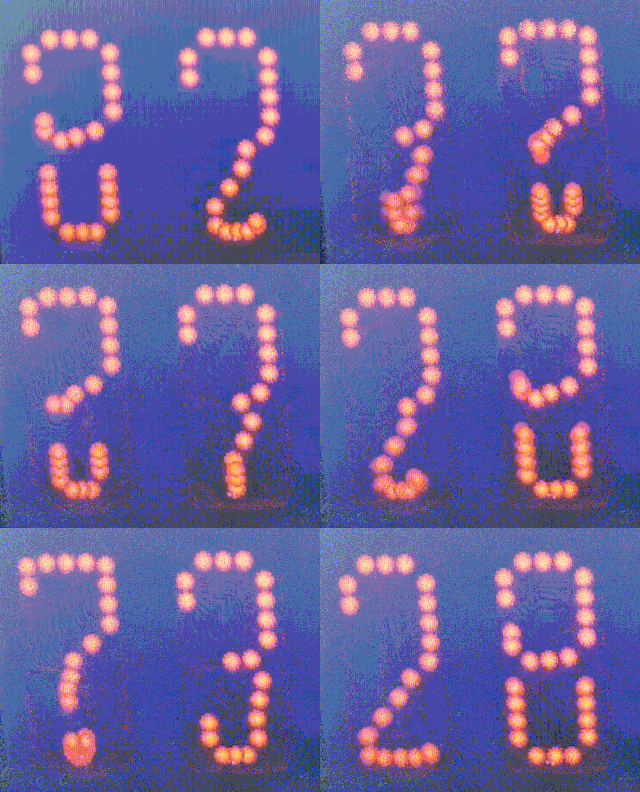
    Every symbol there is described by the coordinates of its dots, and the order of the dots in the list is the choreography: dot number i of one symbol flies to dot number i of the other, and if the symbols have different numbers of dots, the shorter list is padded with repeats of its last dot. An eight, for example, has more dots than a nine, and in the transition the extra dots of the lower left arc simply collapsed into the bottom dot of the nine. The order was chosen so that the parts that don't change stay where they are during a transition. I made the digits and a couple of symbols for degrees myself. For the weather icons I started from a font of weather icons and reworked them by hand in the FontCreator editor https://github.com/Llerr/FontCreator which lets you set the index of every dot while you edit a symbol.

    Next came an experiment with the Game of Life https://habr.com/ru/articles/1081830/ (in Russian). Normally one generation just replaces another, frame after frame. I wanted one to flow into the next, and that is how the "living flow" came about. There is no need to place dots by hand here; the rules of the game themselves say who flies where. A cell is born when it has exactly three live neighbors. Those are its parents, and a dot flies into the new cell from each of them. Three dots arrive in one cell at once, and to keep it from blowing out, the brightness is split evenly among them.

    The third step was morphing a pair of arbitrary symbols https://github.com/jef-sure/cyd-dotview-morphing of an ordinary bitmap font. A pair of symbols has neither an order of dots nor a rule of birth, so the source for each new dot is picked automatically, from geometry. The font is only a source of dots here: the transformation runs between any two matrices. The framework in dgx grew out of those three projects: a matrix of cells, a plan of "who flies where," a frame, and a renderer with glow, and all the project has to say is where the next state comes from and how to choose the sources.

    A cell is either lit or not, and when one matrix gives way to another there are four cases for its state. It was dark and stays dark: nothing happens. It was lit and stays lit: the dot stays put. It was dark and lights up: a dot arrives from somewhere. It was lit and goes dark: the dot leaves. That leaves two questions: where does a new dot come from, and where does an old one go?

    The answer to the first is this: a new dot comes from the nearest dot of the old symbol that isn't yet serving as anyone's source. A dot that isn't going anywhere itself qualifies too: it stays lit where it is and, on top of that, lets a new one go. That is how "u" becomes "ü": the whole letter stays lit, and the dots above it bud off from the tops of its stems. Each old dot serves as a source once. The nearest one is found not for each dot separately but for the whole matrix at once, vector by vector. A vector here is a shift, one cell up, for instance. Take one vector, and every new dot checks whether the old symbol has a free dot at exactly that shift from it. Then the next vector, from short to long, until every new dot has a source or the free old dots run out. A line that has moved sideways finds its whole old line with a single vector and travels as a whole instead of falling apart. A new dot that got no source appears from the center of the matrix. An old dot that nobody took and that isn't in the new symbol is left over: that is the second question, and I'll get to it below.

    It didn't start out that way. At first there were two passes: neighbors, and then, cell by cell, all the rings at once, so a cell early in the scan could grab a source four...

    Read more »

  • Morphing: digits that flow

    Anton Petrusevich • 7 days ago • 0 comments

    Turning one digit into another works the way it did in 2021. The control points of a curve travel in a straight line from the old place to the new one:

    Image

    A curve is built from the new points and drawn like any other.

    For that, the curves of both digits have to be of the same kind, and the strokes in the font vary: dots, straight lines, quadratic and cubic curves. So before a transformation they are all converted to cubics. A straight line and a quadratic curve are raised to a cubic with no change of shape, and a dot becomes a curve whose four points are all in one place. After that a digit is a list of cubic curves, and a transformation is a list of pairs of such curves.

    Pairs of curves

    In 2021 every digit had exactly three curves, and they came in an order that suited morphing: the first into the first, the second into the second. Here is how that looked in the first experiment, with the digits flowing into one another in a loop; the video is at the end of this log.

    In the font the order is different: a digit is drawn the way a hand writes it, and when the clock's digits started coming from the font, the transformation got noticeably worse, and it took me a while to see why. Writing order is no good for pairing: a nine starts with the oval and ends with the tail, a seven starts with the top, and the top of one flew downward to become the tail of the other. So the pairs are now chosen by search, so that all the points together travel the shortest distance. A curve may also be taken from its other end; it draws the same thing. For the digits of font0ss the distance comes out 30% shorter on average than in writing order, and four times shorter when a two turns into a nine.

    The search is cheap: the best path is computed over the sets of strokes already taken, of which there are 2^n rather than n!, and a digit has only a handful of strokes. A symbol with more than ten strokes dgx would pair in writing order.

    Digits have different numbers of strokes, so not every stroke finds a partner. An extra stroke is paired with a point: a curve whose four control points coincide, at the spot where the pen finished writing the digit. From there it is an ordinary pair: over the transformation an extra stroke of the old digit shrinks into that point, and an extra stroke of the new one grows out of it.

    Position

    The shift that puts a digit in the middle of its slot depends on the digit's width, so it is different for the old digit and the new one. It changes along with t: a one turning into a zero moves over to the zero's place on the way.

    Timing

    The transformation of the hours and minutes takes half a second and ends exactly when the second shown on the screen begins. For the other half second the picture stands still: the eye needs time to read it. The seconds worked the same way at first, but that pace felt a little too busy for a digit that changes every second, so I shifted it: the seconds transform in 0.3 seconds and stand for 0.7.

    The parameter t in the formula is the fraction of the way traveled: at 0 the screen shows the old digit, at 1 the new one, and in between an intermediate shape. It is computed from time: how long since the transformation began, divided by its duration. A quarter of a second in, t = 0.5, however many frames have been drawn by then. If a frame took longer than usual to draw, the next one simply lands a little farther along, and the transformation still ends on time.

    What goes into the curves is not that fraction itself but one smoothed by the well-known smoothstep formula: 

    ImageIt changes more slowly at the beginning and the end than in the middle, so the digit starts and stops gently.

    The frame

    Every frame of a transformation is a new picture, and the old one has to go. So the digits are drawn on a virtual screen and reach the display finished, with no flicker. There are as many frames as there is time for: about a hundred in half a second when one digit of the hours or minutes is changing....

    Read more »

  • The pen: effort and pace

    Anton Petrusevich • 10/15/2026 at 21:02 • 0 comments

    Writing is text drawn not all at once but only up to the point the pen has reached, and that point moves forward with time. Nothing has to be erased: the pen only adds ink, each step draws something new, and text finished in any number of steps matches, pixel for pixel, text drawn in one go.

    The question is what to measure the pen's position in: what does "the pen is halfway" mean?

    Effort

    The obvious choice is the curve parameter: every stroke runs t from 0 to 1, so put the pen at t. That falls apart right away. The parameter doesn't move evenly along a Bézier curve, and strokes differ in length many times over, so a long straight line and a tiny curl would take the same time. The pen would sprint, then crawl.

    The second option is more honest: the length of the path traveled. The pen moves at a steady speed, but a hand doesn't write that way: it is fast on a straight line and slow on a curl. Steady writing on a screen looks mechanical, like a plotter, and I didn't like it.

    So I introduced a third measure, effort: length plus a charge for curviness. Every stroke has its own:

    effort = length + k × number of segments

    The length is the pen's path along the stroke. The number of segments is a measure of curviness: the tighter the curve, the more straight segments it takes to draw. The coefficient k says how many units of path each segment costs. With k = 0 this is the second option, and the pen moves evenly.

    I picked the coefficient by eye, by how the writing looks on the screen; the clock uses k = 6. An example from font0ss: the digit one has a path of 271 and 5 segments. The letter "o" has a shorter path, 208, but 23 segments. At a steady speed the one would take longer to write. With k = 6 the effort of the one is 301 and that of the "o" is 346, so the round letter takes longer than three nearly straight strokes, just as it does for a hand.

    A dot has no length, but it does take time. It, and every move of the pen through the air, is given the least effort there is, the same as a hyphen: 44.

    The microcontroller computes neither the length nor the number of segments. A stroke never changes, so the font editor computes both numbers once, when it saves the font, and stores them next to the stroke. All the microcontroller has to do is read them and add them up.

    Pace

    The pen spends effort at a constant pace. The digits of the hours and minutes are written at a pace of 3000 units a second, the city and the temperature at 1500. The time since the writing began, multiplied by the pace, says how much the pen has spent so far, and therefore where it is now. However many frames have been drawn by that moment, the pen is where the clock says it should be. The transformation of digits uses the same trick; more on that in the next log.

    It takes three steps to get from effort spent to a pixel. First, find the stroke it falls on: all the strokes before that one are finished. Then find the place on that stroke, measured along the polyline rather than by the curve parameter, so that the pen neither crawls nor jumps on segments of different lengths. Finally, the segment under the pen is drawn up to where the pen has got to, with a round tip.

    The writing time doesn't depend on the scale. Effort is counted in font units, not pixels, so large text takes as long to write as small text: the pen simply moves faster on the screen. The time depends only on the text itself and on the pace. At 1500 units a second the pen writes "Frankfurt am Main" in 5.2 seconds; at 3000 it would take 2.6.

  • One font, any size, any pen

    Anton Petrusevich • 10/15/2026 at 21:00 • 0 comments

    Units and scale

    The font is drawn on the editor's grid, and all of its numbers are cells of that grid, not pixels: the letter "o" in font0ss is 49 cells wide. So the font has no size. It gets one on output: every coordinate is multiplied by one fractional number, and out come pixels. That number is the scale, and there is nothing special about one: at a scale of 0.5 that same "o" takes 25 pixels on the screen, at 0.33 it takes 16, at 2 it takes 98. One and the same font works for the seconds line and for a splash screen that fills the display.

    The font has no line thickness either: strokes are curves with no width, like lines on a drawing. The pen sets the thickness: along with the scale, the output call is told how many pixels wide the line is. The pen doesn't depend on the scale: the same letter at the same size can be written thin or bold.

    The scale can be set separately for width and for height. If the two are the same, the letter comes out the way it was drawn, only larger or smaller.

    From the editor to the microcontroller

    JSON is the editor's format, general and easy to edit, and there is no reason to parse it on a microcontroller. The font2c utility from dgx turns the file into C tables: the same data under the same names, and the whole font takes 17 KB in the firmware. It already handled TTF fonts, which is how the weather icons got into the clock; now it handles handwritten ones too. While it's at it, font2c checks pairs of symbols: it puts each one after every other the way a line of text would and names the pairs whose lines come closer than the thickness of the pen. Going by that list, I moved apart the "7" and the lowercase letters after it, the "Ф," the parentheses, and the punctuation marks.

View all 14 project logs

Enjoy this project?

Share

Discussions

Similar Projects

Does this project spark your interest?

Become a member to follow this project and never miss any updates

Image