Indie game storeFree gamesFun gamesHorror games
Game developmentAssetsComics
SalesBundles
Jobs
TagsGame Engines

BlueMoon

110
Posts
1
Topics
489
Followers
59
Following
A member registered Oct 27, 2017 · View creator page →

Creator of

Recent community posts

Thank you so much for your support! It really means a lot to me!

I absolutely love that era of visual novels too! There's something really special about their atmosphere and aesthetics, and that's exactly the feeling I wanted to capture with NEVEL-98. I'm hoping to find enough time to bring the engine to macOS and Linux as well!

Also, thanks to the support the project has been receiving, I'm planning to reinvest the contributions into commissioning a pixel artist who can help give NEVEL-98 (and its tech demo) a proper visual identity.

Thanks again!
Thanks for the kind words!! Honestly, I was super undecided about whether to publish this project at first, so I'm really glad I did. I got really inspired by 16 bit sensation anime and i'm trying to write my dream visual novel as well!

Can't wait to see what you make with it—the PC-98 aesthetic is awesome! ♥️

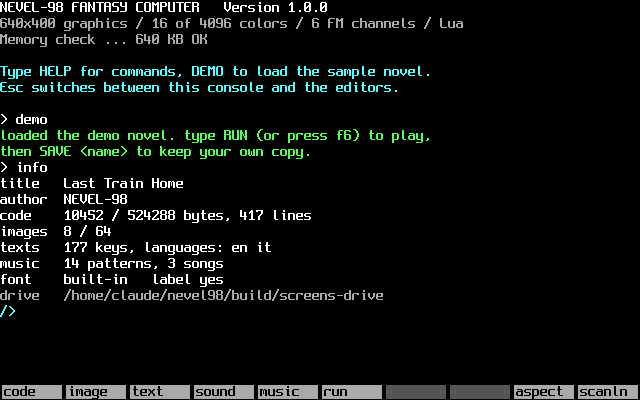
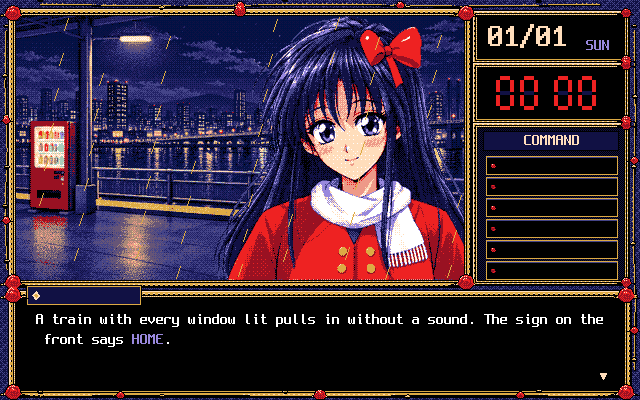
Hi everyone! I'm Bluemoon, and I've just released NEVEL-98, a fantasy computer for making visual novels the way they looked on the Japanese PC-98 computers of the late '80s and '90s.

👉 https://bluemooncoder.itch.io/nevel-98

Image

What is it?

A small, complete machine made for stories. Everything happens inside it:

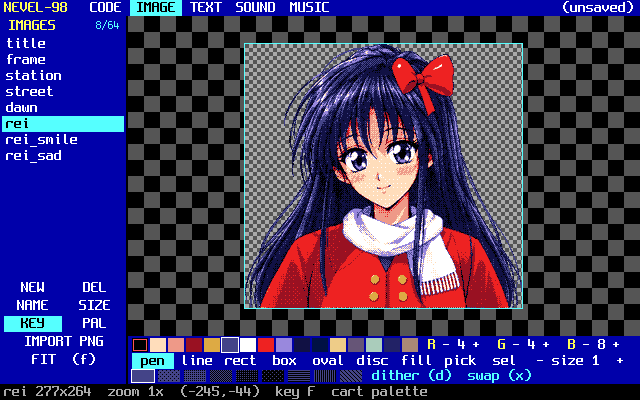
640×400 screen, 16 colors out of 4096, with dithering tools to make the most of them

6-channel FM synthesizer and a music tracker for that unmistakable PC-98 sound

A visual novel engine in Lua: scenes, dialogue, choices, command menus, save/load, multiple endings

Five built-in editors: code, pixel art, texts (with translations), sound and music

Share your game as a text file, as a picture of a 3.5" floppy disk with the whole game hidden inside, or as a single web page that runs anywhere

Image

Image

Why limits?

PC-98 developers had sixteen colors, a few FM voices and a floppy disk, and they still made unforgettable games. When you can't add more, you have to choose, and that's when the real question appears: what is this story about, and how do I make you feel it? NEVEL-98 keeps those limits on purpose, so you can stop worrying about tools and start making something.

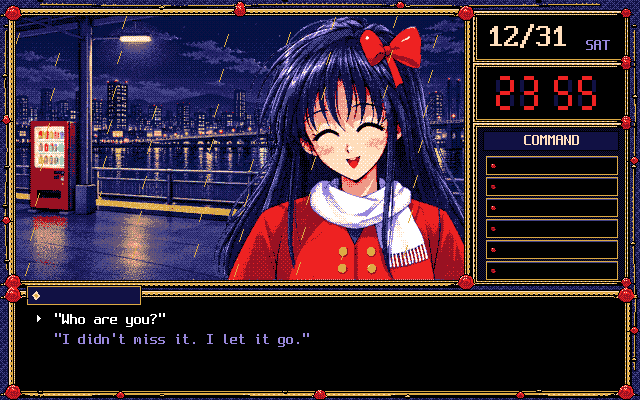
Try the demo: Last Train Home

December 31st, 1994. You've just missed the last train of the year. On the empty platform you meet Rei, whose radio plays songs nobody has heard yet. It has 3 endings and FM music, and its full source is open in the editors, ready to take apart.

Image

Try in your browser, with every editor and feature included!

📖 Manual and more: https://nevel98.bluemoon.moe

I'd love to see what you create with it, and any feedback is very welcome! 🌙

Hello there! Mac and linux versions are on the way!

i really appreciate your feedback and happy to see that linux users are interested in the project!

Thank you very much for your support!

Thank you for your feedback! 🙏

Thanks for the feedback! This is a project I work on in my free time, and since I'm mainly a programmer, I honestly focused much more on the code than on the graphical side.

As noted in the “More Information” section, the artwork is AI Assisted. Still, when I have more time, I'd like to give the visual side of the project more attention too.

I hope the plugin itself can still be useful to you, and that you'll be curious to see the next plugins that will be built on top of this Core!

Hi! Yes, you can definitely have more than 8 characters in the list. There isn't a hard-coded 8-character limit — the plugin uses all the entries you add to the Character List, and the window can scroll through larger casts.

Today has been released a long-awaited update to version 1.1.0 that fixes several little issues. 

Thank you for your interest!

Hi! Thank you very much for your support and for the helpful suggestion.

These features are not currently available, but I agree that excluding specific enemies and customizing their order are important options for a bestiary plugin. I plan to add both in an update scheduled for between late August and early September.

Thank you again for your feedback!

Hello! Thank you for reporting and I'm sorry for the issues. This plugin is part of my plugin update plan. The bugs you reported, along with others I have been informed about, are currently being fixed. A new, corrected version will be released by the end of this month.

Thank you for your patience!

Hello, thank you for reporting. I'll try to investigate the issue. Do you have any other useful information? Did you check if the result PNG had been saved eventually in one of the system folders like Documents, Download, Images etc...?

Hello! And thank you very much for your interest! However, I think I have all the pieces together and the release will probably happen soon the start of the new year. Thank you!

Hello! I'm sorry that you're experiencing issues. However as stated in the "Tips and Suggestions" section of the product page the software works properly with fonts that can be correctly sized at 8px.

However, I'm not sure how refund policy works but I think you can follow the itch.io terms that can be found here: https://itch.io/docs/legal/terms#9-refunds

Thank you very much!

Working from a while on a Web version actually with recent features. Still gathering all the pieces for a proper release. Thank you for your question!

Hello! 

Unfortunately, the plugin should be not compatible with Rpg Maker MZ. I was planning to release an MZ version but for the lack of time I have still not made it. 

Not sure if you can manage to make it work using FOSSIL.

Sorry for the inconvenience and thank you for support!

Hey! Sorry for the late reply! 

If I understand your question you want just to show the content of player's prompt into the text of message or choice windows. 

You can just use escape codes with the variable ID used for registering the player's prompt. 

Like:

"Hey! This is the text you have typed: \v[variableId]" where "variableId" is the ID you've used for saving player's input. 

Good luck!

Buongiorno e ti ringrazio per aver scelto questo plugin! 

Purtroppo il plugin non è dotato di un sistema di personalizzazione dell'UI. Però dovrebbe comunque essere compatibile con tutti i plugin che direttamente intervengono sulla Windowskin ed in generale sulla classe Window dal punto di vista stilistico. Non so perché nello specifico Galv_MessageStyles non sia compatibile (forse questo dipende dall'utilizzo di notetag? Non saprei). Comunque ti consiglio di spulciare il web e sono sicuro che potresti trovare plugin che permettono personalizzazioni ad-hoc.

Saluti!

Hey!
I'm sorry but currently there is not a feature that prevents the use of spaces :(
I know that is just a random suggestion but you can try to solve the problem in a design way like guiding your player in searching for keywords that are not separated by spaces. Or better you can use a trick but you have to be good with the organization of conditional branches.

Using the "Script" section of conditional branches you can check the variable used for registering player's inputs this way: 

$gameVariables.value(variableId).contains(" ")

This way you'll check if the prompt of the player contains at least a space. If it happens you can like retrieve a "system message" (a simple show text or what you want considering your game) that warns the player that "Spaces are not allowed!"

Good luck!

You can do this using the "Conditional Branch" event command. I usually suggest to use the "Script" section and check the variable used for registering the input. 

So you'll have:

$gameVariables.value(variable_id).toLowerCase() === "your word all lowercase". 

This way you'll make the check not case sensitive. If you need a case sensitive check remove the "toLowerCase()" function.

Cool! Thank you! keep up the good work!

Really curious about your graphic's choices. Have you created your color palette? What about your art style? You got inspired by any game in particular? :)

Hello! This software was developed for font generation for GB Studio prior to version 3.0. I got busy and I still haven't released the updated for the most recent versions. 

Hopefully, I'll get back on this as soon as I can, thank you for your interest!

Hello! 

Thank you very much for your kind support 🙏. For Android, this is not really plugin related since it's a known limit of HTML5 technologies that are the base of RPG Maker exports. Indeed, VirtualKeyboard API would be the starting point of making Rpg Maker applications compatible with Android keyboard - because it allows control over the keyboard itself -. However this API was not available at the time of the plugin and today is still an experimental feature. 

Unfortunately on my knowledge there is not too much that it's possible to do on the technical side. 

However, some time ago a friend of mine surpassed this problem using plugins that allows to bind pictures on screen forcing the execution of a common event on touch (like VisuStella common events if I remember correctly). 

In a few words, he created a board with key's pictures binding them to a common event that was adding a character (like result_string += "a") every time the pictures were pressed. This is a matter for expert eventers that has at least a little knowledge of JS too... but I think you can find your own way if you may be interested in this kind of systems :)

Thank you again!

(1 edit)

Hello! I'm sorry for the late reply, I lost your comment.

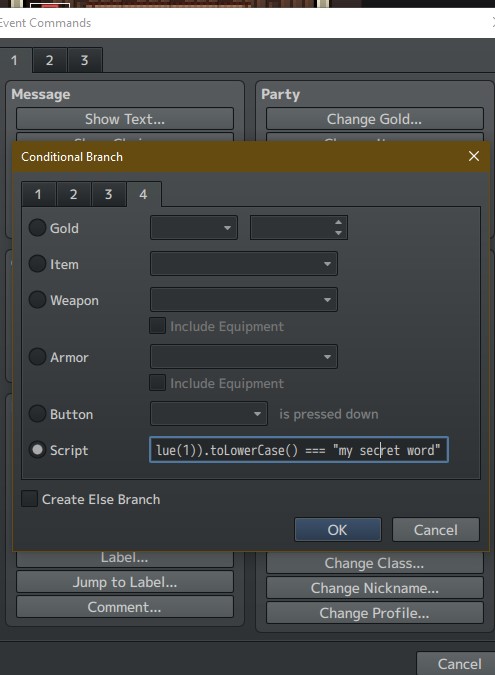
So, about your question. It's actually pretty simple because it's just a Conditional Branch using the Script field in the fourth page of branch configuration. 

Image

So, if the variable where you set the typed value is the variable of ID 1 you will have this script: 

String($gameVariables.value(1)).toLowerCase() === "my secret word"

where:

  • $gameVariables.value(variableId) is the variable where the typed text is stored;
  • The String(value) constructor is needed for being sure that the content is considered a string;
  • toLowerCase() is a method that is needed to lowercase all the typed text for avoiding that capitalized letters makes the check return false (if you need a case sensitive check, just remove .toLowerCase())

Finally, your secret word inside quotation marks :)

Cheers!

Heya! Thank you very much for using this plugin! 

Well, it's possible to remove unused commands. However, it's not dependent by Ring Menu plugin directly. I elaborate. I think you've noticed you can customize command symbol and personal command symbols inside plugin parameters - I assume that you're knowing of what we're talking about since you already managed removing icons -. 

However, Ring Menu command roster is taken by the reference window that is Window_MenuCommand itself. Take a look on this portion of code starting on line 302:

createMenuCommands() {             this._referenceWindow = new Window_MenuCommand(new PIXI.Rectangle(0,0,1,1));             this._referenceWindow.refresh();             for(let i = 0; i < this._referenceWindow._list.length; i++) {                 const comm = this._referenceWindow._list[i]                 this._symbols.push(comm.symbol)                 this._names[comm.symbol] = comm.name                 let sp = new Sprite();                 sp.alpha = this._globalAlpha                 let iconset = ImageManager.loadSystem("iconset");                 iconset.addLoadListener(() => {                     sp.bitmap = iconset;                     sp.anchor.set(0.5)                     const iconIndex = !!_ring_menu_icons[comm.symbol] ? _ring_menu_icons[comm.symbol] : 16;                     const pw = ImageManager.iconWidth;                     const ph = ImageManager.iconHeight;                     const sx = (iconIndex % 16) * pw;                     const sy = Math.floor(iconIndex / 16) * ph;                     sp.setFrame(sx,sy,pw,ph)                 })                 this.addChild(sp)             }             this._angleDistance = this.calculateAngleDistance()         }

As you can see referenceWindow is Window_MenuCommand. 

Said that, you have to apply your changes on Window_MenuCommand and then, eventually, mod the Ring Menu for your necessities. As far as I know this kind of interaction could be possible with some well-known plugins done by developers like VisuStella or if you're proficient in Javascript just editing the Window_MenuCommand class on your own in the part where commands are declared.

Hoping that this could help you at least a little,

Cheers!

Thank you for your feedback! 

I'm adding this to my todo since I'm planning to do some products update as soon as I get free from some life duties.  Thank you again for choosing my plugin! 

Hi there!
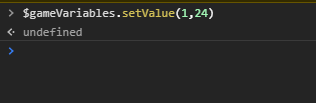
Mmm... That's quite strange. So, yes when you write the code $gameVariables.value(1) you print the current value set to Value having as ID 1. So, all variables have as default value 0, but assigning a value this should change - as you probably already know -. I've done a test on my end trying to set the value of Variable ID 1 by console to 24 and it seems to work properly: 

Image

Image

The same thing should be if you set the value through event commands. Not sure why it do not update on your end. Have you tried to use the plugin in a void project?

About your second question, you can show the money value just using this script call: $gameParty.gold() assigning it to the proper plugin parameter. Image

Furthermore you can change the Parameter Name from "Age" to what you prefer and you should have a similar result

Image

Thank you for your support <3

Hello there!

Thank you so much for your feedback. About your question, currently, there Is not a feature of this sort. Actually, there could be a way if we try to combine eventing with Keyboard Windows inner methods (ex. Having an event in loop that checks for the Activity of the keyboard Window and then forces the "confirm" method of the Window After a Number of cycles).

However, it's a try and catch application and for a released game could not be as much as solid as needed. But, I take note of your idea and, when I'll get free from some job duties I Will push the update for this plugin including a system for interrupting typing :)

Thank you!

Hello there!

For now the plugin supports the leader mechanic only for troops. However, your suggestion is oretta interesting, when I'll have time i'll update the plugin with this feature!

Whops! Thank you for reporting, I've applied the correction 😉

Hey there! 
Sorry for the late reply, but I got mega-busy recently. 

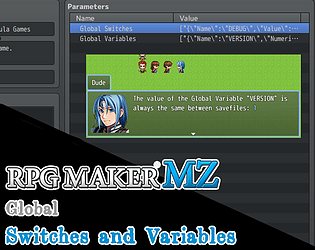
So, If I have understood correctly your question... Yes. Global Switches and Variables are indexed by the name you assign them into the configuration and not by their "id". Moreover, for making them interactive with the changes you do in game, the property "SAVABLE" must be set to true.

This mean that if you create a Global Switch named "FOO" and set the property "SAVABLE" to true and maybe edit them in game through one of the methods (plugin command or script call) the edit you do will be saved and accessible with the new value you assigned when you re-open again the game.

However, if you have a more specific issue that I have not satisfied with my answer, feel free to let me know :)

Hello there! Thank you for your interest.
Actually, the update is still not available - due the lack of time I had recently - but it will be done for sure in the near future, since I will add some new content as well.

Stay tuned! <3

thank you! 🌟

Added to the To-Do list :)

Thank you for your suggestion!

hi! That's difficult to tell since self variables are not something that Is available as default by Rpg Maker. If this is something that could be eventually compatibile with the default variable system, It could be possible, but i can't tell for sure.

you're very welcome! Thank you for your support!

hello there! 

Thank you for your interest! The plugin aims to replicate the same experience of IB (and similar kind of games). So, outside of checking (and enabling a feature for assigning an item to a variable for making item-check events), it's not possible to add other menu commands by default. Obviously, if you have JS knowledge, you can mod the plugin for your personal use to reach the result you want.

Hello there! Sorry for the late reply and thank you for your kind support!! 

About your report, I've actually updated the plugin to a new version applying the fix for the bug you have reported :) 

The fix has been done around line 390 if you're interested.

Thank you!

Thank you for the highlight!! It's much appreciated!

hi there! Thank you for the feedback!

Actually, the plugin uses pixi js for Window rendering, so It should be compatibile. However, for next month I'm planning some Plugins update and, since there is request, I Will publish an update containing MZ compatibility for this One too :)