This post is a wiki (feel free to hit the edit button near the bottom right of this post to add your own changes!)
This post collects concrete information about configuring Emacs to be an Elixir editing environment.
Related posts/info:
Overview
- Alchemist - Very full featured but development has stalled, not currently recommended
- elixir-mode - Provides the basic font-locking, indentation and navigation support
- Should be used as the baseline of support
- elixir-ts-mode - Provides font-locking and other basic features based on the tree-sitter grammar for elixir
- Built into Emacs as of 29.1
- Either elixir-ts-mode or elixir-mode may be used, but not both.
- Elixir Language Server backend
- elixir-ls - Elixir LSP server implementation (previously this was a fork, but it has since been reconciled)
- Language Server Emacs Frontend (choose 1)
- lsp-mode - General LSP (Language Server Protocol) mode, use it together with a language server implementation
- eglot - an Emacs LSP client that stays out of your way
- exunit.el - Simple test runner for ex_unit tests
Configuration Examples/Instructions
Installing elixir language server
Note: Elixir 1.8.2 (compiled on otp 21) and Erlang 21.3.8 are recommended if you want to work on a wide range of projects. If you use asdf, then this will be taken care of for you with a cp .release-tool-versions .tool-versions && asdf install.
- Clone the elixir-lsp elixir-ls repository locally
git clone https://github.com/elixir-lsp/elixir-ls.git
cd elixir-ls (that you just cloned)mix deps.getmix elixir_ls.release
This will create a release/language_server.sh (and .bat for windows) file that you will need for the Emacs integration, so note down this path (referred to later as path-to-elixir-ls/release).
eglot Configuration
With Spacemacs
Warning: I still face issues with evil-mode and eglot in Spacemacs. If anyone manages to make it work properly, feel free to edit this guide.
- The
elixir layer in Spacemacs does not play well with Eglot: it calls lsp-mode from the Spacemacs lsp layer. Do NOT use it. Instead, add elixir-mode in dotspacemacs-additional-packages .
- Add
eglot in dotspacemacs-additional-packages.
- Add in
dotspacemacs/user-config :
(require 'eglot)

;; This is optional. It automatically runs `M-x eglot` for you whenever you are in `elixir-mode`
(add-hook 'elixir-mode-hook 'eglot-ensure)

;; Make sure to edit the path appropriately, use the .bat script instead for Windows
(add-to-list 'eglot-server-programs '(elixir-mode "path-to-elixir-ls/release/language_server.sh"))
- If you didn’t add the optional hook, run
M-x in any Elixir file to activate eglot.
Note:
- The
require instruction must come before the others.
- If you fail to add the
require instruction appropriately, eglot will randomly stop working on Emacs restart, and you will be prompted the error described in this GitHub issue.
With Vanilla Emacs
(package-install 'eglot)

;; This is optional. It automatically runs `M-x eglot` for you whenever you are in `elixir-mode`
(add-hook 'elixir-mode-hook 'eglot-ensure)

(add-to-list 'eglot-server-programs `(elixir-mode "path-to-elixir-ls/release/language_server.sh"))
Note: the package-install line must come before the add-to-list
And then, if you didn’t add the optional hook, type M-x eglot in any elixir file.
(You may also want to view this alternative configuration example which used to be recommended here)
lsp-mode Configuration
With Doom Emacs:
Elixir module documentation can be found at: https://github.com/hlissner/doom-emacs/blob/develop/modules/lang/elixir/README.org
- In your
init.el ensure that the lsp Doom module is enabled
- In your
init.el enable the Elixir layer with (elixir +lsp)
- Ensure that
language_server.sh (generated from mix elixir_ls.release) is on your $PATH
With Spacemacs:
- Ensure that you are using the
develop branch of spacemacs (your ~/.emacs.d should be on the develop branch)
a. This is necessary as of 2019/03/03 but once 0.300 comes out it should be fine to use the stable release
- Set the elixir-backend variable inside your layer definitions i.e.
(elixir :variables elixir-backend 'lsp)
NOTE: As of Add elixir-ls as a language backend for elixir by mpanarin · Pull Request #12668 · syl20bnr/spacemacs · GitHub alchemist is no longer included by default so excluding alchemist is no longer necessary
Add alchemist to your excluded package list dotspacemacs-excluded-packages '(alchemist) so that it is not loaded (since we’re using lsp-mode instead)
With Vanilla Emacs
- Add
lsp-mode via MELPA
- M-x
package-install [RET] lsp-mode [RET]
For both Spacemacs and Vanilla Emacs
  (use-package lsp-mode
    :commands lsp
    :ensure t
    :diminish lsp-mode
    :hook
    (elixir-mode . lsp)
    :init
    (add-to-list 'exec-path "path-to-elixir-ls/release"))
Verify that it is working by opening up a file in an elixir project (you should receive a prompt like mix.exs is not part of any project. Select action:. To which you probably want to respond Import project root. Then if there are no errors you can run M-x lsp-describe-session which will show you all of your lsp server sessions. On this screen you can press RET on the "diamond’ icon next to Capabilities to see the detected capabilities of the server.
Note: there is also GitHub - elixir-lsp/lsp-elixir.el: Emacs minor mode to interact with elixir buffers by using LSP that will manage the elixir-ls installation for you, but by installing it manually (as above) you can more easily contribute to elixir-ls.
Note: if you already have lsp-mode installed make sure it is up-to date (version 5.0 had many breaking changes)
Handy optional configuration: add '(lsp-ui-doc-enable nil t) to remove the auto-doc popups (instead you can run , h h when you want the docs). You can also run , T d to temporarilly enable/disable the popups.
ElixirLS Configuration
As mentioned in the elixir-ls README, as with VSCode you can configure the language server through entries in settings.json.
Configure emacs settings with lsp-mode
To configure through emacs (using lsp-mode), you can use code like the below.
  (defvar lsp-elixir--config-options (make-hash-table))

  (add-hook 'lsp-after-initialize-hook
            (lambda ()
              (lsp--set-configuration `(:elixirLS, lsp-elixir--config-options))))
You can use a .dir-locals.el file to set config options specific to the project. For example to disable dialyzer in one project, you’d run the above code in your init and the following in your .dir-locals.el:
(puthash "dialyzerEnabled" :json-false lsp-elixir--config-options)
Configure emacs settings with eglot
You can use .dir-locals.el local to your project directory like so, without configuring any other explicitly configuration-related hooks for eglot:
((elixir-mode
  . ((eglot-workspace-configuration
      . ((:elixirLS . (:projectDir "subdir")))))))
DAP(Debug Adapter Protocol)
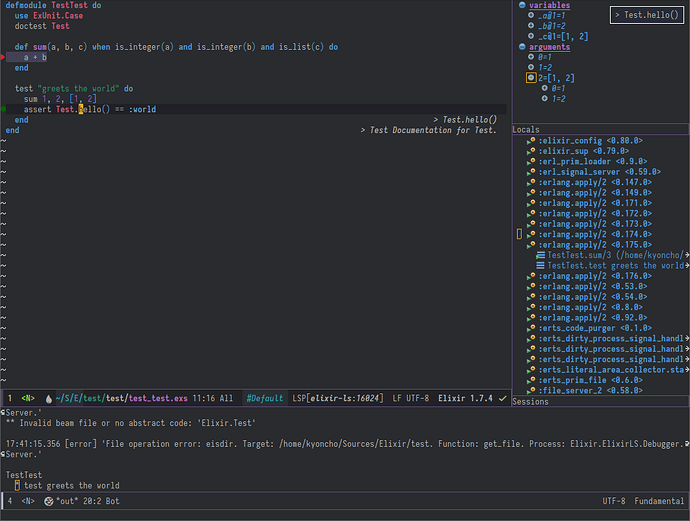
For integrated debugging, optionally enable DAP (Debug Adapter Protocol) (requires installing dap-mode from MELPA):
(require 'dap-elixir)
(dap-ui-mode)
(dap-mode)
exunit.el configuration
Note: this is recommended because the LSP protocol does not currently include running tests (so this is a good supplement to lsp-mode and eglot)
Note: Doom Emacs elixir module installs exunit.el by default
Install by cloning locally:
Add this to your emacs configuration:
  (add-to-list 'load-path "~/path_to_exunit.el")
  (require 'exunit)
Or Install via melpa:
M-x package-install [RET] exunit [RET]
Optional key binding examples with Spacemacs:
  (with-eval-after-load 'elixir-mode
    (spacemacs/declare-prefix-for-mode 'elixir-mode
      "mt" "tests" "testing related functionality")
    (spacemacs/set-leader-keys-for-major-mode 'elixir-mode
      "tb" 'exunit-verify-all
      "ta" 'exunit-verify
      "tk" 'exunit-rerun
      "tt" 'exunit-verify-single))
In Spacemacs (and I assume custom configs if you have popwin installed) you can add:
(push '("*exunit-compilation*"
        :dedicated t
        :position bottom
        :stick t
        :height 0.4
        :noselect t)
      popwin:special-display-config)
To make the exunit window always appear at the bottom and close when you press C-g
Tips and Tricks