New to Rust? Grab our free Rust for Beginners eBook Get it free →
Import as JavaScript: named, default and namespace imports explained


Using import as in JavaScript renames a named or default export the moment you pull it into another file. I reach for it the moment two modules export something with the same name, or when a library’s export name does not fit my codebase’s naming style. This guide covers named imports, default imports, namespace imports and every place as shows up, plus dynamic import() and the mistakes that trip up experienced developers.
Named imports and the basic import syntax
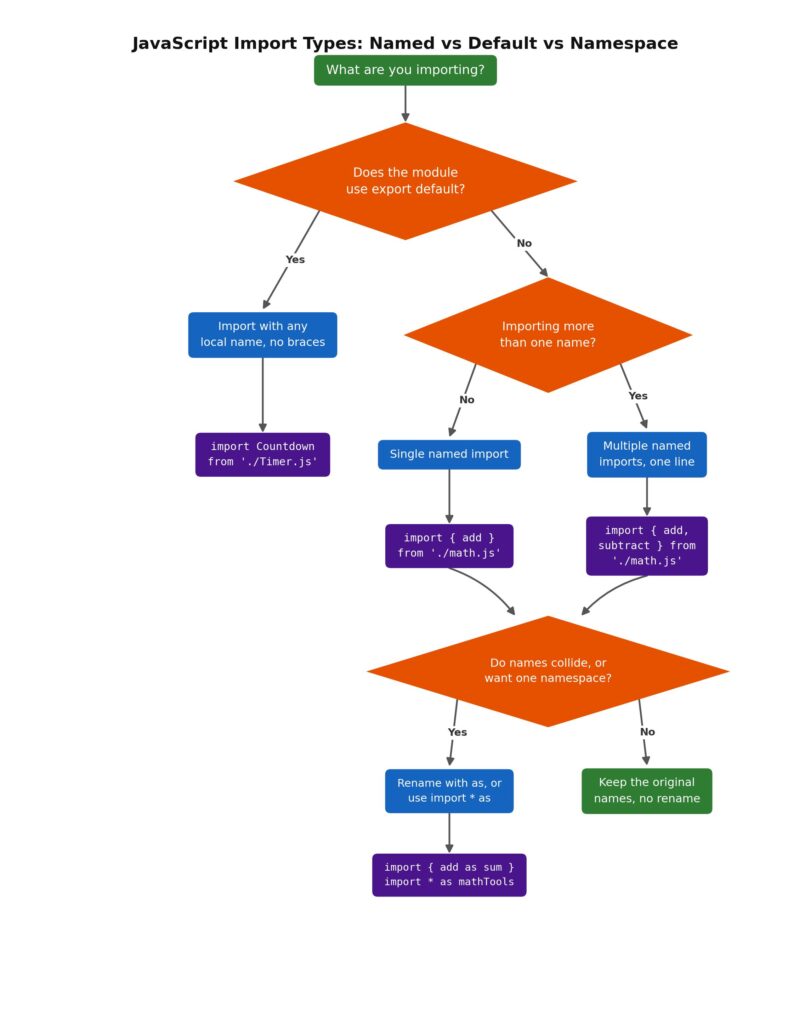
Named imports pull one or more explicitly named exports out of a module. Node.js and browsers wrap the request in curly braces, and the name inside the braces has to match the exported name exactly.
// math.js
export const add = (a, b) => a + b;
export const subtract = (a, b) => a - b;

// app.js
import { add, subtract } from './math.js';

console.log(add(2, 3)); // 5
You can list as many named imports as a module exports, separated by commas. Named imports are live bindings rather than copies. If the exporting module reassigns the value later, the imported reference reflects the new value everywhere it is used. This is different from a shallow copy of an object, and it is why you cannot reassign an imported binding from the importing file. Writing add = 5 inside app.js throws a TypeError, since only the module that owns the export can change it.
For the pre-ES6 alternative, Node.js require vs ES6 import covers the syntax differences in more depth.
Import as JavaScript
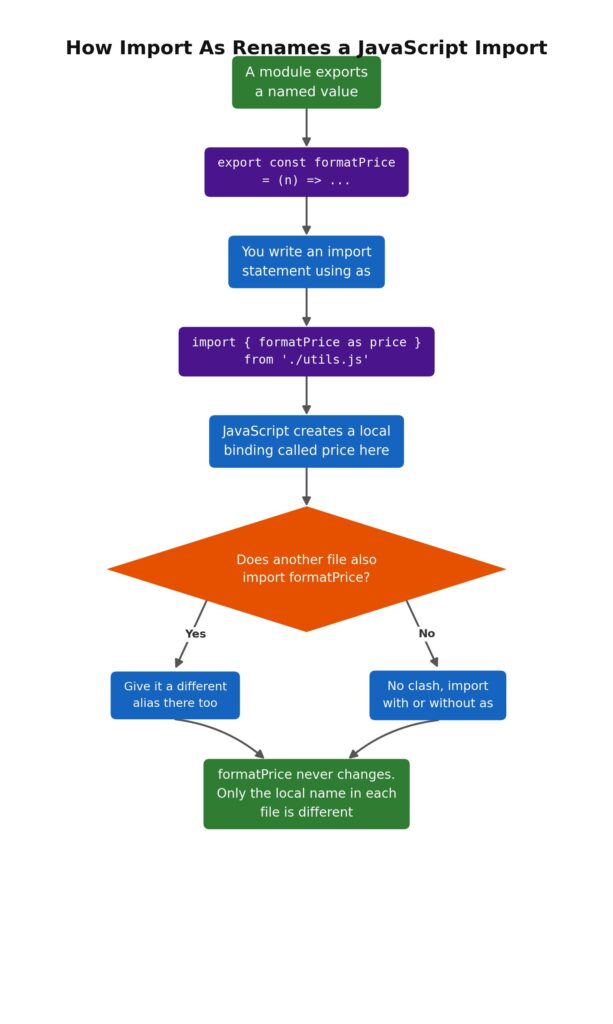
The as keyword renames a named import at the point of import, without touching the original export name in the source file. This matters the moment you import from two modules that happen to export something with the same name, or when a package’s export name does not read well inside your own code.
import { formatPrice as price } from './utils.js';
import { formatPrice as productPrice } from './pricing.js';

console.log(price(9.99));
console.log(productPrice(19.99));
The rename only affects the local binding. utils.js still exports formatPrice, untouched. I ran into this last month wiring up two internal libraries that both exported a function called parse, and renaming both imports with as was the cleanest fix, much cleaner than reaching for a namespace import just to avoid a name clash. You can rename several named imports from the same module in one statement:
import {
  reallyLongExportName as shortName,
  anotherLongName as anotherName,
} from './module.js';
One rule trips people up here: the name before as must match the export exactly. import { addd as sum } throws, even if you meant add, since the mismatch happens on the original name, not the alias.
Renaming default imports (and why you rarely need to)
Default imports do not need as at all. A default import lets you choose any local name without an alias keyword.
// Timer.js
export default class Timer {
  constructor(seconds) {
    this.seconds = seconds;
  }
}

// main.js
import Countdown from './Timer.js'; // any name works, no "as" needed

const t = new Countdown(30);
There is one place as does apply to a default export: importing the special default binding alongside named exports.
import { default as User, sayHi } from './user.js';
This form shows up rarely in hand-written code, but it is common in generated output from bundlers and in re-export chains. default is a reserved word and needs an alias before it can become a usable identifier.
Combining default and named imports
A module can export one default plus several named helpers, and a single import statement can pull both. The default import always comes first, before any curly braces.
// parser.js
export default function parse(input) { /* ... */ }
export function validate(input) { /* ... */ }
export function format(input) { /* ... */ }

// main.js
import parse, { validate, format } from './parser.js';
You can rename the named half of this while leaving the default alone, which is handy when a helper’s export name collides with something already declared in your file:
import logger, { logError as reportError } from './logger.js';

reportError('Something went wrong');
Namespace imports with import * as
import * as name pulls every named export, plus the default under a default key, into a single namespace object. This avoids listing each export by hand and gives every call a clear prefix showing where it came from.
import * as mathTools from './math.js';

console.log(mathTools.add(3, 4));
console.log(mathTools.subtract(9, 2));
The resulting object is sealed, with a null prototype, so you cannot add properties to it afterward. mathTools.newProp = 'x' fails silently outside strict mode and throws inside it. JavaScript has no wildcard import that skips the alias, unlike some other languages. import * from './math.js' is not valid syntax. A namespace import always needs as, since the resulting object has to have a name.
Renaming exports with as
as is not only an import-side keyword. You can rename an export the same way, either at the point of declaration or afterward:
// say.js
function sayHi(user) { console.log(`Hi, ${user}`); }
function sayBye(user) { console.log(`Bye, ${user}`); }

export { sayHi as hi, sayBye as bye };
Importing files then use the exported alias, not the original function name:
import { hi, bye } from './say.js';
This pairs naturally with re-exports, where a package’s entry file imports from internal helper files and immediately re-exports a curated public surface:
// auth/index.js
export { login, logout } from './helpers.js';
export { default as User } from './user.js';
Anyone using the package imports from auth/index.js alone and never has to know that login actually lives in helpers.js.
Import for side effects only
Sometimes a module needs to run without pulling any bindings out of it. Polyfills and setup scripts are the usual case.
import './setupAnalytics.js';
No as applies here, since nothing gets a local name. The module’s top-level code runs once, and Node.js or the browser caches the result so a second import of the same specifier does not re-run it. I use this pattern for anything that registers a global side effect on load, things like a polyfill or a design system’s base stylesheet import in a bundler setup.
Dynamic import() and renaming with destructuring
Static import statements only work at the top level of a module. When you need to load something conditionally, inside a function or in response to a user action, import() returns a promise that resolves to the module’s namespace object.
async function loadChart() {
  const module = await import('./chart.js');
  module.renderChart();
}
Renaming here works through destructuring rather than the as keyword, since import() is a function call, not a declaration. This is the one place a rename for a default export is not optional. default is a reserved word, so pulling it out of the returned object needs an explicit rename:
async function loadDefault() {
  const { default: Widget, helper } = await import('./widget.js');
  return new Widget();
}
Dynamic imports make sense when the imported code is large, rarely needed or depends on something you only know at runtime, loading a browser-only module versus a server-only one, for example. Static imports stay preferable for anything your app always needs, since bundlers can tree-shake and statically analyze them in ways they cannot with a dynamically built path.
Module paths and resolution
The string after from is the module specifier, and how it resolves depends on where the code runs. Browsers and Node’s ESM loader both require the file extension. import { add } from './math' fails. './math.js' is required. Bare specifiers without a leading ./, ../ or / resolve against node_modules, which is how import { nanoid } from 'nanoid' finds an installed package. For a deeper look at path resolution and the errors that show up when it goes wrong, see the Node.js path module reference and the guide to fixing Node’s cannot find module error.
Other ways to bring code into a JavaScript file
import and as cover ES modules, but they are not the only mechanism JavaScript has for pulling in code. Node.js’s CommonJS require() predates ES modules and is still the default in a lot of existing codebases. See module.exports versus exports for how the export side works there. In the browser, code can also load through a dynamically inserted script tag, or by fetching a file’s text and running it with eval(), a pattern worth avoiding outside tightly controlled internal tooling given the security risk of evaluating arbitrary strings as code. None of these alternate paths use as for renaming, since that syntax belongs to the ES module import and export statements specifically.
Final Conclusion
Renaming with as is a small piece of syntax that solves a real problem: name collisions between modules you do not control. Once the pattern clicks, reaching for it becomes automatic every time two imports want the same name.