
Kommunicate is a chat platform designed for websites that enables real-time communication between customers and support teams. It features AI-powered chatbots that automate responses to common queries, improving efficiency and reducing response times. A single agent can handle multiple conversations simultaneously, helping reduce operational costs while maintaining high customer satisfaction.
Integrating Kommunicate with your Document360 knowledge base lets you deliver seamless support experiences directly within your knowledge base, ensuring faster resolution of customer inquiries.
Before you begin
- You need a Kommunicate account.
- You need your Kommunicate App ID. See How to find your Kommunicate App ID below.
How to find your Kommunicate App ID
The Kommunicate App ID is a unique code obtained from the Kommunicate application. It is required to connect Kommunicate with Document360.
Existing Kommunicate user
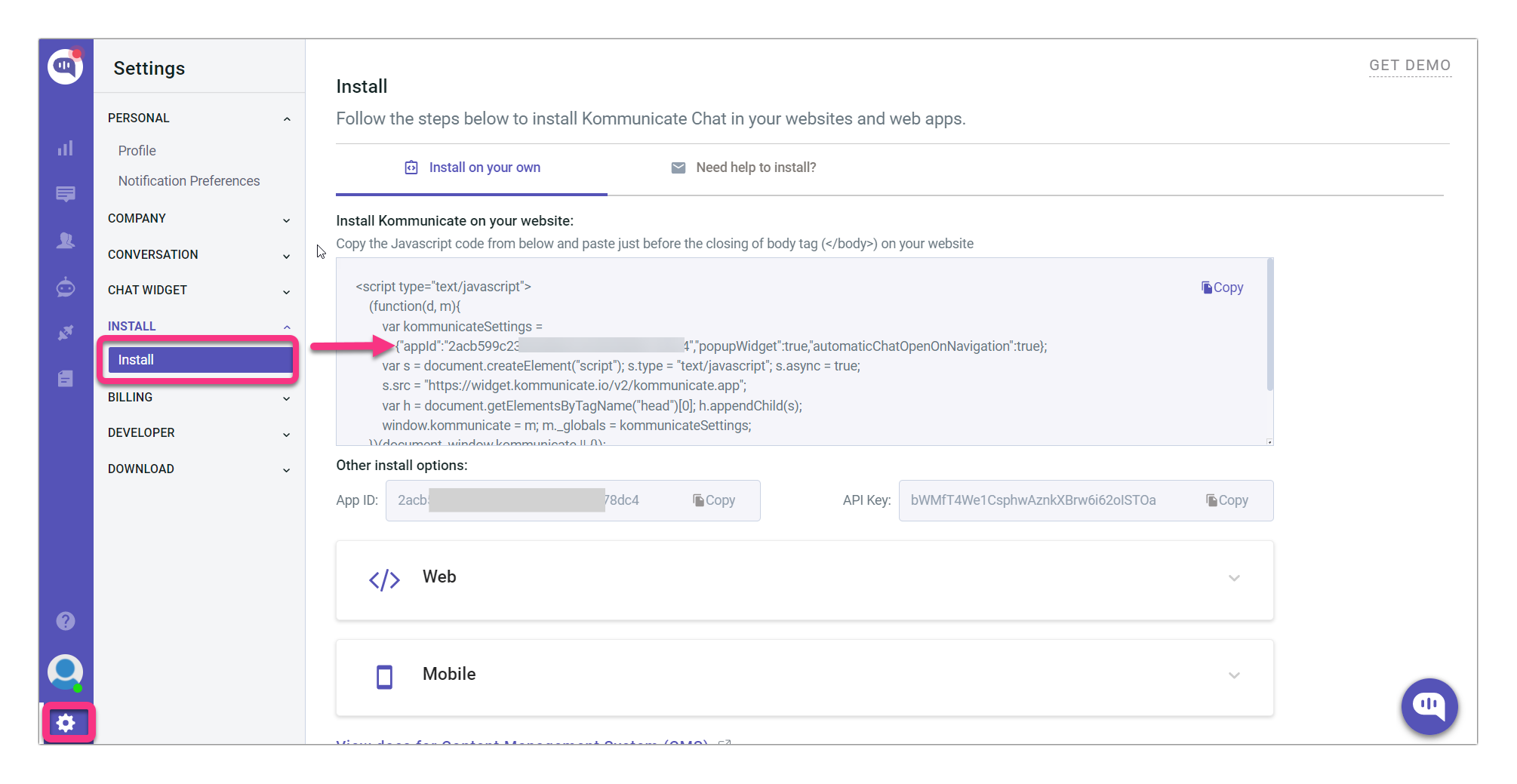
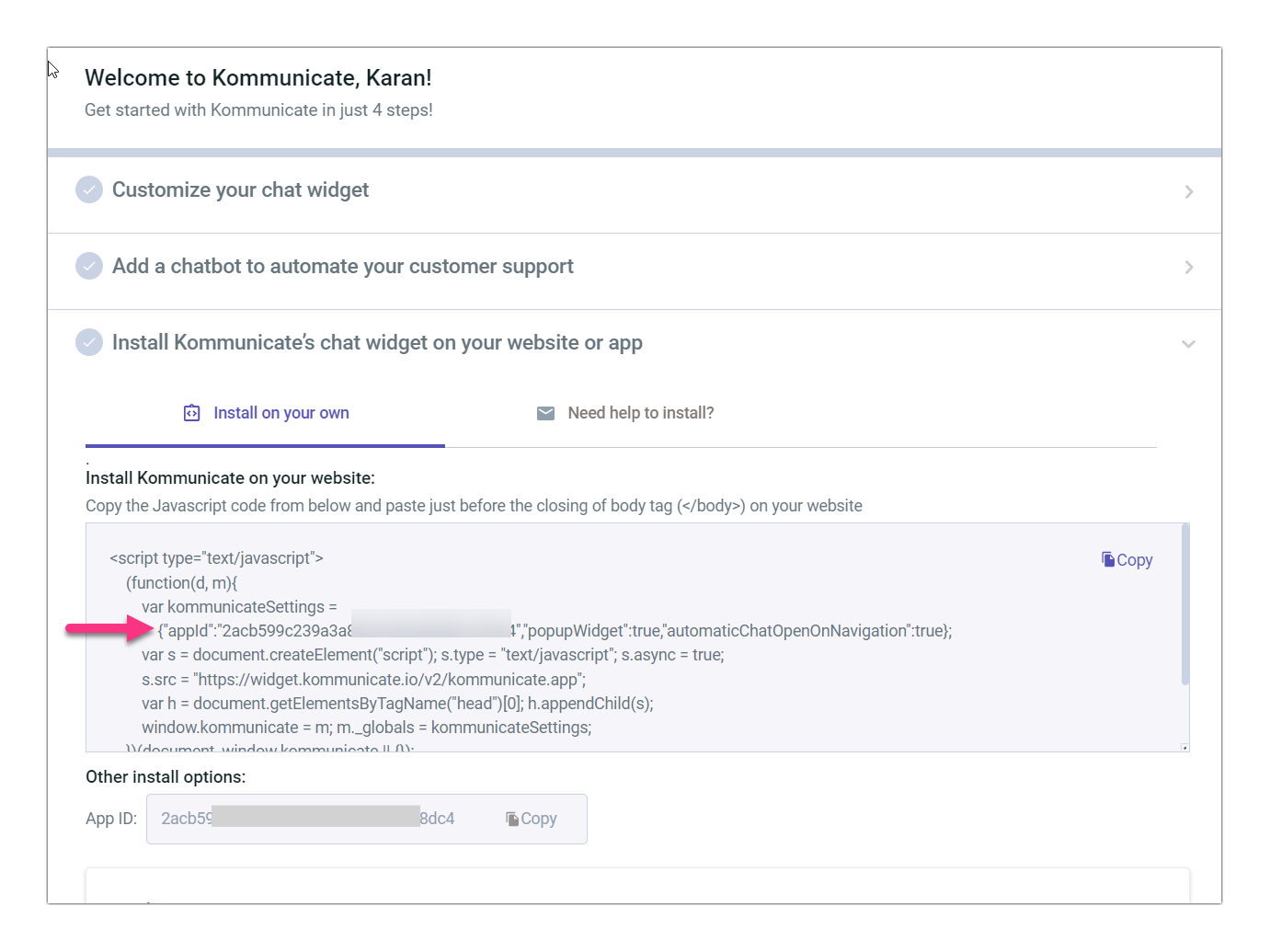
- Log in to your Kommunicate account and navigate to Settings > Install.
- In the Install Kommunicate on your website section, copy the App ID from the JavaScript code. It is the value that follows
appIdin the code.
New Kommunicate user
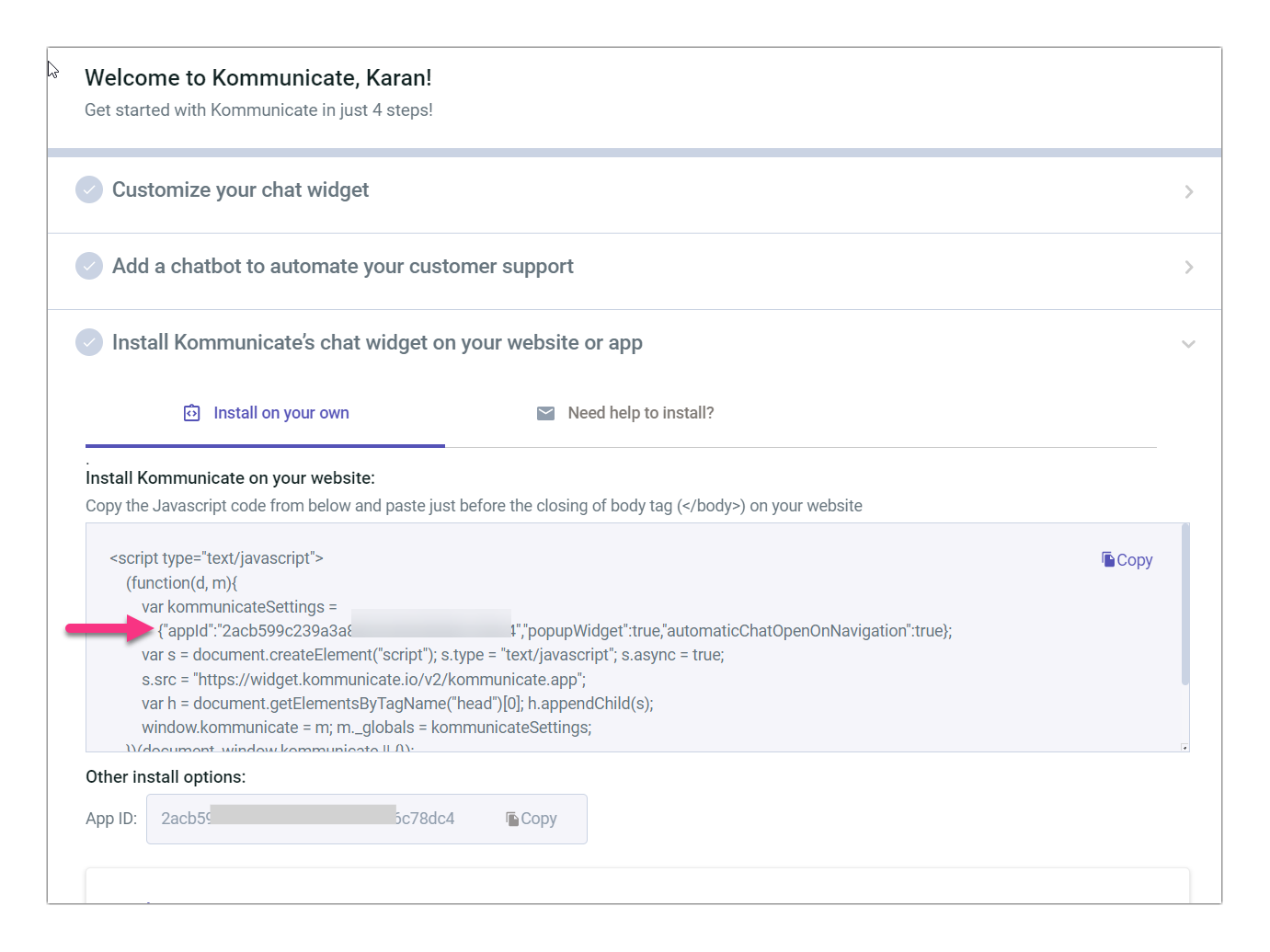
Your Kommunicate App ID is provided during the account installation process. Copy and save it for use in the integration.
How to integrate Kommunicate with Document360
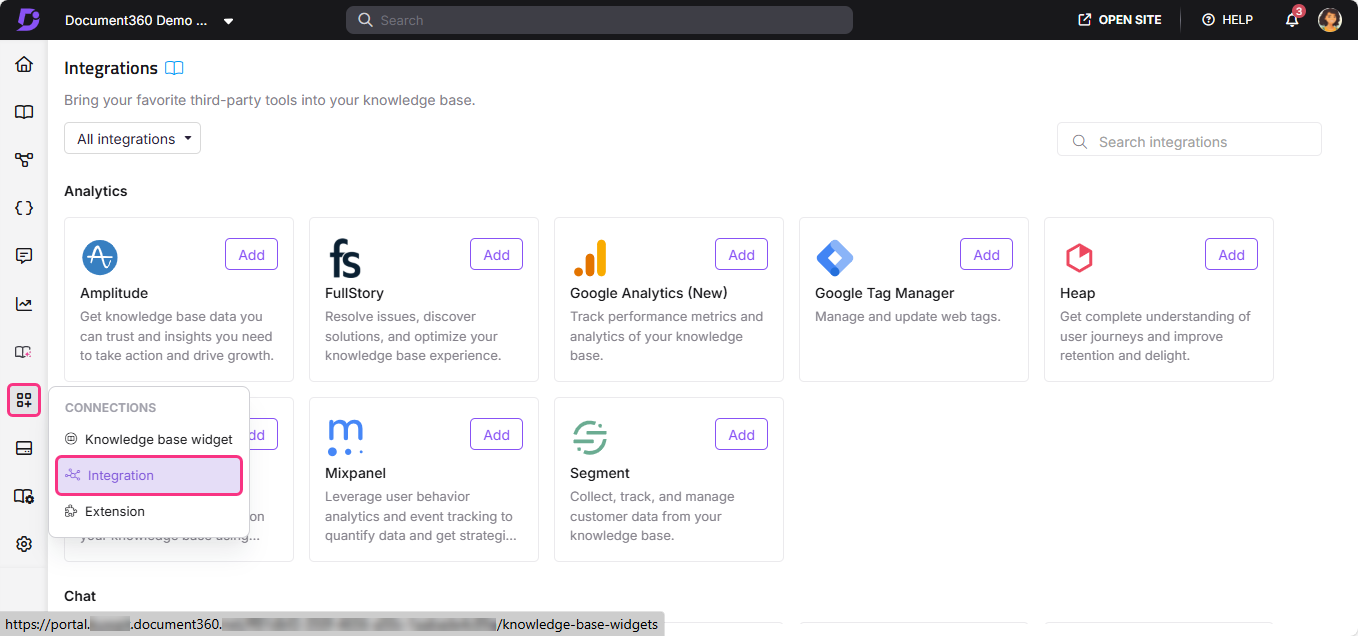
- In the Document360 portal, navigate to Connections () > Integrations () in the left navigation bar.
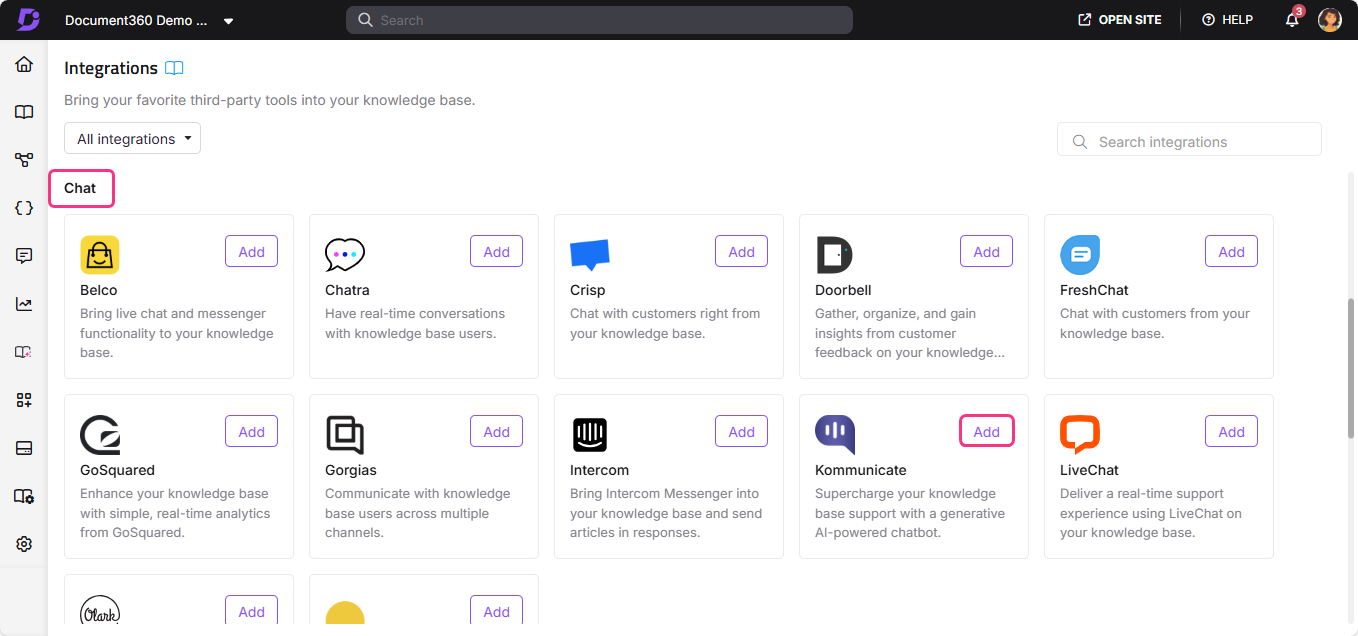
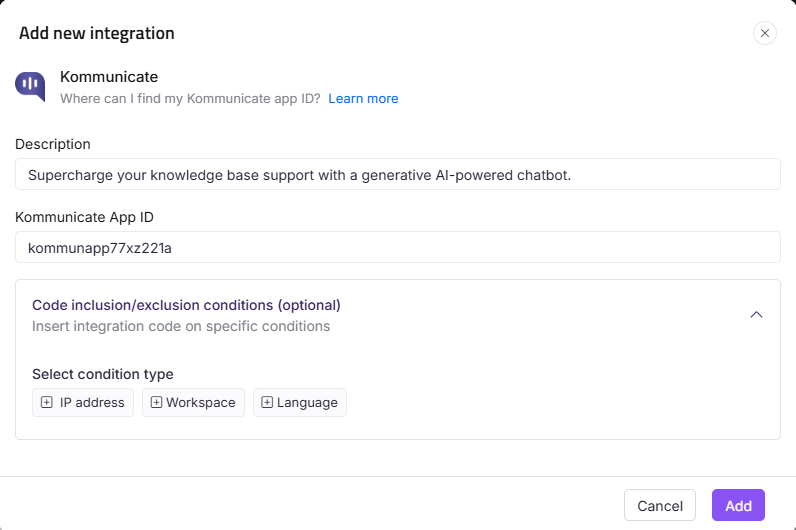
- Select Kommunicate from the list of integrations and click Add. The Add new integration panel appears.
- Add a Description and enter your Kommunicate App ID.
The Kommunicate App ID is a unique code obtained from the Kommunicate application. It is required to connect Kommunicate and Document360 in the knowledge base portal.
- Optionally, expand Code inclusion/exclusion conditions to control when the integration runs based on IP address, Workspace, or Language.
- Click Add.
After setup, log in to your Kommunicate account to view and respond to chats from your knowledge base visitors.
With the Kommunicate AI chatbot, you can qualify leads, schedule meetings, and support customers 24/7. This lets you manage customer conversations more efficiently with a lower churn rate.
Best practices
- Use AI chatbots to handle common knowledge base questions automatically. Configure Kommunicate's chatbot to answer frequently asked questions so your support team only needs to handle complex conversations that require a human response.
- Use lead qualification to identify high-value visitors. Kommunicate's AI chatbot can qualify leads during a conversation, helping your team prioritize follow-ups from knowledge base visitors who show purchase or upgrade intent.
- Use 24/7 chatbot coverage to reduce after-hours drop-off. Set up the chatbot to handle queries outside business hours so readers always get a response, even when your team is offline.
- Use Code inclusion/exclusion conditions to control where the widget appears. If Kommunicate should only appear on specific workspaces or for certain languages, configure conditions to limit where the integration runs.
- Monitor conversations to improve your knowledge base content. Recurring questions in Kommunicate are strong signals that certain topics need better coverage or clearer explanations in your articles.
FAQ
What is the Kommunicate App ID?
The Kommunicate App ID is a unique identifier obtained from the Kommunicate application. Existing users can find it by going to Settings > Install and copying the value that follows appId in the JavaScript code. New users receive it during the account installation process.
What can Kommunicate's AI chatbot do?
Kommunicate's AI chatbot can automate responses to common queries, qualify leads, schedule meetings, and provide 24/7 customer support. This reduces the workload on your support team and helps manage customer conversations more efficiently with a lower churn rate.
Can a single agent handle multiple Kommunicate conversations at once?
Yes. Kommunicate is designed to let a single agent manage multiple customer conversations simultaneously, which helps reduce operational costs while keeping customer satisfaction high.
Can I limit which workspaces or languages the Kommunicate widget appears on?
Yes. When adding or editing the Kommunicate integration, expand Code inclusion/exclusion conditions and add conditions based on IP address, Workspace, or Language. See Code inclusion and exclusion conditions for full details.
What can I do after completing the Kommunicate integration?
After setup, log in to your Kommunicate account to view and respond to chats from your knowledge base visitors. You can also configure the AI chatbot to handle common queries automatically, qualify leads, and provide round-the-clock support.
