

subagents parameter. Subagents are useful for context quarantine (keeping the main agent’s context clean) and for providing specialized instructions.
This page covers synchronous subagents, where the supervisor blocks until the subagent finishes. For long-running tasks, parallel workstreams, or cases where you need mid-flight steering and cancellation, see Async subagents.
Why use subagents?
Subagents solve the context bloat problem. When agents use tools with large outputs (web search, file reads, database queries), the context window fills up quickly with intermediate results. Subagents isolate this detailed work—the main agent receives only the final result, not the dozens of tool calls that produced it. When to use subagents:- ✅ Multi-step tasks that would clutter the main agent’s context
- ✅ Specialized domains that need custom instructions or tools
- ✅ Tasks requiring different model capabilities
- ✅ When you want to keep the main agent focused on high-level coordination
- ❌ Simple, single-step tasks
- ❌ When you need to maintain intermediate context
- ❌ When the overhead outweighs benefits
Configuration
subagents should be a list of dictionaries or CompiledSubAgent objects. There are two types:
Default subagent
Deep Agents automatically adds a synchronousgeneral-purpose subagent unless you already provide a synchronous subagent with that name.
The general-purpose subagent has filesystem tools by default and can be customized with additional tools/middleware.
- To replace it, pass your own subagent named
general-purpose. - To rename or re-prompt the auto-added version, set
general_purpose_subagent=GeneralPurposeSubagentProfile(...)on the active harness profile. - To disable it, see Running without subagents below.
Running without subagents
To run an agent without thetask tool, do two things:
- Set
general_purpose_subagent=GeneralPurposeSubagentProfile(enabled=False)on the active harness profile. - Pass no synchronous subagents via
subagents=oncreate_deep_agent.
SubAgentMiddleware (and the task tool) when at least one synchronous subagent exists. With neither the default nor a caller-provided one, the agent runs without delegation.
Async subagents are unaffected—they flow through their own middleware and tools, described in Async subagents.
Custom subagents
You can define specialized subagents with specific tool by using thesubagents parameter. For example to serve as a code reviewer, web researcher, or test runner.
For most use cases, define subagents as dictionaries with SubAgent dictionaries. For complex workflows, use a CompiledSubAgent:
SubAgent (Dictionary-based)
Define subagents as dictionaries matching theSubAgent spec with the following fields:
CompiledSubAgent
For complex workflows, use a prebuilt LangGraph graph as aCompiledSubAgent:
Using SubAgent
Using CompiledSubAgent
For more complex use cases, you can provide your custom subagents withCompiledSubAgent.
You can create a custom subagent using LangChain’s create_agent or by making a custom LangGraph graph using the graph API.
If you’re creating a custom LangGraph graph, make sure that the graph has a state key called "messages":
Dynamic subagents
By default, the main agent delegates to subagents throughtask tool calls (it can issue several in a single turn to run them in parallel). With an interpreter attached, the agent can instead dispatch subagents from code—using loops, branches, and parallel batches to fan work out across many items and synthesize the results programmatically. This is called dynamic subagents.
Reach for dynamic subagents when work spans many independent units (reviewing every file in a directory, triaging a batch of tickets), needs multiple perspectives, or benefits from recursive analysis.
Enable dynamic subagents
Dynamic subagents become available as soon as the agent has both subagents and the interpreter middleware. Install the QuickJS interpreter package, then addCodeInterpreterMiddleware to your agent.
Dynamic subagent dispatch is on by default whenever the agent has subagents and the interpreter middleware. Pass
CodeInterpreterMiddleware(subagents=False) to require dispatch through the normal task tool path. Interpreters require langchain-quickjs>=0.2.0 and Python >=3.11.Trigger dynamic orchestration
Dynamic dispatch is implicit: the agent decides to fan work out from code based on the shape of the task, not a per-call flag. For example, phrasing the request as a “workflow” opts into fan-out from code:Use with a coding agent
The fastest way to try dynamic subagents is withdcode, the LangChain terminal coding agent built on a Deep Agent. It ships with the code interpreter enabled, so dynamic subagents work out of the box with nothing to wire up.
Install dcode:
task tool, the agent writes an orchestration script that calls the built-in task() global and runs it in the code interpreter. For example: “Run a workflow to review every file in src/ for SQL injection.”
As subagents spawn, dcode shows them live in the dynamic subagents panel, grouped into phases by dispatch.
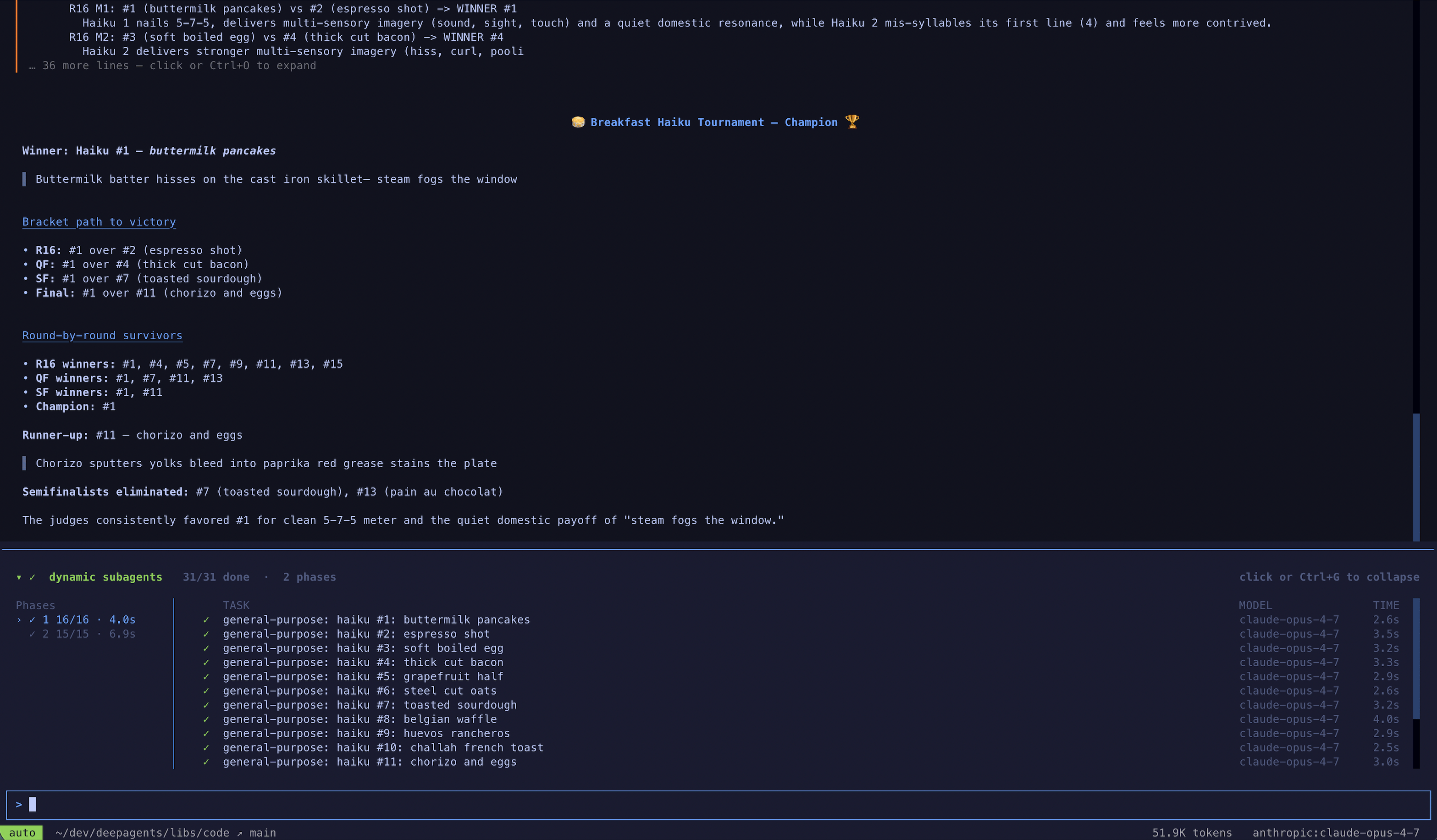
dcode is the fastest way to try this, but you can also use dynamic subagents in the coding agent of your choice over ACP (for example, Zed).
Streaming
Deep Agents support streaming updates from both the coordinator and every delegated subagent. Usestream_events to get typed projections—separate iterators for subagents, messages, tool calls, and values—so you can consume each independently.
Stream subagent progress
The simplest pattern is to iteratestream.subagents to track each delegated task as it starts, runs, and completes. Each subagent handle exposes .name, .messages, .tool_calls, and .output.
LangSmith tracing
As your deep agent runs, all runs executed by a subagent or the coordinator will have the agent name in their metadata under thelc_agent_name key—for example, {'lc_agent_name': 'research-agent'}. This lets you identify and filter runs by subagent in LangSmith.
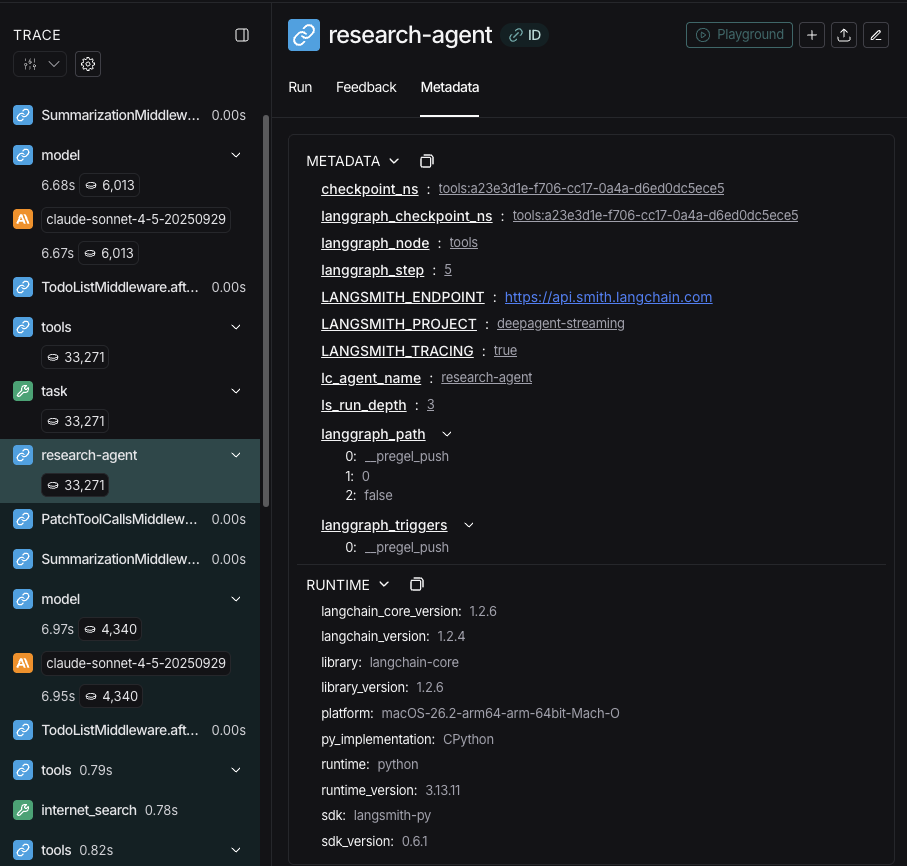
Filter by subagent in LangSmith
Because each subagent’sname is written to the lc_agent_name metadata key on every run it produces, you can use LangSmith’s metadata filtering to isolate all runs from a specific subagent — useful for debugging, monitoring, or comparing subagent behavior over time.
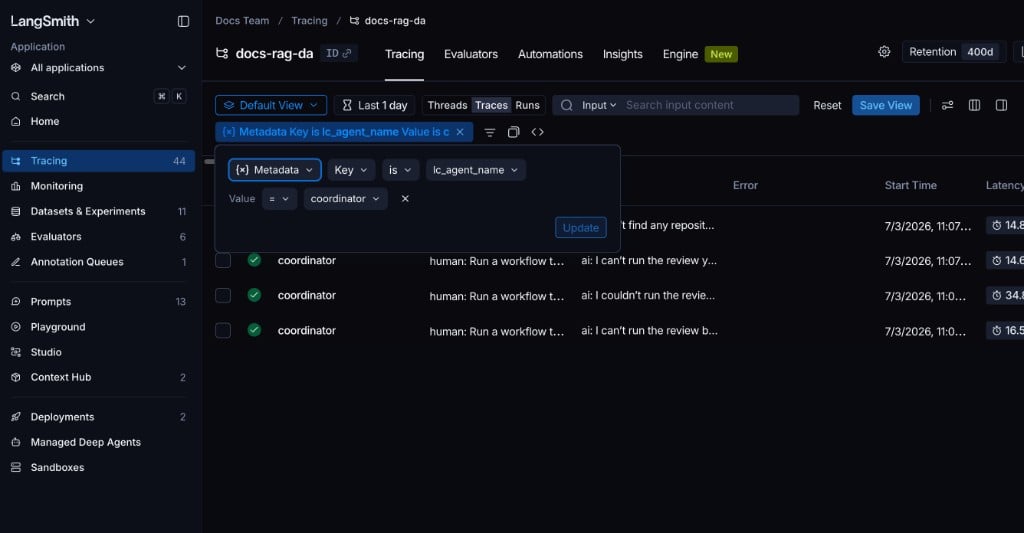
Filter in the LangSmith UI
- Open your tracing project in LangSmith.
- Switch the view to Runs on the Tracing project page to see individual spans.
- Click Add filter and select Metadata.
- Set the Key to
lc_agent_nameand the Value to the subagent name, for examplecoordinator.
Filter programmatically with the SDK
Use thehas comparator in the LangSmith filter query language to match runs by metadata key-value pair:
lc_agent_name key at all:
Structured output
Subagents support structured output, so the parent agent receives predictable, parseable JSON instead of free-form text.Structured output for subagents requires
deepagents>=0.5.3.response_format on the subagent config. When the subagent finishes, its structured response is JSON-serialized and returned as the ToolMessage content to the parent agent. The schema accepts anything supported by create_agent: Pydantic models, ToolStrategy(...), ProviderStrategy(...), or a raw schema type.
response_format, the parent receives the subagent’s last message text as-is. With it, the parent always gets valid JSON matching the schema, which is useful when the parent needs to process the result programmatically or pass it to downstream tools.
For full details on schema types and strategies (tool calling vs. provider-native), see Structured output.
The general-purpose subagent
In addition to any user-defined subagents, every deep agent has access to ageneral-purpose subagent at all times. This subagent:
- Uses its own default system prompt with profile overlays applied
- Has access to all the same tools
- Uses the same model (unless overridden)
- Inherits skills from the main agent (when skills are configured)
Override the general-purpose subagent
Include a subagent withname="general-purpose" in your subagents list to replace the default. Use this to configure a different model, tools, or system prompt for the general-purpose subagent:
enabled flag to False.
When to use it
The general-purpose subagent is ideal for context isolation without specialized behavior. The main agent can delegate a complex multi-step task to this subagent and get a concise result back without bloat from intermediate tool calls.Example
Instead of the main agent making 10 web searches and filling its context with results, it delegates to the general-purpose subagent:
task(name="general-purpose", task="Research quantum computing trends"). The subagent performs all the searches internally and returns only a summary.Skills inheritance
When configuring skills withcreate_deep_agent:
- General-purpose subagent: Automatically inherits skills from the main agent
- Custom subagents: Do NOT inherit skills by default—use the
skillsparameter to give them their own skills
Only subagents configured with skills get a
SkillsMiddleware instance—custom subagents without a skills parameter do not. When present, skill state is fully isolated in both directions: the parent’s skills are not visible to the child, and the child’s skills are not propagated back to the parent.Best practices
Write clear descriptions
The main agent uses descriptions to decide which subagent to call. Be specific: ✅ Good:"Analyzes financial data and generates investment insights with confidence scores"
❌ Bad: "Does finance stuff"
Keep system prompts detailed
Include specific guidance on how to use tools and format outputs:Minimize tool sets
Only give subagents the tools they need. This improves focus and security:Choose models by task
Different models excel at different tasks:Return concise results
Instruct subagents to return summaries, not raw data:Common patterns
Multiple specialized subagents
Create specialized subagents for different domains:- Main agent creates high-level plan
- Delegates data collection to data-collector
- Passes results to data-analyzer
- Sends insights to report-writer
- Compiles final output
Context management
When you invoke a parent agent with runtime context, that context automatically propagates to all subagents. Each subagent run receives the same runtime context you passed on the parentinvoke / ainvoke call.
This means tools running inside any subagent can access the same context values you provided to the parent:
Per-subagent context
All subagents receive the same parent context. To pass configuration that is specific to a particular subagent, use namespaced keys (prefix keys with the subagent name, for exampleresearcher:max_depth) in a flat context mapping, or model those settings as separate fields on your context type:
Identifying which subagent called a tool
When the same tool is shared between the parent and multiple subagents, you can use thelc_agent_name metadata (the same value used in streaming) to determine which agent initiated the call:
runtime.context and read lc_agent_name from runtime.config metadata when branching tool behavior.
Troubleshooting
Subagent not being called
Problem: Main agent tries to do work itself instead of delegating. Solutions:-
Make descriptions more specific:
-
Instruct main agent to delegate:
Context still getting bloated
Problem: Context fills up despite using subagents. Solutions:-
Instruct subagent to return concise results:
-
Use filesystem for large data:
Wrong subagent being selected
Problem: Main agent calls inappropriate subagent for the task. Solution: Differentiate subagents clearly in descriptions:Connect these docs to Claude, VSCode, and more via MCP for real-time answers.
