
TL;DR
Every new Prerender.io account starts with a free 30-day Starter trial: 25,000 renders, full API access, and no credit card required. You can keep using the trial until it ends, or activate the paid Starter plan immediately from Billing at any point during the trial. If you don't upgrade and the trial ends, rendering stops and you should remove the Prerender.io integration right away to avoid AI & Search visibility impact.
What the trial includes
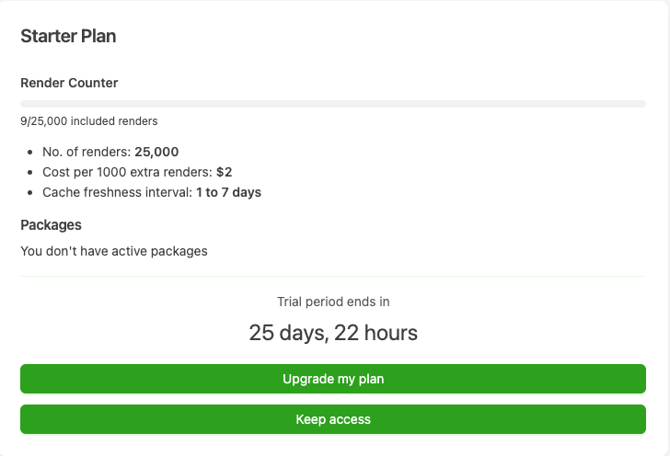
- 25,000 renders during the 30-day period.
- Full API access to manage caching and integrations.
- Flexible cache expiration from 24 hours up to 7 days.
- Performance tracking for crawl efficiency, indexed pages, and delivery times.
Frequently asked questions
How long does the trial last?
The trial lasts 30 days from the moment you sign up, unless you choose to activate a paid plan earlier.
Do I need a credit card to start?
No. No credit card is required to use the 30-day Starter trial.
What happens when the trial ends?
It depends on what you've chosen in your Prerender.io dashboard's Billing section during the trial:
-
Already activated Starter. If you activated the paid Starter plan during the trial, you're already on paid Starter and your billing cycle is already running, so nothing changes when the original 30-day period would have ended.
-
Card added, activation set for after trial. If you added a credit card but kept the default "Activate after trial" setting, your account converts to the paid Starter plan automatically when the trial ends, and you're charged $49/month at the start of your first billing cycle.
-
No credit card added. Rendering stops and your access to Prerender.io ends.
If you don't plan to upgrade, remove your Prerender.io integration as soon as the trial ends. Leaving the integration active after rendering stops means AI crawler and search engine requests will return errors (429/503), which can negatively affect your AI & Search visibility.
What happens to rendering once the trial ends?
Rendering stops immediately. AI crawlers and search engines will receive errors on requests to your site until you either upgrade or remove the integration.
What if I run out of renders before the trial ends?
You will be notified in-app and by email. A buffer of approximately ~15% extra renders may be applied before rendering completely stops — this is not guaranteed. If you hit the limit and don't plan to upgrade, remove the Prerender.io integration immediately.
What happened to the Free plan?
The Free plan was discontinued on October 15, 2025. All users previously on the Free plan were migrated to the 30-day Starter trial.
How do I upgrade to a paid plan?
Go to Billing in your Prerender.io dashboard and click Upgrade my plan.
Can I activate a paid plan before the trial ends?
Yes. Go to Billing in your Prerender.io dashboard at any time during the Starter trial and choose one of two options:
-
Activate Starter now. Ends your trial immediately, starts the paid Starter plan today, resets your render counter, and starts your billing cycle today.
- Activate after trial. Keeps your trial running as normal, and paid Starter starts automatically when the trial ends. You can switch to Activate Starter now at any point while the trial is still active.
If you upgrade to Growth or Pro instead of Starter, your paid plan starts immediately, as it always has.
Related articles
- Plan options and how to estimate renders
- Canceling your paid subscription
- Canceled or suspended account
- Invoices and payment methods
Still need help? If you have questions about the trial, your render usage, or upgrading to a paid plan, our support team can help. → Contact us at support@prerender.io
