<?xml version="1.0" encoding="UTF-8"?>
<?xml-stylesheet href="/vendor/feed/atom.xsl" type="text/xsl"?>
<feed xmlns="http://www.w3.org/2005/Atom" xml:lang="en-US">
                        <id>https://freek.dev/feed</id>
                                <link href="https://freek.dev/feed" rel="self"></link>
                                <title><![CDATA[freek.dev - all blogposts]]></title>
                    
                                <subtitle>All blogposts on freek.dev</subtitle>
                                                    <updated>2026-07-10T15:29:06+02:00</updated>
                        <entry>
            <title><![CDATA[A tour of my dotfiles]]></title>
            <link rel="alternate" href="https://freek.dev/3054-a-tour-of-my-dotfiles" />
            <id>https://freek.dev/3054</id>
            <author>
                <name><![CDATA[Freek Van der Herten]]></name>
                <email><![CDATA[freek@spatie.be]]></email>

            </author>
            <summary type="html">
                <![CDATA[<p>Over the years, I've built up a collection of aliases, shell functions, and CLI tools that make my terminal feel like home. All of it lives in a single repository: <a href="https://github.com/freekmurze/dotfiles">my dotfiles</a>.</p>
<p>It's a backup of every terminal tool and configuration I rely on, and it means I can set up a brand new Mac from scratch in about five minutes. Colleagues at <a href="https://spatie.be">Spatie</a> use it as a starting point for their own setups too.</p>
<p>Let me walk you through what's in there. I'll cover the tools and tricks first, with <a href="#the-install-script">installation and setup</a> further down.</p>
<!--more-->
<h2 id="what-are-dotfiles">What are dotfiles?</h2>
<p>Dotfiles are configuration files that typically live in your home directory and start with a dot: <code>.zshrc</code>, <code>.gitconfig</code>, <code>.vimrc</code>, and so on. They control how your terminal, shell, editor, and various command-line tools behave. The dot prefix makes them hidden by default on macOS and Linux, which is where the name comes from.</p>
<p>The idea behind a dotfiles repository is simple. You put all those configuration files in a git repo, then symlink them to where they need to be on your machine. If you get a new laptop or need to set up a fresh environment, you clone the repo, run the installer, and everything is exactly the way you like it within minutes.</p>
<h2 id="modern-cli-tools">Modern CLI tools</h2>
<p>I've gradually replaced most traditional Unix tools with faster, more modern alternatives. My aliases handle the switchover transparently:</p>
<pre data-lang="bash" class="notranslate"><span class="hl-keyword">if</span> <span class="hl-keyword">command</span> -v eza &amp;&gt; /dev/null; <span class="hl-keyword">then</span>
    <span class="hl-keyword">alias</span> ls=<span class="hl-value">&quot;eza --icons --group-directories-first&quot;</span>
    <span class="hl-keyword">alias</span> l=<span class="hl-value">&quot;eza -la --icons --group-directories-first --hyperlink&quot;</span>
    <span class="hl-keyword">alias</span> lt=<span class="hl-value">&quot;eza --tree --level=2 --icons&quot;</span>
<span class="hl-keyword">fi</span>

<span class="hl-keyword">if</span> <span class="hl-keyword">command</span> -v bat &amp;&gt; /dev/null; <span class="hl-keyword">then</span>
    <span class="hl-keyword">alias</span> cat=<span class="hl-value">&quot;bat --style=plain&quot;</span>
<span class="hl-keyword">fi</span>

<span class="hl-keyword">if</span> <span class="hl-keyword">command</span> -v rg &amp;&gt; /dev/null; <span class="hl-keyword">then</span>
    <span class="hl-keyword">alias</span> grep=<span class="hl-value">&quot;rg&quot;</span>
<span class="hl-keyword">fi</span>
</pre>
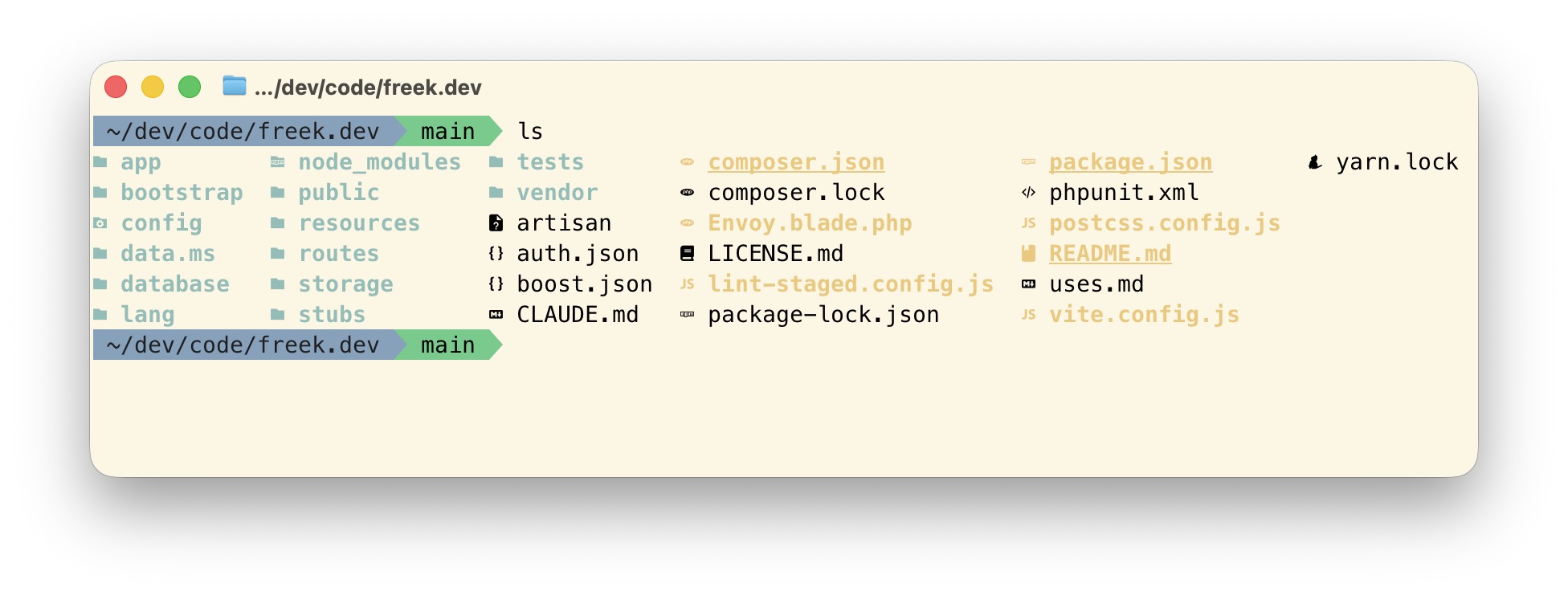
<p>Here's what <code>ls</code> looks like with eza: colorized output, file type icons, and directories grouped first. Much easier to scan than a plain wall of filenames:</p>
<img src="https://freek.dev/admin-uploads/eza-output.jpg" alt="eza output with icons" style="max-width: 125%; margin-left: -12.5%;">
<p>The <code>command -v</code> checks mean these aliases only activate when the tool is actually installed. On a machine without them, I still get the standard versions.</p>
<p>Here's what each tool does:</p>
<p><a href="https://eza.rocks">eza</a> replaces <code>ls</code> with colorized output, file icons, and a tree view. <a href="https://github.com/sharkdp/bat">bat</a> replaces <code>cat</code> with syntax highlighting. <a href="https://github.com/BurntSushi/ripgrep">ripgrep</a> replaces <code>grep</code> and is incredibly fast at searching through large codebases. <a href="https://github.com/sharkdp/fd">fd</a> replaces <code>find</code> with a much friendlier syntax. <a href="https://github.com/ajeetdsouza/zoxide">zoxide</a> replaces <code>cd</code> with smart directory jumping, which I'll get to in a minute. And <a href="https://github.com/dandavison/delta">delta</a> makes git diffs actually readable with side-by-side views and syntax highlighting.</p>
<p>Delta is the one that surprised me most. Here's a plain <code>git diff</code> with it configured as the pager:</p>
<p><video src="https://freek.dev/admin-uploads/delta-demo.mp4" autoplay loop muted playsinline style="max-width: 125%; margin-left: -12.5%;"></video></p>
<p>Notice that it highlights the parts of a line that changed, not just the line itself. On the signature it marks the added <code>: void</code>, and further down it marks exactly where <code>now()-&gt;addSeconds(20)</code> became <code>$socialDelay</code>. Plain <code>git diff</code> would paint those whole lines red and green and leave you to spot the difference yourself.</p>
<p>All of these are Rust-based, which means they're fast. Noticeably fast, even on large projects.</p>
<h2 id="jumping-between-projects-with-z">Jumping between projects with z</h2>
<p>Of everything in this post, <a href="https://github.com/ajeetdsouza/zoxide">zoxide</a> is my favourite. It gives you a <code>z</code> command that remembers every directory you've visited. Instead of typing a path, you type a fragment of the directory name, and zoxide takes you to the best match.</p>
<p>On any given day I bounce between five or six projects. With <code>z</code>, that looks like this:</p>
<pre data-lang="bash" class="notranslate">z ohdear
z mailcoach
z dotfiles
z flare
z freek
</pre>
<p>Those commands take me to ohdear.app, mailcoach.app, my dotfiles, flareapp.io, and back to freek.dev. It doesn't matter where I am when I type them. No paths, no tab completion, no <code>cd ../../..</code> to climb out of a subdirectory first.</p>
<p><video src="https://freek.dev/admin-uploads/zoxide-demo.mp4" autoplay loop muted playsinline style="max-width: 125%; margin-left: -12.5%;"></video></p>
<p>Watch what happens when I land in flareapp.io: fnm notices the project's Node version and switches to it automatically. That's the <code>--use-on-cd</code> flag doing its work, and it triggers on a <code>z</code> jump just as it would on a <code>cd</code>.</p>
<p>Zoxide ranks directories by a combination of how often and how recently you visit them. The projects I work on daily win over the ones I opened once last year, so the fragments I type can stay short. If a fragment is ambiguous, <code>zi</code> opens an interactive picker instead.</p>
<p>Wiring it up takes one line in <code>.zshrc</code>:</p>
<pre data-lang="bash" class="notranslate"><span class="hl-keyword">eval</span> <span class="hl-value">&quot;$(zoxide init zsh)&quot;</span>
</pre>
<p>That's the whole setup. Zoxide builds its database as you go, so it gets better the more you use it. For the first day or two you'll still reach for <code>cd</code>, and then you'll never think about it again.</p>
<h2 id="shell-configuration">Shell configuration</h2>
<p>The heart of the setup is <code>.zshrc</code>. It loads Oh My Zsh with a customized <a href="https://github.com/agnoster/agnoster-zsh-theme">agnoster theme</a> (a popular Powerline-style prompt that shows your current directory and git status at a glance), then sources three separate files: <code>.exports</code> for environment variables, <code>.aliases</code> for shortcuts, and <code>.functions</code> for more complex shell functions.</p>
<p>Splitting things up like this keeps each file focused and easy to navigate. When I want to add a new alias, I know exactly where to go.</p>
<h2 id="aliases">Aliases</h2>
<p>Aliases are the quick wins that save you keystrokes every single day. If you work with Laravel, these are especially handy:</p>
<pre data-lang="bash" class="notranslate"><span class="hl-keyword">alias</span> a=<span class="hl-value">&quot;php artisan&quot;</span>
<span class="hl-keyword">alias</span> mfs=<span class="hl-value">&quot;php artisan migrate:fresh --seed&quot;</span>
<span class="hl-keyword">alias</span> nah=<span class="hl-value">&quot;git reset --hard;git clean -df&quot;</span>
<span class="hl-keyword">alias</span> c=<span class="hl-value">&quot;claude&quot;</span>
<span class="hl-keyword">alias</span> cy=<span class="hl-value">&quot;claude-yolo&quot;</span>
</pre>
<p><code>a</code> turns any artisan command into something short. <code>a make:model Post -m</code> just flows better than typing out <code>php artisan</code> every time.</p>
<p><code>mfs</code> rebuilds the entire database from scratch: drops all tables, runs every migration, and seeds. This is why I <a href="https://freek.dev/2900-why-i-dont-use-down-migrations">don't bother with down migrations</a>. When your workflow is &quot;nuke it and rebuild,&quot; rollbacks become unnecessary.</p>
<p><code>nah</code> is probably my most-used alias. Changed something, realized it was a bad idea? Type <code>nah</code> and everything is back to the last commit. It's the &quot;undo everything&quot; button for your working directory.</p>
<p><code>c</code> and <code>cy</code> are for Claude Code. <code>cy</code> is short for <code>claude-yolo</code>, which runs Claude Code with <code>--dangerously-skip-permissions</code>. I'll be honest: <code>cy</code> is the one I use most these days. 😅</p>
<p>Composer gets the same treatment. Four aliases cover everything I do with it day to day:</p>
<pre data-lang="bash" class="notranslate"><span class="hl-keyword">alias</span> cu=<span class="hl-value">&quot;composer update&quot;</span>
<span class="hl-keyword">alias</span> cr=<span class="hl-value">&quot;composer require&quot;</span>
<span class="hl-keyword">alias</span> ci=<span class="hl-value">&quot;composer install&quot;</span>
<span class="hl-keyword">alias</span> cda=<span class="hl-value">&quot;composer dump-autoload -o&quot;</span>
</pre>
<p>For git, I keep it simple:</p>
<pre data-lang="bash" class="notranslate"><span class="hl-keyword">alias</span> push=<span class="hl-value">&quot;git push&quot;</span>
<span class="hl-keyword">alias</span> pull=<span class="hl-value">&quot;git pull&quot;</span>
<span class="hl-keyword">alias</span> gpo=<span class="hl-value">&quot;git push origin&quot;</span>
<span class="hl-keyword">alias</span> uncommit=<span class="hl-value">&quot;git reset --soft HEAD~1&quot;</span>
</pre>
<p><code>uncommit</code> is one of those aliases you don't need often, but when you do, you're glad it's there. It undoes the last commit but keeps all your changes staged, ready to be committed again. Useful when you committed too early, want to reword the message, or need to split one commit into two.</p>
<h2 id="the-small-aliases-that-earn-their-keep">The small aliases that earn their keep</h2>
<p>The shortcuts that save me the most time are the simple ones. I type them dozens of times a day without thinking, and that's exactly where the value is.</p>
<pre data-lang="bash" class="notranslate"><span class="hl-keyword">alias</span> o=<span class="hl-value">&quot;open .&quot;</span>
<span class="hl-keyword">alias</span> hostfile=<span class="hl-value">&quot;sudo vi /etc/hosts&quot;</span>
<span class="hl-keyword">alias</span> sshconfig=<span class="hl-value">&quot;vi ~/.ssh/config&quot;</span>
<span class="hl-keyword">alias</span> flushdns=<span class="hl-value">&quot;sudo dscacheutil -flushcache; sudo killall -HUP mDNSResponder&quot;</span>
<span class="hl-keyword">alias</span> flush-redis=<span class="hl-value">&quot;redis-cli FLUSHALL&quot;</span>
<span class="hl-keyword">alias</span> ip=<span class="hl-value">&quot;curl ifconfig.me/ip ; echo&quot;</span>
</pre>
<p><code>o</code> opens the current directory in Finder. It saves maybe two seconds, but I use it constantly, and two seconds many times a day is worth a one-line alias. That's the whole calculation. Frequency beats sophistication.</p>
<p><code>hostfile</code> and <code>sshconfig</code> exist because I could never remember whether it was <code>/etc/hosts</code> or <code>/etc/hostfile</code>, and because <code>~/.ssh/config</code> is just annoying to type. <code>flushdns</code> is the macOS incantation for clearing the DNS cache, which you need roughly once a year and can never recall when you do.</p>
<p>Opening the current project in an editor gets an alias per editor:</p>
<pre data-lang="bash" class="notranslate"><span class="hl-keyword">alias</span> phpstorm=<span class="hl-value">'open -a ~/Applications/PhpStorm.app &quot;`pwd`&quot;'</span>
<span class="hl-keyword">alias</span> vscode=<span class="hl-value">'code &quot;`pwd`&quot;'</span>
<span class="hl-keyword">alias</span> zed=<span class="hl-value">'open -a /Applications/Zed.app &quot;`pwd`&quot;'</span>
</pre>
<p>For Laravel work, <code>tunnel</code> shares my local site on a public URL through <a href="https://laravel.com/docs/valet">Valet</a>, always on the same subdomain so the URL stays stable across restarts:</p>
<pre data-lang="bash" class="notranslate"><span class="hl-keyword">alias</span> tunnel=<span class="hl-value">'valet share -subdomain=freekmurze -region=eu'</span>
</pre>
<p>And two aliases for toggling hidden files in Finder, which is the kind of thing you look up every single time otherwise:</p>
<pre data-lang="bash" class="notranslate"><span class="hl-keyword">alias</span> show=<span class="hl-value">&quot;defaults write com.apple.finder AppleShowAllFiles -bool true &amp;&amp; killall Finder&quot;</span>
<span class="hl-keyword">alias</span> hide=<span class="hl-value">&quot;defaults write com.apple.finder AppleShowAllFiles -bool false &amp;&amp; killall Finder&quot;</span>
</pre>
<p>There's one alias in my <code>.aliases</code> that isn't a shortcut at all:</p>
<pre data-lang="bash" class="notranslate"><span class="hl-keyword">alias</span> sudo=<span class="hl-value">'sudo '</span>
</pre>
<p>That trailing space is deliberate. Normally the shell won't expand an alias that appears after <code>sudo</code>, so <code>sudo l</code> fails with &quot;command not found.&quot; The trailing space tells zsh to check the next word for an alias too. A one-character fix for a papercut I hit for years before I learned about it.</p>
<h2 id="custom-functions">Custom functions</h2>
<p>For anything more complex than a simple alias, I use shell functions. My <code>.functions</code> file contains a handful of these.</p>
<p>The <code>p</code> function runs tests. It detects whether the project uses Pest or PHPUnit and calls the right one:</p>
<pre data-lang="bash" class="notranslate"><span class="hl-keyword">function</span> p() {
   <span class="hl-keyword">if</span> [ -f vendor/bin/pest ]; <span class="hl-keyword">then</span>
      vendor/bin/pest <span class="hl-value">&quot;$@&quot;</span>
   <span class="hl-keyword">else</span>
      vendor/bin/phpunit <span class="hl-value">&quot;$@&quot;</span>
   <span class="hl-keyword">fi</span>
}
</pre>
<p>I can also filter tests with <code>pf</code>:</p>
<pre data-lang="bash" class="notranslate"><span class="hl-keyword">function</span> pf() {
   <span class="hl-keyword">if</span> [ -f vendor/bin/pest ]; <span class="hl-keyword">then</span>
      vendor/bin/pest --filter <span class="hl-value">&quot;$@&quot;</span>
   <span class="hl-keyword">else</span>
      vendor/bin/phpunit --filter <span class="hl-value">&quot;$@&quot;</span>
   <span class="hl-keyword">fi</span>
}
</pre>
<p>When a suite gets big enough that I notice the wait, <code>pp</code> runs it in parallel:</p>
<pre data-lang="bash" class="notranslate"><span class="hl-keyword">alias</span> pp=<span class="hl-value">&quot;php artisan test --parallel&quot;</span>
</pre>
<p>The <code>mkd</code> function creates a directory and moves into it. Creating a directory you don't then want to enter is rare enough that I've stopped typing the two commands separately:</p>
<pre data-lang="bash" class="notranslate"><span class="hl-keyword">function</span> mkd() {
   mkdir -p <span class="hl-value">&quot;$@&quot;</span> &amp;&amp; cd <span class="hl-value">&quot;$@&quot;</span>
}
</pre>
<p><code>git-prune-local</code> deletes every local branch whose remote counterpart is gone. After a few months of merging pull requests, <code>git branch</code> becomes unreadable, and this cleans it up in one go:</p>
<pre data-lang="bash" class="notranslate"><span class="hl-keyword">function</span> git-prune-<span class="hl-keyword">local</span>() {
  git fetch -p &amp;&amp; git branch -vv | grep <span class="hl-value">': gone]'</span> | awk <span class="hl-value">'{print $1}'</span> | xargs git branch -D
}
</pre>
<p><code>clone</code> is a two-line function that saves me from ever typing a GitHub URL again. It hands off to the <a href="https://cli.github.com">GitHub CLI</a>, which accepts the <code>owner/repo</code> shorthand:</p>
<pre data-lang="bash" class="notranslate"><span class="hl-keyword">function</span> clone() {
  gh repo clone <span class="hl-value">&quot;$1&quot;</span> <span class="hl-value">&quot;${@:2}&quot;</span>
}
</pre>
<p>So <code>clone spatie/laravel-permission</code> is all I need.</p>
<p><code>digga</code> prints the DNS records for a domain in a format I can actually read, instead of the wall of text that plain <code>dig</code> gives you:</p>
<pre data-lang="bash" class="notranslate"><span class="hl-keyword">function</span> digga() {
	dig +nocmd <span class="hl-value">&quot;$1&quot;</span> any +multiline +noall +answer
}
</pre>
<p>The <code>db</code> function is a wrapper around MySQL for quick database operations:</p>
<pre data-lang="bash" class="notranslate"><span class="hl-keyword">function</span> db() {
    <span class="hl-keyword">case</span> <span class="hl-value">&quot;$1&quot;</span> <span class="hl-keyword">in</span>
        refresh) mysql -uroot -e <span class="hl-value">&quot;drop database $2; create database $2&quot;</span> ;;
        create)  mysql -uroot -e <span class="hl-value">&quot;create database $2&quot;</span> ;;
        drop)    mysql -uroot -e <span class="hl-value">&quot;drop database $2&quot;</span> ;;
        list)    mysql -uroot -e <span class="hl-value">&quot;show databases&quot;</span> | sed <span class="hl-value">'s/[|[:space:]]//g'</span> ;;
    <span class="hl-keyword">esac</span>
}
</pre>
<p>So <code>db create myapp</code> creates a database, <code>db refresh myapp</code> drops and recreates it, and <code>db list</code> shows all databases. No need to remember the MySQL CLI syntax.</p>
<p><code>scheduler</code> runs Laravel's scheduler in a loop, the way cron would in production. Handy when you're building something scheduled and want to watch it fire without waiting on the real thing:</p>
<pre data-lang="bash" class="notranslate"><span class="hl-keyword">function</span> scheduler() {
   <span class="hl-keyword">while</span> :; <span class="hl-keyword">do</span>
      php artisan schedule:run
      echo <span class="hl-value">&quot;Sleeping 60 seconds...&quot;</span>
      sleep 60
   <span class="hl-keyword">done</span>
}
</pre>
<p>My <code>commit</code> function is probably the most interesting one. I <a href="https://freek.dev/2978-how-to-automatically-generate-a-commit-message-using-claude">wrote about it separately</a>, but the short version is: it uses Claude to generate commit messages from the git diff. Type <code>commit</code> with no arguments and you get a descriptive message instead of my old habit of writing &quot;wip&quot; for everything.</p>
<p><video src="https://freek.dev/admin-uploads/commit-demo.mp4" autoplay loop muted playsinline style="max-width: 125%; margin-left: -12.5%;"></video></p>
<p>Here I delete <code>composer.json</code> and type <code>commit</code> with no arguments. The spinner runs while Claude reads the staged diff, and a moment later the commit lands with &quot;Delete composer.json&quot; as its message.</p>
<p>This is where <code>uncommit</code> earns its place. Every so often Claude writes a message that misses the point of the change. Typing <code>uncommit</code> rewinds that commit and leaves everything staged, so I can run <code>commit</code> again for a second attempt, or give up and write the message myself. The two aliases work as a pair: one guesses, the other lets me take the guess back.</p>
<h2 id="git-configuration">Git configuration</h2>
<p>My <code>.gitconfig</code> is worth a look too. The most impactful setting is configuring <a href="https://github.com/dandavison/delta">delta</a> as the default pager:</p>
<pre data-lang="ini" class="notranslate"><span class="hl-keyword">[core]</span>
    <span class="hl-property">pager </span>= delta

<span class="hl-keyword">[interactive]</span>
    <span class="hl-property">diffFilter </span>= delta --color-only

<span class="hl-keyword">[delta]</span>
    <span class="hl-property">navigate </span>= true
    <span class="hl-property">light </span>= false
    <span class="hl-property">side-by-side </span>= true
    <span class="hl-property">line-numbers </span>= true
</pre>
<p>This gives me side-by-side diffs with line numbers and syntax highlighting for every <code>git diff</code>, <code>git log -p</code>, and <code>git show</code> command, which is what you saw in the video near the top of this post. Going back to the default diff output feels painful after using this.</p>
<p>I also have a <a href="https://freek.dev/1602-setting-up-a-global-gitignore-file">global gitignore</a> to keep <code>.DS_Store</code>, <code>.idea</code>, <code>node_modules</code>, and other junk out of every repository without needing per-project ignore rules. The idea is simple: instead of adding the same entries to every project's <code>.gitignore</code>, you configure one file that applies to all repos on your machine. It keeps your project gitignore files focused on project-specific things, and you never accidentally commit <code>.DS_Store</code> again.</p>
<h2 id="the-install-script">The install script</h2>
<p>My dotfiles repo has a <a href="https://github.com/freekmurze/dotfiles/blob/main/bin/install"><code>bin/install</code></a> script that handles the full setup. Run it on a fresh Mac and about five minutes later, everything is exactly the way you like it.</p>
<p>It starts by installing <a href="https://ohmyz.sh/">Oh My Zsh</a> (a framework for managing your Zsh configuration with plugin support and themes) and creating all the necessary symlinks so your config files end up where the system expects them.</p>
<p>Then it runs Homebrew to install everything declared in a <code>Brewfile</code>, sets up PHP extensions, configures Node.js via fnm, and installs global Composer packages like Valet and Pint. At the end, it optionally sets up Claude Code with all your skills and agents.</p>
<p>The symlink step is the core of the installer. It connects each config file in the repo to where the system expects it:</p>
<pre data-lang="bash" class="notranslate">ln -sf ~/.dotfiles/home/.zshrc ~/.zshrc
ln -sf ~/.dotfiles/home/.gitconfig ~/.gitconfig
ln -sf ~/.dotfiles/config/ghostty/config ~/.config/ghostty/config
</pre>
<p>The same pattern applies to Zed, Vim, and everything else. The benefit: when you edit <code>~/.zshrc</code>, you're actually editing the file inside <code>~/.dotfiles/</code>, so every change is automatically tracked by git. No copying files around, no syncing, no forgetting to update the repo after a tweak. And because it's all in git, your settings are backed up by default. Tweak an alias, push, and it's safe. Get a new laptop, clone the repo, and you're right back where you left off.</p>
<p>I use <a href="https://ghostty.org/">Ghostty</a> as my terminal, and its configuration is managed through dotfiles too. The config is minimal: it sets the working directory to my code folder, uses a block cursor, and tweaks one palette color.</p>
<h2 id="the-brewfile">The Brewfile</h2>
<p>All my Homebrew packages are declared in a single <code>Brewfile</code>. This is the canonical list of everything I need installed on a fresh Mac:</p>
<pre data-lang="txt" class="notranslate"># Modern CLI tools
brew &quot;zoxide&quot;
brew &quot;bat&quot;
brew &quot;eza&quot;
brew &quot;ripgrep&quot;
brew &quot;fd&quot;
brew &quot;git-delta&quot;
brew &quot;fnm&quot;
brew &quot;fzf&quot;
brew &quot;jq&quot;
brew &quot;yq&quot;
brew &quot;bottom&quot;

# Development
brew &quot;php&quot;
brew &quot;composer&quot;
brew &quot;mysql&quot;
cask &quot;claude-code&quot;
cask &quot;zed&quot;
</pre>
<p>Running <code>brew bundle --file=~/.dotfiles/config/Brewfile</code> installs everything in one go. Adding a new tool is just appending a line and running that command again.</p>
<p>Here's what each of those modern CLI tools does:</p>
<ul>
<li><a href="https://github.com/ajeetdsouza/zoxide">zoxide</a> - A smarter <code>cd</code>. It learns which directories you visit and lets you jump to them by partial name. <code>z dotfiles</code> from anywhere takes you straight to <code>~/.dotfiles</code>.</li>
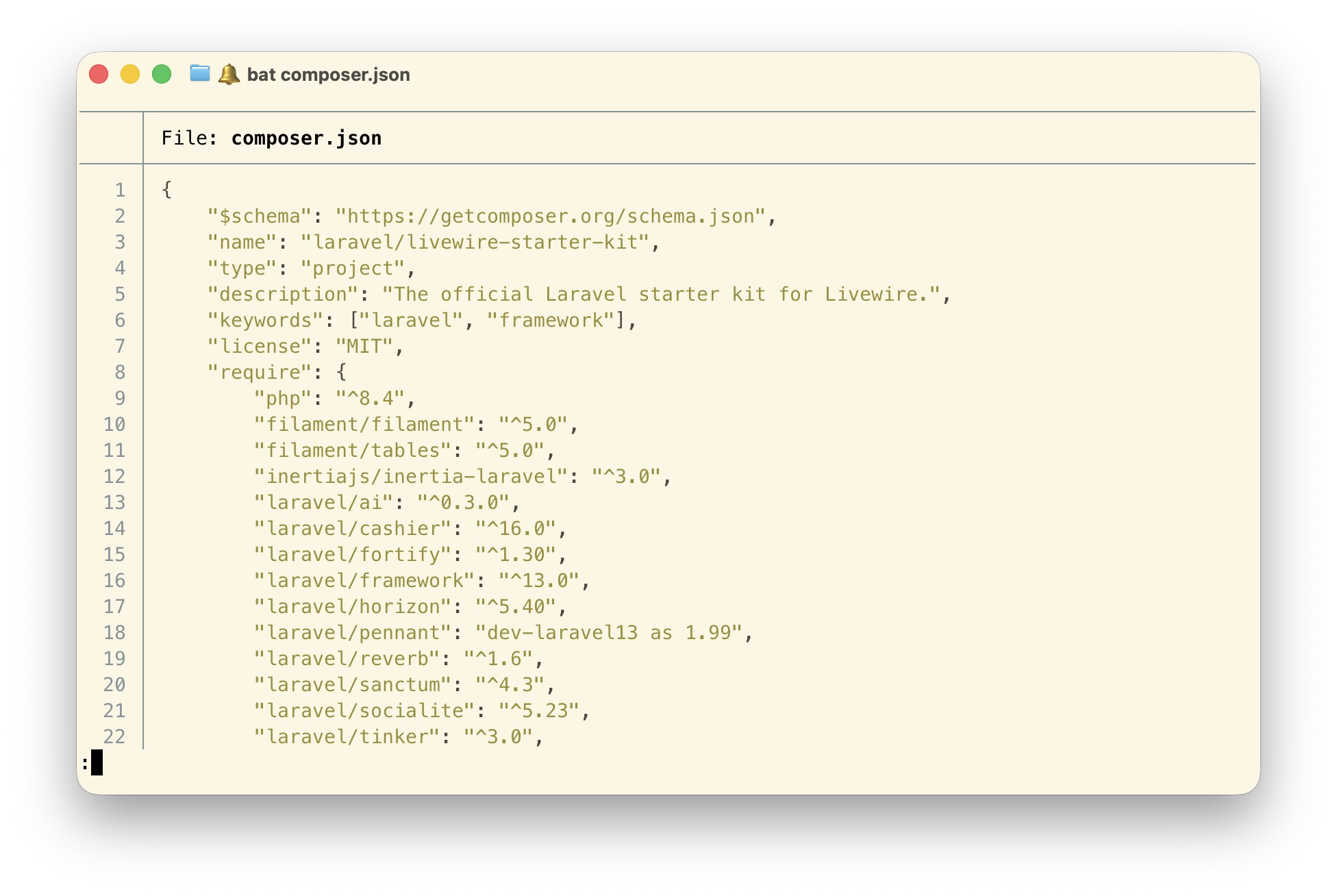
<li><a href="https://github.com/sharkdp/bat">bat</a> - <code>cat</code> with syntax highlighting and line numbers. Makes reading files in the terminal actually pleasant.</li>
<li><a href="https://eza.rocks">eza</a> - A modern <code>ls</code> with icons, colors, tree view, and git status integration.</li>
<li><a href="https://github.com/BurntSushi/ripgrep">ripgrep</a> - <code>grep</code>, but fast. Respects <code>.gitignore</code> by default and searches through large codebases in milliseconds.</li>
<li><a href="https://github.com/sharkdp/fd">fd</a> - A simpler <code>find</code>. <code>fd migration</code> beats <code>find . -name '*migration*'</code> every time.</li>
<li><a href="https://github.com/dandavison/delta">git-delta</a> - Beautiful side-by-side diffs with syntax highlighting. Configured as the default git pager (see the git section above).</li>
<li><a href="https://github.com/Schniz/fnm">fnm</a> - Fast Node.js version manager. Automatically switches Node versions when you <code>cd</code> into a project with a <code>.node-version</code> file.</li>
<li><a href="https://github.com/junegunn/fzf">fzf</a> - A fuzzy finder for everything. Press <code>Ctrl+R</code> and search through your command history interactively instead of mashing the up arrow.</li>
<li><a href="https://jqlang.github.io/jq/">jq</a> - Command-line JSON processor. Pipe any API response through <code>jq</code> and get readable, colorized, filterable output.</li>
<li><a href="https://github.com/mikefarah/yq">yq</a> - The same thing as <code>jq</code>, but for YAML files.</li>
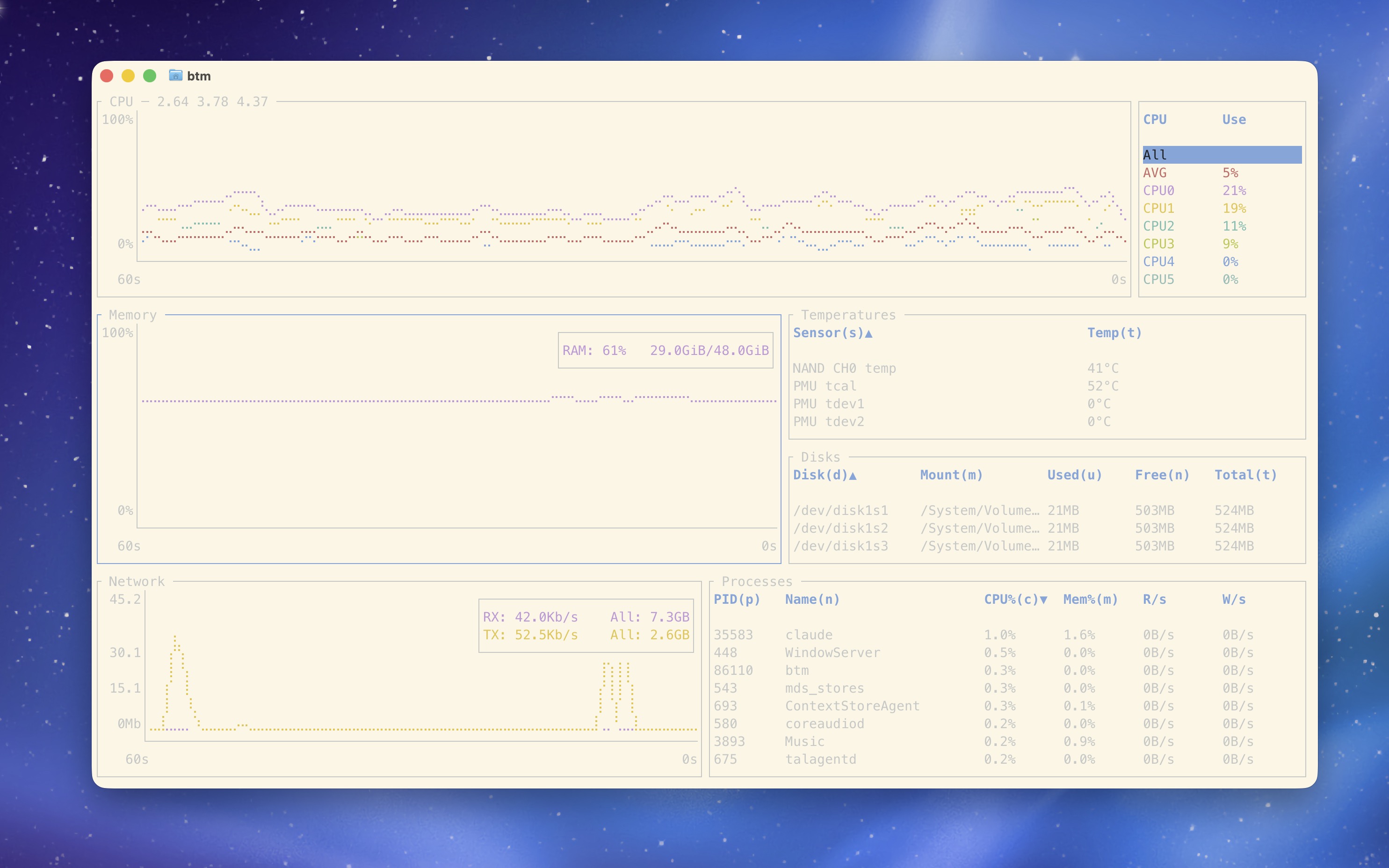
<li><a href="https://github.com/ClementTsang/bottom">bottom</a> - A graphical process/system monitor. I have it aliased as <code>htop</code> and <code>top</code>.</li>
</ul>
<img src="https://freek.dev/admin-uploads/bat-output.jpg" alt="bat output with syntax highlighting" style="max-width: 125%; margin-left: -12.5%;">
<img src="https://freek.dev/admin-uploads/btm-output.jpg" alt="the bottom system monitor showing CPU, memory, network and process graphs" style="max-width: 125%; margin-left: -12.5%;">
<h2 id="claude-code-configuration">Claude Code configuration</h2>
<p>Since I <a href="https://freek.dev/3026-my-claude-code-setup">wrote about my Claude Code setup</a> in a separate post, I'll keep this brief. My dotfiles also version-control my entire Claude Code configuration: the global CLAUDE.md instructions, custom skills, custom agents, and settings. All of it is symlinked from <code>~/.dotfiles/config/claude/</code> to <code>~/.claude/</code>.</p>
<p>This means when I clone my dotfiles on a new machine, my Claude Code setup comes along for the ride. Same agents, same skills, same guidelines, ready to go immediately.</p>
<h2 id="customization-without-conflicts">Customization without conflicts</h2>
<p>One pattern I like is the support for a <code>~/.dotfiles-custom</code> directory. My <code>.zshrc</code> sources files from this directory if they exist:</p>
<pre data-lang="bash" class="notranslate"><span class="hl-keyword">for</span> file <span class="hl-keyword">in</span> ~/.dotfiles-custom/shell/.{exports,aliases,functions,zshrc}; <span class="hl-keyword">do</span>
    [ -r <span class="hl-value">&quot;$file&quot;</span> ] &amp;&amp; [ -f <span class="hl-value">&quot;$file&quot;</span> ] &amp;&amp; <span class="hl-keyword">source</span> <span class="hl-value">&quot;$file&quot;</span>
<span class="hl-keyword">done</span>
</pre>
<p>This means I can have machine-specific configuration that never gets committed to the dotfiles repo. Work-specific API keys, aliases for a particular project, or anything else that shouldn't be shared publicly.</p>
<h2 id="in-closing">In closing</h2>
<p>Dotfiles are one of those things that seem like overkill until you set them up. Then you wonder how you ever lived without them. The initial investment pays off every time you open a terminal, and it really pays off the day you set up a new machine.</p>
<p>My entire setup is public at <a href="https://github.com/freekmurze/dotfiles">github.com/freekmurze/dotfiles</a>. Feel free to fork it and make it your own. That's the beauty of dotfiles: everyone's are different, tailored to how they work.</p>
<p>If you want to see more about the rest of my development environment, including my editor, macOS apps, and hardware, check out my <a href="https://freek.dev/uses">uses page</a>.</p>
]]>
            </summary>
                                    <updated>2026-07-10T15:29:06+02:00</updated>
        </entry>
            <entry>
            <title><![CDATA[Rewriting Bun in Rust]]></title>
            <link rel="alternate" href="https://freek.dev/3159-rewriting-bun-in-rust" />
            <id>https://freek.dev/3159</id>
            <author>
                <name><![CDATA[Freek Van der Herten]]></name>
                <email><![CDATA[freek@spatie.be]]></email>

            </author>
            <summary type="html">
                <![CDATA[<p>Jarred Sumner explains why the Bun team is moving from Zig to Rust, after years of fighting memory safety issues in a codebase that mixes GC and manual memory management. He also shares how Claude helped make a mechanical, test-suite-driven rewrite realistic without pausing feature work for a year.</p>


<a href='https://bun.com/blog/bun-in-rust'>Read more</a>]]>
            </summary>
                                    <updated>2026-07-10T14:30:28+02:00</updated>
        </entry>
            <entry>
            <title><![CDATA[CLAUDE.md is RAM, not disk]]></title>
            <link rel="alternate" href="https://freek.dev/3158-claudemd-is-ram-not-disk" />
            <id>https://freek.dev/3158</id>
            <author>
                <name><![CDATA[Freek Van der Herten]]></name>
                <email><![CDATA[freek@spatie.be]]></email>

            </author>
            <summary type="html">
                <![CDATA[<p>CLAUDE.md isn't documentation, it's working memory. A practical approach to keeping it lean and focused instead of letting it grow into an unreadable 300-line dumping ground.</p>


<a href='https://albertoarena.it/posts/claude-md-is-ram-not-disk/'>Read more</a>]]>
            </summary>
                                    <updated>2026-07-09T14:45:28+02:00</updated>
        </entry>
            <entry>
            <title><![CDATA[Charging AI Agents Per Request: A Practical Guide to the Machine Payments Protocol]]></title>
            <link rel="alternate" href="https://freek.dev/3157-charging-ai-agents-per-request-a-practical-guide-to-the-machine-payments-protocol" />
            <id>https://freek.dev/3157</id>
            <author>
                <name><![CDATA[Freek Van der Herten]]></name>
                <email><![CDATA[freek@spatie.be]]></email>

            </author>
            <summary type="html">
                <![CDATA[<p>Agentic commerce is a buzzy term, but is still pretty abstract for developers asking what they can actually build today. This post explains MPP through a working Laravel example, and introduces the new square1/laravel-mpp package.</p>


<a href='https://www.conroyp.com/articles/practical-guide-machine-payments-protocol'>Read more</a>]]>
            </summary>
                                    <updated>2026-07-08T14:30:28+02:00</updated>
        </entry>
            <entry>
            <title><![CDATA[Leave a failing test before you go on vacation]]></title>
            <link rel="alternate" href="https://freek.dev/3156-leave-a-failing-test-before-you-go-on-vacation" />
            <id>https://freek.dev/3156</id>
            <author>
                <name><![CDATA[Freek Van der Herten]]></name>
                <email><![CDATA[freek@spatie.be]]></email>

            </author>
            <summary type="html">
                <![CDATA[<p>Every year I dread coming back from vacation not because of the work, but because I have no idea where I left off. A failing test, a well-written TODO, and a slow first day back are all you need to ease back in.</p>


<a href='https://lukapeharda.com/article/leave-a-failing-test-before-you-go-on-vacation/'>Read more</a>]]>
            </summary>
                                    <updated>2026-07-07T14:17:28+02:00</updated>
        </entry>
            <entry>
            <title><![CDATA[UUIDs, ULIDs and Sqids: A Practical Deep Dive]]></title>
            <link rel="alternate" href="https://freek.dev/3155-uuids-ulids-and-sqids-a-practical-deep-dive" />
            <id>https://freek.dev/3155</id>
            <author>
                <name><![CDATA[Freek Van der Herten]]></name>
                <email><![CDATA[freek@spatie.be]]></email>

            </author>
            <summary type="html">
                <![CDATA[<p>A practical deep dive into UUIDs, ULIDs, and Sqids, from generation models and sorting behavior to database storage, public IDs, and security trade-offs.</p>


<a href='https://wendelladriel.com/blog/uuids-ulids-and-sqids-a-practical-deep-dive'>Read more</a>]]>
            </summary>
                                    <updated>2026-07-06T14:46:27+02:00</updated>
        </entry>
            <entry>
            <title><![CDATA[How AI is changing (the way I do) UX]]></title>
            <link rel="alternate" href="https://freek.dev/3154-how-ai-is-changing-the-way-i-do-ux" />
            <id>https://freek.dev/3154</id>
            <author>
                <name><![CDATA[Freek Van der Herten]]></name>
                <email><![CDATA[freek@spatie.be]]></email>

            </author>
            <summary type="html">
                <![CDATA[<p>Nick Houtman shares how AI is reshaping UX work: clients arrive with better prototypes, common patterns get safer and more generic, and real research still matters most.</p>


<a href='https://spatie.be/blog/how-ai-is-changing-ux'>Read more</a>]]>
            </summary>
                                    <updated>2026-06-30T17:35:57+02:00</updated>
        </entry>
            <entry>
            <title><![CDATA[Your Laravel routes can carry metadata now, and Flare shows it]]></title>
            <link rel="alternate" href="https://freek.dev/3153-your-laravel-routes-can-carry-metadata-now-and-flare-shows-it" />
            <id>https://freek.dev/3153</id>
            <author>
                <name><![CDATA[Freek Van der Herten]]></name>
                <email><![CDATA[freek@spatie.be]]></email>

            </author>
            <summary type="html">
                <![CDATA[<p>Laravel now supports attaching arbitrary metadata to routes, and the latest laravel-flare client shows that context in error reports and performance traces.</p>


<a href='https://flareapp.io/blog/your-laravel-routes-can-carry-metadata-now-and-flare-shows-it/'>Read more</a>]]>
            </summary>
                                    <updated>2026-06-30T17:33:00+02:00</updated>
        </entry>
            <entry>
            <title><![CDATA[Everything About the Context Facade]]></title>
            <link rel="alternate" href="https://freek.dev/3152-everything-about-the-context-facade" />
            <id>https://freek.dev/3152</id>
            <author>
                <name><![CDATA[Freek Van der Herten]]></name>
                <email><![CDATA[freek@spatie.be]]></email>

            </author>
            <summary type="html">
                <![CDATA[<p>A deep dive into Laravel Context, from request metadata and automatic log enrichment to hidden context, scoped values, queues, scheduled commands, and internals.</p>


<a href='https://wendelladriel.com/blog/everything-about-the-context-facade'>Read more</a>]]>
            </summary>
                                    <updated>2026-06-29T14:13:28+02:00</updated>
        </entry>
            <entry>
            <title><![CDATA[Storied Colors]]></title>
            <link rel="alternate" href="https://freek.dev/3151-storied-colors" />
            <id>https://freek.dev/3151</id>
            <author>
                <name><![CDATA[Freek Van der Herten]]></name>
                <email><![CDATA[freek@spatie.be]]></email>

            </author>
            <summary type="html">
                <![CDATA[<p>A lovely growing index of colors, each with its own provenance, chemistry, and often grim history. Beautifully made, and exactly the kind of rabbit hole I enjoy falling into.</p>


<a href='https://storiedcolors.com'>Read more</a>]]>
            </summary>
                                    <updated>2026-06-27T14:30:32+02:00</updated>
        </entry>
            <entry>
            <title><![CDATA[Learn Anything With My /teach Skill]]></title>
            <link rel="alternate" href="https://freek.dev/3150-learn-anything-with-my-teach-skill" />
            <id>https://freek.dev/3150</id>
            <author>
                <name><![CDATA[Freek Van der Herten]]></name>
                <email><![CDATA[freek@spatie.be]]></email>

            </author>
            <summary type="html">
                <![CDATA[<p>Matt Pocock shows how his /teach skill turns Claude Code into a personalized teacher that adapts lessons to your goals, level, and progress. It creates structured lessons, resources, quizzes, and a learning record so you can keep building on what you learned.</p>


<a href='https://www.aihero.dev/learn-anything-with-my-teach-skill'>Read more</a>]]>
            </summary>
                                    <updated>2026-06-26T14:30:35+02:00</updated>
        </entry>
            <entry>
            <title><![CDATA[Life is too short for a slow terminal]]></title>
            <link rel="alternate" href="https://freek.dev/3149-life-is-too-short-for-a-slow-terminal" />
            <id>https://freek.dev/3149</id>
            <author>
                <name><![CDATA[Freek Van der Herten]]></name>
                <email><![CDATA[freek@spatie.be]]></email>

            </author>
            <summary type="html">
                <![CDATA[<p>Mijndert Stuij shares a bunch of practical ways to make your terminal feel instant, from skipping shell frameworks and caching completions to lazy-loading slow tools. A good reminder that tiny bits of latency add up fast when you live in your terminal all day.</p>


<a href='https://mijndertstuij.nl/posts/life-is-too-short-for-a-slow-terminal/'>Read more</a>]]>
            </summary>
                                    <updated>2026-06-25T14:30:26+02:00</updated>
        </entry>
            <entry>
            <title><![CDATA[Context-aware headings in HTML]]></title>
            <link rel="alternate" href="https://freek.dev/3148-context-aware-headings-in-html" />
            <id>https://freek.dev/3148</id>
            <author>
                <name><![CDATA[Freek Van der Herten]]></name>
                <email><![CDATA[freek@spatie.be]]></email>

            </author>
            <summary type="html">
                <![CDATA[<p>A look at the new experimental headingoffset attribute, which lets heading levels adapt to their context instead of hardcoding h2s and h3s. A thoughtful explanation of where this could be genuinely useful, especially in component-based UIs.</p>


<a href='https://www.matuzo.at/blog/2026/content-aware-headings'>Read more</a>]]>
            </summary>
                                    <updated>2026-06-24T14:30:34+02:00</updated>
        </entry>
            <entry>
            <title><![CDATA[Improving Laravel Architecture With Expressive]]></title>
            <link rel="alternate" href="https://freek.dev/3134-improving-laravel-architecture-with-expressive" />
            <id>https://freek.dev/3134</id>
            <author>
                <name><![CDATA[Freek Van der Herten]]></name>
                <email><![CDATA[freek@spatie.be]]></email>

            </author>
            <summary type="html">
                <![CDATA[<p>Learn how Expressive can improve a Laravel application by keeping Eloquent as the database layer while moving business logic to fully typed objects.</p>


<a href='https://wendelladriel.com/blog/improving-laravel-architecture-with-expressive'>Read more</a>]]>
            </summary>
                                    <updated>2026-06-23T14:30:27+02:00</updated>
        </entry>
            <entry>
            <title><![CDATA[Eloquent Query Classes Pattern]]></title>
            <link rel="alternate" href="https://freek.dev/3146-eloquent-query-classes-pattern" />
            <id>https://freek.dev/3146</id>
            <author>
                <name><![CDATA[Freek Van der Herten]]></name>
                <email><![CDATA[freek@spatie.be]]></email>

            </author>
            <summary type="html">
                <![CDATA[<p>Learn how to use Eloquent Query Classes to organize important database logic in Laravel without adding a full repository layer.</p>


<a href='https://wendelladriel.com/blog/eloquent-query-classes-pattern'>Read more</a>]]>
            </summary>
                                    <updated>2026-06-22T14:30:28+02:00</updated>
        </entry>
            <entry>
            <title><![CDATA[Architecture Decision Record]]></title>
            <link rel="alternate" href="https://freek.dev/3145-architecture-decision-record" />
            <id>https://freek.dev/3145</id>
            <author>
                <name><![CDATA[Freek Van der Herten]]></name>
                <email><![CDATA[freek@spatie.be]]></email>

            </author>
            <summary type="html">
                <![CDATA[<p>A concise explanation of ADRs: short documents that capture an important decision, the context behind it, and its consequences. Good practical advice on keeping them lightweight, readable, and useful over time.</p>


<a href='https://martinfowler.com/bliki/ArchitectureDecisionRecord.html'>Read more</a>]]>
            </summary>
                                    <updated>2026-06-20T14:30:29+02:00</updated>
        </entry>
            <entry>
            <title><![CDATA[Building RAG in Laravel: Four Ingestion Bugs That Silently Wreck Retrieval]]></title>
            <link rel="alternate" href="https://freek.dev/3144-building-rag-in-laravel-four-ingestion-bugs-that-silently-wreck-retrieval" />
            <id>https://freek.dev/3144</id>
            <author>
                <name><![CDATA[Freek Van der Herten]]></name>
                <email><![CDATA[freek@spatie.be]]></email>

            </author>
            <summary type="html">
                <![CDATA[<p>Every Laravel RAG tutorial builds the same ingestion pipeline (chunk, embed, store) and stops the moment the agent answers on screen. None of them check whether retrieval is any good. But retrieval quality is decided at ingestion, before the model runs once, and four decisions there fail with no error, no exception, no failed test:</p>
<ul>
<li><strong>Chunking</strong> that severs the answer mid-sentence, so <code>answer@1</code> falls while <code>source hit@1</code> still looks healthy.</li>
<li>An <strong>HNSW index</strong> built with <code>vector_l2_ops</code> while you query with cosine <code>&lt;=&gt;</code>. Postgres silently ignores the index and scans every row. Laravel 13's native <code>whereVectorSimilarTo()</code> hardcodes <code>&lt;=&gt;</code>, so it's easier to hit than ever. Shown with <code>EXPLAIN</code>.</li>
<li>The <strong>embedding dimension</strong> baked into the <code>vector(1536)</code> column type, so &quot;shrink it to save storage&quot; is a migration plus a full re-embed that quietly drops retrieval to 47%.</li>
<li><strong>Ingesting and querying with different models</strong>, which turns every distance into noise.</li>
</ul>
<p>Each bug is real code from a working repo, proven against an eval suite. It's the prequel to my earlier &quot;Evaluating RAG in Laravel&quot; post: build it, prove it, tune it. Every example verified against <code>laravel/ai</code> v0.7.2 and pgvector, with the full repo to clone.</p>


<a href='https://mujahidabbas.dev/blog/building-rag-laravel-pgvector/'>Read more</a>]]>
            </summary>
                                    <updated>2026-06-19T14:32:25+02:00</updated>
        </entry>
            <entry>
            <title><![CDATA[Feature Flags in Laravel with Pennant]]></title>
            <link rel="alternate" href="https://freek.dev/3143-feature-flags-in-laravel-with-pennant" />
            <id>https://freek.dev/3143</id>
            <author>
                <name><![CDATA[Freek Van der Herten]]></name>
                <email><![CDATA[freek@spatie.be]]></email>

            </author>
            <summary type="html">
                <![CDATA[<p>How we use class-based Laravel Pennant features, with a kill switch on every flag and a config-driven path to general availability.</p>


<a href='https://koomai.net/posts/feature-flags-in-laravel-with-pennant/'>Read more</a>]]>
            </summary>
                                    <updated>2026-06-18T14:04:25+02:00</updated>
        </entry>
            <entry>
            <title><![CDATA[How PHP Attributes Changed the Way I Write Livewire]]></title>
            <link rel="alternate" href="https://freek.dev/3142-how-php-attributes-changed-the-way-i-write-livewire" />
            <id>https://freek.dev/3142</id>
            <author>
                <name><![CDATA[Freek Van der Herten]]></name>
                <email><![CDATA[freek@spatie.be]]></email>

            </author>
            <summary type="html">
                <![CDATA[<p>Bert De Swaef shows how PHP attributes made his Livewire components easier to read by attaching validation, URL sync, and event listeners directly to the properties and methods they belong to. Nice piece on how attributes reduce mental overhead, improve IDE support, and make components feel more self-documenting.</p>


<a href='https://bert.gent/articles/2026-05-24/how-php-attributes-changed-the-way-i-write-livewire'>Read more</a>]]>
            </summary>
                                    <updated>2026-06-17T12:30:28+02:00</updated>
        </entry>
            <entry>
            <title><![CDATA[Rust Tutorial For PHP and JavaScript Developers]]></title>
            <link rel="alternate" href="https://freek.dev/3141-rust-tutorial-for-php-and-javascript-developers" />
            <id>https://freek.dev/3141</id>
            <author>
                <name><![CDATA[Freek Van der Herten]]></name>
                <email><![CDATA[freek@spatie.be]]></email>

            </author>
            <summary type="html">
                <![CDATA[

<a href='https://youtu.be/lJdqrDFswns?si=xs8_bE4e1JwIsZHu'>Read more</a>]]>
            </summary>
                                    <updated>2026-06-16T14:55:29+02:00</updated>
        </entry>
    </feed>