Haiwen Feng*, Long Lian*, Lisa Dunlap*, Jiahao Shu, XuDong Wang, Renhao Wang, Trevor Darrell, Alane Suhr, Angjoo Kanazawa
UC Berkeley
Paper | Project Page | Dataset | Citation
TL;DR: Small visual-prompting details (marker color/size, dataset size, JPEG compression) can swing VLM accuracy and reorder leaderboards on visually prompted tasks; VPBench adds 16 marker variants to stress-test this instability.
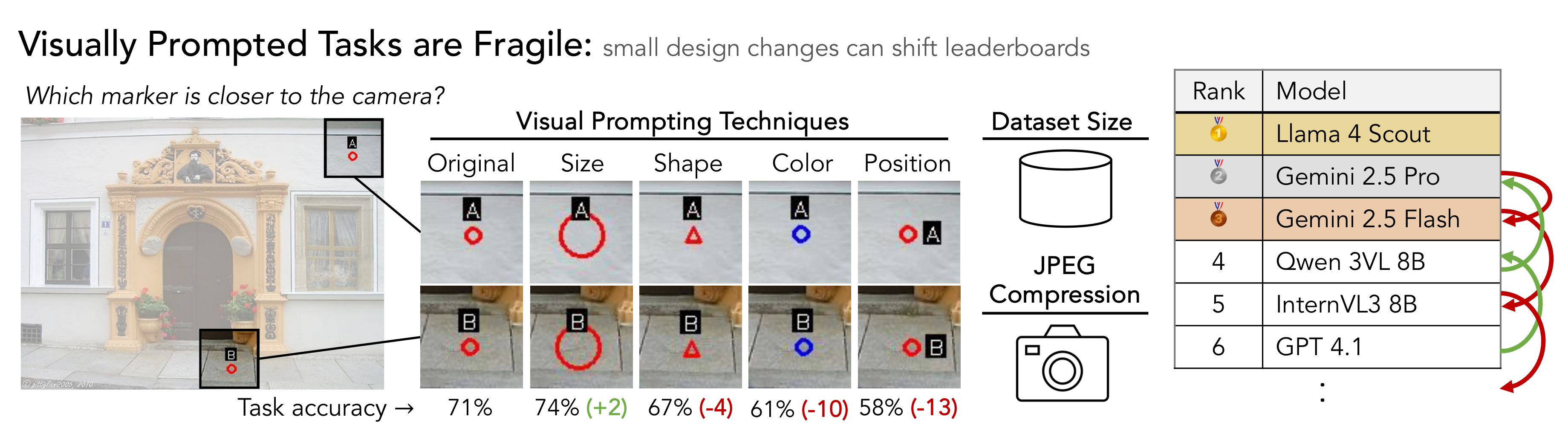
This repo contains evaluation code for VPBench proposed in the paper Visually Prompted Benchmarks Are Surprisingly Fragile.
- Python 3.9 or 3.10 (required)
- uv package manager
- API keys for cloud models (OpenAI or OpenRouter)
- Dataset files (see Dataset Setup below)
curl -LsSf https://astral.sh/uv/install.sh | shFrom the release directory, install all required packages:
uv syncThis will create a virtual environment and install all dependencies specified in pyproject.toml.
Download the BLINK dataset and extract it:
- Download VPBench from HuggingFace
- Place the content in the
Datasetfolder inside the project directory
You can do this with the following command:
mkdir -p Dataset
uv run hf download --repo-type dataset longlian/VPBench --local-dir DatasetWe support models hosted with an OpenAI-compatible API. We use gpt-4o and qwen/qwen3-vl-8b-instruct as examples.
| Provider | Models | API Endpoint |
|---|---|---|
| OpenAI | GPT-4o | https://api.openai.com/v1 |
| OpenRouter | Qwen3-VL-8B-Instruct (qwen/qwen3-vl-8b-instruct) |
https://openrouter.ai/api/v1 |
There are two ways to run benchmarks: Auto Mode (recommended) and Manual Mode. Auto Mode batches runs for the supported cloud models, while Manual Mode lets you run a single model/dataset command with fine-grained flags.
Auto mode uses auto_mode_runner.py to run the supported cloud models. Local/self-hosted endpoints are not supported.
Single model:
# OpenAI
export OPENAI_API_KEY="your-key"
TASK="Relative_Depth" # or Semantic_Correspondence
DATASET="BLINK" # BLINK, DA-2K, or SPair-71k
uv run python auto_mode_runner.py --models gpt-4o --task $TASK --dataset $DATASET

# OpenRouter (Qwen3 VL)
export OPENROUTER_API_KEY="your-openrouter-key"
uv run python auto_mode_runner.py --models qwen/qwen3-vl-8b-instruct --task $TASK --dataset $DATASET
Multiple models:
uv run python auto_mode_runner.py --models gpt-4o qwen/qwen3-vl-8b-instruct \
    --task $TASK --dataset $DATASET --num_threads 16

# Debug mode (first 10 samples only)
uv run python auto_mode_runner.py --models gpt-4o \
    --task $TASK --dataset $DATASET --debug_run
Options:
--models: One or more model names (required)--task:Relative_DepthorSemantic_Correspondence(required)--dataset:BLINK,DA-2K, orSPair-71k(required)--num_threads: Parallel threads for benchmark execution (default: 16)--run_time: Number of runs per configuration (default: 1)--debug_run: Run only first 10 samples--show_scripts: Print generated commands--dry_run: Show commands without executing--overwrite: Force fresh start--checkpoint_interval: Save progress every N queries (default: 25)
Manual mode runs one model/dataset command at a time with explicit flags. It is still cloud-only; custom/self-hosted endpoints are not supported.
Model configuration examples (Manual Mode)
Note: Auto Mode users just need to specify the model name (e.g., gpt-4o). These configurations are for Manual Mode.
MODEL_NAME="gpt-4o"
OPENAI_BASE_URL="https://api.openai.com/v1"MODEL_NAME="qwen/qwen3-vl-8b-instruct"
OPENAI_BASE_URL="https://openrouter.ai/api/v1"
PROVIDER_ONLY="parasail/bf16,alibaba"Provider filters (OpenRouter):
qwen/qwen3-vl-8b-instruct:parasail/bf16,alibaba
Manual mode supports one model per command. Run a separate command for each task/dataset combination you want to evaluate.
# Required config
MODEL_NAME="gpt-4o"
OPENAI_BASE_URL="https://api.openai.com/v1"
# Optional: Set provider filter (for OpenRouter models)
# PROVIDER_ONLY=""
# Single run example
TASK="Relative_Depth" # or Semantic_Correspondence
DATASET="BLINK" # or DA-2K (Relative_Depth) / SPair-71k (Semantic_Correspondence)
python manual_mode_runner.py \
--openai_base_url=$OPENAI_BASE_URL \
--model_names $MODEL_NAME \
${PROVIDER_ONLY:+--provider-only "$PROVIDER_ONLY"} \
--task_name $TASK \
--dataset_type $DATASET \
--run_time 1 \
--num_threads 16 \
--show_scriptsValid combinations are:
- Relative_Depth: BLINK, DA-2K
- Semantic_Correspondence: BLINK, SPair-71k
Individual command examples (Manual Mode)
Run a single task on a specific dataset:
# Example 1: GPT-4o on BLINK Relative Depth
MODEL_NAME="gpt-4o"
OPENAI_BASE_URL="https://api.openai.com/v1"
python manual_mode_runner.py \
--openai_base_url=$OPENAI_BASE_URL \
--model_names $MODEL_NAME \
--task_name Relative_Depth \
--dataset_type BLINK \
--run_time 1 \
--num_threads 16 \
--show_scripts# Example 2: Qwen3-VL-8B (OpenRouter) on BLINK Semantic Correspondence
MODEL_NAME="qwen/qwen3-vl-8b-instruct"
OPENAI_BASE_URL="https://openrouter.ai/api/v1"
PROVIDER_ONLY="parasail/bf16,alibaba"
python manual_mode_runner.py \
--openai_base_url=$OPENAI_BASE_URL \
--model_names $MODEL_NAME \
--provider-only "$PROVIDER_ONLY" \
--task_name Semantic_Correspondence \
--dataset_type BLINK \
--run_time 1 \
--num_threads 16 \
--show_scripts--models: One or more model names (required)--task:Relative_DepthorSemantic_Correspondence(required)--dataset:BLINK,DA-2K, orSPair-71k(required)--num_threads: Parallel threads for benchmark execution (default: 16)--run_time: Number of runs per configuration (default: 1)--debug_run: Run only first 10 samples--show_scripts: Print generated commands--dry_run: Show commands without executing--overwrite: Force fresh start--checkpoint_interval: Save progress every N queries (default: 25)
Core Parameters:
--model_names: Model name to test (one per command)--task_name: Task to run (Relative_DepthorSemantic_Correspondence)--dataset_type: Dataset variant (BLINK,DA-2K, orSPair-71k)--openai_base_url: API endpoint URL (OpenAI or OpenRouter only)--num_threads: Number of parallel execution threads (default: 8)--run_time: Number of times to run each configuration (default: 1)
Optional Parameters:
--show_scripts: Print all generated commands--dry_run: Show commands without executing--default_only: Only run default configuration (skip experimental variants)--compression_test: Test different JPEG compression levels (100, 90, 80, 70)--overwrite: Force fresh start without resuming progress--checkpoint_interval: Save progress every N queries (default: 25)--debug_run: Run only first 10 samples with '_debug' suffix--provider-only: Filter for specific OpenRouter providers (comma-separated or JSON)--save_images: Save annotated images to filesystem (disabled by default to save disk space)--save_commands: Save generated commands to generated_commands.txt (disabled by default)
Results are saved under output/<task>/<dataset>/ and include JSON results, checkpoints, and optionally annotated images when --save_images is enabled.
If you use this work, please cite our work:
@article{feng2025visually,
  title={Visually Prompted Benchmarks Are Surprisingly Fragile},
  author={Feng, Haiwen and Lian, Long and Dunlap, Lisa and Shu, Jiahao and Wang, XuDong and Wang, Renhao and Darrell, Trevor and Suhr, Alane and Kanazawa, Angjoo},
  journal={arXiv preprint arXiv:2512.17875},
  year={2025}
}