A MacOS Swift/Metal Application - Made by Kia Preston (pkncoder)

Light teachings is an application designed to help users understand the basics of Ray Tracing - a computer graphics technique that simulates light to create realistic light interactions inside of a scene.
The app includes an intuitive scene editor and a real time renderer, allowing users to build or modify 3D scenes and instantly see how changes affect lighting, reflections, and transparency. Paired with a series of five short, beginner-friendly videos I made, Light Teachings provides a clear and visual path for learning ray tracing from the ground up.
- Scene Editor – Build or modify your own 3D scenes with simple controls.
- Real-Time Renderer – Watch your lighting and reflection changes instantly update.
- Material Customization – Experiment with colors, transparency, and reflective surfaces of solid objects.
- Lighting Customization - Change the color, intensity, and position of the light.
This project has been tested on an M2 Macbook Air (2022), running MacOS Sequoia 15.2, and using XCode 16.2.
It may or may not run on higher/lower versions, but most likely will not run on Intel based Macbooks.
Open up the XCode Welcome Window
Select "Clone Git Repository..."
Copy the git https cloning URL, and paste it into the box.
This URL: https://github.com/pkncoder/Light-Teachings.git
Press "Clone" and wait for XCode to finish processing files.
Use the scene editor to change elements in the render. Change your point of view to better understand different perspectives, and how light is moving through the scene.
- IDE - XCode
- Language - Swift
- UI/UX Library - SwiftUI
- Rendering Library - MetalKit
- Rendering Method - Ray Tracing
Light Teachings was developed as part of my submission for the Congressional App Challenge 2025, a nationwide competition encouraging students to learn coding and create impactful apps.
2025 Light Teachings Winners Page: Ohio District 9 - Rep. Marcy Kaptur Winner
Rep. Marcy Kaptur's Post on X: Rep. Marcy Kaptur visits Perkins High School
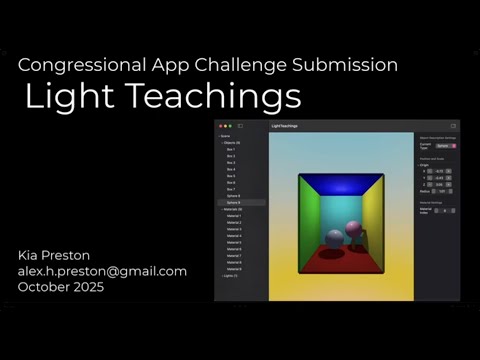
Along with the application, I created 5 Youtube videos, explaining what Ray Tracing is in a simple and understandable way.
Here is the youtube playlist of the videos: Ray Tracing Theory Explained — YouTube Playlist


Some of the Resources I used in creating Light Teachings:
- Demofox: Casual Shadertoy Path Tracing Part 1
- Sebastian Leage: Coding Adventure: Ray Tracing
- Learn OpenGL: learnopengl.com
For a full list of resources used, see RESOURCES.md
Thank you to these people:
- Mr. Leffler - My Computer Science teacher that provided encouragement and support through writing this application.
- Rep. Marcy Kaptur - For giving me the opportunity to compete in the 2025 Congressional App Challange.
- @Acerola - The inspiration to try and help out newcomers in Computer Graphics, and getting me started in my own journey.
This project is protected under the MIT License.
