
Repostify vs Buffer
Buffer is a very good scheduler. But a scheduler still needs you every day. Repostify never wants to see you again after setup.
TL;DR: choose Buffer if you like planning a queue and checking a dashboard, and its free plan is honestly great for light posting. Choose Repostify if you want your videos on every platform without making distribution a daily habit.
Side by side
| Feature | Repostify | Buffer |
|---|---|---|
| Detects your new posts by itself | Yes, that is the whole product | No, you add each post |
| Zero logins after setup | Yes | No, the queue is the product |
| Native posting via official APIs | Yes | Yes |
| Queue to keep filled | None | Yes, that is the model |
| Analytics | Simple stats in the app | Strong analytics and engagement tools |
| Platforms | 7, plus Google Drive and Dropbox backups | Wide, 10+ channel types |
| Pricing | Simple creator plans | Free plan; paid from $6 per channel per month |
| Free trial | Start free in 60 seconds, no card | Free plan, plus a 14-day trial |
Buffer details checked on their public site. Spotted something out of date? Tell us and we will fix it.
What your week looks like on each
Both columns are honest. The left is Repostify. The right follows Buffer's own publishing flow.
You did nothing else. Repostify detected the post and sent the original everywhere.
Buffer's model is the queue. It is tidy, and it is still a chore.
What is Repostify?
Repostify is a set-and-forget automation tool for content creators. Connect your accounts once, in about 60 seconds, and pick the platform you post on. From then on, every new video you publish is detected automatically and reposted natively, in full HD, to up to 7 platforms: TikTok, Instagram Reels, YouTube Shorts, Facebook, LinkedIn, X and Bluesky. It uses official platform APIs with secure OAuth login, never touches your file, and never needs you to log in again. It is free to start, with paid plans from $17 per month.
What is Buffer?
Buffer is a social media scheduling tool. You add posts to a queue, set time slots, and Buffer publishes them through official platform connections. It has a clean interface, solid analytics and a free plan covering up to 3 channels with a small queue, with paid plans from $6 per channel per month. It is a well-made scheduler, and like every scheduler, it needs you to keep the queue fed.
A tool you visit daily vs a tool you forget
Buffer is one of the most respected schedulers around, and it earns that. The interface is clean. The free plan is genuinely useful. The analytics are solid. If you enjoy planning a week of posts in advance, Buffer makes that pleasant.
Here is the honest catch. A queue only works while you keep filling it. Every video still needs uploading, captioning and slotting. When the queue runs dry, nothing posts. So Buffer quietly becomes a place you have to visit, another dashboard in your week.
Repostify removes the visit. You post on the platform you already open every day anyway. Repostify notices the new post and republishes the original file natively to up to 7 platforms through official APIs. There is no queue because there is nothing to queue. The moment you post, distribution is already done.
If you want to curate and schedule every post per platform, use Buffer. If you mostly post the same video everywhere and wish it just happened, that wish is literally the product Repostify sells.
The honest breakdown
What Buffer does better
- A real free plan for up to 3 channels with light posting
- Strong analytics, engagement tools and team features
- Fine control over exactly what posts where, and when
What Repostify does better
- No queue to fill, ever. Post once and the rest is automatic
- Zero logins after a 60-second setup
- Native reposts of your original HD file via official APIs
- Hours saved every week, not just organised into a calendar
7 reasons creators pick Repostify over Buffer
The short version: Buffer organises your posting work. Repostify makes the work stop existing.
A queue is a chore with a nicer interface
Buffer arranges your posting chores beautifully. They are still chores. Upload the video, write the caption, pick the slot, again and again, forever. Repostify does not organise the work. It removes it. You post where you already post, and distribution happens on its own. That is the difference between a tidy to-do list and an empty one.
The queue runs dry. Repostify does not.
Every Buffer queue has the same failure mode: you get busy, the queue empties, and your channels go silent exactly when you have the least time to fix it. Repostify cannot run dry, because posting anywhere is what feeds it. Consistency stops depending on your discipline. It becomes physics.
Zero logins means zero relapse
Buffer's model needs you back in the dashboard every day or two. Call it 20 minutes a day and that is over 120 hours a year of feeding a tool. Repostify's number is zero. Sixty seconds of setup, then nothing, ever. Creators here report getting 8+ hours back every single week.
You grow on platforms you never open
Each platform is a separate lottery, and the same clip pulls wildly different numbers on each. The video that flops on Instagram can run to 200,000 views on Shorts. Repostify buys you a ticket in every draw, on every post, automatically. New followers show up on apps you have not opened in weeks.
Native posts, original quality
Repostify sends the exact file you posted through each platform's official API. Full HD, no watermarks, no compression tricks, published as an original because it is one. Your TikTok audience, your LinkedIn audience and your X audience all get the real thing, not a tired-looking repost.
Per-channel pricing punishes your growth
Buffer charges about $6 per channel per month, so covering 7 channels lands near $42 a month, and you are still doing all the posting. Repostify Unlimited is $32 per month billed annually, covers unlimited platforms, and does the posting for you. With Buffer, growing costs more. With Repostify, growing is the point.
Built for creators, not social media managers
Buffer serves marketing teams juggling brands, campaigns and approval chains, and it serves them well. You are not a marketing team. You are one creator whose best video deserves every feed. Repostify does that one job completely: post once, be everywhere, get back to creating.



Is automated cross-posting safe for my accounts?
Short answer: yes, and here is exactly why. Repostify connects with official OAuth logins, so we never see or store a password. Every repost goes through each platform's official API, the front door, not a side door. Your file is never downloaded, stripped, or re-uploaded. The original is delivered natively and appears as a normal post on each platform, because it is one. Buffer publishes through official channel connections too, as its own site explains. The difference between these tools is not safety. It is who does the work. With Buffer, you feed a queue. With Repostify, posting once is the whole job.
Your account, your rules: Repostify only ever posts what you posted, where you told it to.
Built on official platform APIs.
Every connection uses each platform’s official API and secure OAuth login. Repostify never receives your password.







Connected through each platform’s official API.
How the connection actually works
Here’s what happens when you connect an account:
Your password goes to them, never to us.
It can only publish your videos. Nothing else.
Turn it off any time, in one tap.
Official developer access
Repostify went through each platform’s developer review to get API access.
Official APIs only
Every repost goes through the platform’s official API. No bots, no scrapers.
Your password stays yours
We never see, ask for or store a single password.
Designed to follow the rules
Every post is designed to follow each platform’s publishing rules.
And if you ever change your mind, one tap disconnects everything. Instantly.
Try Repostify for freePricing, plainly
Start free in 60 seconds. Upgrade once the reposts are already flowing.
Billed annually ($20, $35 and $42 billed monthly). Every plan has automated HD reposting, automatic checks for new posts (every 10 minutes on Unlimited) and analytics. Start free, no card. If it is not for you, we refund every cent.
Buffer's free plan covers up to 3 channels with a small queue. Paid plans start at $6 per channel per month. Confirm current pricing on their site.
Honest math: 7 channels on Buffer is about $42 per month and you still do the posting. Repostify Unlimited is $32 billed annually and the posting does itself.
Start free. Scale when you're ready.
Set up in 60 seconds. No credit card needed. Cancel anytime.
- Link up to 2 platforms
- Automated HD reposting
- Repostify scans for new posts every hour and reposts them automatically
- Multi-platform analytics
- Set up in 60 seconds
- Link up to 4 platforms
- Automated HD reposting
- Repostify scans for new posts every hour and reposts them automatically
- Direct Upload + editable captions per platform
- Multi-platform analytics
- Set up in 60 seconds
- Unlimited platforms
- Automated HD reposting
- Repostify scans for new posts every 10 minutes and reposts them automatically
- Direct Upload + editable captions per platform
-
 YouTube integration
 - Full analytics dashboard
- Set up in 60 seconds
Try it. If it’s not for you,
we’ll refund every cent.
Start free. Even after you upgrade, you’re covered by a 30-day money-back guarantee.
Your purchase is 100% protected
If Repostify isn’t for you, email us within 30 days and we’ll refund every penny.
Creators who stopped doing it manually.
Real creators on what changed when they stopped posting app by app.
Join the creators who never post manually again.
Try Repostify for freePost Once.
Grow Everywhere.
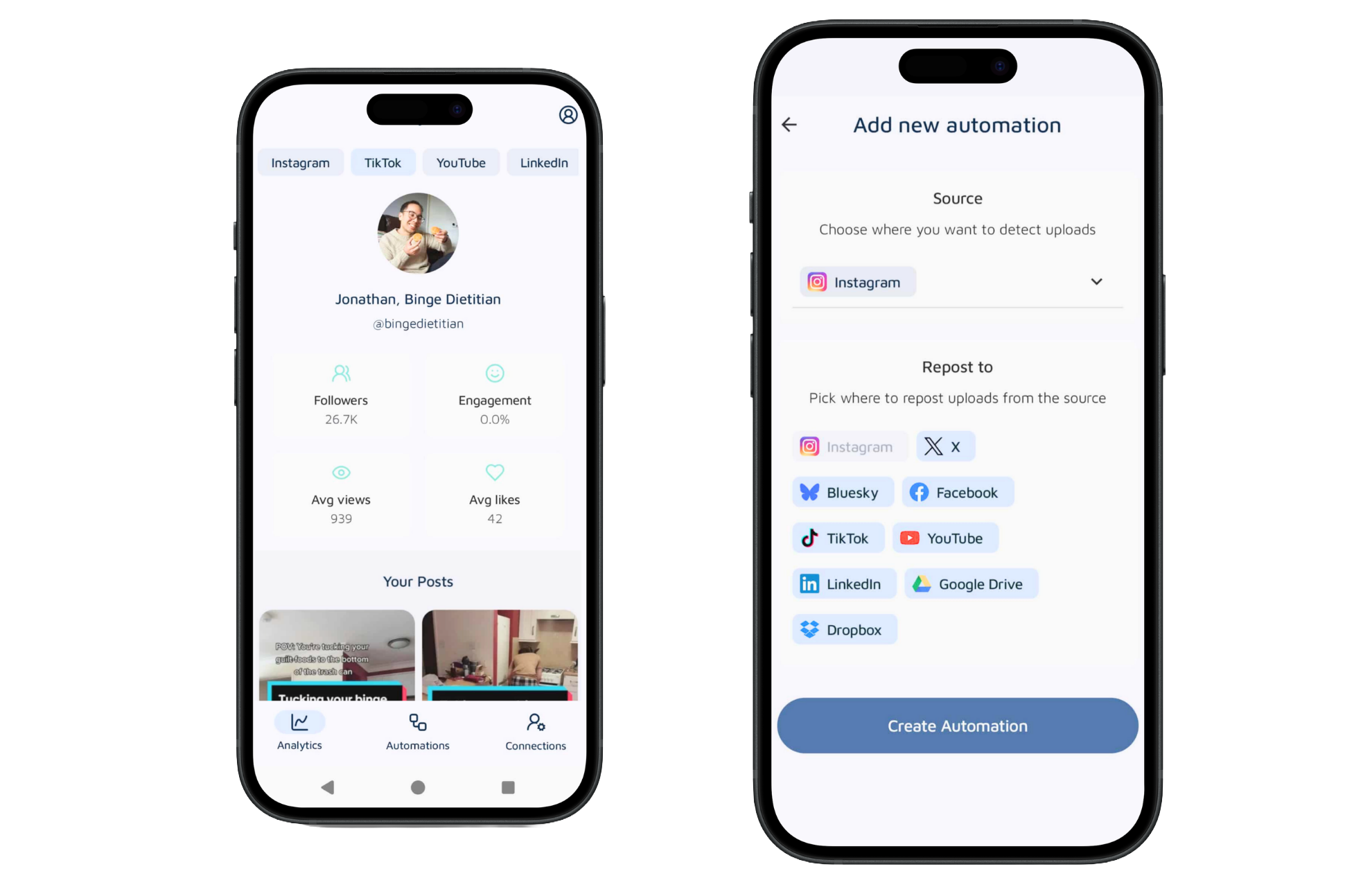
Run your automations and track every platform, right from your pocket.


Repostify vs Buffer
Buffer is a very good scheduler. But a scheduler still needs you every day. Repostify never wants to see you again after setup.
TL;DR: choose Buffer if you like planning a queue and checking a dashboard, and its free plan is honestly great for light posting. Choose Repostify if you want your videos on every platform without making distribution a daily habit.
Side by side
| Feature | Repostify | Buffer |
|---|---|---|
| Detects your new posts by itself | Yes, that is the whole product | No, you add each post |
| Zero logins after setup | Yes | No, the queue is the product |
| Native posting via official APIs | Yes | Yes |
| Queue to keep filled | None | Yes, that is the model |
| Analytics | Simple stats in the app | Strong analytics and engagement tools |
| Platforms | 7, plus Google Drive and Dropbox backups | Wide, 10+ channel types |
| Pricing | Simple creator plans | Free plan; paid from $6 per channel per month |
| Free trial | Start free in 60 seconds, no card | Free plan, plus a 14-day trial |
Buffer details checked on their public site. Spotted something out of date? Tell us and we will fix it.
What your week looks like on each
Both columns are honest. The left is Repostify. The right follows Buffer's own publishing flow.
You did nothing else. Repostify detected the post and sent the original everywhere.
Buffer's model is the queue. It is tidy, and it is still a chore.
What is Repostify?
Repostify is a set-and-forget automation tool for content creators. Connect your accounts once, in about 60 seconds, and pick the platform you post on. From then on, every new video you publish is detected automatically and reposted natively, in full HD, to up to 7 platforms: TikTok, Instagram Reels, YouTube Shorts, Facebook, LinkedIn, X and Bluesky. It uses official platform APIs with secure OAuth login, never touches your file, and never needs you to log in again. It is free to start, with paid plans from $17 per month.
What is Buffer?
Buffer is a social media scheduling tool. You add posts to a queue, set time slots, and Buffer publishes them through official platform connections. It has a clean interface, solid analytics and a free plan covering up to 3 channels with a small queue, with paid plans from $6 per channel per month. It is a well-made scheduler, and like every scheduler, it needs you to keep the queue fed.
A tool you visit daily vs a tool you forget
Buffer is one of the most respected schedulers around, and it earns that. The interface is clean. The free plan is genuinely useful. The analytics are solid. If you enjoy planning a week of posts in advance, Buffer makes that pleasant.
Here is the honest catch. A queue only works while you keep filling it. Every video still needs uploading, captioning and slotting. When the queue runs dry, nothing posts. So Buffer quietly becomes a place you have to visit, another dashboard in your week.
Repostify removes the visit. You post on the platform you already open every day anyway. Repostify notices the new post and republishes the original file natively to up to 7 platforms through official APIs. There is no queue because there is nothing to queue. The moment you post, distribution is already done.
If you want to curate and schedule every post per platform, use Buffer. If you mostly post the same video everywhere and wish it just happened, that wish is literally the product Repostify sells.
The honest breakdown
What Buffer does better
- A real free plan for up to 3 channels with light posting
- Strong analytics, engagement tools and team features
- Fine control over exactly what posts where, and when
What Repostify does better
- No queue to fill, ever. Post once and the rest is automatic
- Zero logins after a 60-second setup
- Native reposts of your original HD file via official APIs
- Hours saved every week, not just organised into a calendar
7 reasons creators pick Repostify over Buffer
The short version: Buffer organises your posting work. Repostify makes the work stop existing.
A queue is a chore with a nicer interface
Buffer arranges your posting chores beautifully. They are still chores. Upload the video, write the caption, pick the slot, again and again, forever. Repostify does not organise the work. It removes it. You post where you already post, and distribution happens on its own. That is the difference between a tidy to-do list and an empty one.
The queue runs dry. Repostify does not.
Every Buffer queue has the same failure mode: you get busy, the queue empties, and your channels go silent exactly when you have the least time to fix it. Repostify cannot run dry, because posting anywhere is what feeds it. Consistency stops depending on your discipline. It becomes physics.
Zero logins means zero relapse
Buffer's model needs you back in the dashboard every day or two. Call it 20 minutes a day and that is over 120 hours a year of feeding a tool. Repostify's number is zero. Sixty seconds of setup, then nothing, ever. Creators here report getting 8+ hours back every single week.
You grow on platforms you never open
Each platform is a separate lottery, and the same clip pulls wildly different numbers on each. The video that flops on Instagram can run to 200,000 views on Shorts. Repostify buys you a ticket in every draw, on every post, automatically. New followers show up on apps you have not opened in weeks.
Native posts, original quality
Repostify sends the exact file you posted through each platform's official API. Full HD, no watermarks, no compression tricks, published as an original because it is one. Your TikTok audience, your LinkedIn audience and your X audience all get the real thing, not a tired-looking repost.
Per-channel pricing punishes your growth
Buffer charges about $6 per channel per month, so covering 7 channels lands near $42 a month, and you are still doing all the posting. Repostify Unlimited is $32 per month billed annually, covers unlimited platforms, and does the posting for you. With Buffer, growing costs more. With Repostify, growing is the point.
Built for creators, not social media managers
Buffer serves marketing teams juggling brands, campaigns and approval chains, and it serves them well. You are not a marketing team. You are one creator whose best video deserves every feed. Repostify does that one job completely: post once, be everywhere, get back to creating.
Is automated cross-posting safe for my accounts?
Short answer: yes, and here is exactly why. Repostify connects with official OAuth logins, so we never see or store a password. Every repost goes through each platform's official API, the front door, not a side door. Your file is never downloaded, stripped, or re-uploaded. The original is delivered natively and appears as a normal post on each platform, because it is one. Buffer publishes through official channel connections too, as its own site explains. The difference between these tools is not safety. It is who does the work. With Buffer, you feed a queue. With Repostify, posting once is the whole job.
Your account, your rules: Repostify only ever posts what you posted, where you told it to.
Built on official platform APIs.
Every connection uses each platform’s official API and secure OAuth login. Repostify never receives your password.
Connected through each platform’s official API.
How the connection actually works
Here’s what happens when you connect an account:
Your password goes to them, never to us.
It can only publish your videos. Nothing else.
Turn it off any time, in one tap.
Official developer access
Repostify went through each platform’s developer review to get API access.
Official APIs only
Every repost goes through the platform’s official API. No bots, no scrapers.
Your password stays yours
We never see, ask for or store a single password.
Designed to follow the rules
Every post is designed to follow each platform’s publishing rules.
And if you ever change your mind, one tap disconnects everything. Instantly.
Try Repostify for freePricing, plainly
Start free in 60 seconds. Upgrade once the reposts are already flowing.
Billed annually ($20, $35 and $42 billed monthly). Every plan has automated HD reposting, automatic checks for new posts (every 10 minutes on Unlimited) and analytics. Start free, no card. If it is not for you, we refund every cent.
Buffer's free plan covers up to 3 channels with a small queue. Paid plans start at $6 per channel per month. Confirm current pricing on their site.
Honest math: 7 channels on Buffer is about $42 per month and you still do the posting. Repostify Unlimited is $32 billed annually and the posting does itself.
Upload once. Live on 8 platforms.
Don’t want automation? Drop a video in, tap publish, done.
 your-video.mp4
Uploaded · 1080p · No watermark
InstagramTikTokYouTubeFacebookLinkedInX
your-video.mp4
Uploaded · 1080p · No watermark
InstagramTikTokYouTubeFacebookLinkedInX Google DriveDropbox
Have the app? Direct Upload to all 8 platforms straight from your phone.
Set up in 60 seconds · No credit card needed
Start free. Scale when you’re ready.
Set up in 60 seconds. No credit card needed. Cancel anytime.
Essentials
per month · billed annually
- Link up to 2 platforms
- Automated HD reposting
- Repostify scans for new posts every hour and reposts them automatically
- Multi-platform analytics
- Set up in 60 seconds
Growth
per month · billed annually
- Link up to 4 platforms
- Automated HD reposting
- Repostify scans for new posts every hour and reposts them automatically
- Direct Upload + editable captions per platform
- Multi-platform analytics
- Set up in 60 seconds
Unlimited
per month · billed annually
- Unlimited platforms
- Automated HD reposting
- Repostify scans for new posts every 10 minutes and reposts them automatically
- Direct Upload + editable captions per platform
- YouTube integration
- Full analytics dashboard
- Set up in 60 seconds
Try it. If it’s not for you,
we’ll refund every cent.
Start free. When you choose to upgrade, you’re covered by our 30-day money-back guarantee.
Your purchase is 100% protected
If Repostify isn’t for you, email us within 30 days of upgrading and we’ll refund every penny.
Creators who stopped doing it manually.
Real creators on what changed when they stopped posting app by app.
Join the creators who never post manually again.
Try Repostify for freePost Once.
Grow Everywhere.
Run your automations and track every platform, right from your pocket.
Repostify vs Buffer
Buffer is a very good scheduler. But a scheduler still needs you every day. Repostify never wants to see you again after setup.
TL;DR: choose Buffer if you like planning a queue and checking a dashboard, and its free plan is honestly great for light posting. Choose Repostify if you want your videos on every platform without making distribution a daily habit.
Side by side
| Feature | Repostify | Buffer |
|---|---|---|
| Detects your new posts by itself | Yes, that is the whole product | No, you add each post |
| Zero logins after setup | Yes | No, the queue is the product |
| Native posting via official APIs | Yes | Yes |
| Queue to keep filled | None | Yes, that is the model |
| Analytics | Simple stats in the app | Strong analytics and engagement tools |
| Platforms | 7, plus Google Drive and Dropbox backups | Wide, 10+ channel types |
| Pricing | Simple creator plans | Free plan; paid from $6 per channel per month |
| Free trial | Start free in 60 seconds, no card | Free plan, plus a 14-day trial |
Buffer details checked on their public site. Spotted something out of date? Tell us and we will fix it.
What your week looks like on each
Both columns are honest. The left is Repostify. The right follows Buffer's own publishing flow.
You did nothing else. Repostify detected the post and sent the original everywhere.
Buffer's model is the queue. It is tidy, and it is still a chore.
What is Repostify?
Repostify is a set-and-forget automation tool for content creators. Connect your accounts once, in about 60 seconds, and pick the platform you post on. From then on, every new video you publish is detected automatically and reposted natively, in full HD, to up to 7 platforms: TikTok, Instagram Reels, YouTube Shorts, Facebook, LinkedIn, X and Bluesky. It uses official platform APIs with secure OAuth login, never touches your file, and never needs you to log in again. It is free to start, with paid plans from $17 per month.
What is Buffer?
Buffer is a social media scheduling tool. You add posts to a queue, set time slots, and Buffer publishes them through official platform connections. It has a clean interface, solid analytics and a free plan covering up to 3 channels with a small queue, with paid plans from $6 per channel per month. It is a well-made scheduler, and like every scheduler, it needs you to keep the queue fed.
A tool you visit daily vs a tool you forget
Buffer is one of the most respected schedulers around, and it earns that. The interface is clean. The free plan is genuinely useful. The analytics are solid. If you enjoy planning a week of posts in advance, Buffer makes that pleasant.
Here is the honest catch. A queue only works while you keep filling it. Every video still needs uploading, captioning and slotting. When the queue runs dry, nothing posts. So Buffer quietly becomes a place you have to visit, another dashboard in your week.
Repostify removes the visit. You post on the platform you already open every day anyway. Repostify notices the new post and republishes the original file natively to up to 7 platforms through official APIs. There is no queue because there is nothing to queue. The moment you post, distribution is already done.
If you want to curate and schedule every post per platform, use Buffer. If you mostly post the same video everywhere and wish it just happened, that wish is literally the product Repostify sells.
The honest breakdown
What Buffer does better
- A real free plan for up to 3 channels with light posting
- Strong analytics, engagement tools and team features
- Fine control over exactly what posts where, and when
What Repostify does better
- No queue to fill, ever. Post once and the rest is automatic
- Zero logins after a 60-second setup
- Native reposts of your original HD file via official APIs
- Hours saved every week, not just organised into a calendar
7 reasons creators pick Repostify over Buffer
The short version: Buffer organises your posting work. Repostify makes the work stop existing.
A queue is a chore with a nicer interface
Buffer arranges your posting chores beautifully. They are still chores. Upload the video, write the caption, pick the slot, again and again, forever. Repostify does not organise the work. It removes it. You post where you already post, and distribution happens on its own. That is the difference between a tidy to-do list and an empty one.
The queue runs dry. Repostify does not.
Every Buffer queue has the same failure mode: you get busy, the queue empties, and your channels go silent exactly when you have the least time to fix it. Repostify cannot run dry, because posting anywhere is what feeds it. Consistency stops depending on your discipline. It becomes physics.
Zero logins means zero relapse
Buffer's model needs you back in the dashboard every day or two. Call it 20 minutes a day and that is over 120 hours a year of feeding a tool. Repostify's number is zero. Sixty seconds of setup, then nothing, ever. Creators here report getting 8+ hours back every single week.
You grow on platforms you never open
Each platform is a separate lottery, and the same clip pulls wildly different numbers on each. The video that flops on Instagram can run to 200,000 views on Shorts. Repostify buys you a ticket in every draw, on every post, automatically. New followers show up on apps you have not opened in weeks.
Native posts, original quality
Repostify sends the exact file you posted through each platform's official API. Full HD, no watermarks, no compression tricks, published as an original because it is one. Your TikTok audience, your LinkedIn audience and your X audience all get the real thing, not a tired-looking repost.
Per-channel pricing punishes your growth
Buffer charges about $6 per channel per month, so covering 7 channels lands near $42 a month, and you are still doing all the posting. Repostify Unlimited is $32 per month billed annually, covers unlimited platforms, and does the posting for you. With Buffer, growing costs more. With Repostify, growing is the point.
Built for creators, not social media managers
Buffer serves marketing teams juggling brands, campaigns and approval chains, and it serves them well. You are not a marketing team. You are one creator whose best video deserves every feed. Repostify does that one job completely: post once, be everywhere, get back to creating.
Is automated cross-posting safe for my accounts?
Short answer: yes, and here is exactly why. Repostify connects with official OAuth logins, so we never see or store a password. Every repost goes through each platform's official API, the front door, not a side door. Your file is never downloaded, stripped, or re-uploaded. The original is delivered natively and appears as a normal post on each platform, because it is one. Buffer publishes through official channel connections too, as its own site explains. The difference between these tools is not safety. It is who does the work. With Buffer, you feed a queue. With Repostify, posting once is the whole job.
Your account, your rules: Repostify only ever posts what you posted, where you told it to.
Built on official platform APIs.
Every connection uses each platform’s official API and secure OAuth login. Repostify never receives your password.
Connected through each platform’s official API.
How the connection actually works
Here’s what happens when you connect an account:
Your password goes to them, never to us.
It can only publish your videos. Nothing else.
Turn it off any time, in one tap.
Official developer access
Repostify went through each platform’s developer review to get API access.
Official APIs only
Every repost goes through the platform’s official API. No bots, no scrapers.
Your password stays yours
We never see, ask for or store a single password.
Designed to follow the rules
Every post is designed to follow each platform’s publishing rules.
And if you ever change your mind, one tap disconnects everything. Instantly.
Try Repostify for freePricing, plainly
Start free in 60 seconds. Upgrade once the reposts are already flowing.
Billed annually ($20, $35 and $42 billed monthly). Every plan has automated HD reposting, automatic checks for new posts (every 10 minutes on Unlimited) and analytics. Start free, no card. If it is not for you, we refund every cent.
Buffer's free plan covers up to 3 channels with a small queue. Paid plans start at $6 per channel per month. Confirm current pricing on their site.
Honest math: 7 channels on Buffer is about $42 per month and you still do the posting. Repostify Unlimited is $32 billed annually and the posting does itself.
Upload once. Live on 8 platforms.
Don’t want automation? Drop a video in, tap publish, done.
your-video.mp4
Uploaded · 1080p · No watermark
InstagramTikTokYouTubeFacebookLinkedInXGoogle DriveDropboxHave the app? Direct Upload to all 8 platforms straight from your phone.
Set up in 60 seconds · No credit card needed
Start free. Scale when you’re ready.
Set up in 60 seconds. No credit card needed. Cancel anytime.
Essentials
per month · billed annually
- Link up to 2 platforms
- Automated HD reposting
- Repostify scans for new posts every hour and reposts them automatically
- Multi-platform analytics
- Set up in 60 seconds
Growth
per month · billed annually
- Link up to 4 platforms
- Automated HD reposting
- Repostify scans for new posts every hour and reposts them automatically
- Direct Upload + editable captions per platform
- Multi-platform analytics
- Set up in 60 seconds
Unlimited
per month · billed annually
- Unlimited platforms
- Automated HD reposting
- Repostify scans for new posts every 10 minutes and reposts them automatically
- Direct Upload + editable captions per platform
- YouTube integration
- Full analytics dashboard
- Set up in 60 seconds
Try it. If it’s not for you,
we’ll refund every cent.
Start free. When you choose to upgrade, you’re covered by our 30-day money-back guarantee.
Your purchase is 100% protected
If Repostify isn’t for you, email us within 30 days of upgrading and we’ll refund every penny.
Creators who stopped doing it manually.
Real creators on what changed when they stopped posting app by app.
Join the creators who never post manually again.
Try Repostify for freePost Once.
Grow Everywhere.
Run your automations and track every platform, right from your pocket.
