


Pre-request and Post-response Scripts in API Testing

Ronak Kadhi
June 10, 2026
8MIN READ
Your lightweight Client for API debugging
No Login Required
Get Requestly
Requestly Works on Desktop Only
Requestly isn’t available for download on mobile or tablets.
To download it, please open this page on a desktop PC and enter your email to get the link.



Mac app
Lightweight & Privacy-first API Client
- Local Projects
- Organize API into Collections & Environments
- API Tests
- Import from Postman, OpenAPI, etc
Download Now


Chrome extension
Intercept & modify HTTP requests/responses
- Redirect URLs & modify HTTP headers
- Mock API / GraphQL responses
- Insert custom JavaScript scripts
Add To Chrome
Advertisement
Advertisement

A request is rarely just “send these bytes and show me what comes back.” You need to stamp a timestamp before sending, sign a payload, pull a fresh value into a header, or check the response the instant it arrives. Scripts are how you do that in an API client — small pieces of JavaScript that run around a request, before it goes out and after the response returns. In the Requestly API client these are called pre-request and post-response scripts, and they are the engine behind chaining, dynamic auth, and automated checks.
This guide explains the Requestly scripting model precisely: when each script runs, the rq.* surface you have access to, how snippets and import packages keep code reusable, which built-in modules you can require(), and one hard limit that surprises people coming from other tools — a script cannot make its own HTTP call. Understanding that limit is the key to using scripts correctly, so we end on exactly why it exists. For how scripts fit alongside variables and scopes, see the pillar guide on variables in API testing.
When each script runs
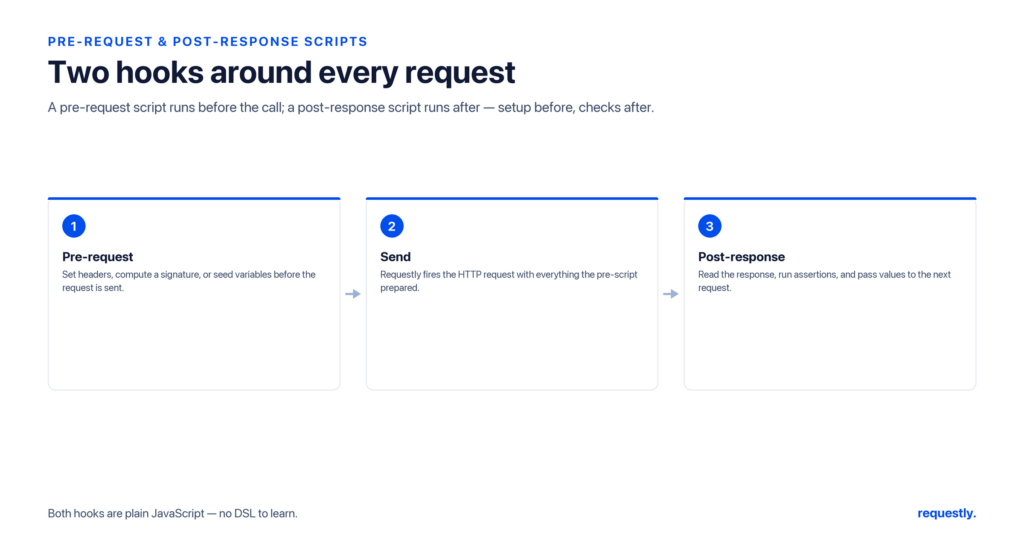
Every request has two optional script slots, and the difference between them is simply timing.
Pre-request scripts
A pre-request script runs before the request is sent. This is your chance to prepare the outgoing call: compute a value, set a variable that a {{placeholder}} will pick up, generate a nonce, or build a signature. Whatever the script writes into the environment is resolved into the request as it goes out.
// pre-request: stamp a unique idempotency key the request body can reference
const uuid = require("uuid");
rq.environment.set("idempotencyKey", uuid.v4());
Post-response scripts
A post-response script runs after the response arrives. Here you inspect what came back: read the status, parse the body, capture a value for a later request, or assert that the response matches expectations.
// post-response: confirm success and capture an ID for the next request
rq.test("created successfully", function () {
  rq.expect(rq.response.code).to.equal(201);
});
const body = rq.response.json();
rq.environment.set("orderId", body.id);
Pre-request prepares; post-response reacts. Almost everything scripts do in practice is one of those two halves.
The rq.* script surface
Scripts talk to the request, the response, and your variables through the rq object. This is the entire surface you need to learn, and getting the exact member names right matters — close-but-wrong names are the most common scripting bug.
Inspecting the response
After a response arrives, rq.response exposes it:
rq.response.code;        // numeric status code, e.g. 200 (not .status)
rq.response.json();      // parsed JSON body as an object (not .body)
rq.response.text();      // raw response body as a string
rq.response.headers;     // an array of { key, value } objects
Two of these trip people up. The status is rq.response.code, not .status. The parsed body is the return value of rq.response.json(), not a .body property. And headers are an array of { key, value } pairs, not a keyed map, so you find one by searching:
const ct = rq.response.headers.find(function (h) {
  return h.key.toLowerCase() === "content-type";
});
rq.expect(ct.value).to.include("application/json");
Variables, request, and run context
The rest of the surface covers variables and metadata:
rq.environment.set("k", "v");   // write / read / unset env values (strings)
rq.environment.get("k");
rq.environment.unset("k");

rq.collectionVariables.get("x"); // collection scope
rq.globals.get("y");             // global scope

rq.request;                      // the outgoing request (url, method, headers, body)
rq.info;                         // metadata about the current request/run
rq.iterationData.get("col");     // a field from the current data-file row
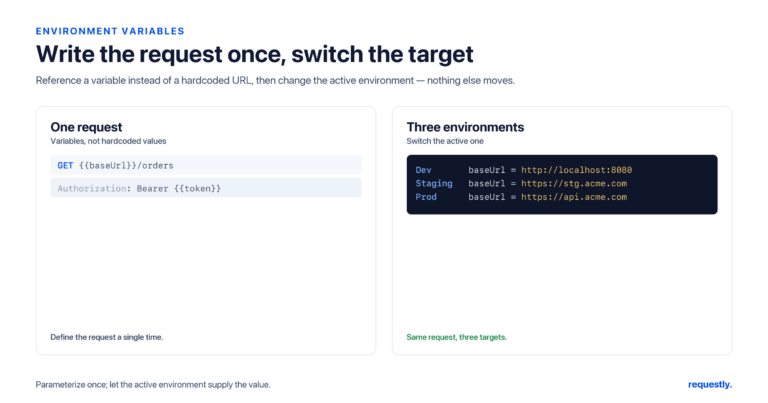
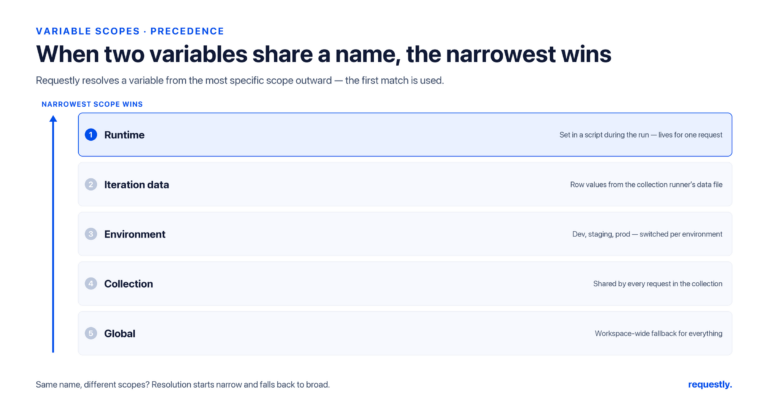
Writing and reading variables is how scripts coordinate across requests — the same mechanism the variables guide describes, just driven from code instead of typed into a panel. rq.iterationData connects scripts to data-driven runs — call rq.iterationData.get("field") to read a value from the current CSV or JSON row.
Reusing code: snippets and import packages
You do not want to paste the same signing logic into thirty requests. Requestly gives you two reuse mechanisms.
Script snippets are saved, named blocks of code you can drop into any request’s script slot — handy for boilerplate you reach for constantly, like a standard “assert 2xx and JSON” check. Import packages let you define shared helper code once and import it into multiple scripts, so a single canonical implementation of, say, your request-signing function is reused everywhere rather than copied. Update the package and every script that imports it picks up the change.
Together these turn scripts from scattered copy-paste into a small, maintainable library that your whole collection draws on.
Write it once, reuse it everywhere: Save common checks as snippets and share helpers through import packages so your Requestly scripts stay DRY across an entire collection. Explore the API client →
Built-in modules you can require()
Scripts can pull in a curated set of bundled libraries with require() — no install step, no network fetch. The available modules cover the things API testing actually needs:
- crypto — hashes and HMAC signatures for signing requests.
- buffer — binary and Base64 encoding/decoding.
- uuid — generate unique identifiers.
- lodash — ergonomic data manipulation.
- moment — date and time formatting.
- chai — the assertion style behind
rq.expect. - ajv — JSON-schema validation.
- cheerio — parse and query HTML.
- xml2js — convert XML responses to JavaScript objects.
- csv-parse — read CSV data.
A representative pre-request signature using two of them:
const crypto = require("crypto");
const moment = require("moment");

const ts = moment().toISOString();
const payload = ts + rq.request.method + "/v1/orders";
const sig = crypto.createHmac("sha256", rq.environment.get("apiSecret"))
                  .update(payload)
                  .digest("hex");

rq.environment.set("timestamp", ts);
rq.environment.set("signature", sig);
The request then references {{timestamp}} and {{signature}} in its headers, fully signed before it leaves.
The hard limit: scripts cannot make HTTP calls
Here is the rule that matters most. A Requestly script cannot make its own HTTP request. There is no fetch, and you do not write async/await to call another endpoint from inside a script. A script is not a place to orchestrate network traffic — it runs around one request, the one it is attached to.
This is intentional, and once it clicks the whole model makes sense. A script’s job is to prepare the request it belongs to (pre-request) or react to that request’s response (post-response). If you need to “call” a second endpoint, you do not fetch it from a script — you create a real request for that endpoint and put a script on it. The requests are the network actions; the scripts are the glue between them.
So the way to do work that spans two endpoints is to use two requests, each with its own script, and pass data between them through variables. Request A’s post-response script captures a value into the environment; request B references it as {{value}}. That is precisely the pattern in chaining API requests, and it is why chaining is built from per-request scripts rather than one big script making many calls.
// WRONG - a script cannot do this; there is no fetch inside scripts
// const res = await fetch("/auth/login");

// RIGHT - put this post-response script on your real /auth/login request,
// then let the next request use {{token}}
const body = rq.response.json();
rq.environment.set("token", body.accessToken);
Putting scripts to work
Most real scripting falls into a few buckets. Pre-request scripts generate values and sign payloads. Post-response scripts validate the response and capture data for later steps — the validation half grows into full API tests and assertions with rq.test and rq.expect. And the capture half, combined with the no-fetch rule, is exactly how you chain requests together.
Keep three things in mind and you will rarely hit a wall: use the exact rq.* member names (rq.response.code, rq.response.json(), the headers array), reuse logic through snippets and import packages instead of copy-paste, and remember that a script rides on a single request rather than making calls of its own. From there, the pre-request and post-response slots cover nearly everything you will want to automate.
Frequently asked questions
What is the difference between a pre-request and a post-response script?
A pre-request script runs before the request is sent, so you use it to prepare the outgoing call — computing values, signing payloads, or setting variables a placeholder will resolve. A post-response script runs after the response arrives, so you use it to inspect the response, capture values for later requests, and assert that it matches expectations.
How do I read the response status and body in a script?
Use rq.response.code for the numeric status (not .status) and rq.response.json() for the parsed body (not .body). Raw text is rq.response.text(), and headers come back as an array of objects with key and value properties, so you find one with headers.find(h => h.key === "...").
Can a Requestly script make an HTTP request?
No. Scripts cannot make their own HTTP calls — there is no fetch and you do not use async/await to hit another endpoint. A script runs around the single request it is attached to. To call another endpoint, create a real request for it and put a script on that request, passing data between them through variables.
What built-in modules can I require in a script?
Requestly bundles a curated set you can require() with no install: crypto, buffer, uuid, lodash, moment, chai, ajv, cheerio, xml2js, and csv-parse. They cover hashing and signatures, encoding, unique IDs, data manipulation, date formatting, assertions, JSON-schema validation, and HTML, XML, and CSV parsing.
How do I reuse script code across requests?
Use script snippets to save named blocks of code you can drop into any request’s script slot, and use import packages to define shared helper code once and import it into multiple scripts. Update the package and every script that imports it picks up the change, so a single canonical implementation is reused everywhere.
How do scripts share data between requests?
Through variables. A post-response script writes a value with rq.environment.set(name, value), and a later request reads it as {{name}} or a script reads it with rq.environment.get(name). Collection and global scopes work the same way via rq.collectionVariables and rq.globals. This is the foundation of request chaining.
Automate the work around each request: Pre-request and post-response scripts in Requestly let you sign payloads, validate responses, and capture data for the next call — all in plain JavaScript. Try the API client →
Written by
Ronak Kadhi
Contents
- When each script runs
- Pre-request scripts
- Post-response scripts
- The rq.* script surface
- Inspecting the response
- Variables, request, and run context
- Reusing code: snippets and import packages
- Built-in modules you can require()
- The hard limit: scripts cannot make HTTP calls
- Putting scripts to work
- Frequently asked questions
- What is the difference between a pre-request and a post-response script?
- How do I read the response status and body in a script?
- Can a Requestly script make an HTTP request?
- What built-in modules can I require in a script?
- How do I reuse script code across requests?
- How do scripts share data between requests?
Subscribe for latest updates
[sibwp_form id=1]
Share this article
Related posts
Get started today
Join 300,000+ developers building smarter workflows.
Get Started for Free
Requestly Works on Desktop Only
Requestly isn’t available for download on mobile or tablets.
To download it, please open this page on a desktop PC and enter your email to get the link.
Mac app
Lightweight & Privacy-first API Client
- Local Projects
- Organize API into Collections & Environments
- API Tests
- Import from Postman, OpenAPI, etc
Download Now
Chrome extension
Intercept & modify HTTP requests/responses
- Redirect URLs & modify HTTP headers
- Mock API / GraphQL responses
- Insert custom JavaScript scripts
Add To Chrome
Advertisement
Advertisement